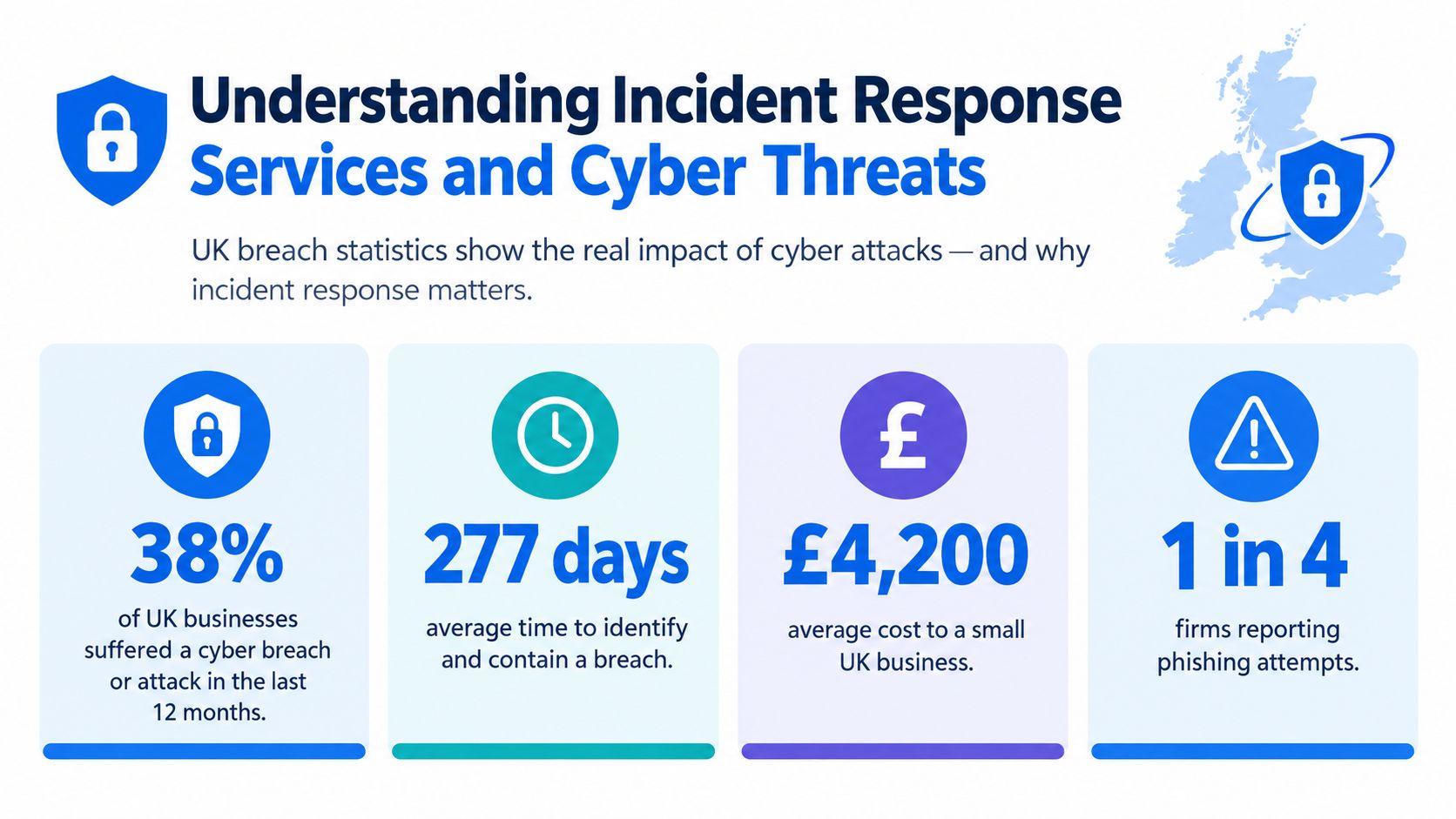
The UK's cyber problem isn't limited to large enterprises. Approximately 612,000 UK businesses and 61,000 charities identified a breach or attack in the past year, yet only 20% of businesses had a formal incident response plan in place, according to the UK Cyber Security Breaches Survey 2025. For a small business in London or Essex, that gap can turn a manageable compromise into prolonged disruption, confused decision-making and avoidable regulatory exposure.
Incident response services give an organisation a prepared way to investigate, contain and recover from a cyber incident. They aren't the same as ordinary IT support. A helpdesk can restore a laptop, reset a password or reconnect a user. An incident response team must determine what happened, stop the attacker moving further, preserve evidence, assess data exposure and coordinate technical, legal, insurance and executive decisions under pressure.
The traditional image of ransomware is a screen full of locked files. That still happens, but extortion increasingly depends on stolen information and negotiation pressure even when systems remain online. Your response plan must therefore deal with identity compromise, unauthorised access, data theft and notification decisions, not just encryption.
Table of Contents
- Understanding Incident Response Services and Cyber Threats
- Comparing Retainer On-Call and Managed IR Offerings
- Navigating the Incident Response Lifecycle
- Why London and Essex SMEs Need Local IR Support
- Evaluating and Choosing the Right IR Provider
- Building Your Cyber Readiness Checklist
- Securing Your Business Against Future Threats
Understanding Incident Response Services and Cyber Threats
UK businesses face a high volume of attacks while many smaller firms still lack a tested response process. That risk is sharper when one person handles IT, suppliers, backups and communications. A regional IT partner in London or Essex can provide a named contact, explain the situation without jargon and coordinate containment before confusion spreads.
What specialist response adds
A serious response begins by taking control. Engineers isolate affected endpoints, disable compromised accounts, restrict suspicious remote access and protect systems that remain clean. Investigators collect relevant logs, endpoint data and system images before routine remediation overwrites useful evidence.
The threat has also changed. Ransomware may still encrypt files, but attackers increasingly steal information and apply extortion pressure while systems remain online. The response must therefore examine identity compromise, unauthorised access, data theft and possible notification duties, rather than focus only on restoring encrypted files.
Wiping an infected laptop may remove the malware, but it can also erase clues about the initial access route, stolen credentials and other affected devices. A specialist responder preserves enough evidence to answer practical questions: how did the attacker enter, what did they access, what remains active and what must be reported?
Containment also needs clear ownership. One person should coordinate technical actions, another should keep leadership informed, and legal or privacy advisers should assess notification duties. Record actions and times as the incident develops. Memory becomes unreliable during an outage, while insurers, regulators or law enforcement may later require a clear account.
Practical rule: Don't treat a cyber incident as a normal support ticket. Protect evidence before rebuilding systems.
UK organisations may need to consider reports to the police, the NCSC, the FCA or the ICO. The ICO can require notification within 72 hours where a breach is likely to create a risk to people's rights and freedoms. A practical guide to what to report after a data breach can help business owners gather the relevant information, but it does not replace advice suited to the incident.
Basic IT support remains useful before and after an attack. During an active compromise, the business needs coordinated containment, investigation, recovery and communication. A local partner can help decision-makers act quickly while keeping regulatory obligations visible.
Comparing Retainer On-Call and Managed IR Offerings
The right commercial model depends on how quickly your business needs help, how much internal capability it has and whether it can tolerate uncertainty during an emergency. A provider may offer a retainer, emergency on-call support or managed incident response as part of wider security operations. These services overlap, but they don't create the same level of readiness.
| Engagement Model | Cost Structure | SLA Guarantee | Best Fit For |
|---|---|---|---|
| Retainer | Pre-agreed commitment, often with defined response work included | Usually provides priority access and agreed response terms | SMEs that need a known route to specialists during a major incident |
| On-call emergency support | Pay for work when an incident occurs, often at emergency rates | May depend on engineer availability and incident demand | Businesses with lower perceived risk and the ability to accept uncertainty |
| Managed IR | Recurring service integrated with monitoring, investigation and response processes | Defined operational targets can cover detection, escalation and response | Organisations that want ongoing security oversight rather than crisis-only assistance |
A retainer is useful when response availability matters more than minimising monthly commitment. It can give your provider background information about your environment, nominated contacts and an agreed playbook before anything goes wrong. Ask whether unused time expires, which activities are included and what happens during a widespread attack affecting many customers. Priority access must be written into the agreement, not assumed from a sales conversation.
Emergency on-call support looks cheaper until an incident occurs at an inconvenient time. You may have to explain your network from scratch, wait for triage and approve unfamiliar charges while staff are already unable to work. That model can suit a small firm with straightforward systems, but only if the provider explains availability, escalation and pricing clearly.
Managed IR costs more in operational commitment because it connects response with daily monitoring, endpoint controls, vulnerability management and security reviews. Its advantage is continuity. The provider can recognise unusual behaviour in context, maintain current asset information and rehearse decisions with your team.
Questions to put in the contract
- Response scope: Confirm whether the service covers cloud accounts, Microsoft 365, endpoints, servers, network equipment and third-party platforms.
- Authority to act: Define who can isolate devices, disable accounts or block traffic, and what happens if your nominated contact is unavailable.
- Evidence handling: Ask how logs, images and collected data are secured, transferred and retained.
- Communication: Require a named incident lead and a plain-English update process for directors and staff.
- Recovery boundary: Establish whether the provider only investigates or also supports rebuilding, backup validation and post-incident hardening.
The cheapest option isn't automatically economical. A clear retainer may prevent delay, while managed support may reduce the number of decisions your own staff must make during a crisis.
Navigating the Incident Response Lifecycle
A response plan works because it gives people the next safe action when normal judgement is under pressure. Consider an employee laptop that has been compromised after the user enters credentials into a convincing fake sign-in page. The visible symptom may be a suspicious login, but the investigation must establish whether the attacker used those credentials elsewhere.
Preparation before the alert
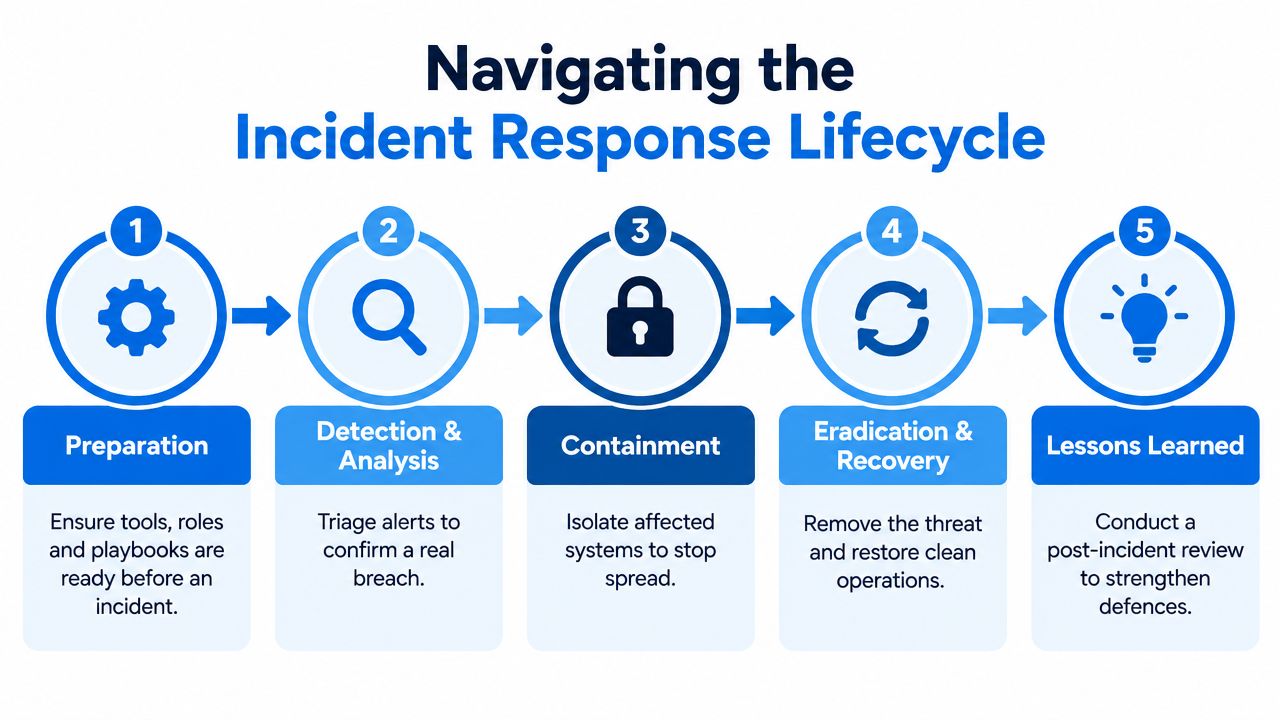
Preparation includes named responders, current asset lists, contact details, backup arrangements and pre-approved isolation steps. The provider should know which systems are business-critical and which accounts have administrative privileges. Tabletop exercises are valuable because they expose practical gaps, such as a response number stored only in the compromised email account.
Detection and analysis
The response team validates the alert rather than assuming every warning is an intrusion. It reviews sign-in history, endpoint activity, mailbox rules, authentication changes and related devices. If the laptop is still connected, responders may isolate it through endpoint management while preserving relevant data for analysis.
Containment without destroying evidence
Containment limits the attacker's options. Engineers may revoke sessions, reset credentials, block malicious infrastructure and separate affected network areas. They must balance speed against business continuity. Disconnecting an entire office can stop spread, but it can also interrupt essential operations, so the response lead should document the reason for each major action.
Eradication, recovery and review
Eradication removes the attacker's foothold. That may involve rebuilding the laptop, removing unauthorised mailbox rules, patching the exploited weakness and resetting credentials from a trusted device. Recovery should restore clean systems in business priority order, with heightened monitoring for renewed access. A backup is useful only when the team knows it predates the compromise and can restore it safely.
The final stage is a review with specific owners and deadlines. Record what delayed detection, which controls worked and where staff needed clearer instructions. The HR crisis management guide is also relevant because an incident affects staff communication, absence, responsibilities and employee confidence, not just servers and accounts.
The lifecycle isn't a rigid line. New evidence can send the team back to analysis, and recovery may pause if investigators find persistence. A competent provider explains those changes in business language instead of presenting technical activity without decisions.
Why London and Essex SMEs Need Local IR Support
For a London or Essex SME, response speed depends on more than a security dashboard. A local partner can secure a physical server, collect a company laptop, coordinate with an office manager, or brief a director face to face. Those practical actions often determine whether containment holds while the wider investigation continues.

Proximity improves practical control
A regional provider can learn your office layout, connectivity, equipment and supplier relationships before an incident. If a device needs to leave service, an engineer can identify and isolate it without asking a stressed employee to follow unfamiliar instructions. Local presence also supports face-to-face briefings when email or collaboration tools cannot be trusted.
The UK's response capability has developed through government, industry and academic teams. RUSI recorded 21 cyber incident response groups operating in the UK by 2013 and described the growth of specialist capacity in its account of the UK incident and emergency management market. For SMEs, that history matters because effective response combines technical containment with reporting, alerts and coordination suited to the organisation's sector.
Encryption isn't the only crisis
Ransomware increasingly involves data theft and extortion even when systems remain available. UK claims data found ransomware encryption in 70% of extortion claims in 2021, compared with 24% by 2025, according to Marsh's UK cyber claims trends. An incident can therefore create privacy exposure, negotiation pressure and regulatory work without every server being encrypted.
An SME still needs clear answers. Which records were copied? Has the attacker lost access? Do contracts require notification? Should the business involve its insurer, solicitor, police, NCSC or ICO? A local provider cannot make those legal decisions, but it can collect technical evidence quickly and coordinate the specialists who can advise on them.
Regional support also reduces communication friction. Directors need plain answers about what has stopped, what remains uncertain, which decision is required and when the next update will arrive. A provider that explains those points clearly, and can attend locally when necessary, gives a small business more control during a fast-moving incident.
Evaluating and Choosing the Right IR Provider
Don't choose an incident response provider from a search result during a live breach. The useful test happens before the crisis, when you can check capabilities, challenge assumptions and confirm how the service behaves under pressure.
Start with the provider's investigation method. Ask whether its responders can work across Microsoft 365, cloud services, Windows endpoints, firewalls, virtual servers and line-of-business applications. Find out how it preserves evidence, produces a timeline and distinguishes confirmed facts from working hypotheses. A provider that only offers malware removal may not be able to answer whether data was accessed or accounts were abused.
Five checks for a serious shortlist
Accreditation and competence: Ask for relevant certifications and confirm whether the team has experience with investigations, digital forensics and incident coordination. Accreditations such as CHECK or CREST can form part of your assessment, but they shouldn't replace detailed questions about the actual people who will respond.
Response terms: Get the response window, escalation route and on-site expectations in writing. “Available quickly” isn't an SLA. Clarify whether the clock starts at your call, the provider's triage or technical confirmation of an incident.
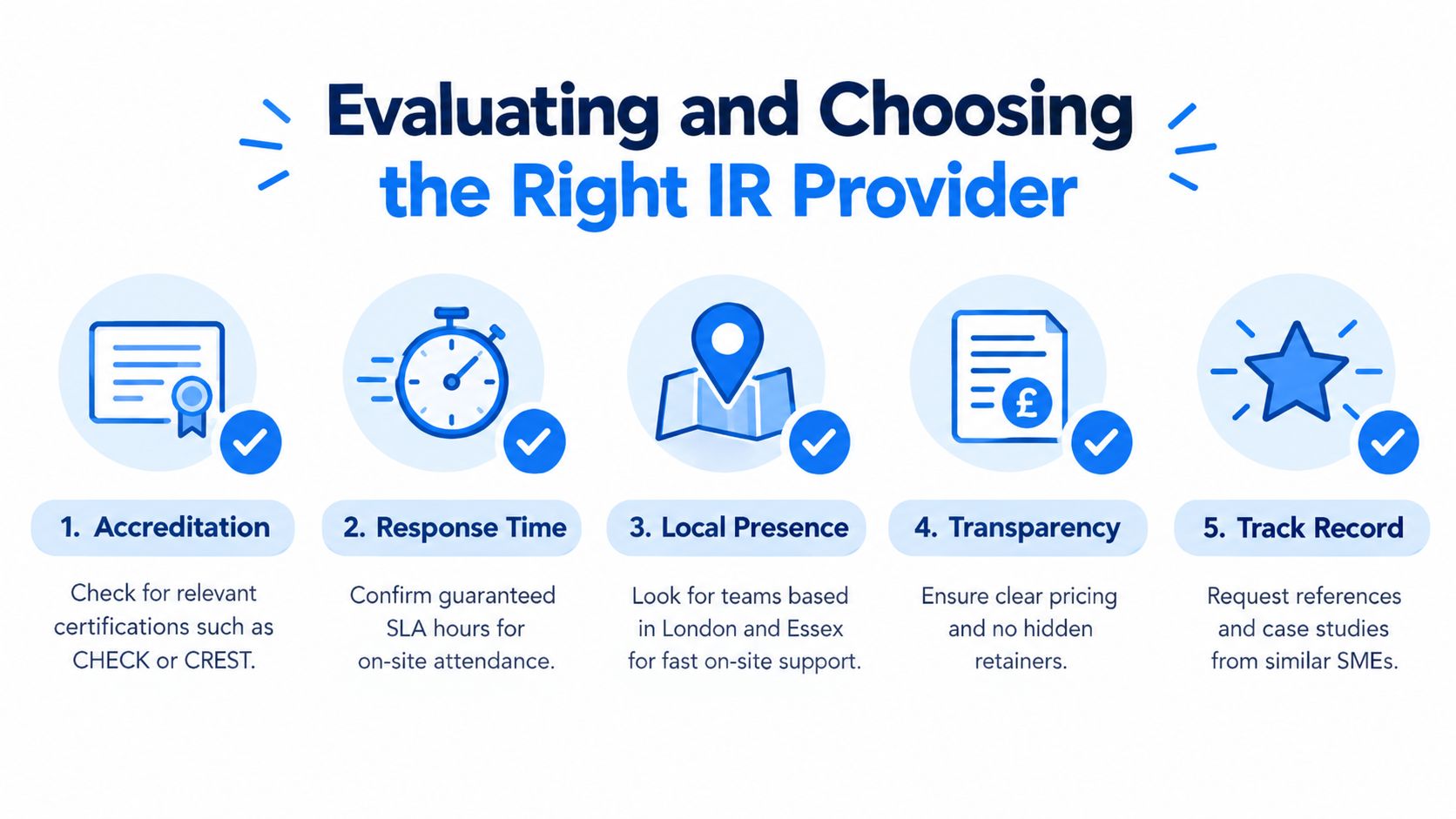
Local delivery: Check whether engineers are truly based near the sites they serve or just assigned from a distant operations centre. Ask how they handle physical devices, disconnected offices and evidence that can't be uploaded immediately.
Commercial clarity: Request a complete explanation of retainer use, emergency rates, travel, forensic work, recovery assistance and third-party costs. Vague pricing becomes a distraction when directors should be deciding how to contain the incident.
Relevant references: Speak to organisations with similar size, systems and regulatory pressures. A provider may have impressive enterprise credentials but little experience helping a small firm where one shared account or unsupported server can affect the whole operation.
Communication reveals maturity
Ask to see a sample incident update. It should separate known facts, assumptions, actions taken, business impact and decisions required. Also ask who speaks to your insurer and legal advisers, who updates staff and whether the same incident lead stays involved through recovery.
Red flags include a generic response mailbox, no named escalation contact, unclear evidence handling, no explanation of authorisation boundaries and a promise to “sort everything” without defining the service. The strongest provider may still say that legal advice, ransom negotiation or specialist forensic testimony sits outside its scope. That honesty helps you build a complete response team instead of discovering missing expertise during an emergency.
Building Your Cyber Readiness Checklist
Readiness isn't a document stored in a folder nobody can access. It's a set of practical arrangements that staff can use when accounts, systems or offices are unavailable. A small business can improve its starting position without trying to build a large security department.
Start with access and communication
Create an out-of-band contact list that doesn't depend on your primary email tenant. Include directors, IT contacts, your incident response provider, insurer, solicitor and key suppliers. Test the route. A phone number that nobody answers and a messaging account protected by the same compromised credentials won't help.
Review privileged access and remove accounts that no longer need administrative rights. Confirm that important services use strong authentication and that break-glass access is controlled, recorded and tested. Keep recovery details away from ordinary user accounts, while ensuring authorised leaders can reach them.
Make recovery realistic
Map the systems that keep the business operating. Include files, finance, payroll, customer records, email, telephony, websites, production tools and supplier portals. For each one, identify the owner, dependencies and acceptable recovery order.
Use this working checklist:
- Validate backups: Confirm that backups are protected from routine administrator access and that restoration has been tested. A successful backup job doesn't prove that the restored data is usable.
- Record assets: Maintain an inventory of laptops, servers, cloud services, firewalls and important applications. Include responsible owners and support contacts.
- Prepare isolation: Document how staff can disconnect a device, suspend an account or contact the provider without improvising.
- Preserve logs: Check that authentication, endpoint, email and firewall records are available for investigation and aren't overwritten before responders can review them.
- Define decisions: Agree who can stop a service, notify customers, contact the insurer or approve emergency spending.
- Practise the scenario: Run a short exercise involving a stolen credential, suspicious mailbox activity or unavailable files. Record every question that the team can't answer.
Maintain the plan
Assign an owner to review the checklist after staff changes, supplier changes and major technology upgrades. Keep a printed emergency summary in a secure location, but don't put sensitive passwords into an unprotected document. The plan should tell people where authorised recovery information is held, who can release it and how to verify a caller's identity.
A readiness plan won't prevent every incident. It reduces avoidable delay, which is often the difference between a contained account compromise and a wider investigation.
Securing Your Business Against Future Threats
Cyber resilience is a business process, not a product purchase. A firewall, endpoint tool or backup platform can support your defences, but none of them decides who leads a crisis, how evidence is preserved or when a privacy assessment begins.
The most important shift is conceptual. Ransomware response must address encryption, but it must also address stolen data, account misuse and extortion where employees can still open their files. That requires visibility across identity, email, endpoints, cloud services and suppliers, followed by a response process that people have practised.
A local partner can make that process easier to operate. London and Essex SMEs often need a combination of remote technical support, practical recovery work, clear leadership updates and access to engineers who understand the physical environment. Regional providers can also connect incident response with everyday services such as managed firewalls, email, connectivity, telephony and device support, reducing the gaps between prevention and recovery.
Don't wait for an alert to discover that your plan depends on a compromised mailbox or one unavailable employee. Review your response contacts, backup restoration, evidence handling and reporting responsibilities with a trusted IT security partner, then document the decisions while the business is calm.
Networking2000 provides IT support and security assistance for businesses across London and Essex, including practical post-incident recovery and remediation support as part of managed service arrangements. Speak with the team about your current readiness and visit Networking2000 to arrange a clear, jargon-free discussion before an incident demands urgent decisions.

