A lot of small firms are in this position right now. A contractor arrives with a laptop. Someone in sales connects a personal phone to the office Wi-Fi. The printer in the corner was installed years ago and nobody's quite sure who set it up. All three end up on the same network, often with far more access than they need.
That's where problems begin.
If every device can wander around your network like an unescorted visitor in your building, one weak point can become everyone's problem. A compromised laptop can reach file shares. A badly configured printer can become a blind spot. A guest device can land on the same wireless network as finance or operations.
For businesses in London and Essex, this isn't a big-enterprise issue. It's an everyday SME issue. Hybrid work, bring-your-own-device habits, smart TVs in meeting rooms, CCTV recorders, door entry systems, cloud apps, VoIP handsets and warehouse scanners all create more connection points than most owners realise.
Table of Contents
- Introduction Why Every Device on Your Network Matters
- What Network Access Control Really Does
- How Network Access Control Works Under the Hood
- Key Benefits of Network Access Control for Small and Medium Businesses
- Deployment Models and Choosing the Right Approach
- Rolling Out Network Access Control Without Disrupting Your Business
- Costs Compliance and Your Next Steps with Local Support
Introduction Why Every Device on Your Network Matters
Small businesses often think about security in layers they can see. Front door locks. Alarm codes. CCTV. Reception sign-in. But on the network side, many firms still run a flat setup where trusted and untrusted devices mix too freely.
That setup made more sense years ago, when most devices were company-owned desktops and a server in a cupboard. It doesn't hold up well now. You've got visitors needing internet, staff moving between home and office, cloud-managed phones, printers that need network access, and building systems that now sit on IP networks too.
The UK picture shows why this matters in practical terms. The Cyber Security Breaches Survey 2025/2026 estimated that 43% of businesses experienced at least one cyber security breach or attack in the previous 12 months. The same survey also identified access-related issues, with 2% of businesses reporting unauthorised access to files or networks by staff and 2% by outsiders, and it estimated about 5.19 million cyber crimes against UK businesses in the last year.
The risk usually looks ordinary
Most network trouble doesn't start with a dramatic Hollywood moment. It starts with something dull.
- A contractor device joins the staff Wi-Fi and keeps access after the job ends.
- An old printer sits on the same network as office PCs even though it only needs to print.
- A visitor gets the password for the main wireless network because it's easier than setting up guest access.
- A door entry or CCTV system is installed by a separate contractor and nobody checks how it fits with the rest of the network.
Your network is only as controlled as the least-managed device connected to it.
Network access control, usually shortened to NAC, solves this by deciding which devices can connect, what they can reach, and what happens when they don't meet your rules.
For SMEs, the value isn't technical elegance. It's control. You stop treating the network like one open room and start treating it like a building with zones, badges and restricted doors. That matters even more when you're trying to tie together office Wi-Fi, physical entry systems, managed firewalls and remote support without building an enterprise-grade maze.
What Network Access Control Really Does
Think of network access control like reception in a well-run building.
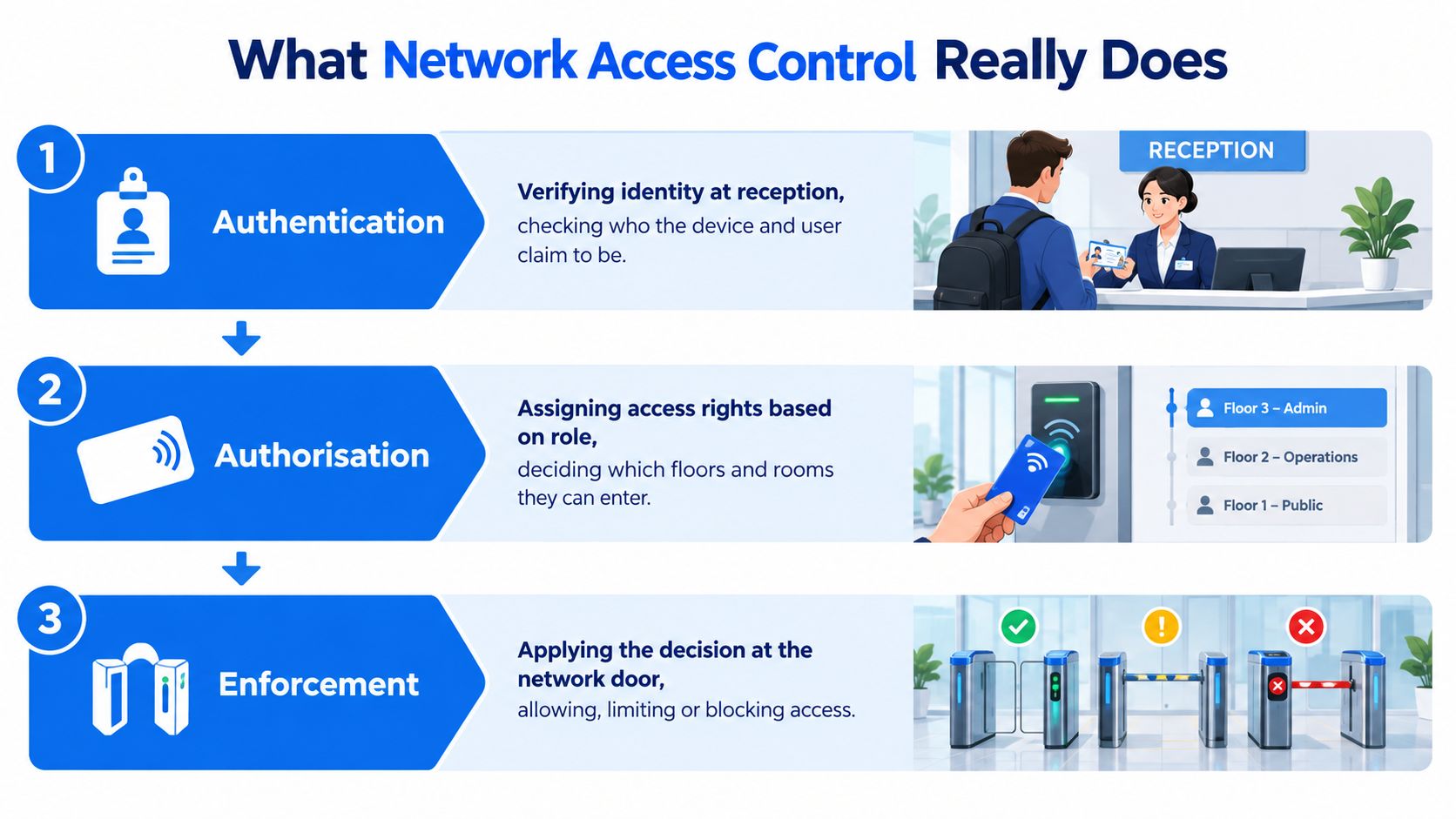
A person walks in. Reception checks who they are. Then it checks whether they should be there. Then it gives them the right level of access. A staff member might reach every-day work areas. A cleaner may enter only at certain times. A visitor might get a badge that opens the lobby and meeting room, but nothing else.
That's what NAC does for devices and users.
The three decisions NAC makes
Core idea: NAC doesn't just ask “can this device connect?”. It asks “who is it, what is it, and where should it be allowed to go?”
Authentication
This is the identity check.
The network wants proof that the person or device is what it claims to be. That might be a username and password, a certificate on a company laptop, or credentials held in a central system such as Microsoft Active Directory. If you need a plain-English refresher on how directory services fit into identity decisions, Monro Cloud's AD guide is a useful companion read.
Authorisation
This is the permissions decision.
Once the network knows who or what is asking for access, it decides what that identity should be allowed to do. An employee laptop may reach file storage, cloud apps and printers. A guest phone may get internet only. A CCTV recorder may talk only to the systems that manage video.
Enforcement
The decision becomes real.
The switch or wireless access point applies the rule. It allows full access, puts the device on a restricted network, or blocks it entirely.
Where readers often get mixed up
People often bundle three separate ideas together:
- Identity means who the user is.
- Device trust means whether the laptop, phone or printer itself meets your standards.
- Network enforcement means the switch or Wi-Fi system applies the rule.
A good NAC design handles all three.
The jargon in plain English
You'll hear a few technical terms when discussing NAC with suppliers.
- 802.1X is a standard that lets wired or wireless connections demand proof before letting a device in.
- RADIUS is the back-end service that helps check those credentials and return the access decision.
- Profiling means identifying the type of device connecting, such as a laptop, phone, printer, camera or VoIP handset.
The important point isn't memorising those labels. It's understanding the job they do. NAC acts as the gatekeeper between “something wants to join” and “this is what it's allowed to touch”.
How Network Access Control Works Under the Hood
When people hear “network access control”, they often picture one giant security product doing magic in the background. In reality, NAC is a sequence of checks and decisions carried out by your switches, wireless kit, identity systems and policy engine.
This workflow is easier to grasp when you break it into stages.
What happens when a device connects
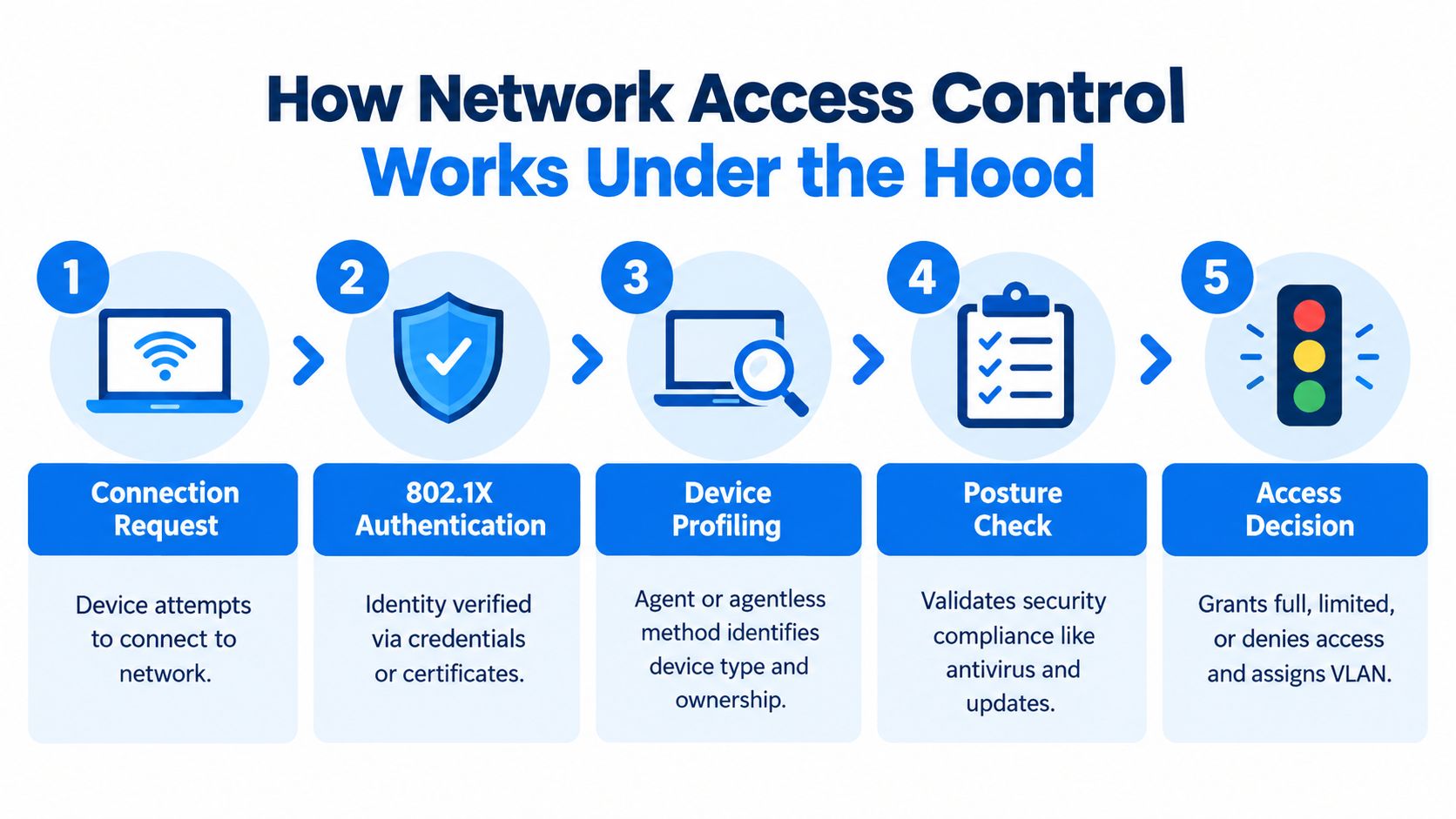
A laptop plugs into a desk port or joins Wi-Fi. The access point or switch doesn't just wave it through. It can ask for proof first.
With 802.1X, the network challenges the device to authenticate. If the user signs in correctly, or the device presents a trusted certificate, that request goes to a policy system, often through RADIUS. The policy system checks the rules and sends back an answer.
That answer might be:
- Full access for a managed company laptop
- Limited access for a guest or personal device
- Quarantine access so the device can update but not reach internal systems
- No access if it fails the checks
Later in the process, the network can place the device into a separate VLAN, apply a downloadable access policy, or steer it onto the right wireless segment.
A short explainer helps make the flow easier to picture:
Agent versus agentless checks
This is one of the biggest SME decisions because it affects user experience and support effort.
| Method | How it works | Best fit | Trade-off |
|---|---|---|---|
| Agent-based | Software on the device reports security details | Managed laptops and company mobiles | Better visibility, more admin |
| Agentless | The system infers details from network behaviour, login flow or scan results | BYOD, guests, printers, IoT and mixed estates | Easier rollout, less detailed checking |
An agent can tell you more. It may report whether encryption is enabled, whether endpoint protection is running, or whether the machine is missing updates. That's useful on company devices.
An agentless approach is lighter. It's often the only realistic option for printers, cameras, door controllers, VoIP phones and contractor devices. But it won't usually give the same depth of posture information.
Profiling and posture in real life
Profiling is how NAC works out what has connected. It looks at clues such as traffic patterns, device fingerprints and connection behaviour. That's how the system can tell the difference between a printer and a smartphone, even if both are on the same wireless estate.
Posture checking goes a step further. It asks whether the device is in an acceptable state.
Practical rule: Don't expect the same checks for every device. A company laptop, a visitor phone and a warehouse printer need different standards.
A common example is an employee phone with an outdated operating system. You may not want to block it outright if the person needs email urgently. But you might place it on a limited network until it updates. That's far better than giving it broad internal access by default.
This is also where NAC starts to overlap with physical and wireless security. For example, many firms understand badge-based entry systems more quickly than 802.1X because the logic is familiar. If you want a simple example of credential-led entry in the physical world, how cellular gate access works is a helpful reference point. The mechanism is different, but the principle is similar. Identity first, access second.
Key Benefits of Network Access Control for Small and Medium Businesses
For SMEs, NAC pays off when it removes messy, risky habits that staff have worked around for years. Shared Wi-Fi passwords. Untracked contractor access. Office printers and smart devices living on the same network as finance systems. Temporary fixes that became permanent.
The business case is easier to see when you tie it to daily operations rather than abstract security theory.

Five practical gains SMEs notice
- Reduced exposure at the front door. NAC stops unknown or non-compliant devices from joining with the same freedom as trusted company machines.
- Less room for lateral movement. If one device is compromised, segmentation and restricted permissions make it harder for that problem to spread.
- Safer BYOD and guest access. Staff can still use personal phones or tablets where appropriate, but those devices don't need the same reach as a managed business laptop.
- Better visibility. You can see what is connecting, including the devices people forget to mention.
- Cleaner audits and policy control. It becomes easier to explain who gets access, why they get it, and how that access is limited.
Why this matters in the UK SME context
UK guidance increasingly treats access control as a foundation rather than a nice extra. The government's 2025 education findings linked to Cyber Essentials reported that 97% of institutions restricted IT admin and access rights to specific users in line with that baseline approach, and the NCSC's 2023 Annual Review recorded 24.48 million automated Early Warning notifications, underlining the volume of potential malicious activity and vulnerability alerts in the wider environment. Both points come from the UK government education findings on cyber security.
That doesn't mean every SME needs a heavyweight enterprise project. It means controlled access has become normal good practice.
It works better with other controls
NAC is strongest when it supports what you already have.
- With managed firewalls, it helps decide which devices deserve which routes and protections.
- With wireless segmentation, it separates staff, guests, voice devices and operational equipment more cleanly.
- With VoIP and smart devices, it stops phones and appliances being treated like ordinary office PCs.
- With physical access systems, it gives you a chance to align who can enter the building with what they can reach once inside.
A flat network asks your firewall to solve too much on its own. NAC shares the job at the point of entry.
That's why SMEs often get more value from a sensible NAC rollout than from adding yet another monitoring dashboard. It changes behaviour at connection time, when the decision matters most.
Deployment Models and Choosing the Right Approach
Not every NAC deployment looks the same. A firm with one office, cloud-first systems and a small support team will usually make different choices from a business with legacy switches, a warehouse, door controllers and specialist kit that can't easily be changed.
The right question isn't “which NAC has the longest feature list?”. It's “which model can your business run without creating a support burden every week?”.
The main deployment choices
Some NAC platforms are cloud-managed. The policy engine and administration live in the vendor's cloud, while your local network devices enforce the rules. These can be easier for SMEs to maintain because updates, scaling and administration are often simpler.
Others are on-premises. That can make sense when you need tighter local control, have legacy integration requirements, or run sites with unusual connectivity constraints.
Then there's hybrid, where core services stay local but management or reporting uses cloud components. That can be a practical middle ground for firms moving in stages.
A separate design choice is inline versus out-of-band enforcement.
- Inline means the NAC solution sits directly in the traffic path. It can give strong control, but it also adds another critical component in line with your network.
- Out-of-band means the NAC system tells switches, wireless gear and other infrastructure what to do, without carrying the traffic itself. Many SMEs prefer this because it's less disruptive operationally.
Choosing a NAC Deployment Model for Your Business
| Deployment Model | Best For | Management Effort | Integration Needs |
|---|---|---|---|
| Cloud-managed | SMEs with lean IT teams, multi-site firms, businesses standardising on modern switches and wireless | Lower day-to-day overhead | Good integration with cloud identity, Wi-Fi and supported switching |
| On-premises | Firms with strict local control needs, specialist environments, older internal dependencies | Higher internal upkeep | Strong dependency on local servers, switching and policy maintenance |
| Hybrid | Businesses migrating gradually or supporting mixed estates | Medium | Needs careful planning between local and cloud components |
| Inline enforcement | Environments needing very direct traffic control | Higher operational sensitivity | Requires careful placement and resilience planning |
| Out-of-band enforcement | Most office-based SMEs | Lower disruption | Depends on switch, wireless and firewall feature support |
Integration is where SME projects succeed or stall
A NAC rollout rarely fails because the core concept is wrong. It stalls because the surrounding systems don't line up.
Check these areas early:
- Switches. Can they support the authentication and policy features you want?
- Wireless platforms. Can they map users and devices into the right SSIDs, VLANs or roles?
- Firewalls. Can they consume identity or segment information usefully?
- VoIP and IoT devices. Will phones, printers, cameras and door systems authenticate in a practical way?
- Support model. Who handles exceptions when a legacy device doesn't behave?
Physical access examples help here. A 24/7 gym can't treat every visitor, cleaner, member and engineer the same way because timing and permissions matter. That's why even outside IT, articles like access control systems for 24/7 gyms are useful. They show the operational side of access design, not just the hardware.
For some London and Essex SMEs, a managed service is the sensible route because the challenge isn't buying NAC. It's keeping policies tidy, exceptions documented and support requests under control after go-live. Networking2000 is one example of a local provider that combines network support with wireless, firewall and physical access services, which can matter when you want the logical and physical sides to fit together.
Rolling Out Network Access Control Without Disrupting Your Business
Bad NAC rollouts break printers, annoy staff and create panic at reception. Good ones start, observe the network, and only enforce once the team understands what's really connected.
That phased approach matters even more in SMEs because a single blocked till, warehouse scanner or VoIP handset can interrupt trading.
Start with discovery, not lockdown
First, build a realistic device inventory. Not the one in the spreadsheet from two years ago. The one that reflects what is joining your wired and wireless networks today.
Look for:
- Managed devices such as company laptops and enrolled mobiles
- Personal devices brought in by staff
- Shared equipment including printers and meeting room kit
- Operational devices such as CCTV, alarms, door controllers and phones
- Third-party access used by contractors, support firms or temporary staff
Then group those devices by role, not by convenience. A camera isn't “just another network device”. It has a very different trust profile from a finance laptop.
Build policies around business reality
Start with a few plain rules that everyone can understand.
- Staff laptops get normal internal access if they meet the security standard.
- Guest devices get internet only.
- Printers can talk to print services, not to everything else.
- CCTV and door systems live on restricted segments.
- Unknown devices land in a holding area or are blocked.
If a policy needs three meetings to explain, it's probably too complicated for day-one enforcement.
Handle exceptions deliberately. Legacy printers, specialist machinery and older phones may not support modern authentication cleanly. That doesn't mean you abandon the project. It means you create tightly limited rules for those devices and review them regularly.
Pilot one site or one access layer at a time
For London and Essex businesses with more than one office, don't turn everything on everywhere at once. Pilot by building, by floor, or by network type.
A sensible sequence often looks like this:
- Monitor mode to see devices and likely policy matches.
- Guest and BYOD control because these are usually easier wins.
- Corporate Wi-Fi enforcement for managed devices.
- Wired office ports once the wireless side is stable.
- Edge cases and legacy kit after the main population is settled.
This is also the stage to line up the helpdesk. Staff need to know what a failed connection looks like, who to call, and what they'll be asked. If support is available early and late, that helps with out-of-hours cutovers and sites that open before standard office times.
Communication matters more than people expect. Tell staff why a personal phone no longer belongs on the same network as payroll. The change is accepted once the reason is clear.
Costs Compliance and Your Next Steps with Local Support
NAC costs aren't just about software. The spend usually comes from a mix of platform licensing, switch and wireless compatibility, rollout time, policy design, support effort and the awkward devices that need special handling.
That's why the cheapest-looking option on paper isn't always the least expensive in practice. A tool that creates months of manual exceptions can cost more in staff time than a cleaner design with better integration.
What to evaluate before you buy
Use a shortlist that reflects operations, not just features:
- Device coverage. Can it handle staff laptops, guest phones, printers, VoIP handsets and building systems?
- Authentication options. Does it support certificates, directory-based logins and sensible fallback methods?
- Segmentation control. Can it place devices into the right VLANs or roles without awkward workarounds?
- Exception handling. How well does it deal with older or specialised devices?
- Administration. Can your team realistically run it, or do you need a managed service?
- Audit trail. Will it help you document who had access and on what basis?
Compliance is really about disciplined access
UK guidance for essential services says organisations should document and manage access to networks and information systems, apply least privilege, and use allow lists where possible. For cloud platforms, the NCSC also recommends granular controls, just-in-time administration and removing unused permissions over time. That guidance appears in the NCSC Cyber Assessment Framework principle on identity and access control.
The UK Telecommunications Security Code of Practice takes a similar line for providers. It requires monitoring and analysing access to security-critical functions, tightly limiting permissions, and ensuring credentials are individually assigned and revoked when no longer needed, as set out in the Telecommunications Security Code of Practice.
The takeaway for SMEs is simple. NAC supports the kind of access discipline UK guidance expects. It helps turn “only the right people and devices should get in” from a policy statement into an enforceable control.
Don't separate network access from building access
One issue many guides skip is the overlap between logical and physical access. UK market forecasts for access control show growing demand in adjacent areas such as cloud software, mobile credentials and retrofit projects, with one projection placing the UK access control market at $853.1 million in 2025 rising to $1,232.1 million by 2030, and another estimating $470 million in 2025 growing to $702.89 million by 2031, according to UK access control market projections.
For a growing SME, that matters because staff don't experience these systems separately. They use one badge, one phone, one laptop, one office and one guest process. The best outcomes usually come when Wi-Fi segmentation, building entry, cloud identities and support processes are designed together rather than bought in silos.
If you're in Romford, Hornchurch, Rayleigh, Brentwood, Wickford or Chelmsford, the next step is usually a practical review. List your current switches and wireless kit, identify every non-user device on the network, decide how you want guests handled, and check whether your physical access setup should be brought into the same conversation.
If your business needs clearer control over who and what can connect, Networking2000 can help you assess the network, wireless and physical access sides together without turning it into an enterprise-only project. For London and Essex SMEs that want practical advice on segmentation, managed firewalls, Wi-Fi and access control, visit Networking2000.

