If you're reviewing IT support right now, there's usually a reason. Staff are chasing slow laptops. Microsoft 365 logins are failing often enough to become normal. Someone is forwarding supplier emails to a personal address because "the server's playing up again". Or you've just had the expensive kind of wake-up call. The internet dropped, phones followed, and your team sat there waiting for technology to come back to life.
That situation is where most UK SMEs make the wrong buying decision. They compare hourly rates, not operating risk. They ask how quickly a provider can answer the phone, but not who is watching the estate before anyone has to call. They buy a helpdesk subscription when what they need is a resilience plan.
That distinction matters because the cost of poor support isn't the invoice from the IT company. It's the day your sales team can't quote, your accounts team can't post invoices, your phones fail mid-call, or your backups turn out to be unusable. The UK's own data makes the point clearly. The government found that 43% of UK businesses experienced a cyber breach or attack in the previous 12 months, equivalent to about 612,000 businesses, with exposure rising as firms grow (UK Cyber Security Breaches Survey context via AMVIA).
Good IT support for businesses should reduce interruption, tighten security, and make costs more predictable. If it doesn't do those three things, it's not support. It's ticket handling.
Table of Contents
- The Tuesday Morning That Changes How You Think About IT Support
- What IT Support for Businesses Actually Covers
- Managed Support Versus Break-Fix and Why the Gap Has Grown
- Reading a Service Level Agreement Like an Operator
- Security and Backups as Core Service, Not Optional Extras
- Pricing Models and What They Reveal About a Provider
- Why London and Essex SMEs Benefit From Regional IT Support
- Choosing a Provider and Getting Started This Week
The Tuesday Morning That Changes How You Think About IT Support
It's 8:47 on a Tuesday in an Essex office. The shared drive won't open. Outlook keeps asking for a password. The phone system is dropping calls, and the managing director is trying to salvage a client conversation on a mobile with patchy signal near the window. Someone says, "Has anybody called IT?" as if that solves anything by itself.
By 9:30, you've got six people standing still, one sales call lost, and no clear answer on whether this is internet, Microsoft 365, the firewall, a failed update, or all three. The provider says they'll "take a look remotely" once an engineer is free. That's break-fix in real life. Nothing starts until something breaks loudly enough.
Now compare that with a similar firm a few miles away. Their firewall flagged instability overnight. Monitoring picked up an issue before users logged in. A failing service had already been restarted, a patch had been rolled back, and the provider had checked the backup status before the first member of staff made coffee. Same technology category. Different operating model.
The real cost isn't the engineer's hour
Reactive support always looks cheaper until the day it isn't. The billable hour is rarely the biggest cost. The bigger losses sit inside your business:
- Idle staff time: Salaried people still cost money when they can't work.
- Missed commercial activity: Orders stall, proposals go out late, calls drop, and clients notice.
- Management drag: Directors stop running the business and start coordinating an outage.
- Reputational damage: Customers forgive the odd delay. They don't forgive repeated disruption.
UK connectivity data backs up how serious downtime is. Research on business internet failures estimated 8.8 million internet failures and 50.5 million hours of disruptive downtime in 2023, costing the UK economy about £3.7 billion. The same analysis found that more than half of fixed business connectivity customers experienced an outage in the year to January 2024, and micro businesses that had at least one outage lost an average of 15.83 hours (UK business internet downtime analysis from Beaming).
Practical rule: Buy IT support the same way you'd buy business continuity. Ask who detects problems first, who owns recovery, and how fast normal operations return.
That's the lens that matters. Not "Do you have a helpdesk?" but "Can you keep us trading when systems wobble?"
What IT Support for Businesses Actually Covers
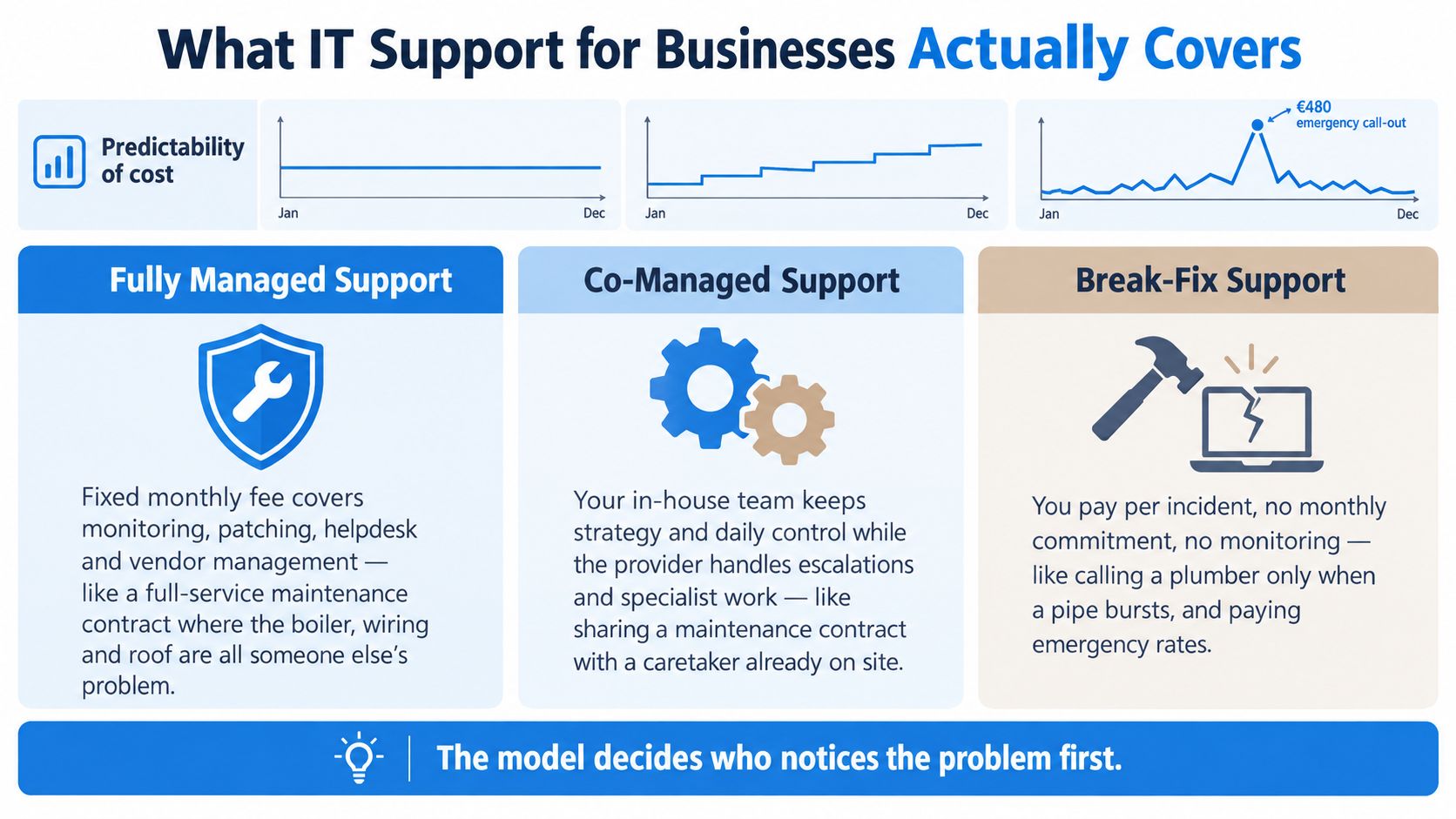
Most confusion comes from the fact that businesses use one phrase, IT support for businesses, to describe three very different service models. They aren't interchangeable. They produce different outcomes because they start from different assumptions about who should notice a problem first.
Fully managed support
This is the maintenance-contract version. You pay a fixed monthly fee and the provider takes responsibility for routine care and day-to-day support. That usually includes monitoring, patching, helpdesk, device oversight, account administration, backup checks, and coordination with third-party vendors such as Microsoft, broadband providers, or VoIP suppliers.
The point isn't just convenience. It's prevention. A managed provider is supposed to spot issues before your users report them.
Co-managed support
This model works when you already have an internal IT lead or small team. Your staff keep control of daily priorities, business context, and internal decision-making. The external provider handles escalations, specialist tools, security oversight, leave cover, and project capacity.
It's often the most sensible model for growing SMEs. You keep local knowledge in-house but stop pretending one overstretched internal person can cover support, cyber security, cloud administration, supplier management, and strategic planning alone.
Break-fix support
This is the call-the-engineer-when-it-fails model. No one is watching the estate by default. No one is patching, reviewing alerts, or validating backup success unless you've separately paid for that work. You call when something hurts, and you're billed for the response.
That can still suit very small firms with limited reliance on systems. It is not a serious operating model for a business that lives in Microsoft 365, cloud line-of-business apps, VoIP, and remote access.
What's normally included and what's not
A lot of disputes start because businesses assume "support" includes everything. It doesn't.
Typically bundled under managed cover:
- Helpdesk support: User issues, login problems, printer faults, Microsoft 365 problems.
- Remote and on-site support: Remote first, with on-site visits when the issue needs hands on equipment.
- Monitoring and maintenance: Device health, disk space, failed services, hardware warnings.
- Patch management: Windows, Microsoft 365 ecosystem, and often key third-party applications.
- Backup verification: Checking jobs completed and investigating failures.
- User admin: New starters, leavers, permission changes, device setup.
Usually outside scope unless written in:
- Hardware purchases: Laptops, switches, firewalls, phones.
- Major projects: Office moves, cloud migrations, server replacements, structured cabling.
- Licensing costs: Microsoft 365, backup platforms, endpoint security tools.
- Out-of-scope app support: Bespoke software, legacy line-of-business systems, unsupported devices.
A full contract covers servicing, inspection, and routine repair. It doesn't automatically include replacing the whole lift or rewiring the building.
Managed Support Versus Break-Fix and Why the Gap Has Grown
The old argument for break-fix was simple. Why pay every month if you don't always need IT? That logic made more sense when a small office had a file server, a few desktops, and one broadband line. It makes far less sense now.
Modern SMEs depend on cloud email, Teams or VoIP, identity platforms, remote access, endpoint security, mobile devices, and third-party SaaS tools. That stack needs active management. It doesn't stay healthy by accident.
Cost, speed, and coverage
Here's the blunt comparison.
| Criterion | Managed Support | Break-Fix |
|---|---|---|
| Cost predictability | Fixed monthly charge, usually per user, per device, or bundled tier | Variable hourly billing, call-out fees, project extras |
| Response speed | Monitoring can trigger action before users notice | Action starts only after someone reports the issue |
| Security coverage | Patching, policy enforcement, backup checks, and security tooling are normally built into the model | Security is often partial, ad hoc, or absent until an incident forces the issue |
The cost gap is not just about invoices. It's about whether your business carries hidden operational risk every day. With managed support, you're paying to reduce volatility. With break-fix, you're accepting volatility and hoping it stays tolerable.
Why unmanaged estates have become more dangerous
Security is the main reason the gap has widened. The UK government's cyber survey found the average cost of a business's most disruptive breach was £1,600 including zero-cost responses, or £3,550 excluding zero-cost responses. For medium and large businesses, the average cost of the most disruptive breach was about £10,830 (UK Cyber Security Breaches Survey 2025).
That matters because unmanaged environments tend to drift. Patches slip. Dormant accounts stay live. Backups run without anyone checking whether they can restore. Those are exactly the conditions attackers exploit.
If your business operates across several sites, the complexity rises again because you're dealing with more circuits, more devices, and more room for inconsistency. In that case, it's worth reviewing a specialist service for multi-location franchises to see how a standardised support model is structured across dispersed locations.
Fast response means very little if nobody is doing the maintenance that prevents the incident in the first place.
Break-fix still has a place. A tiny operation with low system dependency might choose it knowingly. Most revenue-reliant SMEs shouldn't.
Reading a Service Level Agreement Like an Operator
Most SMEs sign SLAs too quickly. They scan the front page, find a response promise they like, and assume they're protected. Then the first serious issue lands and they discover the provider promised acknowledgement, not recovery.
Response time and resolution time are not the same thing
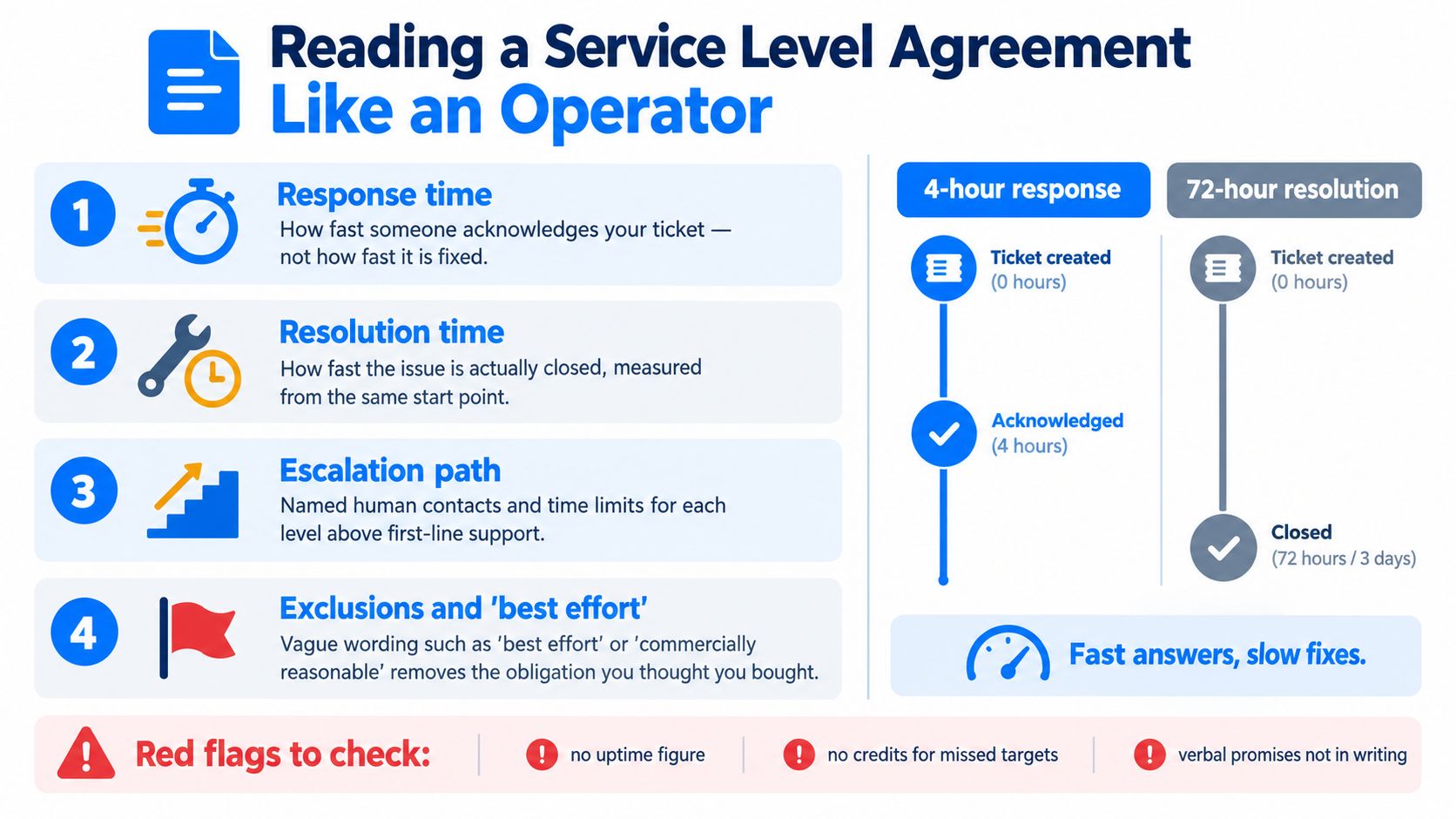
A response time tells you when someone will acknowledge the ticket. That's all. A provider can answer in minutes and still take far too long to fix the issue. A resolution time tells you when the service should be restored or the ticket properly closed.
You want both in writing. If an SLA only commits to response, it leaves too much room for slow fixes dressed up as compliance.
Here's a useful explainer before you review the document in detail.
Words that quietly remove accountability
The most dangerous SLA phrases are the ones that sound reasonable. "Best effort." "Commercially reasonable endeavours." "Subject to available capacity." Those phrases often mean the provider has not committed to an outcome.
Check these points line by line:
- Business hours definition: If your team starts at 7am and the provider's clock starts at 9am, your SLA is weaker than you think.
- After-hours thresholds: Many contracts only treat certain failures as urgent outside core hours.
- Third-party exclusions: If Microsoft 365, broadband, telephony, or your line-of-business app is excluded, a large chunk of your real risk may sit outside the agreement.
- Change requests: Small changes can become chargeable "project work" unless the boundary is clear.
Uptime language needs translating into business reality
Most directors don't need a theory lesson on uptime percentages. They need to know what a practical failure looks like. If a provider talks about availability targets, ask them to translate that into plain English. How much interruption would that permit in a normal month? What systems does the figure apply to? Does it cover the internet circuit, the firewall, Microsoft 365 support, the backup platform, or only the provider's own helpdesk system?
If a promise matters, put it in the contract. Verbal reassurance during the sales call has no value during an outage.
Ask for named escalation contacts, missed-target service credits, and a documented route for major incidents. If the provider can't explain the SLA clearly, they probably won't perform clearly under pressure either.
Security and Backups as Core Service, Not Optional Extras
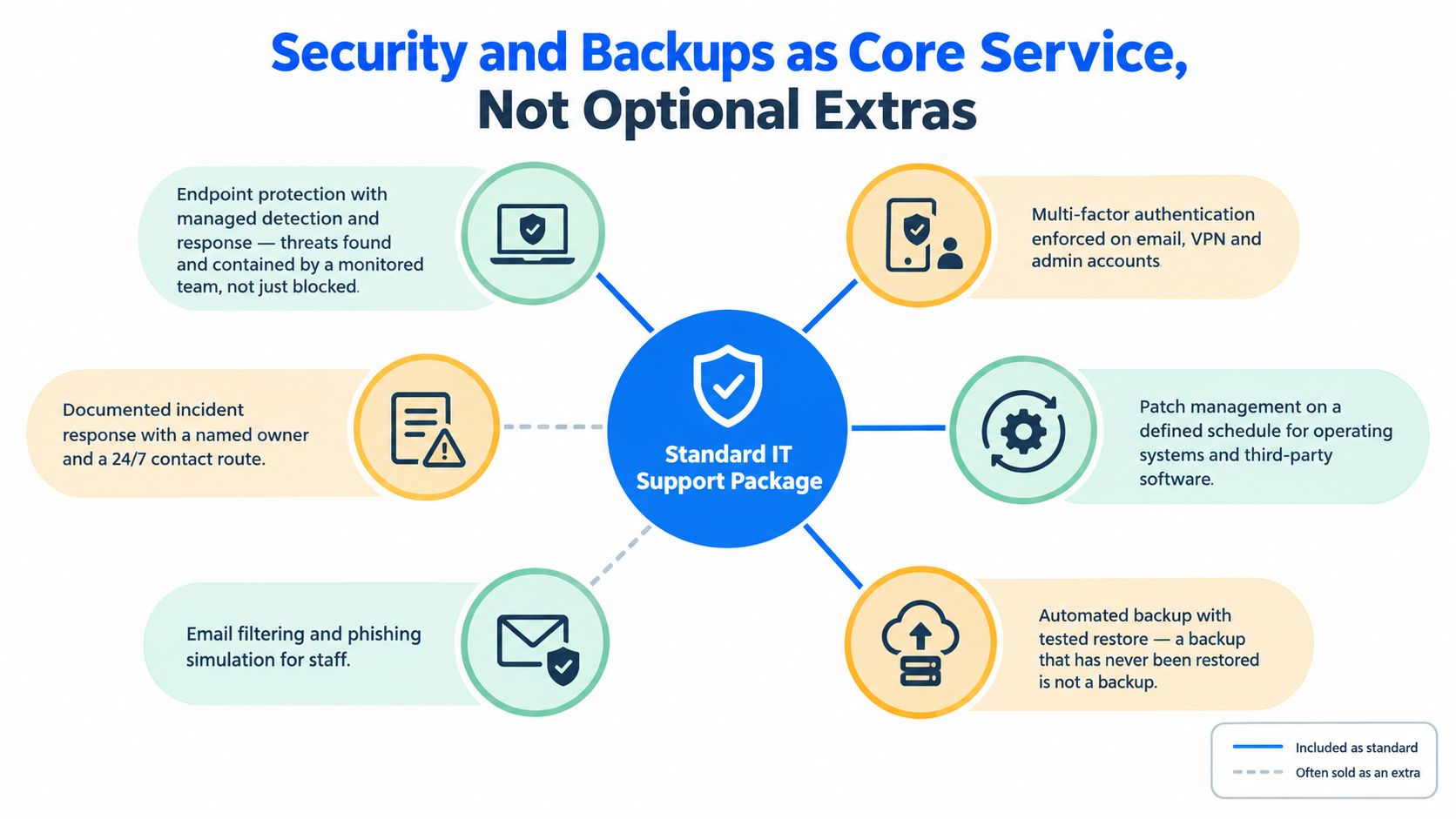
If a provider prices support cheaply by stripping out security, they haven't found efficiency. They've just moved risk onto you. Security should sit inside the core service because most business interruptions now start as security issues, identity issues, or user behaviour issues.
The minimum stack a serious SME package should include
These controls shouldn't be treated as premium add-ons.
- Endpoint protection with active management: Not just antivirus software installed once and forgotten. You want monitored endpoint detection and response, with someone reviewing alerts and isolating machines when needed.
- Multi-factor authentication: This should be enforced on Microsoft 365, admin accounts, remote access, and any system that can expose business data.
- Patch management: A defined patch cadence for Windows, Microsoft applications, browsers, and common third-party software closes obvious gaps.
- Email filtering: Phishing still gets in through ordinary inboxes. Filtering, impersonation controls, and policy tuning matter.
- Vulnerability review: A quarterly review is a sensible minimum for spotting obvious exposure and configuration drift.
The business case is straightforward. The Department for Science, Innovation and Technology's labour-market study found 49% of UK businesses had a basic technical cyber security skills gap, representing about 699,000 businesses, and 32% lacked confidence in handling breaches without outsourcing (DSIT cyber security skills labour market study 2025).
That means most SMEs shouldn't assume they can self-manage controls properly, even if they have a capable office manager or a technically minded operations lead.
Backups are a separate discipline
A backup is not a tick box. It's a recovery system. Those are not the same thing.
Use the 3-2-1 principle as a working standard. Keep multiple copies, on different media or platforms, with one copy offsite. Then tighten that with immutability where possible so ransomware can't encrypt the backup set alongside production data.
What matters in practice:
- Define recovery objectives: Decide which systems need fast recovery and which can wait.
- Separate backup from production credentials: If the same compromised account controls everything, your backup isn't isolated enough.
- Test restores routinely: File-level restores, mailbox restores, and full system recovery tests all matter.
- Document who owns an incident: During a real event, confusion wastes time.
Networking2000 is one example of a provider that combines IT support with managed security, connectivity, telephony, and backup-related infrastructure, which is useful when your risks span more than laptops and email.
Pricing Models and What They Reveal About a Provider
Pricing tells you how a provider thinks. It reveals whether they're set up to prevent problems or profit from them. That's why the cheapest quote often turns out to be the most expensive support arrangement.
The three common pricing structures
Most SME proposals fall into one of these models.
| Pricing Model | Typical Cost Band | Best Fit For | Hidden Cost Risk |
|---|---|---|---|
| Per-user | Fixed monthly fee per employee account | Professional services firms, hybrid office teams, Microsoft 365-heavy environments | Shared devices, meeting room tech, or specialist hardware may sit outside scope |
| Per-device | Fixed monthly fee per supported device | Warehouses, shared workstation setups, hardware-heavy operations | User support intensity can outgrow the model and trigger chargeable extras |
| All-inclusive tier | Bundled monthly package covering support, monitoring, and defined extras | SMEs that want budgeting clarity and broad cover | Fair use clauses, project exclusions, and after-hours carve-outs can narrow the promise |
No single model is always right. The right one depends on how your business works.
How to match pricing to your setup
A professional services firm with fifteen people, all using laptops, mobiles, Microsoft 365, cloud storage, and frequent remote access usually suits per-user pricing. The support burden follows people more than hardware. Every starter, leaver, permission change, MFA issue, and app problem is user-centred.
A thirty-person hybrid office with meeting rooms, shared printers, a firewall estate, VoIP handsets, and a mix of desk-based and shared devices may fit better into an all-inclusive tier or a blended model. You want broad cover because issues won't arrive neatly grouped by user account.
What the price should make you ask:
- Why is this cheaper than the others? Sometimes the answer is efficiency. Often it's exclusion.
- What's billed separately? Projects, onboarding, after-hours work, vendor liaison, and cyber tools commonly sit outside the headline fee.
- What does fair use mean? If "unlimited" support is backed by a vague fair use clause, it isn't really unlimited.
- How are site visits handled? Some contracts include them. Others treat every visit as extra.
Cheap quotes often signal weak service design
Be wary of these pricing signals:
- Unusually low monthly fees: They often exclude monitoring, security tooling, backup oversight, or strategic account management.
- Open-ended scope: If the quote says "support as required" without clear boundaries, budget creep is coming.
- Security sold separately from support: That split usually creates finger-pointing during incidents.
- No onboarding charge and no discovery process: That can mean the provider hasn't assessed your environment properly.
A good proposal doesn't just state a monthly figure. It shows what operational responsibility the provider is taking on.
Why London and Essex SMEs Benefit From Regional IT Support
Location still matters in IT support, despite all the talk about remote-first service. Remote tools solve a lot, but not everything. When a switch fails, a firewall locks up, a circuit handoff needs checking, or a server room issue needs physical eyes on it, geography stops being abstract very quickly.
On-site speed still decides outcomes
A regional provider with engineers covering London and Essex can usually deal with physical incidents more cleanly than a national support desk routing everything through a central queue. Fewer handoffs. Less repeating yourself. Better odds that the person arriving on site already understands the estate.
That matters around the M25 and across the Essex corridor, where a same-day visit can be the difference between a manageable interruption and a lost trading day.
Local context isn't a gimmick
Providers who work regularly across London and Essex tend to understand the practical issues national firms miss. They know the difference between a modern serviced office in the City and an older mixed-use building in Essex with awkward cabling, patchy riser access, or broadband limitations. They know where leased line lead times become planning issues. They know when a "simple install" won't be simple.
That local familiarity also improves supplier handling. Someone who regularly deals with circuits, VoIP, cabling, and access constraints in the area is usually better at pushing issues through to resolution.
Face-to-face reviews still uncover risk
Quarterly reviews work better in person than on a rushed call. Walking the office, seeing where staff work, checking comms cupboards, spotting ad hoc kit under desks, and noticing who is sharing credentials all expose risks that never appear in ticket reports.
Good regional support isn't just about being nearby. It's about reducing delay, reducing translation, and reducing the number of people between the fault and the fix.
For London and Essex SMEs, regional support isn't nostalgia. It's an operational advantage.
Choosing a Provider and Getting Started This Week
Most businesses don't need a long procurement project. They need a shortlist, the right questions, and enough discipline not to be distracted by a polished sales deck.
Ten questions worth asking every provider
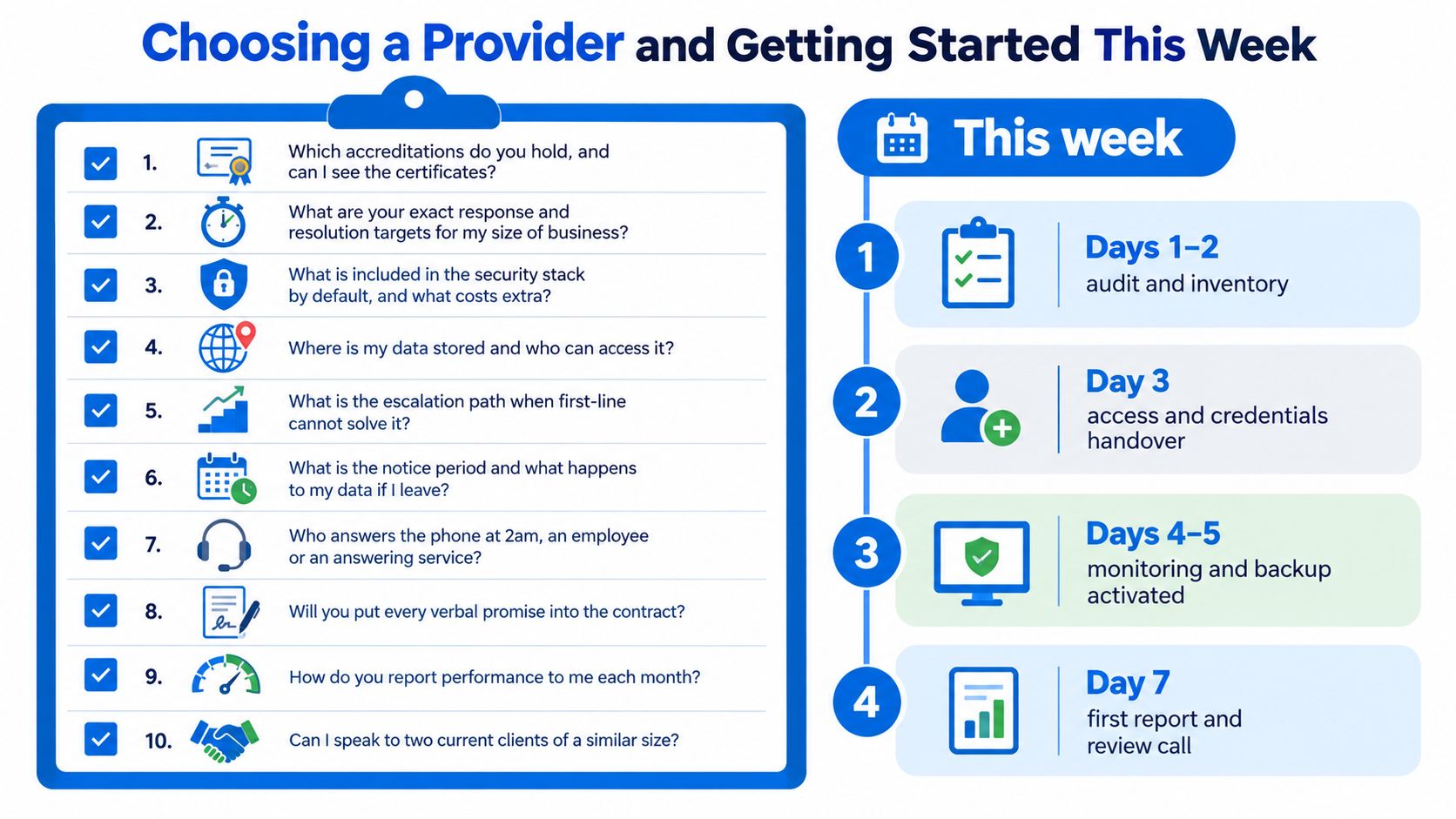
Use this list and insist on direct answers.
- Which accreditations do you hold? Ask to see current certificates.
- What are your exact response and resolution targets? Not general promises.
- What security controls are included by default? Separate the standard stack from chargeable extras.
- Where is our data stored and who can access it? This matters for backups, remote access, and admin tooling.
- What's the escalation path? Ask for named roles, not vague tiers.
- What are the exit terms? Notice period, data return, credential handover, documentation release.
- Who answers after hours? Engineer, dispatcher, or answering service.
- Will you put verbal commitments into the contract? If not, ignore them.
- How do you report performance each month? Tickets alone aren't enough. You want trend visibility.
- Can we speak to current clients of similar size? Similar size matters more than famous names.
There's another trust issue buyers shouldn't ignore. A 2025 SME survey found 53% of UK SMEs said security was the main reason to use an MSP, yet 42% had concerns about how MSPs manage security, while 31% were already fully outsourcing IT management (JumpCloud SME IT trends report coverage in Channelweb). That's why contract clarity matters so much. Businesses want outsourced capability, but they don't want blind trust.
Red flags and the next five steps
Walk away if you see any of these:
- Backup omitted from the quote
- Remote support excluded from the SLA
- One-size-fits-all pricing that seems too low to fund monitored support
- No discovery process before pricing
- No clear boundary between support, projects, and security
Do this this week:
- Map your assets: List users, laptops, key apps, internet connections, phones, and backup systems.
- Write down two genuine pain points: Slow support, recurring outages, weak onboarding, poor visibility, whatever's real.
- Request three scoped proposals: Ask each provider to respond to the same brief.
- Compare scope before price: Cheaper support with missing security isn't cheaper.
- Book a discovery call before month-end: Momentum matters. Delay usually means another quarter of avoidable risk.
The best time to improve support is before the next incident forces the decision for you.
If you're looking at IT support as a resilience decision rather than a helpdesk purchase, Networking2000 offers business IT support, connectivity, telephony, networking, and security services for firms across London and Essex. If you want a practical discussion about service model, SLA fit, and what your current setup is really exposing you to, visit Networking2000.

