Your Wi-Fi drops during a video call, the VoIP handset sounds distorted, and the CCTV feed freezes just when someone needs it. At home, the cause may be a poor patch lead between the router and access point. In a London or Essex office, it may be an untidy cable run, weak termination, interference, or a switch connected through cabling that was never tested properly.
That's why choosing the best Cat6 Ethernet cable isn't mainly a branding exercise. Standard Cat6 is already a strong baseline for most homes and SMEs, but the right construction, length, connector, and installation method matter more than an impressive-looking packet. The practical question is whether you need a flexible patch cable, a permanent solid-core run, shielding for a difficult environment, or better terminations.
| Requirement | Sensible Cat6 choice | Main point |
|---|---|---|
| Router, computer or games console | Stranded Cat6 U/UTP patch lead | Flexible and straightforward |
| Home office or access-point connection | Good-quality Cat6, correctly terminated | Installation quality matters more than branding |
| Fixed office cabling | Solid-core Cat6 | Designed for permanent structured runs |
| Dense cable tray or electrical interference | Cat6 STP, installed and earthed correctly | Shielding only helps when the whole system supports it |
| VoIP, CCTV or PoE devices | Certified Cat6 with suitable terminations | Check routing, heat, bend radius and connector quality |
Table of Contents
- Introduction Why Cat6 Still Matters for UK Homes and Businesses
- What Makes a Cat6 Cable Different and What to Look For
- UTP vs STP and Solid vs Stranded Compared for Real World Use
- Length Attenuation Bandwidth and PoE Considerations
- Choosing the Best Cat6 Ethernet Cable for Home vs Business Use
- Testing Installation Tips and Avoiding Common Mistakes
- Our Recommendation and Local Cat6 Installation Support from Networking2000
Introduction Why Cat6 Still Matters for UK Homes and Businesses
A full-fibre connection can reach the premises and still deliver disappointing performance inside the building. The router may sit in a cupboard, the wireless access point may be placed at the opposite end of the office, and a cheap cable may run beside mains wiring or be bent sharply behind furniture. The broadband service isn't necessarily the weak point. The internal network often is.
UK access speeds have moved quickly. Ofcom reported an average UK home broadband download speed of 69.4 Mbit/s in March 2023, an increase of 10.1 Mbit/s, or 17%, from the previous year in its home broadband performance report. Ofcom's Connected Nations update for spring 2025 reported that nearly three-quarters of UK homes could access full-fibre by spring 2025, with average maximum download speed rising from 170 Mbit/s in 2023 to 223 Mbit/s in 2024 and 285 Mbit/s in 2025.
Those figures don't mean every household needs premium cabling. They do mean internal Ethernet deserves proper attention. A capable wired link supports reliable access points, home working, streaming, gaming, VoIP, CCTV and office devices without forcing every connection through congested Wi-Fi.
The sensible baseline for most installations
Cat6 is specified at 250 MHz, compared with 100 MHz for Cat5 and Cat5e, as summarised in the Category 6 cable technical overview. That higher frequency class gives the cable more transmission headroom and helps explain why Cat6 became a mainstream minimum for modern structured cabling.
For London and Essex homes and SMEs, the attraction is practical. Cat6 works with mainstream UK network equipment, supports gigabit networking across the full channel length when installed correctly, and leaves room for faster equipment over shorter runs. You don't need to pay more just because a cable uses aggressive marketing language.
Networking2000's local approach is useful where the job involves more than buying a lead. A network engineer can assess the router position, access-point locations, VoIP handsets, CCTV routes and existing Cat5e or Cat6 cabling before recommending replacement work. That turns a vague “best cable” search into a clear decision about the actual building.
What Makes a Cat6 Cable Different and What to Look For
Start with the category marking, not the colour or packaging. Cat6 describes a performance class, and the defining frequency rating is 250 MHz. UK procurement and installation references commonly align Cat6 with standards such as TIA/EIA-568-C.2 and ISO/IEC 11801, as reflected in the technical overview linked above.
The higher frequency rating doesn't automatically make a short patch lead faster than every Cat5e lead. It gives the cabling a higher specified performance ceiling and can provide better margin when the installation is properly designed. The cable still needs suitable connectors, correct pair geometry, sensible routing and competent termination.
The useful differentiator: Cat6's 250 MHz class gives structured cabling more signal headroom. It doesn't compensate for a crushed cable, a poor plug or an untested socket.
Read the product specification properly
A sensible product description should identify the category, conductor material, construction and intended use. Look for pure copper conductors, rather than copper-clad aluminium, especially for permanent runs and Power over Ethernet applications. CCA products may be sold with Cat6 language, but they aren't the right choice for a professional structured installation.
Distinguish solid-core cable from stranded patch cable. Solid cable belongs in fixed routes and behind wall plates. Stranded cable is more flexible and suits short connections between a switch, router, computer, phone or access point.
Check whether the cable is U/UTP or shielded. U/UTP has no overall metallic shield and is usually the straightforward choice for domestic rooms and ordinary office routes. Shielded cable can help in areas with significant electromagnetic interference, but it needs compatible shielded components and correct bonding. Buying STP cable and fitting it into an otherwise unshielded system doesn't create a complete shielded channel.
The plugs and sockets matter too. A cable with sound conductors can still fail through weak crimping, damaged latch clips, poor strain relief or incompatible termination. For a larger installation, ask for standards-compliant components and test results, not just a cable box labelled “high speed”.
For readers comparing network infrastructure with broader connectivity work, the overview of professional fiber technology from Amax provides useful context on how fibre services differ from copper Ethernet inside a building.
UTP vs STP and Solid vs Stranded Compared for Real World Use
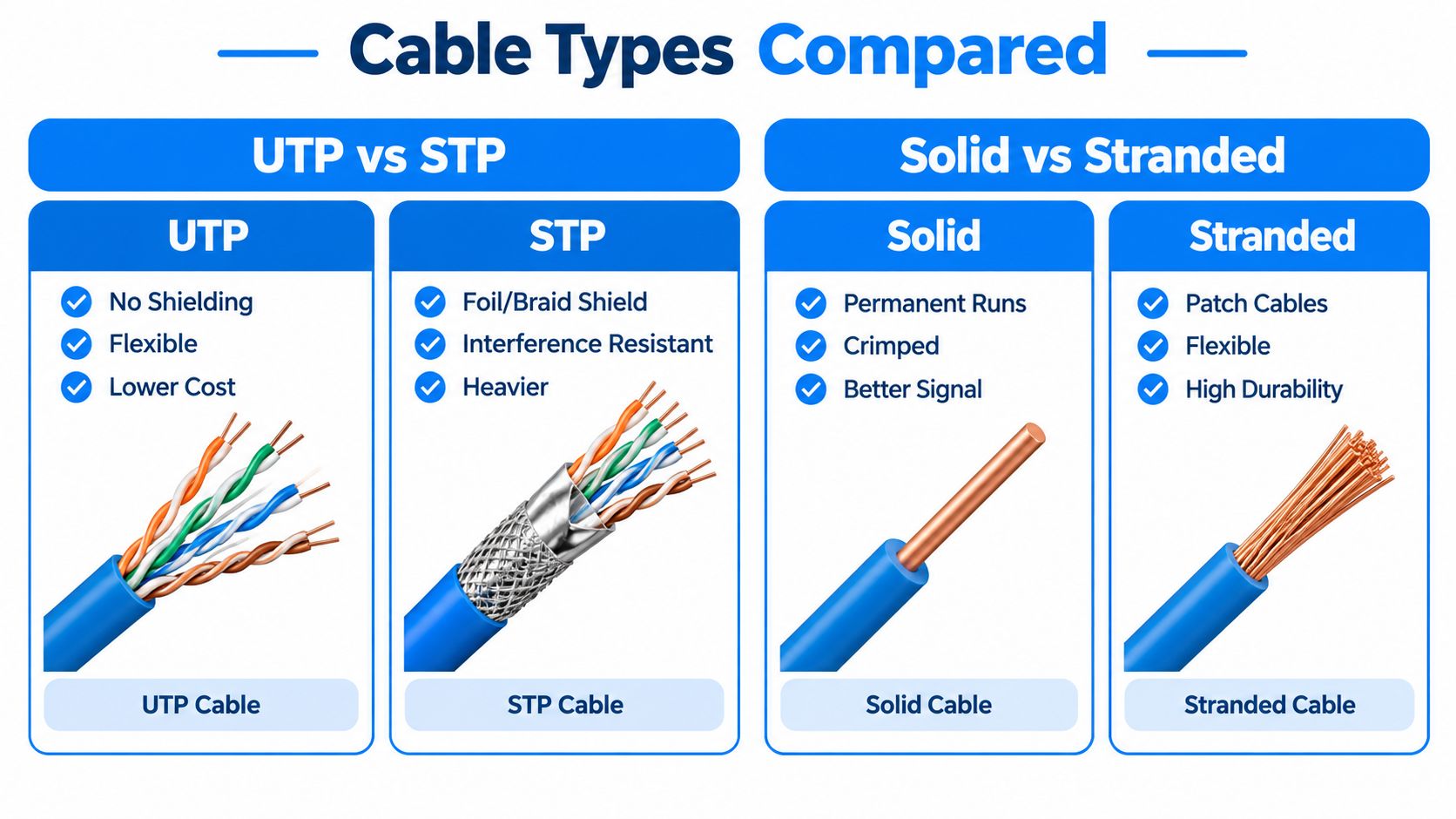
UTP is the default choice because it's simple, lighter and easier to terminate. In a home, small office or ordinary ceiling void, it usually gives you the right balance of performance and handling. It also avoids the installation complications that arise when shielded cable is used without a properly bonded shielded path.
STP has a place. Use it where cable routes pass close to sources of electrical interference, where a dense tray contains many power and data cables, or where the equipment and installer are prepared to maintain shielding end to end. Shielding isn't a magic layer. An incorrectly terminated shield can add cost and complexity without solving the underlying problem.
The solid-versus-stranded choice is more straightforward. Solid-core Cat6 is for permanent runs, such as cable between a patch panel and a room outlet. Stranded Cat6 is for patch leads, where repeated movement and tight equipment layouts make flexibility more valuable.
Decision rule: choose shielding for the environment, solid cable for the fixed route, and stranded cable for the movable connection.
Choosing cable construction by environment
| Construction Type | Best For | Watch Out For |
|---|---|---|
| Cat6 U/UTP solid core | Office outlets, wall runs and patch-panel links | Don't repeatedly flex or coil it |
| Cat6 U/UTP stranded | Router, switch, workstation and home patch leads | Longer flexible leads can be harder to manage |
| Cat6 STP solid core | Dense trays or interference-prone fixed routes | Requires compatible shielded hardware and bonding |
| Cat6 STP stranded | Short patching in a shielded installation | Heavier, less flexible and unnecessary for many homes |
A home worker connecting a router to a desk access point normally doesn't need shielded cable. A small office installing several access points, VoIP handsets and CCTV cameras needs a planned cabling layout, particularly where cables share containment with power. The installer should also consider the PoE load and physical routing rather than selecting cable solely by category.
Keep the construction consistent with the termination hardware. Solid conductors need compatible IDC modules or plugs. Stranded conductors need plugs designed for stranded cable. A mismatch may produce a link that works intermittently, fails under movement or passes a basic test but performs poorly under load.
Length Attenuation Bandwidth and PoE Considerations
Cable length affects signal quality because the transmitted signal loses energy as it travels. The installation therefore needs more than a category label. It needs enough margin for the actual route, connectors, patch panels, cable bundles and interference around it.
UK technical data for Cat6 U/UTP at 250 MHz includes maximum figures of around 33.0 dB/100 m insertion loss, 38.0 dB NEXT, 36.0 dB PS-NEXT and 17.3 dB return loss, as detailed in this structured cabling performance guide for electricians. These measurements describe losses and crosstalk behaviour. Better margin generally gives a link more resilience when the route runs through a busy tray, contains multiple connectors or carries PoE.
Cat6 is commonly used for 1 Gbps Ethernet across the full 100 metre channel, provided the channel and terminations meet the requirements. 10 Gbps operation is a shorter-run proposition, with guidance commonly placing favourable installations up to 55 metres, and more interference-heavy bundles around 37 metres, as explained in this UK Cat6 data cable guide. Treat those distances as design constraints, not promises that every cable will deliver the same result in every building.
Plan the route, not just the cable length
Measure the path from the switch to the outlet or device. Include vertical drops, ceiling routes, service loops and the patch connections at both ends. Don't order a cable that barely reaches. Extra length should be managed in a broad loop, not tightly coiled beside a power supply.
Bend radius matters. Sharp bends deform the twisted pairs and can affect impedance, return loss and crosstalk. Staples can crush the jacket, while over-tight cable ties can compress the conductors. A neat installation is not one pulled as tight as possible. It is one supported without damaging the cable.
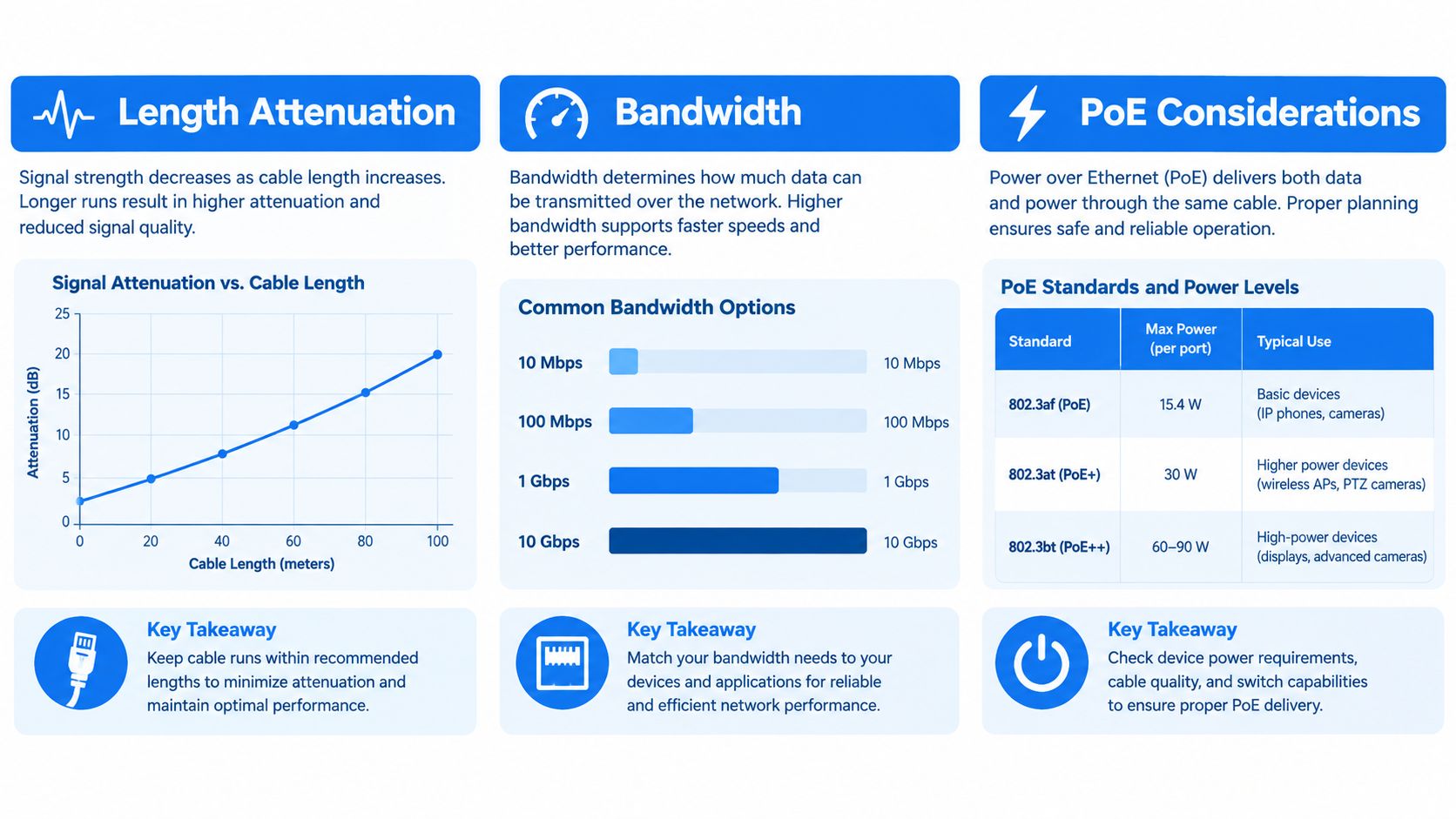
PoE adds another practical concern: heat. Bundled powered cables can warm up, so the installer should follow the cable manufacturer's guidance, avoid unnecessary dense bunching and use suitable cable for the intended PoE equipment. A premium-looking cable won't fix an overloaded or badly routed bundle.
For most home and small-office links, the sensible approach is to specify Cat6, keep routes sensible, avoid unnecessary length and spend effort on terminations and testing. Move to Cat6A or another design only when the speed, distance, environment or expansion plan justifies it.
Choosing the Best Cat6 Ethernet Cable for Home vs Business Use
Home users usually need short, flexible connections. A stranded Cat6 U/UTP patch lead is the sensible choice between a broadband router and a desktop computer, games console, television, network switch or access point. Choose a cable with moulded strain relief, secure connectors and pure copper conductors, then route it without crushing it behind furniture.
A longer in-wall home run is a different job. Use solid-core cable to a wall outlet or patch panel, then connect devices with short stranded leads. This arrangement is easier to repair and change than a single long flexible cable disappearing through a wall.

Practical choices for small offices
For an SME office, Cat6 should normally form the fixed cabling layer for workstations, phones, printers, wireless access points and CCTV backhaul. Use solid-core cable in suitable containment, terminate it at patch panels and outlets, label each run and test every link.
The office environment decides whether UTP is sufficient. An ordinary professional office generally doesn't need shielding, while a route beside significant electrical equipment or a crowded mixed-services tray may justify STP. That decision should be made with the installer, because shielded components, bonding and correct termination all form part of the solution.
Spend where it improves the result
Premium branding rarely transforms a correctly installed short Cat6 connection. Better spending goes towards pure copper, compliant components, sensible route planning, proper termination and a test report. For businesses, that evidence matters when a faulty link interrupts a phone, camera or access point.
The UK structured cabling market overview indicates that Cat6 became the dominant mainstream choice by value, with Cat6 accounting for more than 55% and Cat6A under 30% in the cited market data. The exact product choice still depends on the installation, but the market position reflects Cat6's practical balance of compatibility, headroom and cost.
Testing Installation Tips and Avoiding Common Mistakes
A cable can show link lights and still be badly installed. Basic continuity testing confirms that conductors are present and connected in the expected order, but it may not reveal every performance problem. A professional installation should be tested at the level required by the project, especially where the cable supports business-critical phones, access points, cameras or switches.
Build the run carefully
Keep the twisted pairs as close to the termination as the connector system allows. Untwisting too much at the socket or plug can reduce performance. Use the same wiring arrangement at both ends, commonly T568B, and don't mix conventions casually across a site.
Separate data cabling from mains routes where practical. Cross unavoidable power routes cleanly rather than running parallel for long distances. Avoid sharp bends, crushed sections, tight cable ties and unsupported weight hanging from a socket.
Test before handing over
Use a practical installation checklist:
- Before pulling cable: Confirm the route, endpoint labels, containment, separation from power and realistic cable length.
- During installation: Keep the cable supported, protect the jacket and respect the manufacturer's bend guidance.
- At termination: Match the connector to solid or stranded conductors, keep pair twists intact and seat each conductor properly.
- After termination: Run a wiremap and continuity test, then check link negotiation at the connected equipment.
- For structured cabling: Use a suitable certifier when the project requires documented category performance, not just a basic pass indication.
- If a link fails: Re-terminate both ends before replacing the entire cable. Poor plugs, split pairs and loose contacts are common causes.
A split pair is particularly deceptive. The pin order can appear correct to a simple continuity tester while the actual twisted-pair arrangement is wrong, creating crosstalk and unreliable operation. A certifier or capable cable analyser is the right tool when the run needs performance evidence.
Don't diagnose every network fault by buying a more expensive cable. First isolate the cable, switch port, socket, patch lead and device. If an office has repeated faults, unclear routes or cabling inside difficult containment, a professional installer can test the links and identify whether the issue is the cable, termination or wider network design.
Our Recommendation and Local Cat6 Installation Support from Networking2000
For a normal home patch lead, buy pure-copper Cat6 U/UTP stranded cable from a supplier that clearly states the construction and category. Keep it as short as the layout sensibly allows, but don't stretch it under furniture or around a sharp corner. Paying extra for dramatic packaging, gold-plated branding or an unexplained “gaming” label isn't where I'd put the budget.
For a home renovation or office refurbishment, use solid-core Cat6 for fixed routes, with proper outlets or patch panels and stranded patch leads at the equipment. That gives you a cleaner installation and makes future changes easier. Ask for labelling and test results, particularly if the cable will carry VoIP, CCTV, access points or other PoE devices.
Shielding is worth considering only when the environment calls for it. If the route is ordinary domestic or office space, UTP is usually the sensible answer. If the route is exposed to substantial interference, discuss STP with an installer who can specify compatible components and handle bonding correctly.
The current UK broadband environment also changes the spending decision. Ofcom's spring 2025 update reported 78% full-fibre availability across UK residential premises, while the UK broadband speed guide highlights the shift towards higher maximum connection speeds. Many users therefore have bottlenecks in Wi-Fi coverage, router placement, switching capacity or poor terminations rather than in a correctly specified Cat6 cable.
Networking2000 provides Cat5e and Cat6 data cabling, wireless network and router services across London and Essex, alongside broader IT and communications support. Its engineers can advise on supply, installation and testing for homes and SMEs, with support hours stated as 6am to 10pm, seven days a week in the company information supplied for this guide. That's useful when the priority is a working network rather than a theoretical product comparison.
If you're in Romford, Hornchurch, Rayleigh, Brentwood, Chelmsford or elsewhere across London and Essex, start by mapping the devices and routes that need reliable wired connectivity. Then decide whether you need patching, new fixed cabling, testing or a wider wireless and router review.
Networking2000 can supply and install Cat6 cabling, test existing links, and improve the wired and wireless network supporting your home or business. Visit Networking2000 to discuss the cable routes, PoE devices, access points and testing your London or Essex premises needs.

