A managed firewall is an outsourced service where a provider continuously configures, monitors and updates your firewall, so your business doesn't have to. In the UK, it also supports a baseline where every device in scope must have a correctly configured firewall, with unauthenticated inbound connections blocked by default under the NCSC's Cyber Essentials requirements (NCSC guidance).
A business owner in Chelmsford might have a firewall installed in the office, yet still be unsure who reviews its alerts, removes old access rules or applies security updates. A recruitment agency in Romford may have staff working from home, cloud applications handling personal data and a supplier recently affected by ransomware. Buying the appliance was a sensible first step, but it doesn't answer the more important question: who is responsible for keeping the protection effective every day?
Table of Contents
- Understanding What a Managed Firewall Is
- How a Managed Firewall Works Day to Day
- Core Features You Should Expect From a Managed Firewall
- Managed vs Unmanaged Firewalls Compared
- Deployment Models Available to UK Businesses
- Cost Considerations for London and Essex SMEs
- Who Really Benefits and What to Do Next
Understanding What a Managed Firewall Is
A managed firewall is a security service with a firewall at its centre, not just a box in a cupboard or a software licence. A specialist provider configures it for your business, watches its activity, maintains its rules and applies updates as your network and risks change.
That difference matters because equipment can be installed without anyone clearly owning its day-to-day control. The NCSC requires organisations to change default administrative passwords, restrict remote administration from the internet unless there is a documented business need, and block unauthenticated inbound connections by default, as set out in the Cyber Essentials requirements. Under the NCSC's v3.3 guidance, effective from 27 April 2026, inbound rules must also be approved and documented by an authorised person. Unnecessary rules should be removed or disabled.
The box is only one part
With an unmanaged firewall, your staff or IT contractor must decide which traffic is allowed, investigate alerts, apply firmware updates, maintain backups and retain evidence of changes. Those tasks can wait while the same people deal with user support, cloud services and daily operations.
A managed service assigns that operational workload to the provider. Your business still decides what staff need to access and which services are required. The provider turns those decisions into controlled firewall policy, monitors the results and records changes so responsibility is visible rather than assumed.
Practical rule: Ask who will respond when an alert appears outside normal office hours. If nobody has a clear answer, you have equipment support, not a fully managed service.
The arrangement may also cover secure remote access, web filtering, network separation and reporting. It differs from a web application firewall, which protects websites and applications at that layer. For organisations running containerised applications, this CrowdSec WAF on Kubernetes guide from CloudCops helps explain how application-focused protection differs from the boundary controls described here.
For an SME, the value is accountability. You should know who approves a rule, who monitors suspicious traffic, who applies updates and what evidence you will receive for management reviews, insurers or Cyber Essentials preparation.
How a Managed Firewall Works Day to Day
Each morning, the provider's monitoring team reviews firewall logs and alerts before routine requests begin to build up. They check blocked intrusion attempts, unusual connections and repeated access failures, then decide which events need investigation. The firewall enforces the agreed policy, while the provider owns the day-to-day checking, evidence and response.
A well-run service follows a repeatable rhythm:
- The provider reviews logs and alerts, looking for activity that may affect your business.
- Security updates and threat rules are applied, reducing the time a known weakness remains exposed.
- Engineers investigate exceptions, separating a genuine business requirement from activity that only appears urgent.
- Rule changes are agreed and recorded, rather than added informally because someone needs quick access.
- Reports are produced, showing what was blocked, what changed and which issues need your decision.
The starting point should be a deny-by-default policy. Unauthenticated inbound connections remain blocked unless an approved rule gives them a clear business reason to enter. Rules should describe permitted traffic by defined attributes, while unwanted or malicious traffic remains blocked, as set out in the NCSC network security requirements.
The people behind the dashboard matter as much as the dashboard itself. An engineer may need to establish whether a connection belongs to a new cloud service, a supplier or an unauthorised system. The provider should explain who contacts you when an event needs immediate business input, including outside normal office hours.
Why simple changes need discipline
A request to open access for a new supplier may sound harmless. The provider should still record who requested it, the purpose, scope, approval and review point, then remove the rule when it is no longer needed. NHS Digital guidance also requires firewall rules to have a business justification, documentation and approval, with unnecessary rules removed or disabled promptly (NHS Digital IT requirements).
Good records help with practical faults too. If a VoIP service develops one-way audio after a network change, guidance on troubleshooting one-way audio can help your team see why firewall rules, routing and service ports must be checked together, rather than changed at random.
Core Features You Should Expect From a Managed Firewall
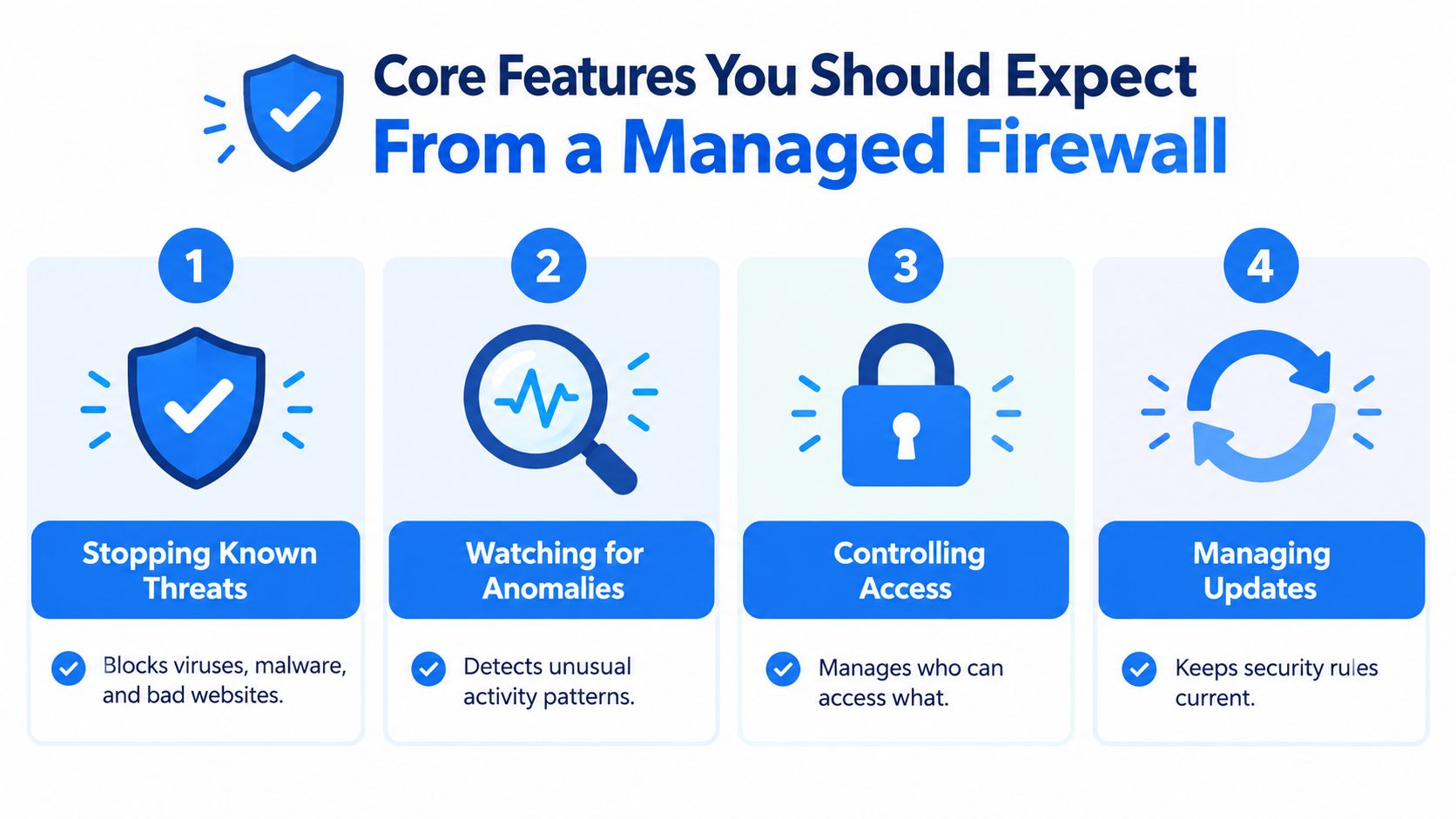
A useful way to assess a managed firewall is to connect each feature to a business problem. A specification sheet can list intrusion prevention, VPNs and filtering, but a business owner needs to know what those controls do for staff in Colchester, Stratford or across several offices.
Stopping known threats
The firewall should block unwanted connections and support controls such as intrusion detection and prevention, malicious website filtering and application control. These features reduce the chance that staff reach harmful destinations or that hostile traffic passes through an approved network path.
The provider should explain how it keeps these protections current. A managed service isn't credible if updates depend on someone remembering to log into the appliance after a busy week.
Watching for unusual behaviour
Blocking known threats isn't the same as spotting activity that looks abnormal. Monitoring can identify patterns such as repeated connection attempts, unexpected outbound traffic or access that doesn't fit normal business use. The provider should define which alerts it investigates, which it sends to you and which it treats as routine noise.
Look for clear escalation channels, not just a portal full of red icons. Ask whether reports include decisions and actions, rather than only raw event logs.
Controlling remote and local access
Remote workers need secure access to the systems they're authorised to use. A managed firewall may support VPN access, identity controls and restrictions based on users, devices or locations. It should also protect the administrative interface itself. The NCSC says internet-facing administration should be blocked unless there's a documented business need, with strong unique credentials and additional safeguards such as MFA or a tightly controlled IP allow list (NCSC firewall requirements).
Network separation is equally practical. Guest Wi-Fi shouldn't have the same access as staff devices, printers or card machines. Ask how the provider will separate those groups and test that separation after changes.
Maintaining evidence and updates
Monthly reporting should show rule changes, significant alerts, update status and outstanding actions. Retailers may also need logging that supports payment-security processes, while other businesses may want evidence aligned with Cyber Essentials controls. Don't assume a report automatically proves compliance. Treat it as useful evidence that still needs to match your obligations and scope.
For businesses reviewing wireless access alongside firewall controls, information about Fortinet for passwordless WiFi can provide useful context on how access experience and network security may fit together.
Managed vs Unmanaged Firewalls Compared
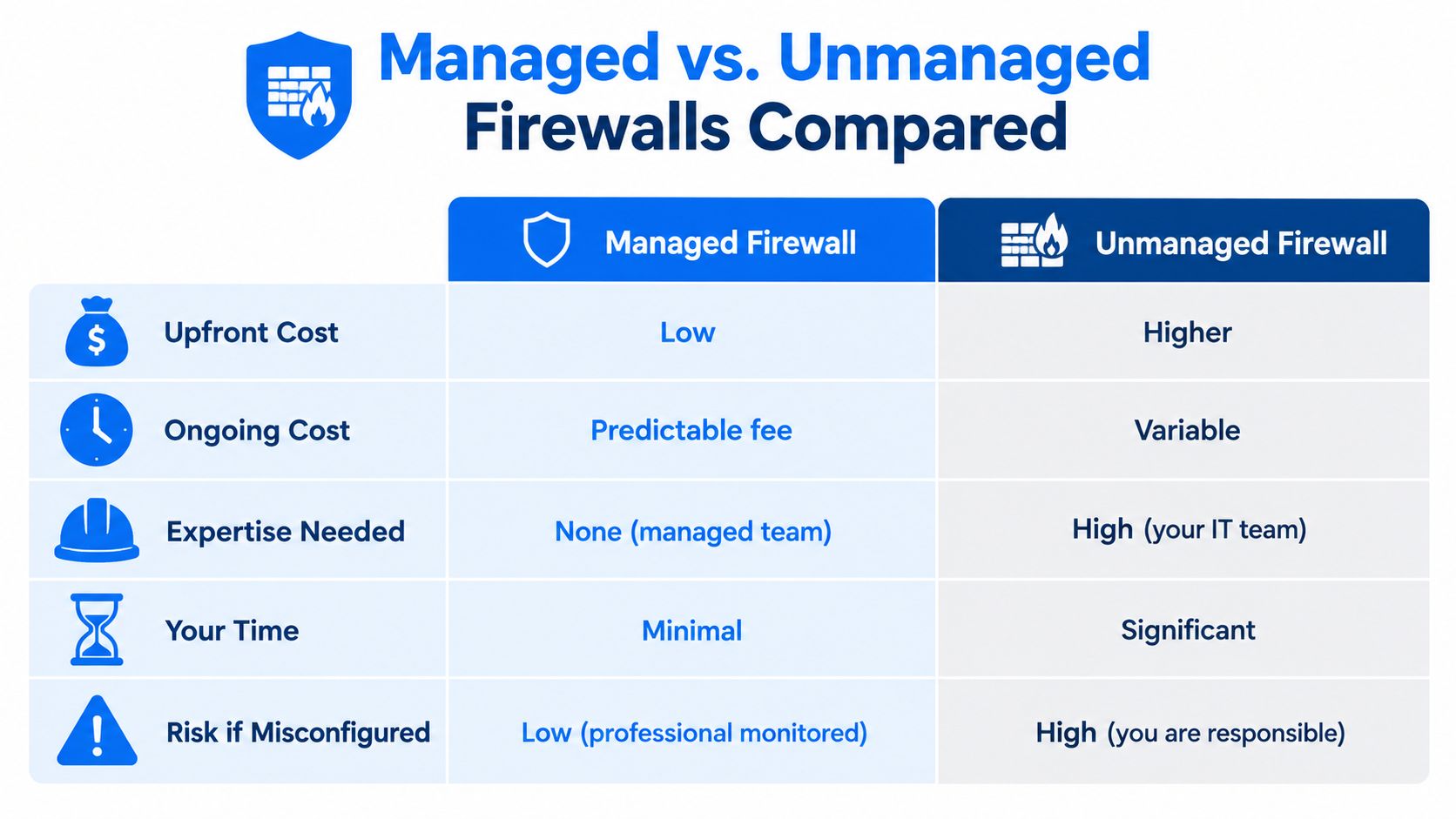
An unmanaged firewall is similar to buying a burglar alarm and leaving the monitoring, battery checks and incident response to whoever happens to notice it. The equipment may be capable, but the protection depends on whether someone maintains it consistently.
A managed firewall is closer to paying an alarm receiving centre to watch for events, follow an agreed response plan and keep records. You still decide who should enter the building and when, but another team handles the ongoing supervision.
Cost and internal effort
An unmanaged setup can look cheaper because the purchase is visible and the management workload is hidden. Your team may then absorb rule changes, patching, troubleshooting and log reviews without a separate budget line.
A managed service usually introduces a recurring fee. In return, the provider takes responsibility for agreed operational tasks and gives you a clearer service boundary. The sensible comparison isn't only the invoice. Include staff time, emergency engineer work, disruption and the effort required to reconstruct what happened after an incident.
Expertise and decision-making
Your internal team understands how the business operates. It knows which staff need access to a finance system and which supplier connections are legitimate. It may not, however, have the specialist time to review firewall policy, investigate alerts and maintain secure administration.
A provider shouldn't make business decisions without you. It should ask the right questions, document the answer and apply the technical control accurately. That partnership works best when responsibilities are written down.
Risk and accountability
Misconfiguration is a practical risk in either model. Managed support can reduce the chance that rules remain open, updates are missed or alerts go unanswered, but only if the provider performs those tasks and reports them clearly.
Use these questions when comparing offers:
- Who approves changes? Confirm whether your nominated contact must authorise new inbound access.
- Who responds to alerts? Ask what happens during evenings, weekends and holidays.
- Who owns the evidence? Check whether you'll receive reports, change records and incident notes.
- Who can administer the firewall? Make sure internet exposure, credentials and MFA requirements are documented.
- Who restores the configuration? Understand how backups and recovery are handled after a failed change.
Deployment Models Available to UK Businesses
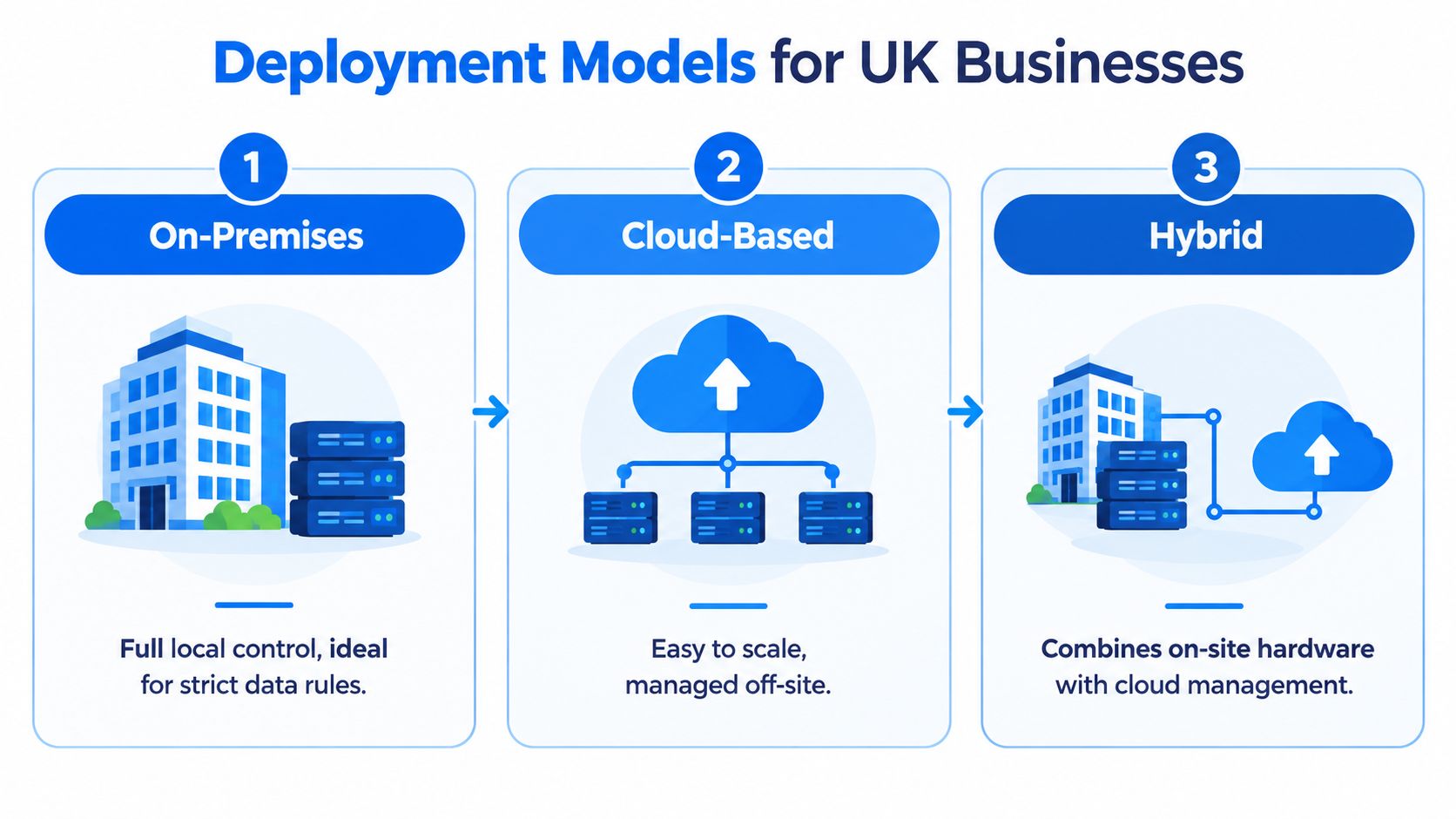
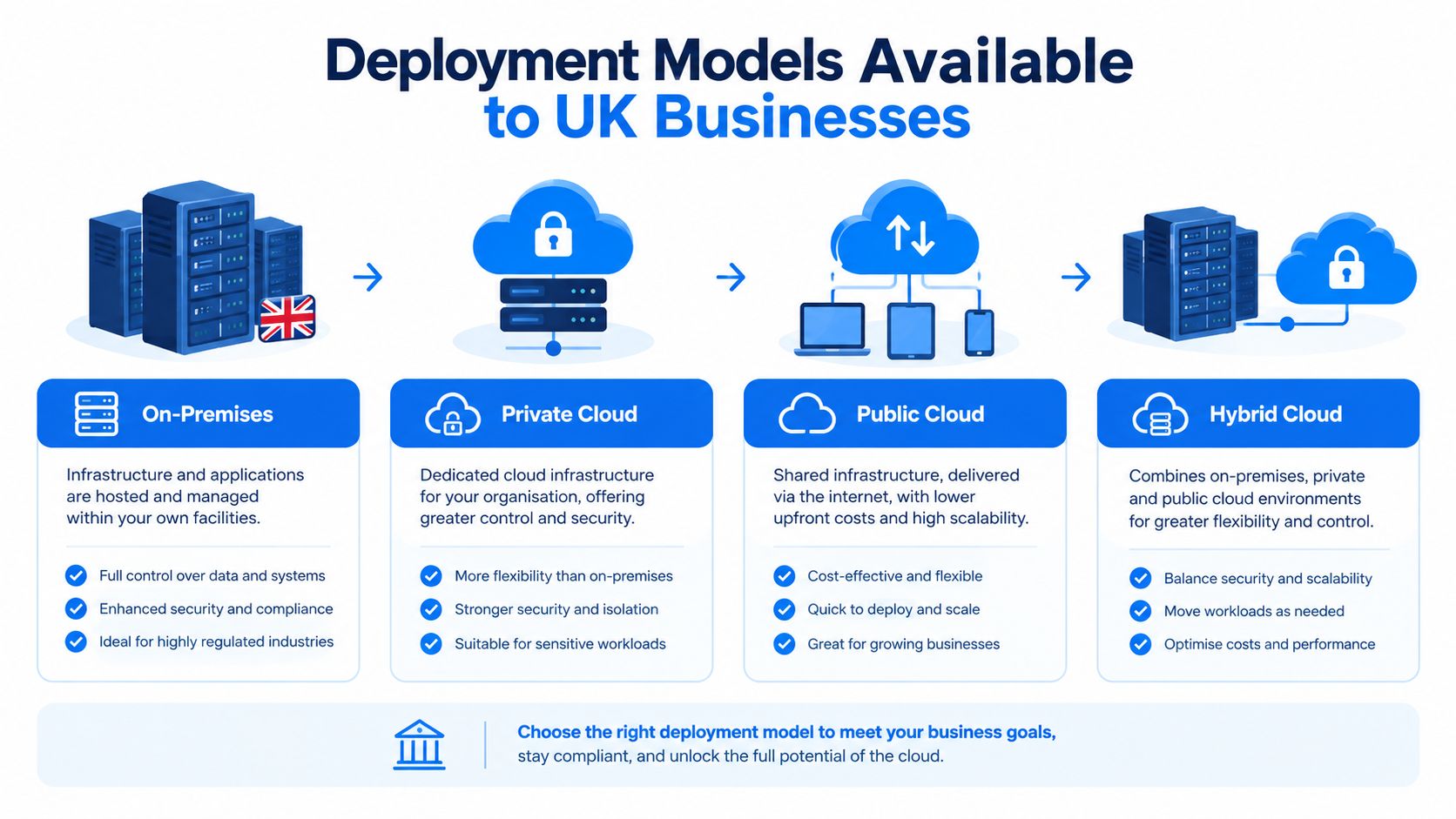
The right deployment depends on where your systems and users are. A firewall at an office entrance may protect local devices, but it won't automatically provide consistent control for cloud workloads or home workers.
On-premises appliances
An on-premises firewall sits at your office or data centre. It can suit a firm with local servers, structured office networking and a need for direct control over the equipment. A managed provider still handles policy, monitoring and maintenance, while the appliance remains on your premises.
The trade-off is physical dependency. Power, connectivity, replacement hardware and access to the site all matter. A Colchester office with stable local systems may prefer this model, provided someone plans for outages and hardware failure.
Cloud-based firewalls
A cloud firewall places enforcement and management away from the office. It can suit teams that rely heavily on Microsoft 365, AWS or Azure, particularly when staff work from different locations and applications no longer sit behind one office router.
Scaling can be simpler, but you're trusting the provider's platform, service design and support process. Ask where policy is enforced, how access is logged and what happens if the cloud service or your internet connection is unavailable.
Hybrid protection
Hybrid arrangements combine local equipment with cloud management or cloud-based controls. They're often practical for a growing London firm with a main office, smaller sites, remote staff and a mixture of local and hosted applications.
The advantage is flexibility. The challenge is avoiding separate policies that drift apart. A provider should give you one clear view of who can access what, how traffic moves between sites and which controls protect remote users.
Zero-trust thinking can complement any model. Instead of trusting a device only because it's inside the office, access decisions consider the user, device, application and requested resource. A managed firewall may support that transition, but it won't replace identity management or endpoint security.
Cost Considerations for London and Essex SMEs
There's no responsible universal price for a managed firewall. A provider needs to assess your users, sites, bandwidth, equipment, remote-access needs, support hours and compliance requirements before giving a meaningful figure.
The most useful approach is to separate recurring service costs from one-off work and from the cost of leaving management to an already busy team. Ask whether the proposal includes installation, migration, monitoring, rule changes, firmware maintenance, backups, reporting and incident escalation. A low headline price may exclude the tasks you thought “managed” covered.
What changes the quote
A single office with straightforward internet access will usually need less design and support than a business with several sites, cloud services and remote users. Requirements linked to Cyber Essentials, customer assurance or payment environments can also affect the work involved, especially where logging, evidence and formal approval processes are expected.
Out-of-hours coverage deserves specific attention. The UK government's Cyber Security Breaches Survey reported that 43% of businesses experienced a cyber breach or attack in the previous 12 months (UK Cyber Security Breaches Survey 2025). That doesn't mean a managed firewall prevents every incident. It does show why a business should ask how quickly someone will review a serious alert.
| Cost factor | Typical UK SME range | What drives it |
|---|---|---|
| Service management | Provider quotation required | Users, sites, bandwidth and policy complexity |
| Setup and migration | Provider quotation required | Existing rules, hardware replacement and testing |
| Monitoring cover | Provider quotation required | Alert handling, escalation and support hours |
| Compliance reporting | Provider quotation required | Required evidence, review frequency and customer demands |
| Unmanaged alternative | Difficult to predict | Internal time, emergency support, disruption and recovery work |
The table deliberately avoids made-up figures. Any supplier quoting a fixed monthly fee should state exactly what's included and what triggers extra charges.
Questions that protect the budget
Ask whether the fee is per firewall, site, user or service tier. Confirm how additional rule changes are charged, whether emergency work costs more and whether the contract includes equipment or only management.
Then compare that proposal with your operational reality. If nobody currently owns updates, alert review and evidence, the “free” unmanaged option already has a cost. You just haven't assigned it to a budget line.
Who Really Benefits and What to Do Next
A managed firewall is most useful when a business needs consistent protection but can't maintain specialist oversight internally. That often describes an SME without dedicated security staff, a growing company holding confidential client information or a remote-first team whose users and applications sit in several places.
Legal practices, healthcare organisations and finance firms may also benefit because they need clear control over access, documented changes and evidence for customers or auditors. The service doesn't remove the organisation's responsibility for data protection or risk decisions. It creates a clearer operating arrangement for the firewall itself.
The UK cyber sector includes 2,165 firms providing cyber security products and services and an estimated 67,300 full-time equivalent workers, according to the government's Cyber Security Breaches Survey 2025 to 2026 (UK Cyber Security Breaches Survey 2025 to 2026). For a small business, that wider market means you should compare service scope carefully rather than choosing on brand recognition alone.
A practical buying checklist
- Identify the owner. Write down who currently approves firewall rules, checks alerts, applies updates and retains records.
- Map the environment. Include offices, home workers, cloud applications, suppliers, guest Wi-Fi and any payment or specialist systems.
- List your obligations. Note Cyber Essentials, GDPR-related expectations, customer questionnaires, insurance conditions and sector requirements.
- Request evidence. Ask for a sample report, change record, escalation procedure and service-level agreement.
- Test the boundaries. Confirm support hours, response expectations, emergency changes, backup arrangements and exit terms.
- Review the policy. Make sure unnecessary access is removed, administration is protected and every inbound rule has a documented business reason.
The key question isn't whether you have a firewall. It's whether a named person or team keeps its policy accurate, watches its signals, manages its updates and can show what happened when something goes wrong. That accountability can support better operational continuity, customer confidence and more orderly compliance work without turning cyber security into a fear-driven purchase.
Networking2000 provides managed firewall support for businesses across London and Essex, including active monitoring, updates, policy changes and technical support. Visit Networking2000 to discuss your current firewall ownership, remote-access needs and the evidence your business needs.

