Endpoint protection is security software and controls that defend every device connecting to your network, including laptops, mobiles, servers and tablets, against malware, ransomware and unauthorised access. The UK's NCSC Early Warning service had 13,178 organisations signed up and produced reports for 131,000 IPs suspected of compromise in its latest annual review, showing why device-level protection matters in everyday business security (NCSC Annual Review 2025).
You might be reading this after a colleague opened an unexpected attachment, or while reviewing the security on laptops used from home, cafés and client sites. Perhaps your business already has antivirus installed, but you're unsure whether that covers phones, remote workers, servers and cloud access as well.
The short answer is that endpoint protection is broader than a traditional antivirus programme. It combines prevention, monitoring and response so that a compromised device can be identified and contained before an attacker reaches shared files, email accounts or other systems.
Table of Contents
- Why Endpoint Protection Matters for UK Small Businesses
- How Endpoint Protection Works
- Types of Endpoint Security Solutions Explained
- The Cost of Weak Endpoint Defences in the UK
- Managed Endpoint Protection Versus In-House Security
- How to Choose the Right Endpoint Protection for Your Business
- Securing Your Endpoints with Networking2000
Why Endpoint Protection Matters for UK Small Businesses
A staff member in a Romford office receives an email asking them to verify a Microsoft 365 account. The branding looks convincing, the message creates urgency, and the link opens on the employee's laptop. They enter their password, and the attacker now has a possible route into email, cloud applications and company data.
The laptop is the endpoint. It's the place where a user, application and business network meet, which makes it a practical target for phishing, malicious downloads and ransomware. If the device lacks effective controls, a single mistake can become a much larger incident.

A plain-English definition
Endpoint protection is the security layer applied to devices that connect to your business environment. That includes office desktops, employee laptops, mobile phones, tablets and servers. The controls aim to stop malicious software, identify suspicious activity and restrict unauthorised access.
A useful comparison is the security on a building. Your firewall is like a barrier around the site, but endpoint protection checks the individual doors, windows and rooms. A laptop outside the office still needs protection, even when it isn't connected to the company's physical network.
For practical malware guidance, readers may also find these Singapore malware protection tips useful, particularly when explaining to staff how malicious files and deceptive links can affect a device.
Why smaller firms face a sharper impact
Small and medium-sized businesses in London and Essex often operate with lean IT teams. A modest device fleet can include Windows laptops, Apple phones, tablets, cloud applications, remote-access tools and older equipment that isn't managed consistently.
That mixture creates gaps. An employee might use a personal mobile for work email, while a rarely used laptop misses updates and a server retains broad access to shared folders. UK government guidance treats endpoint protection as part of wider cyber hygiene, alongside patching, identity controls, email filtering and monitoring (Cyber Security Breaches Survey 2025/2026).
Endpoint protection won't replace sensible staff training or secure passwords. It gives your team another layer when a person clicks the wrong link, downloads a harmful file or uses a device from an untrusted location.
How Endpoint Protection Works
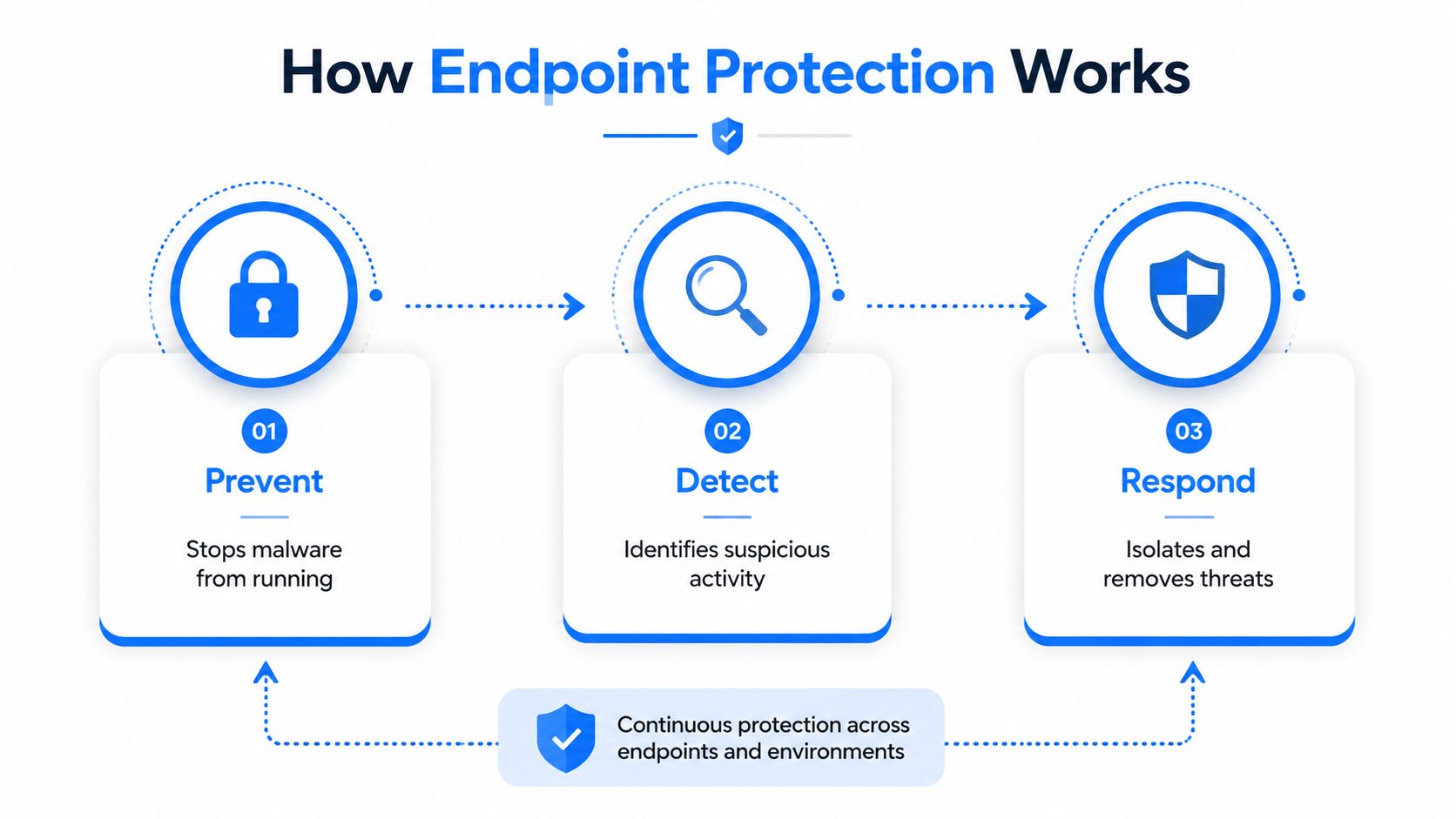
A phishing email reaches an employee in London, a harmful attachment opens on a laptop in Essex, and the attacker tries to move through the business. Endpoint protection handles this sequence in three stages: prevent, detect and respond. The approach aligns with UK Cyber Essentials principles and NCSC guidance, so protection covers more than antivirus.
Prevent known dangers
Prevention stops threats before they run. Anti-malware scanning checks files, downloads and processes for known malicious patterns. Secure configuration removes risky settings, while patch enforcement closes weaknesses in operating systems and applications.
Application control adds another barrier. The NCSC recommends controls such as AppLocker to restrict which software can run, especially when an attacker tries to execute untrusted code after a phishing event (NCSC guidance on mitigating malware and ransomware attacks).
Access controls support the same goal. Multi-factor authentication makes stolen passwords less useful at remote access points. VPN and single sign-on controls can also reduce exposure from services available outside the office.
Detect behaviour that looks wrong
Prevention cannot catch every attack. Endpoint tools monitor activity that does not fit a device's usual role, such as a document launching an unusual script, a process changing security settings or an account accessing resources it rarely needs.
This monitoring distinguishes basic antivirus from endpoint detection and response capabilities. The software records relevant events and sends alerts to a central console. An administrator or security provider can then investigate what happened, rather than waiting for an employee to report a problem.
The working loop: prevent the obvious threat, detect suspicious behaviour, then respond before the activity spreads.
Respond by limiting the blast radius
Response begins after detection. A security operator may quarantine a file, stop a process, disable a risky application or isolate the device from the network while preserving access for investigation.
Isolation limits the damage an infected laptop can cause. Removing its network access can cut communication with an attacker and reduce lateral movement while the team checks accounts, applications and other endpoints.
UK public-sector guidance expects endpoint protection to block and detect malicious software, with security logs forwarded for breach detection. It also recommends controlled master images, unique local administrator passwords and encryption for portable media (London public-sector endpoint guidance).
Digital controls should also support physical security. The guidance on physical security convergence steps provides useful context. A stolen laptop, an open server room and an unmonitored account can undermine the same security objective.
The following video gives another visual explanation of the prevent, detect and respond model:
Types of Endpoint Security Solutions Explained
A London consultancy may need different controls from an Essex retailer, even if both use Windows laptops and cloud email. UK Cyber Essentials and NCSC guidance point towards layers working together, rather than antivirus being treated as the whole defence. Each endpoint security category covers a different part of that job.
Traditional antivirus checks files and activity against known threats, then blocks or removes them. It provides a sensible baseline for a small, straightforward device estate. Its view can be limited, though, if an attacker uses a stolen password or trusted software instead of recognisable malware.
Endpoint Detection and Response, or EDR, watches for suspicious behaviour and records useful activity around it. This helps a business examine how an incident began, which devices were affected and what needs containing. An EDR platform still requires someone to review alerts and act on them, either inside the business or through a managed service.
Extended Detection and Response, known as XDR, brings together signals from endpoints, email, user accounts, networks and cloud services. The result can be a clearer view of an attack crossing several systems. It also requires more connections between tools and a team that can manage the wider flow of alerts.
Mobile Threat Defence protects smartphones and tablets against risks specific to mobile use. It can identify unsafe applications, harmful links, dangerous networks and suspicious changes to a device. This matters when staff access email, files or business applications away from the office.
Endpoint Security Types at a Glance
| Solution Type | Core Capability | Visibility & Response | Best Fit For |
|---|---|---|---|
| Traditional AV | Blocks and removes known malware | Basic alerts, with limited investigation | Businesses seeking a foundational control |
| EDR | Detects suspicious endpoint behaviour | Detailed telemetry, investigation and device isolation | Firms needing stronger response and oversight |
| XDR | Correlates endpoint, identity, email, network and cloud signals | Broader incident context and coordinated response | Businesses with several integrated security services |
| Mobile Threat Defence | Protects phones and tablets from mobile-specific risks | Mobile alerts, policy enforcement and remediation options | Hybrid teams using mobile access to business systems |
The label matters less than the operating plan. An EDR product that nobody checks can leave a dangerous gap, while a simpler service that is monitored and maintained may suit a smaller business better.
Ask each supplier how its product forwards security logs for breach detection, how alerts are reviewed, and whether a device can be contained quickly. Those questions test the practical controls behind the product name. Independent testing, such as the SE Labs SMB endpoint security evaluation, can provide another point of comparison.
The Cost of Weak Endpoint Defences in the UK
A London consultancy laptop is compromised after an employee opens a convincing invoice attachment. The immediate problem is malware, but the wider risk may include browser sessions, cached credentials, client files, VPN software and shared cloud services. Once an attacker controls one endpoint, the business must assess everything that device could reach.
The UK government's Cyber Security Breaches Survey 2025/2026, published on 30 April 2026, offers an official annual view of how UK businesses, charities and educational institutions manage cyber risk. For endpoint protection, its practical lesson is clear: hardening devices, preventing malware and detecting suspicious activity all form part of wider cyber hygiene (official UK survey reference).
What NCSC information means for business owners
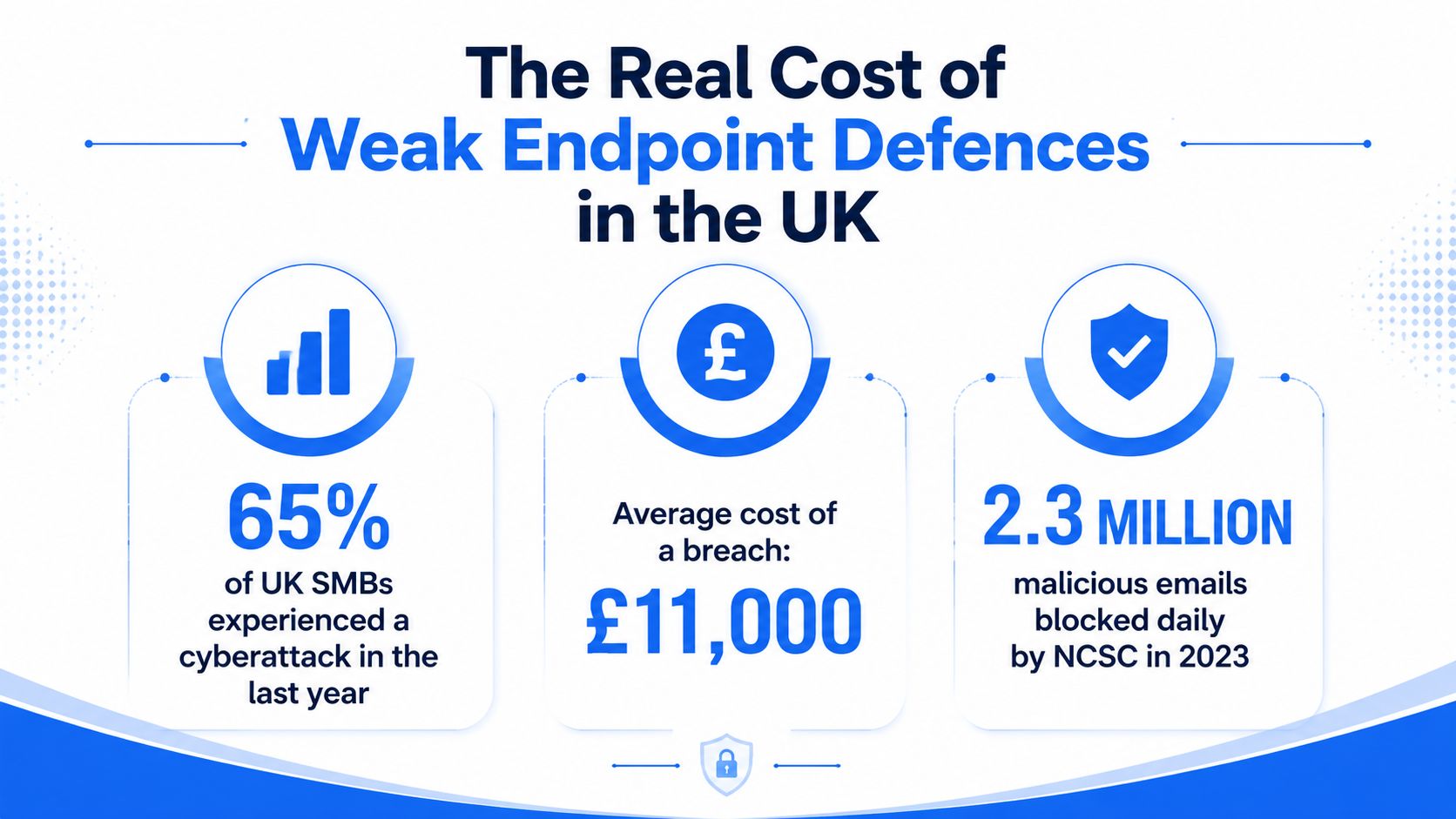
The NCSC's 2025 Annual Review records 13,178 organisations signed up to Early Warning. The service sent alerts for 316,343 IP addresses belonging to customers and produced reports for 131,000 IPs suspected of compromise by malware or hacking, sent to 1,350 organisations (NCSC Annual Review 2025).
The review also records more than 10.9 million suspicious email reports in the last year and more than 45 million reports since April 2020. It records 412,000 malicious URLs removed since 2020. These figures show how an attack can start with an ordinary-looking message or link before reaching a user's device.
They do not describe the result of every alert. They do show the conditions UK organisations face. A business that protects laptops but neglects patching, MFA, email filtering or monitoring leaves other routes open.
Why one device can affect the whole firm
UK guidance treats endpoint security as a hardened control layer for desktops, laptops, mobiles and servers. Devices need controlled configurations, unique administrator passwords and suitable encryption, while endpoint protection detects and blocks malicious software.
For an SMB in London or Essex, this means applying one clear baseline across the device estate. If a laptop is unmanaged, nobody may know whether its security agent is active, updates are installed or suspicious activity has been recorded. Cyber Essentials principles help turn those checks into routine controls, while NCSC guidance supports a layered approach rather than reliance on antivirus alone.
The cost extends beyond technical repair. Staff may lose access to systems, customers may face delays and managers may need to establish what information was exposed. Patching, MFA, filtering, monitoring and endpoint controls work like several locks on the same door. If one fails, the others can limit access and reduce the chance that a single compromised device becomes a firm-wide incident.
Managed Endpoint Protection Versus In-House Security
Choosing between managed and in-house endpoint protection depends on the time, skills and cover your business can provide. Software may block a threat, but someone must still set policies, review alerts, approve exceptions, apply patches and investigate incidents. For a small firm in London or Essex, the practical question is who owns those jobs when an alert arrives.
The in-house model
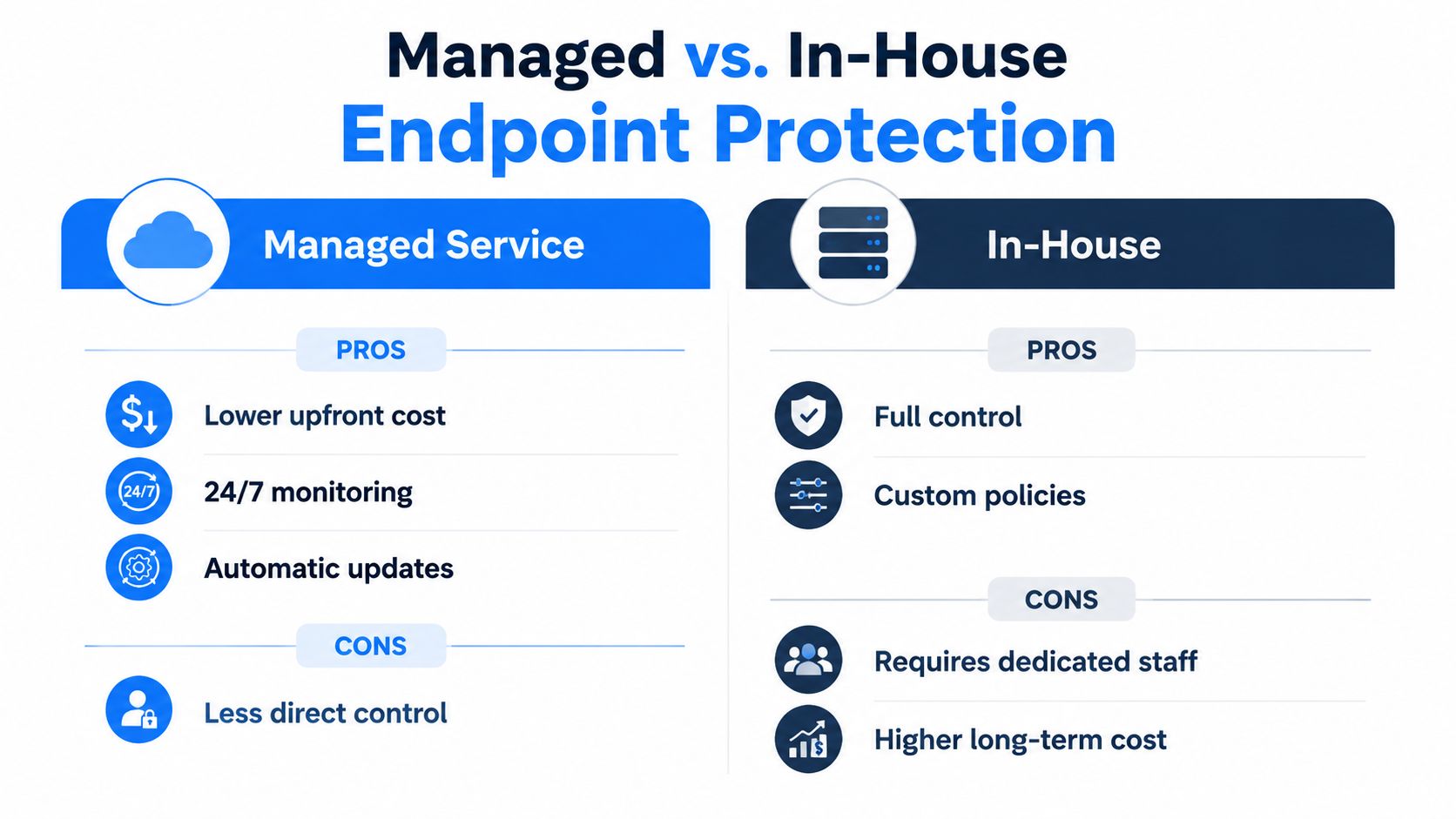
An internal team keeps direct control of device access, security settings and response decisions. This suits a business with security skills, documented procedures and enough cover to review alerts outside normal working hours.
The responsibility is substantial. Staff must maintain the platform, keep their knowledge current, test response procedures and confirm that every device remains enrolled. If these tasks compete with infrastructure support, alerts and patch exceptions may wait. That can make it harder to maintain the layered controls expected by Cyber Essentials and reflected in NCSC guidance.
Advantages include:
- Direct control: Your team owns configuration, escalation and response decisions.
- Customized policies: Engineers can match controls to internal applications and working practices.
- Existing context: Internal staff may understand business systems without a handover.
Challenges include:
- Staffing pressure: Monitoring and incident handling require suitable skills and availability.
- Operational continuity: Holidays, sickness and competing priorities can reduce cover.
- Reporting effort: Evidence for Cyber Essentials and internal reviews must be collected and maintained.
The managed model
A managed service provider operates the endpoint platform for you. Depending on the agreement, the service may cover deployment, monitoring, patch coordination, alert triage, device isolation and reporting. It may also connect endpoint controls with firewalls, email security and identity protection, helping the separate layers work together.
Managed support does not transfer every decision to the provider. You still approve policies, identify important systems and decide how an incident could affect customers or staff. The difference is that routine security work has an assigned owner and a defined escalation route.
Advantages include:
- Predictable operations: Routine checks and updates follow an agreed service process.
- Broader coverage: Monitoring can continue beyond the hours available from a small internal team.
- Practical reporting: A good provider turns technical findings into clear actions and business risk.
Challenges include:
- Less direct control: Changes may follow a service workflow instead of an immediate internal decision.
- Provider dependence: Protection relies on clear communication, suitable access and consistent service quality.
- Shared priorities: The provider must understand your applications, users and tolerance for risk.
Networking2000 offers managed IT support and security services for businesses in London and Essex. It is one option for firms that want local help with endpoint controls rather than operating the full service alone.
How to Choose the Right Endpoint Protection for Your Business
Start with a device inventory. List company laptops, desktops, servers, tablets and mobiles, then include remote and shared devices that access email, files or business applications. You can't protect an endpoint consistently if nobody knows it exists.
Use this buying checklist
Map access: Record which devices connect to Microsoft 365, line-of-business applications, file shares, VPNs and remote desktops. A basic laptop with access to sensitive files may need stronger controls than a standalone workstation.
Check the baseline: Confirm that the product supports anti-malware, behavioural detection, device isolation, patch management and application control. The NCSC's layered approach includes updated anti-malware, MFA for remote access, hardware firewall allow-listing, VPN or single sign-on for exposed services, and AppLocker-style application control (NCSC malware and ransomware guidance).
Ask about logs: Find out where endpoint events go, how long they remain available and who reviews them. Detection without an owner leaves your business with information but no response.
Test integration: Ask whether the solution works with your current firewall, email filtering, identity platform and mobile management tools. Disconnected systems can make an incident harder to understand.
Check Cyber Essentials alignment: Cyber Essentials treats malware protection as one of its five controls and applies the requirements across servers, desktops, laptops, tablets, mobile phones and cloud services (Cyber Essentials requirements for IT infrastructure).
Define support expectations: Ask who responds to a high-priority alert, how escalation works and whether support engineers are UK-based. Request a sample report written for a business owner, not just a technical console screenshot.
Plan for change: Choose licensing that can accommodate new starters, remote devices and replacements without creating unmanaged gaps. Confirm what happens when a device is lost, retired or transferred to another user.
A vendor meeting should end with named actions, not a list of features. Ask the provider to explain how they would handle a phishing-driven compromise from first alert through isolation, account review, cleanup and confirmation that the device is safe to return.
Securing Your Endpoints with Networking2000
Endpoint protection is a layered operating practice, rather than antivirus alone. It combines malware prevention with secure configuration, patching, MFA, application control, logging and a response process that identifies and isolates affected devices.
For smaller businesses in London and Essex, laptops, mobiles, servers and cloud services are often managed by a small team. Consistent controls, aligned with UK Cyber Essentials and NCSC guidance, help prevent one compromised device from disrupting wider operations.
Networking2000 has supported customers since 1998, providing IT and security services across London and Essex. Its service includes Microsoft Certified engineers, support from 6am to 10pm seven days a week, and advice based on each customer's environment.
A security review can identify every endpoint, confirm that protection is active, check patching and access controls, and show where monitoring or remediation would close gaps.
Networking2000 can review your laptops, mobiles, servers and remote-access controls, then recommend an endpoint protection package for your business. Visit Networking2000 to request a security review and discuss practical support for your London or Essex team.

