The call usually starts with a sentence that sounds simple: “Nobody in the office can get online.” A remote technician checks the broadband connection, restarts the router, and asks someone to inspect the cables. The lights still look wrong, the switch is buried under a desk, and the only person nearby is trying to run the business. At that point, remote troubleshooting has reached its limit. You need an engineer at the premises.
That distinction matters for businesses across London and Essex. Modern offices depend on cloud applications, Microsoft 365, remote access and internet services, but they still rely on physical laptops, switches, firewalls, cabling, wireless access points, phones and security equipment. Good on-site IT support doesn't replace remote helpdesk work. It complements it, sending someone to the location when a fault involves equipment, infrastructure, installation work or a security risk that can't be handled safely through a screen.
Table of Contents
- What On-Site IT Support Actually Means for Your Business
- Core Services Included in On-Site IT Support
- On-Site Support Versus Remote and Managed Services
- Understanding SLAs and Cost Factors for On-Site Support
- How to Choose the Right Local IT Support Provider
- Real Scenarios Where On-Site Support Makes the Difference
- Next Steps for Getting Reliable On-Site IT Support
What On-Site IT Support Actually Means for Your Business
A local accountant's office provides a useful example. Employees can still open some cloud applications, but the office network keeps dropping connections. Remote support can check service status, review configuration and guide a member of staff through basic tests. It can't inspect a damaged cable, move a failed switch, replace a power supply or trace a loose connection in a communications cabinet.
An on-site engineer approaches the problem differently. They identify which devices are affected, inspect the physical layout, test the network from several points, check power and ventilation, confirm wireless coverage, and document what they find. If equipment has failed, they can replace it and test the whole access path before leaving, rather than closing the ticket after one computer reconnects.
More than emergency call-outs
On-site IT support covers several types of work:
- Break-fix response: Physical faults involving computers, printers, servers, network devices or office connectivity.
- Planned maintenance: Equipment checks, cable tidying, hardware replacement and changes that are safer to complete at the premises.
- Project delivery: Office moves, new workspaces, Wi-Fi deployments, phone installations and network upgrades.
- Security response: Isolating compromised endpoints, examining local equipment and helping restore a controlled environment.
- User and site support: Practical assistance where staff, rooms or devices need hands-on attention.
Remote support remains the right first move for password resets, Microsoft 365 access, software errors, account changes and many endpoint problems. A technician can often diagnose a physical issue remotely, but diagnosis isn't the same as resolution. If someone must plug, unplug, replace, mount, label, test or physically isolate something, a visit is justified.
The UK has a mature outsourced support market. A 2025 government-backed market study identified 12,867 active managed service providers in the UK as of March 2025, providing useful context for the range of support models available to SMEs through the UK IT support market overview. Local coverage still matters, though. A provider serving your part of Essex or London is better placed to understand travel constraints, premises access, recurring site issues and the practical difference between a remote diagnosis and a repair that needs boots on the ground.
For project-heavy work, businesses may also need a provider that can offer live support for IT projects, particularly when a move, installation or infrastructure change has a fixed deadline.
Core Services Included in On-Site IT Support
Physical visits become valuable when the work affects the building, equipment or shared infrastructure. The service isn't limited to arriving with a replacement laptop. A capable engineer should assess the fault, protect existing configuration, complete the work methodically and leave behind a clear record.
Hardware repair and replacement
A failed workstation, monitor, printer or server component may need inspection and replacement. Remote tools can show that a device isn't responding, but they can't check a damaged port, reseat a component, move a replacement unit into position or verify that every connected user can work again.
The visit should include asset identification, safe shutdown where required, replacement or repair, configuration checks and user testing. Engineers should also record what was changed, especially when a replacement device inherits access to company data.
Networks, cabling and wireless
Network work often begins with symptoms that look like software problems. Slow connections, intermittent Wi-Fi or a whole department losing access can result from a damaged patch lead, faulty switch port, poorly positioned access point, failing router or power issue.
An engineer can trace the physical route, test cables, inspect cabinet layout, configure or replace network equipment, and check coverage around meeting rooms and work areas. Wireless design needs a site view because walls, equipment, distance and interference affect the result. A remote configuration alone can't prove that staff receive a reliable signal where they work.
Phones, CCTV and access systems
VoIP installations involve handsets, network ports, power, call routing and user configuration. The engineer may need to install phones, label connections, test inbound and outbound calls, and verify reception in the areas where staff use the system.
CCTV, intruder alarms and access control are even more dependent on the premises. Cameras need suitable positioning, recording equipment needs secure placement, and door systems must be tested from the user side as well as the administration side. Remote support can help with settings, but it can't mount a camera, route cable through the building or confirm that a door reader works in normal use.
Practical rule: If the fault involves a cable, socket, power source, cabinet, device replacement or room layout, tell the provider that before the visit. It helps the engineer bring the right equipment and avoids a second trip.
On-Site Support Versus Remote and Managed Services
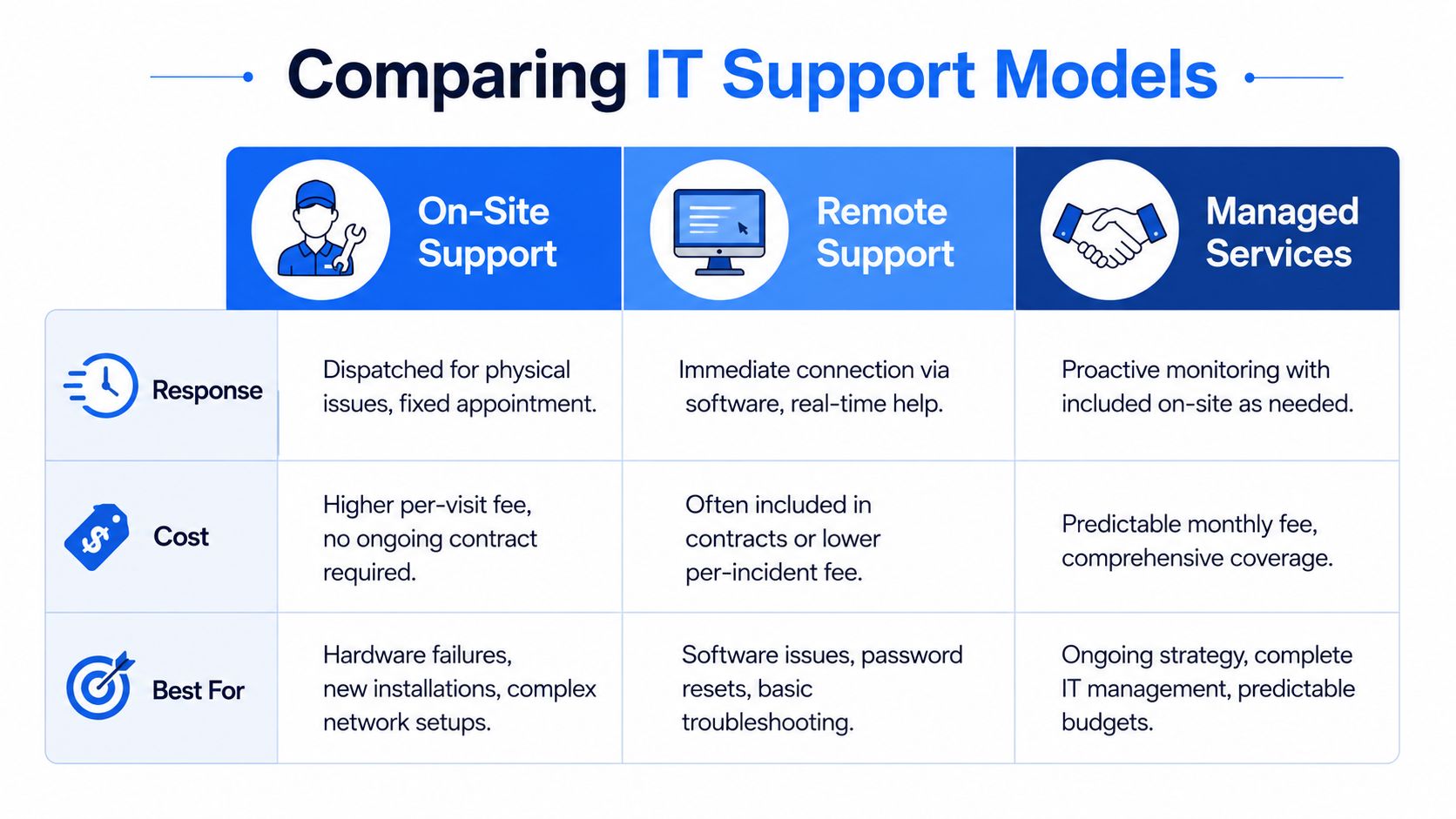
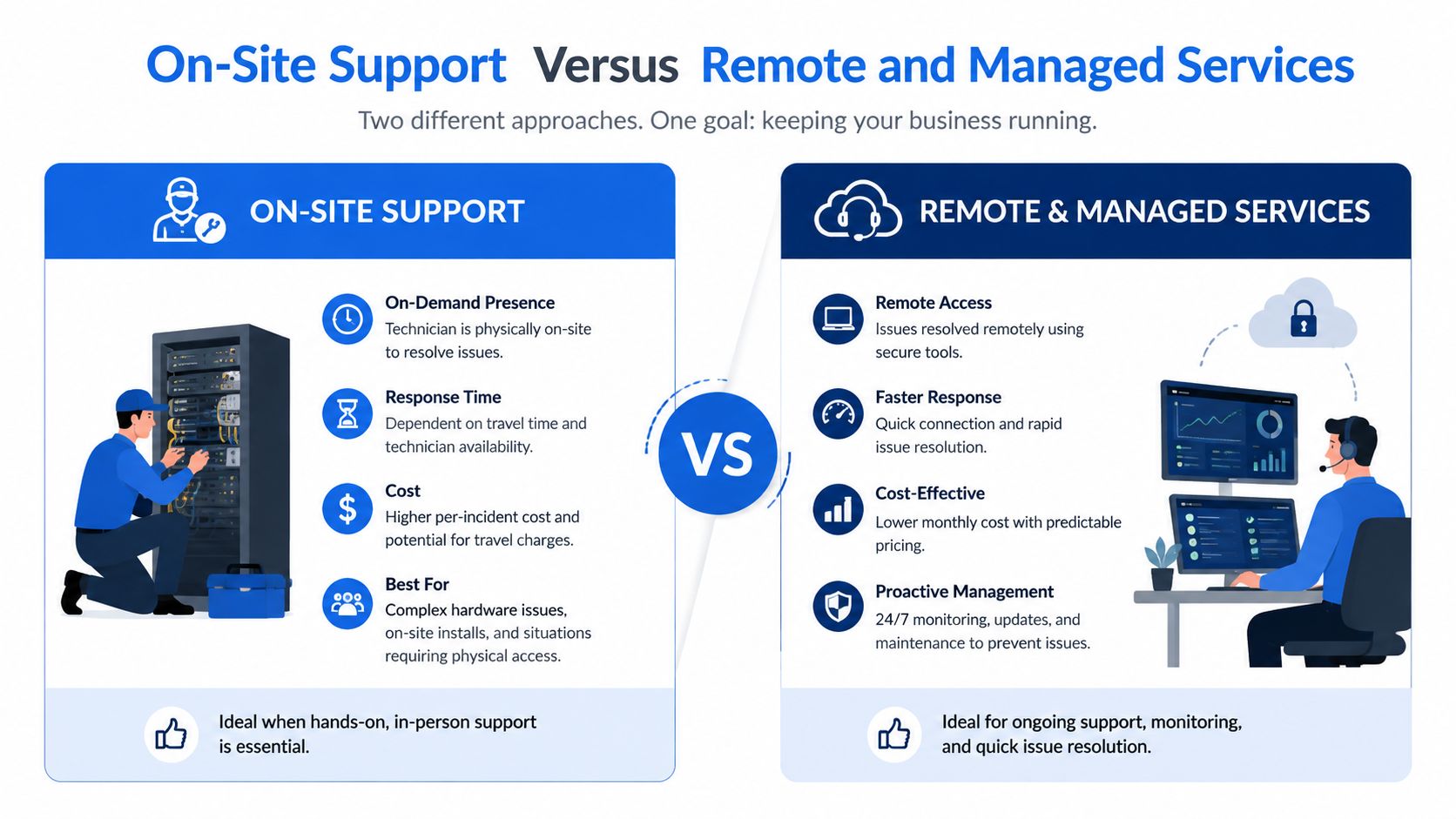
For a London office with staff working partly from home, the practical choice is usually a combination of support models. The provider handles routine user issues remotely, monitors cloud and network services, and sends an engineer when work at the premises is needed. That division keeps travel for faults that require it, while giving the business a clear route to physical assistance.
Cost depends on how the service is organised, not just on whether an engineer attends. Remote support usually covers diagnosis and configuration within the agreed service. A visit may involve travel, on-site time, replacement equipment and follow-up work. Before comparing quotes, ask the provider to separate recurring support, included visits, project work and emergency attendance. A lower monthly fee can become expensive if every physical task is charged separately.
A workable hybrid arrangement
A business might use remote support for Microsoft 365 administration, user access, endpoint policies and routine monitoring. The same provider can schedule site visits for office moves, equipment refreshes and planned network work. If staff suddenly lose access across the office, remote engineers can gather logs and check configuration first, while a local engineer is prepared to inspect the premises if the evidence points to a physical fault.
That preparation matters. The provider should record the site layout, key equipment, access arrangements, configuration backups and known dependencies before an incident occurs. It should also explain which events trigger an on-site escalation, who authorises replacement hardware and how updates are provided while the fault remains open.
The UK Business Data Survey 2026 reports that UK organisations use both on-premises and public cloud storage. A support agreement therefore needs to account for dependencies between local equipment, internet connectivity, cloud platforms and security controls, rather than treating them as separate services.
Managed support suits businesses that want one team to retain responsibility over time. An on-demand visit can suit a smaller one-off requirement or a defined project. During supplier interviews, ask for a worked example of a hybrid incident, including the first remote checks, the escalation point, the expected site response and any charges outside the agreement. That answer reveals more than a general promise of fast support.
Understanding SLAs and Cost Factors for On-Site Support
A support agreement should outline the steps taken after you report a problem, not just promise "fast service". Check whether the provider defines acknowledgement, diagnosis, dispatch, updates, escalation and resolution separately. A response commitment means someone has accepted and started handling the incident. It doesn't guarantee that a failed device will be repaired before replacement equipment arrives.
The cost of a visit usually reflects the engineer's time, travel, required expertise, urgency, working hours and equipment involved. Local coverage can reduce travel friction, but you still need to ask whether travel is included, whether there is a minimum charge, and how emergency or evening work is billed.
What the SLA should spell out
Look for clear answers to these points:
- Priority definitions: What counts as a site-wide outage, a departmental fault or a routine request?
- Response target: When does the clock start, and is it measured in office hours or continuously?
- On-site dispatch: Does the target cover acknowledgement only, or arrival at the premises?
- Communication: How often will the provider update you if the fault isn't resolved?
- Escalation: Who takes ownership when remote triage can't restore service?
- Parts and suppliers: Who sources replacement equipment, and are spares held locally?
- Exclusions: Are third-party broadband, building power and unsupported equipment treated differently?
The Government Digital Service incident-management standard provides a useful operational benchmark. For a P2 incident, it specifies a 60-minute response time during office hours and out of hours, with updates every 2 hours, as set out in the GDS incident-management standard. That isn't a universal commercial SLA, but it demonstrates the value of measurable acknowledgement and regular communication.
Downtime costs can make a slow response more expensive than a higher support fee. Beaming's UK analysis found that SMEs experienced an average of 3 to 4 internet failures and nearly 19 hours of downtime each year, with annual costs ranging from about £250 for a solo enterprise to over £25,000 for organisations with more than 250 staff. The Beaming downtime analysis supports a practical conclusion: compare the full interruption risk, not just the invoice line for dispatch.
For a plain-English explanation of contract terms, service agreements explained can help you review the difference between commitments, exclusions and remedies before signing.
How to Choose the Right Local IT Support Provider
Start with the service you need. A small office with cloud applications may need remote-first support plus reliable escalation, while a business with a server room, VoIP phones, CCTV and multiple premises needs a provider with field engineering capability. Don't choose from a generic list of services. Ask how the provider handles your exact equipment and failure patterns.
Questions worth asking
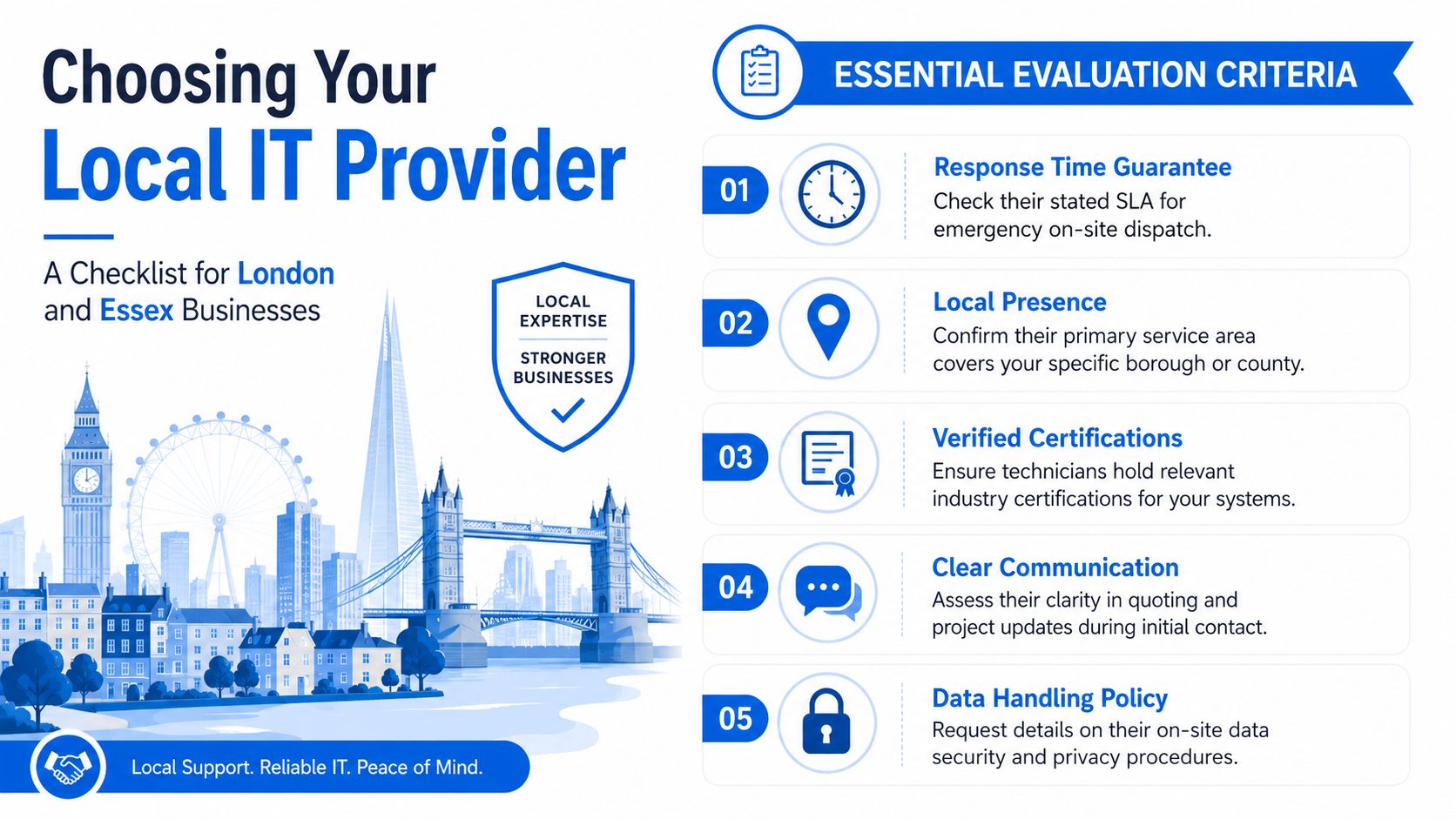
- Response guarantee: What happens when the whole office loses connectivity, and does the SLA promise an arrival time or only an initial response?
- Local coverage: Which London boroughs and Essex areas do engineers regularly serve?
- Technical capability: Can the same team handle switching, Wi-Fi, VoIP, endpoints and physical security systems?
- Cyber readiness: How are engineers authenticated, supervised and prevented from exposing data during a visit?
- Documentation: Will you receive an asset record, change notes and recommendations after the work?
- Pricing: Are travel, emergency work, parts and follow-up visits itemised clearly?
- References: Can the provider demonstrate experience with businesses of your size and site type?
Local presence isn't just a marketing phrase. It affects travel planning, familiarity with premises and the likelihood that an engineer can attend without treating your site as an exceptional journey. Ask where the support team is based and whether subcontractors handle urgent work.
Check cyber competence as well as hardware skills
A physical visit can improve security, but it can also create risk if access is poorly controlled. The UK's 2025 cyber skills report found that 49% of businesses had a basic cyber security skills gap, affecting about 699,000 businesses, while the national cyber workforce had a net annual shortfall of about 3,800 people. These figures are reported in the UK cyber skills report summary.
Ask whether engineers use individual accounts, MFA, least-privilege access, job records and secure handling procedures. A provider that talks only about replacing hardware, but can't explain how it protects credentials and business data, is leaving an important gap.
Be cautious about vague “24/7” language, unclear subcontracting, no written scope and quotes that hide travel or parts charges. The right provider should explain what it can fix remotely, what needs a visit and how it will keep you informed.
Real Scenarios Where On-Site Support Makes the Difference
A shared network outage is one of the clearest examples. Staff may still have power at their desks, but phones, printers, shared drives and internet access fail together. Remote engineers can check the broadband handoff and network configuration, then identify whether the likely fault sits with a router, switch or wireless controller. The on-site visit is what allows them to inspect links, test ports, replace equipment and verify service across the office.
The practical outcome isn't merely “the internet came back”. A good engineer also identifies why the failure happened, labels the relevant connections, records the replacement and flags single points of failure. That turns a disruptive outage into a documented improvement rather than a recurring mystery.
A new premises needs more than a broadband line
An office move may involve desks, phones, wireless access, printers, meeting-room equipment, CCTV and access control. Remote support can prepare accounts, licences and configuration files, but it can't confirm that a cable reaches the correct desk or that a camera covers the intended entrance.
An on-site engineer can survey the rooms, install and label equipment, test each service and coordinate final changes with the building schedule. This is especially useful where the business has a fixed opening date and little tolerance for discovering missing connections on the first morning.
Cyber incidents can become physical problems
A suspected malware incident often begins remotely. The support team can disable accounts, isolate endpoints through management tools and preserve information for investigation. If the affected device is still connected locally, or if several systems share a physical network, an engineer may need to disconnect equipment, secure the affected area, replace compromised hardware or inspect local network devices.
The 2025/2026 UK Cyber Security Breaches Survey estimated that 19% of businesses experienced at least one cyber crime in the previous 12 months, equivalent to about 267,000 businesses, with roughly 5.19 million cyber crimes overall. The survey reporting shows why cyber response can't be treated as a rare specialist concern. Your provider should know how to combine remote containment with safe on-site intervention.
VoIP deployments create a different challenge. Handsets may register inconsistently because of cabling, switching, power or network configuration. An engineer can install phones, test call flows, check audio quality around the premises and resolve physical faults that a remote administrator can only infer from logs.
Next Steps for Getting Reliable On-Site IT Support
Before contacting a provider, gather a simple picture of your environment. List your premises, users, broadband services, routers, switches, wireless equipment, phones, printers, servers, cloud platforms and security systems. Note recurring failures, business-critical rooms, access restrictions and the times when an outage causes the most damage.
Describe the outcome you need rather than relying on labels. “The finance team loses access to the shared system every afternoon” gives an engineer more useful information than “the network is unreliable”. Ask for a proposal that separates remote triage, on-site response, planned maintenance, project work, parts and out-of-hours cover.
For London and Essex businesses, Networking2000 provides IT support, networking, communications and security services, including wireless networks, routers, data cabling, VoIP, CCTV and access control. Its stated support hours run from 6am to 10pm, seven days a week, with a jargon-free approach that helps business owners understand what needs fixing and why.
Don't wait for the next outage to discover whether your provider can attend. Arrange a review, test the escalation process and build a support relationship while your systems are working.
Networking2000 can combine remote assistance with on-site engineering for businesses across London and Essex, covering connectivity, networks, VoIP and premises security. Visit Networking2000 to discuss your current setup, recurring faults and the practical support model your business needs.

