A Romford accountancy firm can run profitably for years on practice software installed on a server bought in the early 2010s. Then the engineer who remembers the administrator password announces his retirement, the supplier stops mainstream support, and a routine hardware fault becomes a business interruption event.
That's the point at which many directors first hear the phrase legacy system migration. They often assume it means buying a newer application and moving the data across. In practice, it's a controlled business continuity exercise. You're deciding how work will continue, how records will remain accurate, how staff will operate during the change, and what happens if the new platform doesn't behave as expected.
The UK public sector shows why this deserves more than a casual upgrade plan. The government's guidance on legacy systems says legacy technology accounted for 28% of systems in central government departments in 2024, up from 26% in 2023, while some critical services still rely on technology dating back decades. Parliamentary evidence cited in the same guidance put the proportion at between 10% and 60% by department, and the Public Accounts Committee has noted systems dating back to the 1970s. SMEs face a smaller estate, but not necessarily a simpler one.
Table of Contents
- What Legacy System Migration Really Means for Your Business
- Assessing Your Current Systems Before You Move
- Choosing the Right Migration Strategy for an SME
- Planning Timelines That Survive Contact With Reality
- Budgeting Honestly and Avoiding Cost Surprises
- Security, Compliance, Testing and Rollback in One Discipline
- Choosing Tools, Vendors and Your Local Support Partner
What Legacy System Migration Really Means for Your Business
A legacy system is more than old software. It includes the application, server or hosting arrangement, database, integrations, user procedures, reports, backups, licences and the people who know how the whole arrangement works. If changing one component risks disrupting payroll, invoicing, customer records or regulatory reporting, you're dealing with a business system, not a standalone programme.
Migration means moving that capability, and often its data and processes, to a safer or more suitable environment. The destination might be a modern SaaS product, a supported server platform, a cloud environment or a replacement application. A routine upgrade usually preserves the same product and operating model. A like-for-like replacement may move the software without questioning whether the process still fits the business. Migration should challenge both.

Why waiting quietly becomes expensive
Older platforms create several forms of exposure:
- Operational fragility: A system may work perfectly until a storage device fails, a dependency expires or a knowledgeable employee leaves.
- Security exposure: Unsupported operating systems and applications make patching, monitoring and access control harder to manage.
- Commercial restriction: An inflexible platform can prevent new integrations, remote working arrangements or changes to the way you sell and deliver services.
- Knowledge loss: Procedures that were never documented become difficult to reproduce when experienced staff move on.
- Hidden support cost: A low licence bill can disguise specialist contractor time, compatibility work, manual rekeying and recovery effort.
The UK government recommends continuous improvement planning and identifying systems that are beyond economical support, rather than treating replacement as a single dramatic event. That principle works well for SMEs. You don't need to modernise everything because it's old. You do need to understand whether the system still earns its place, whether the risk is acceptable, and whether the business can recover if it fails.
Three defensible decisions
For each system, directors should make one of three decisions:
- Migrate: The system is important, but its platform, support model or capabilities no longer suit the business.
- Retain with controls: The system remains fit enough for now, with documented ownership, backups, access controls and a funded review date.
- Retire or wind down: The system no longer justifies its cost or risk, and its functions can be stopped, archived or absorbed elsewhere.
Practical rule: If nobody can explain who owns a system, how its data is backed up, or how the business would operate during an outage, the business hasn't accepted the risk. It has merely failed to measure it.
Assessing Your Current Systems Before You Move
Don't begin with a vendor demonstration. Begin with an inventory that a non-technical director can read and challenge. In a small business, this can be completed through a focused set of workshops, provided the people doing the work record evidence rather than relying on memory.
Build a useful system register
Create one row for every application, service, server and significant spreadsheet that supports a business process. Record:
- Purpose: What work does it perform, and what breaks if it disappears?
- Business owner: Which director or department is accountable for the outcome?
- Technical owner: Who administers it, and who can recover it?
- Users: Which teams rely on it, including occasional users and external parties?
- Data classification: Does it contain personal, financial, confidential or operational information?
- Dependencies: What databases, file shares, APIs, printers, email services or payment tools connect to it?
- Support position: Is the supplier still supporting the product, operating system and integrations?
- Cost profile: Include licences, hosting, maintenance, support contracts and internal effort.
- Recovery position: Where are backups held, and has restoration been tested?
Avoid entries such as “accounts system, owned by finance”. Write “produces monthly management accounts, imports bank transactions, exports payroll journals, and is administered by the finance manager”. Specific records expose dependencies that general descriptions hide.
Interview the people who make the process work
Staff can become defensive when an audit appears to question their tools. Ask about the work, not whether they chose the right software. Questions such as “What do you do when this screen fails?” and “Which steps happen outside the system?” uncover manual workarounds without assigning blame.
Capture the informal details. A customer services employee may know that a particular report only works after a nightly job, while a warehouse supervisor may know that a shared spreadsheet corrects an error the main application can't handle. Those workarounds are migration requirements.
Score risk and value, then make a shortlist
Use a simple internal scale such as low, medium and high for business impact, technical risk, data sensitivity, dependency complexity and replacement difficulty. Don't pretend the score is scientific. Its value comes from making assumptions visible and giving directors a consistent basis for prioritisation.
The UK government guidance on managing legacy technology supports identifying systems that are no longer economical to support and modernising in stages. Apply that test to each candidate:
- Is the annual support effort rising without improving capability?
- Can the supplier provide supported versions and security updates?
- Does the system block a necessary business change?
- Can the business explain its data structure and retention needs?
- Is a suitable replacement available without recreating the same weakness?
Your assessment is incomplete if dependencies have unnamed owners, critical data has no accountable custodian, staff disagree about the system of record, or nobody can demonstrate a restore. Those gaps aren't reasons to postpone migration. They're reasons to extend discovery before selecting a destination.
Choosing the Right Migration Strategy for an SME
The best strategy is rarely the most fashionable one. It's the option that protects continuity while improving the specific weakness you've identified. A finance application with valuable business logic may need a different treatment from an obsolete CRM database or an unused reporting server.
Six routes through the decision
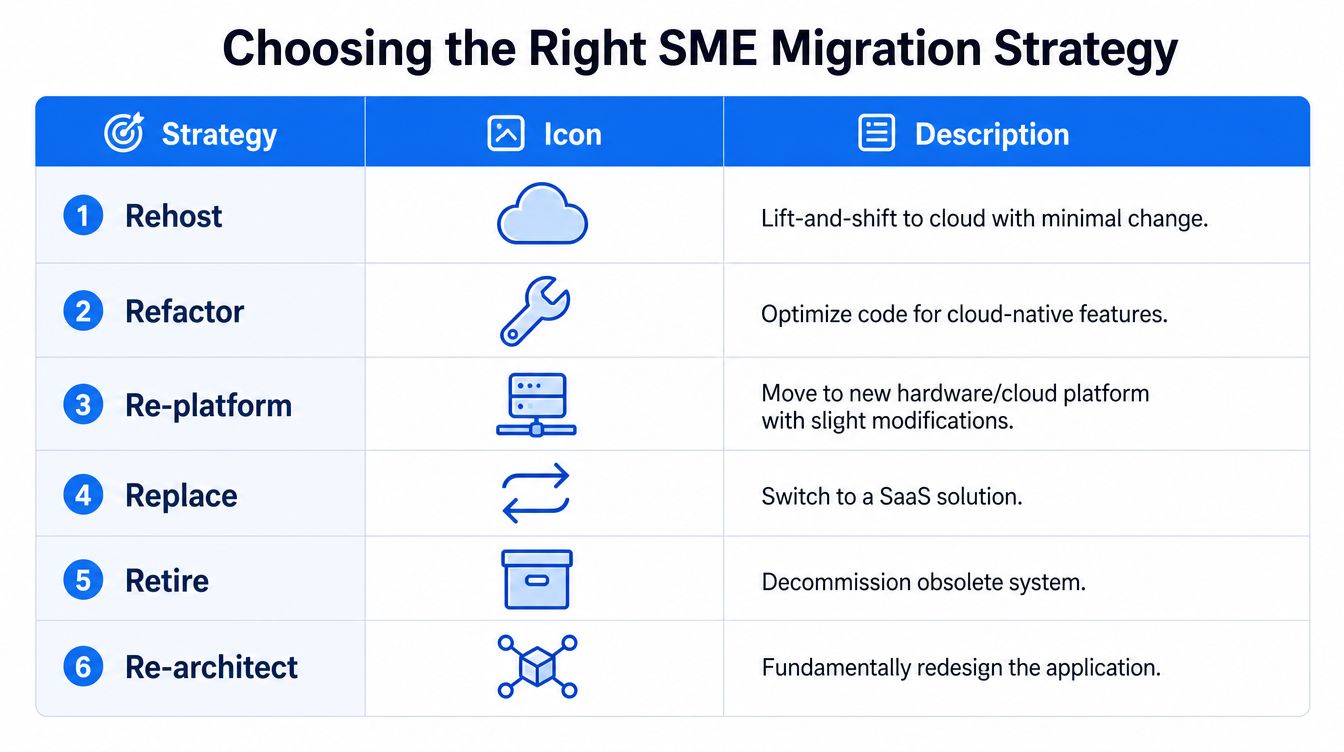
Rehost means moving the existing system to new infrastructure with minimal change. It can be sensible when an ageing physical server is the immediate risk and the application still works. The trade-off is clear: you may remove hardware dependency without removing obsolete code, awkward licensing or poor integration.
Refactor changes the code to improve maintainability while preserving the core behaviour. This suits a bespoke application that still reflects a valuable process but has become difficult to modify. It requires access to capable developers and patient business owners who can validate that behaviour hasn't changed.
Re-platform moves the system to a newer operating environment, database or hosting platform with limited application changes. It sits between rehosting and refactoring. Check compatibility, support boundaries and export rights before signing up to a platform that creates a different lock-in.
Replace swaps the existing application for a new product, often SaaS. This is usually the right conversation when the business model has moved on and the old workflow is forcing staff into manual workarounds. Replacement only works if the business changes its processes where appropriate rather than demanding that the new product imitate every historic exception.
Retire removes a system that no longer provides enough value. Archive what must be retained, identify any reports or records that still matter, and communicate the end date. Decommissioning is a successful migration outcome when the capability is no longer needed.
Retain is also legitimate. Keep the system where its business value remains high and immediate change would create disproportionate risk, but add controls, ownership, documentation and a review trigger. Retention without controls is postponement.
| Situation | Best-fit strategy | Main trade-off |
|---|---|---|
| Hardware is the urgent weakness, application still fits | Rehost | Technical debt remains |
| Bespoke logic is valuable but hard to maintain | Refactor | Specialist effort is required |
| Core application is sound, platform is restrictive | Re-platform | Compatibility work can surface late |
| Product no longer matches the operating model | Replace | Users must adapt to new processes |
| Duplicate or unused capability exists | Retire | Records and dependencies need closure |
| Change risk outweighs immediate benefit | Retain | Exposure remains and must be managed |
For ecommerce teams, the data problem deserves particular attention. A practical resource such as data mapping for Shopify migrations can help structure the relationship between old fields, new fields, orders, customers and product records before a platform move.
Hybrid decisions are normal
An SME might re-platform its accounting database, replace its CRM, retire an old reporting tool and retain a specialist manufacturing application. Treat those as separate work packages with a shared continuity plan. Don't force the entire estate into one strategy merely because a supplier prefers a single project scope.
Before committing, answer one question: what should success look like twelve months after cutover? The answer should describe business capability, ownership, supportability and user adoption, not just whether the new software is switched on.
Planning Timelines That Survive Contact With Reality
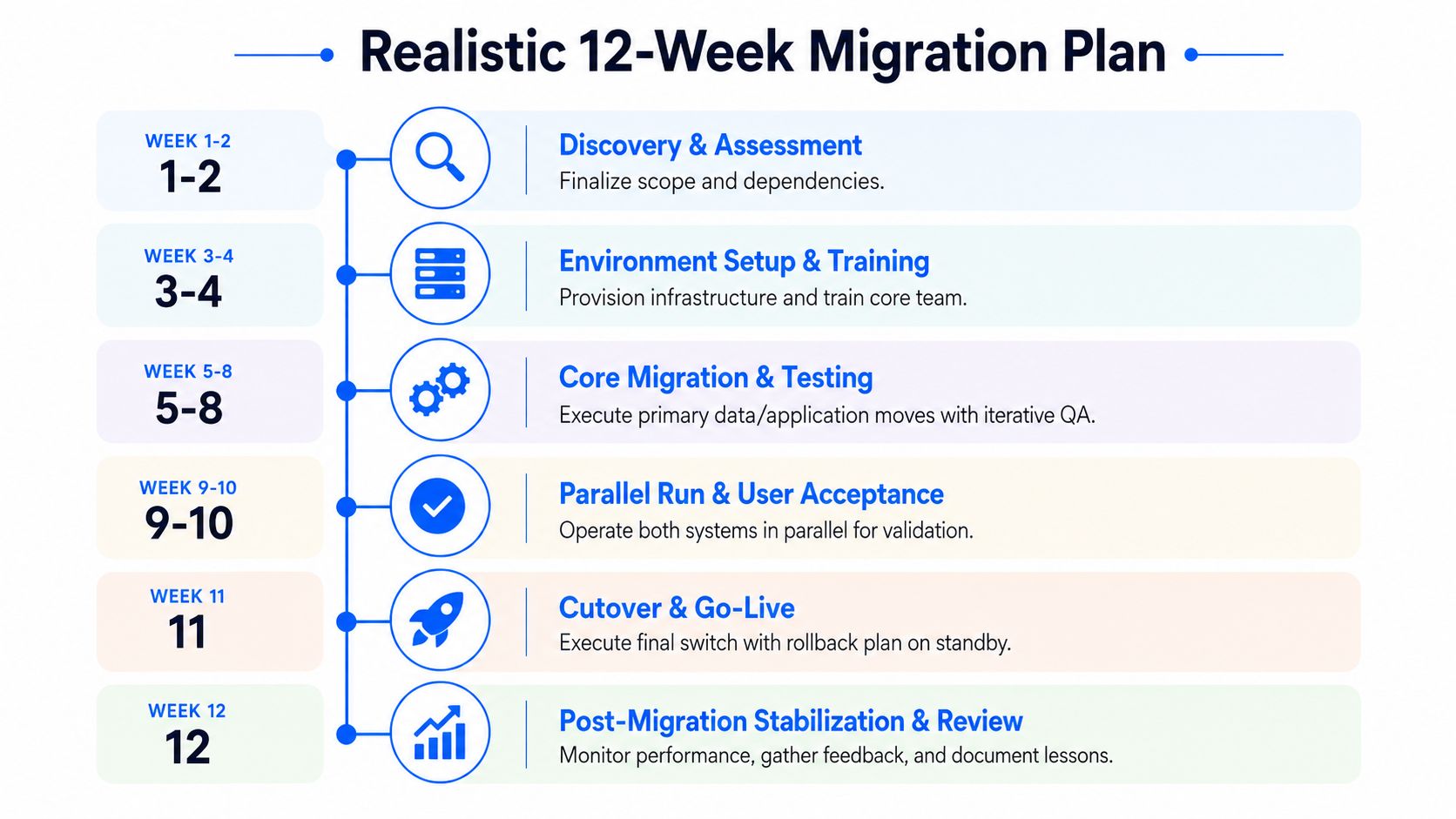
A staged plan gives people something more useful than a hopeful go-live date. The UK government's legacy technology guidance favours continuous improvement and staged modernisation, while National Archives guidance highlights backups, secure transfer, version validation, data volumes and formats before cutover. An SME can translate those principles into a practical twelve-week template.
A workable twelve-week shape
Weeks one and two, discovery and assessment: Confirm scope, users, data owners, dependencies, retention requirements and success measures. Freeze the inventory at an agreed baseline, while recording later discoveries separately.
Weeks three and four, design and preparation: Configure the destination environment, agree permissions, design data mappings, prepare training and write the test plan. This is the phase to discover that an integration cannot be supported, not during the final weekend.
Weeks five to eight, migration build and testing: Prepare data, execute trial migrations, test integrations and correct defects. Keep business users involved. Technical testers can prove that a file moved; finance or operations staff must prove that the file still supports the right decision.
Weeks nine and ten, parallel run and acceptance: Run old and new processes together where the risk justifies it. Reconcile outputs, log differences and obtain written acceptance from named process owners.
Week eleven, cutover: Complete the final backup, restrict changes, transfer the agreed data, validate the destination and keep the recovery decision-maker available. A cutover without a rollback or forward-fix position isn't a plan.
Week twelve, stabilisation: Monitor errors, resolve user issues, remove temporary access, update documentation and review what should change in the next migration wave.
Protect the business calendar
Don't schedule go-live during payroll processing, year-end accounts, an audit window, peak seasonal trading or a period when key staff are unavailable. A technically quiet weekend can still be commercially dangerous if Monday is the busiest day of the month.
Start with a low-risk system where the team can rehearse communications, escalation and recovery. If discovery slips because a dependency remains unknown, extend discovery. If a cosmetic report slips, remove it from the first release. If data integrity or access controls fail, reset the cutover date rather than compressing the test phase.
Budgeting Honestly and Avoiding Cost Surprises
Licence pricing is only one line in a migration budget. The primary cost appears in the work around the software, especially when staff must keep the existing operation running while preparing the replacement.
Include discovery, data extraction, cleansing, transformation, implementation, integration, security review, testing, training, communications, temporary parallel operation, vendor exit charges, support and internal staff time. Treat management attention as a real cost even if it doesn't appear on an external invoice.
A practical budget view
| Cost line | Indicative share | Easy to underestimate? |
|---|---|---|
| Discovery and assessment | Set from the agreed scope | Yes, especially undocumented dependencies |
| Data preparation and mapping | Set after data profiling | Yes, poor quality often appears late |
| Licences and subscriptions | Based on the supplier proposal | Yes, add-ons and minimum terms matter |
| Implementation and integration | Set against named deliverables | Yes, interfaces are frequently under-described |
| Internal staff time | Protected capacity, not spare time | Yes, operational work still has to continue |
| Training and communications | Based on user groups and process change | Yes, informal support is often omitted |
| Parallel running and hypercare | Agreed support period | Yes, defects rarely respect office hours |
| Contingency | Ring-fenced management reserve | Yes, pressure can consume it early |
The Universal Credit transition illustrates why continuity planning needs room for incomplete adoption. Between July 2022 and June 2025, the Department for Work and Pensions sent migration notices to 2,108,000 individuals in 1,593,856 households. 1,605,629 individuals in 1,218,480 households claimed Universal Credit, while 340,260 individuals did not claim and had their legacy benefit claims closed. The published DWP migration statistics also record 617,306 households awarded transitional protection.
An SME won't face the same policy context, but the operational lesson transfers. Some users won't complete training, some records won't map cleanly and some exceptions will arrive after the planned deadline. Protect contingency for those realities, not for optional features that can wait.
Common traps include assuming historic data can be imported without cleansing, overlooking contract termination requirements, and expecting users to learn while maintaining their normal workload. Ask every supplier what isn't included, who owns remediation, and what happens when the project needs an extra migration rehearsal.
Security, Compliance, Testing and Rollback in One Discipline
Security, compliance, testing and rollback belong in one operational conversation because each affects the others. A secure migration that loses records is unacceptable. A successful data transfer that grants excessive access is also unacceptable.
Set the baseline before data moves
The destination should have named owners, role-based access, strong authentication appropriate to the risk, encryption in transit and at rest where supported, audit logging, monitored backups and a documented supplier assurance process. Check where personal data is stored and processed, how the supplier handles incidents, what subcontractors are involved and how data will be returned when the contract ends.
Keep the transfer route controlled. The National Archives recommends pre-migration backups, secure transfer methods such as SFTP or encrypted media, validation of source and target versions, and explicit consideration of data volumes and formats. These checks should appear as signed tasks in the cutover plan, not as informal assurances.

Test business outcomes, not just technology
A useful test pack covers:
- Access: Each role can see and change only what it should.
- Data integrity: Counts, totals, dates, statuses and relationships reconcile between source and destination.
- Integrations: Imports, exports, email notifications, payment processes and reporting links work as intended.
- Failure handling: The team knows what users see when a dependency is unavailable.
- Operational recovery: Backups can be restored and the support team can follow the recovery procedure.
- User acceptance: Named staff complete real tasks and approve the result.
Define a pass before testing starts. “The system loads” isn't a pass for payroll, sales orders or client records. The process owner should sign off the outcome, while technical staff record evidence and unresolved defects.
Decide whether to roll back
Rollback is essential when the source remains intact, the destination has not accepted irreversible transactions and the business cannot safely operate. A rollback may be impractical after new records have been created in the destination or external parties have received changed information. In that case, a controlled forward fix may be safer, provided the incident owner, communications route and data reconciliation process are already agreed.
A compact cutover runbook should state:
- Who authorises the start.
- When changes stop in the old system.
- Which backup is verified.
- Who performs each transfer and validation task.
- What evidence confirms a pass.
- Who decides rollback or forward fix.
- How staff and customers are informed.
- Who provides support after release.
Choosing Tools, Vendors and Your Local Support Partner
Software selection and implementation partner selection are different decisions. A well-designed product can still fail if the implementation team doesn't understand your processes, while a capable partner can't overcome a product with unclear licensing or poor data portability.
Score software against licensing clarity, export rights, integration openness, security controls, support hours and contract flexibility. Ask to see the exit process, not only the demonstration. Require the supplier to explain how historical records, attachments, permissions and audit information will be handled.
Assess partners separately. Look for named consultants, relevant experience in your sector, fixed-scope deliverables, explicit assumptions, a test and acceptance process, and a realistic hypercare arrangement. Ask who will attend a cutover issue outside normal office hours and whether the partner can support the wider network, telephony, connectivity and security estate when the new system goes live.
For London and Essex SMEs, local response can matter when a migration affects a physical office. Coverage across Romford, Hornchurch, Rayleigh, Brentwood, Wickford and Chelmsford can make on-site troubleshooting more practical, particularly where a system depends on local cabling, wireless networks, printers or phone services.
Before signing, confirm the data processor terms, ownership of documentation, liability boundaries, change-control rates, termination assistance and the conditions for final acceptance. On Monday morning, appoint an executive owner, freeze unnecessary system changes, build the register, interview the people who keep the operation running, and book an independent review of the shortlist within the first month.
Networking2000 helps London and Essex businesses plan and deliver legacy system migration alongside the connectivity, security, communications and user support that keep operations running. Visit Networking2000 to discuss your current estate, identify practical migration risks and arrange clear, jargon-free support for the next step.

