Monday morning, your VoIP phones are silent, two staff working from home can't open the shared drive, and the person who normally “sorts the IT” is away. The business still has customers waiting, orders to send, calls to answer, and no patience for excuses. That's the situation for a lot of Essex SMEs, and it's why business IT support Essex should be judged on whether it keeps people working, not on how many buzzwords it can fit into a sales page.
Essex businesses don't run on theory. They run on phones, connectivity, access to files, email, and systems that need to stay up when someone is in Romford, Chelmsford, Brentwood, or working from a kitchen table in between site visits. The county's own Sector Growth 2023 to 2024: Year One in Review shows a business-support environment shaped by active local economic development, with performance tracked across priority sectors and delivery milestones reported in the 2023 to 2024 programme, which is the right context for IT decisions in the county rather than generic national marketing claims. In plain terms, if you're buying support in Essex, you need a provider that understands uptime, resilience, and fast reaction, not just a remote helpdesk script.
Table of Contents
- Why Essex Businesses Need Dedicated IT Support
- Core IT Services Every Essex Business Should Expect
- The Real Cost of IT Downtime and How Resilience Beats Speed
- Preparing for the PSTN Switch-Off Before 2027
- How to Choose the Right IT Support Provider in Essex
- Understanding Service Levels and Pricing Models
- Your Next Steps to Reliable IT Support
Why Essex Businesses Need Dedicated IT Support
A Monday-morning outage doesn't care that you've got payroll due or customer orders stacked up. The phones go down, the cloud drive stops syncing, and the office blames the internet while remote staff blame the office. That's where dedicated support earns its keep, because someone has to diagnose the actual fault fast, not just guess at it.
Local working patterns need local response
Essex SMEs rarely operate in one neat location with everyone on the same network. Teams split across sites, homes, and customer premises need support that understands hybrid working, Wi-Fi quality, cloud access, and the very real problem of “my laptop works at home but not in the office”. If your provider can't deal with that mix, you end up paying for delays twice, once in engineer time and again in lost trading.

Local support matters because the problem is often physical as well as digital. Faulty cabling, ageing routers, patchy wireless coverage, and office layouts with dead spots don't get fixed by a distant call centre reading from a script. A good Essex provider deals with the network people use, not the network shown on the invoice.
Practical rule: if staff can't reach email, telephony, or files, the issue is already business-critical, even if the ticket sounds small.
Why outsourcing beats DIY patch-ups
The national market for managed support is already huge, with a government-backed UK study finding over 11,000 firms, £52.6 billion in estimated MSP-related revenue, 294,340 employees, and £29.1 billion in GVA in the UK managed service provider sector. That scale tells you outsourced IT isn't a niche add-on, it's a core business function, and Essex buyers are choosing inside a mature market with plenty of scope for comparison on service, scope, and response.
If you want a useful benchmark for phone migration planning, the 2026 business phone system guide is a sensible place to sanity-check features before you commit to a VoIP move. The point is simple, a local SME should not have to piece together telephony, cabling, email, and security from different suppliers who all blame each other when something breaks.
A dedicated provider removes that mess. You get one party accountable for the stack, one team that knows your setup, and one contact point when the office goes dark at 8.30 on a Tuesday.
Core IT Services Every Essex Business Should Expect
A proper Essex IT partner should cover more than password resets. If a provider only talks about “support” in the abstract, they're probably hiding gaps in infrastructure, telephony, or security. The useful test is whether they can keep the whole operation moving, from the desk phone to the cabling in the wall.
Managed support, helpdesk, and the network underneath
Managed IT support is proactive work, monitoring, patching, maintenance, and fixing issues before users spiral into downtime. Helpdesk support is the front line, the person who picks up the call, logs the issue, and gets employees back to work without making them repeat the same story three times. If the helpdesk is slow or vague, everything else suffers.
A strong provider also handles network infrastructure and structured cabling. Cat5e and Cat6 aren't exciting, but they matter when warehouse staff keep losing wireless signal or when a meeting room drops out during a client call. Bad cabling creates flaky performance that looks like “random IT problems” until someone traces the cause.
Connectivity, telephony, and security
VoIP telephony and business internet need to be designed together, not sold as separate add-ons. If the connection is unstable, the phone system will be unstable too. That's why leased lines, broadband, router compatibility, and failover planning should be part of the same conversation.
Managed firewalls and practical cybersecurity controls are essential. They reduce the chance of malware, phishing fallout, and lateral spread when something slips through. A proper setup isn't just a device in a cabinet, it's policy, monitoring, and someone who responds before the problem becomes an incident.
Security also extends to the building. CCTV, access control, and intruder alarms matter because IT no longer stops at the office PC. Email services sit in the same category because a badly managed mailbox causes missed orders, misdirected invoices, and a messy recovery when staff are locked out or a phishing attack lands.
| Service Area | What It Does | What It Prevents |
|---|---|---|
| Managed IT Support | Keeps systems patched and monitored | Surprise outages and neglected updates |
| Helpdesk | Gives staff fast first-line assistance | Time wasted chasing the wrong fix |
| Network and Cabling | Stabilises office connectivity | Dead zones, slow file access, dropped calls |
| VoIP and Connectivity | Keeps voice and data working together | Phone failure during internet issues |
| Firewalls and Cybersecurity | Controls access and blocks threats | Ransomware spread and unauthorised access |
| CCTV and Access Control | Protects premises and staff entry points | Gaps between physical and digital security |
| Email Services | Keeps business mail reliable and recoverable | Lost messages and weak mailbox security |
The cleanest setup is one partner who can cover the stack end to end. That reduces vendor sprawl, makes fault finding faster, and stops small problems getting bounced between three different suppliers.
The Real Cost of IT Downtime and How Resilience Beats Speed
A lot of IT support marketing obsesses over response time. That sounds good in a brochure, but it's not the main question. The main question is whether the system stays usable when something goes wrong, because by the time a call is logged, the damage has already started.
Recovery speed matters, but design matters more
Under the UK government's Cyber Security Breaches Survey, 50% of businesses that experienced a breach or attack needed no more than a day to recover, while 1% took more than a month, which shows why downtime can range from an inconvenience to a serious operational hit in a very short space of time. That's useful, but it's not an excuse to stop at “we answer quickly”. It's a reminder that recovery curves are uneven, and the tail risk is ugly.
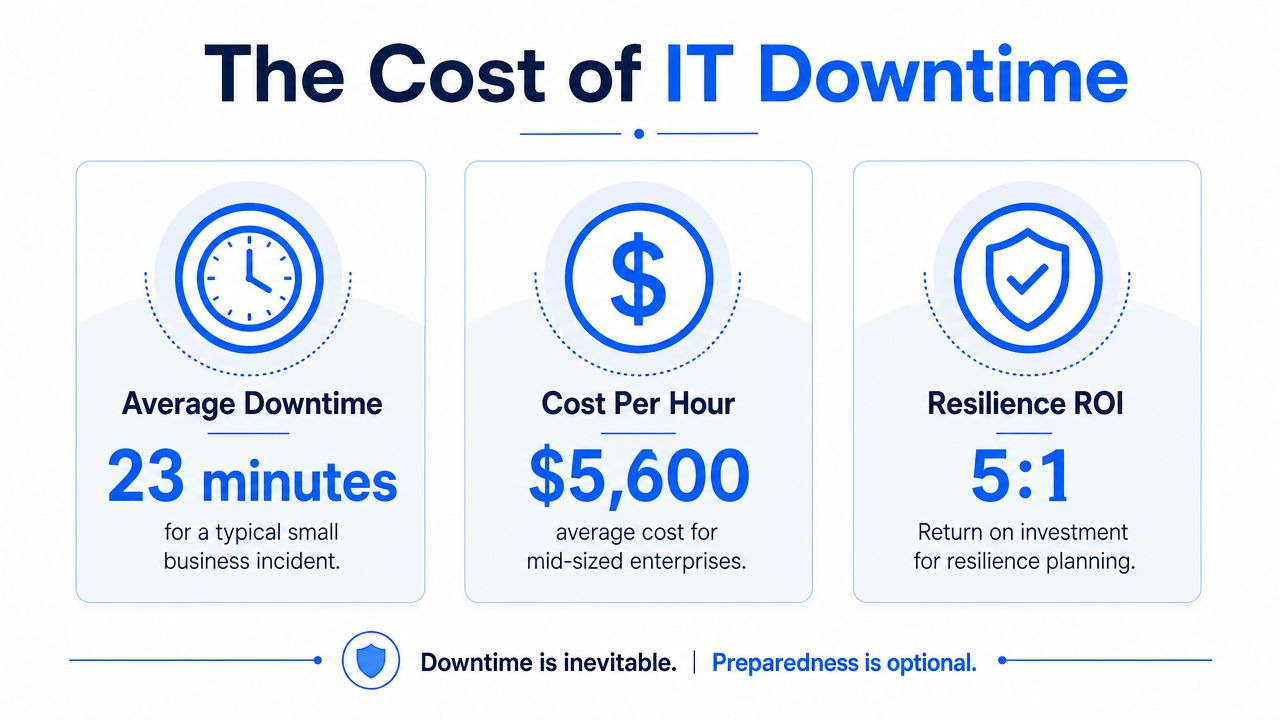
The engineer's arrival doesn't undo the lost hour, the missed call, or the failed order. Resilience design reduces that damage before it starts.
What resilience looks like in practice
For Essex firms with VoIP, cloud apps, and remote staff, resilience means layered failover. That can include 4G or 5G backup connectivity, secure remote access, and recovery procedures that have been tested, not just documented. If your branch internet dies and everyone has to hotspot manually, you don't have resilience, you have improvisation.
The key is to assume the primary connection will fail at some point. That doesn't mean overbuilding everything, it means deciding what must still work, email, phone calls, shared files, and customer access, then building for that. UK cyber guidance treats availability as a core control, and it should be treated that way in any small business that depends on constant connectivity.
A resilient design also reduces pressure on staff. They don't have to wait for “someone to come in and have a look”, because they already know how to keep trading while the fault is being fixed. That is the difference between a nuisance and a lost day.
Preparing for the PSTN Switch-Off Before 2027
The old phone network is being phased out, and too many businesses are still treating that like a future problem. It isn't. If your phones, alarms, or entry systems depend on analogue lines, the switch-off is not just a telecoms change, it's an estate-wide migration.
What actually breaks first
PSTN migration is bigger than desk phones. Analogue lines can also support alarms, access control panels, lift emergency lines, and some payment terminals, so the failure point is often not the first thing people think about. Businesses that only swap handsets and ignore dependencies usually discover the hidden equipment later, when it's already too late.
The right approach is to audit everything that uses the line, then map what needs replacing, testing, or reconfiguring. That means asking vendors awkward questions about compatibility, not assuming the new phone system will magically solve every dependency in the building.
A migration checklist that actually works
- Audit line-dependent services: list phones, alarm circuits, fax lines, door systems, and anything else that still touches PSTN.
- Plan the migration path: choose VoIP or SIP, then map a realistic transition order for each office or site.
- Check the building setup: review cabling, router compatibility, and power backup, because voice services now rely on the wider network.
- Test third-party equipment: get suppliers to confirm whether their devices still work when the analogue line disappears.
If you're running a hybrid office with some staff at home and some on-site, the migration needs to cover both people and premises. The worst mistake is assuming the voice platform is the only thing changing. In reality, the switch affects the internet connection, the backup power plan, and every device that depended on the old line.
Direct advice: treat the PSTN switch-off like a small infrastructure project, not a phone swap.
That mindset prevents panic later. It also gives you time to fix the building properly, instead of scrambling when the old line is already gone.
How to Choose the Right IT Support Provider in Essex
With more than 11,000 firms in the UK managed service provider market, choice is not the problem. The problem is choosing a provider that fits the way an Essex SME operates. The wrong supplier sounds cheap until you need them on a Friday evening and nobody answers.
Compare the provider types properly
| Criteria | Solo Freelancer | National Call Centre | Established Local Specialist |
|---|---|---|---|
| Support availability | Often limited to one person's working day | Broad opening hours, but impersonal | Extended hours and direct access to engineers |
| Service scope | Usually narrow | Broad on paper, variable in practice | IT, networking, telephony, security under one roof |
| Response quality | Depends on one individual | Script-led and ticket-heavy | Faster fault context because they know your setup |
| Accountability | High if the person is available | Diffused across queues and teams | Clear ownership from start to finish |
| Best fit | Tiny setups with simple needs | Commodity support where depth doesn't matter | SMEs that need uptime, continuity, and local context |
The questions that expose weak suppliers
Ask who answers the phone after 5pm. Ask whether they cover network, VoIP, cabling, firewalls, and email, or whether they just resell bits of the stack. Ask how they handle escalation when a remote worker, office router, and firewall are all involved in the same fault. If the answer feels vague, move on.
Pricing matters too, but only after scope. A cheap contract that excludes half the faults you face isn't cheap, it's just incomplete. The better provider is the one that can prove they've handled businesses like yours and can explain what happens when something fails outside normal office hours.
A local specialist is often the simplest answer for Essex SMEs because they can combine rapid reaction with on-site familiarity. They understand the usual mix of office layouts, ageing premises, and hybrid working patterns that national firms often treat as edge cases.
Understanding Service Levels and Pricing Models
Most business owners don't want to study IT contracts, they want to know they won't get ambushed by hidden charges. Fair enough. The easiest way to think about support pricing is by risk, how predictable your environment is and how badly you'd feel a surprise bill or a long outage.
The three pricing models
Ad hoc pay-as-you-go suits very small businesses with rare issues and low dependency. It looks flexible, but it can get expensive when a small fault drags on or hits at the wrong time. You pay for each incident, which sounds tidy until several small problems pile up.
Fixed monthly maintenance is better when uptime matters, because you're buying ongoing care, monitoring, and predictable spend. That model works well for firms that need stable support across users, devices, and sites. It's also easier for budget planning, which matters when cash flow is tight.
Hybrid packages sit in the middle. They usually combine a core support fee with billable extras for larger projects, hardware, or one-off upgrades. For many Essex SMEs, that's the most practical structure because day-to-day support is covered while bigger changes stay transparent.
What a sensible SLA should contain
A proper service level agreement should spell out response times, escalation paths, included services, and what gets billed separately. It should also say whether support is limited to office hours or available later in the day. Extended windows such as 6am to 10pm, seven days a week are useful where phones, retail systems, or hybrid staff can't wait until Monday.
If a contract doesn't clearly define what's included, the cheapest monthly fee will usually cost more in the end.
Transparent pricing is a trust signal. So is agreeing the fee in advance and sticking to it instead of padding the invoice with vague extras. That's the commercial side of resilience, because good support is as much about clarity as it is about technical ability.
Your Next Steps to Reliable IT Support
Start with the faults that already hurt you. If staff complain about phones, Wi-Fi, file access, remote login, or recurring email issues, those aren't minor annoyances, they're the places where revenue leakage begins. Then audit your building and services for PSTN dependencies, because that switch-off won't wait for a convenient week.
Next, decide what continuity means for your business. For some firms it's keeping calls live during a broadband failure, for others it's secure remote access, backup internet, and a tested recovery plan. Once you know that, shortlist providers that can show real coverage across support, networking, communications, and security, instead of selling just one piece of the puzzle.
Networking2000 is one option worth speaking to if you want Essex and London IT support with networking, communications, and security covered in the same place. The company's extended support hours, jargon-free approach, and packages for local businesses in Romford, Hornchurch, Rayleigh, and Brentwood make it relevant to the exact problems raised in this guide.
If you want a provider that can handle IT support, VoIP, connectivity, cabling, firewalls, CCTV, and access control without bouncing you between departments, speak to Networking2000. For Essex businesses that care more about staying online than chasing ticket numbers, that's the conversation worth having next.

