Your staff log into Microsoft 365, Xero, your CRM, the bank portal, and a supplier website before lunch. One person says the accounts system keeps timing out. Another can't get a web form to load properly. Someone on a laptop complains the battery is flat halfway through a client visit. Most businesses treat those as separate annoyances.
They often have one common cause. The browser.
For a small business in Essex, the browser isn't just the app people use to “get on the internet”. It's the front end for payroll, invoicing, cloud storage, video meetings, online banking, document signing, and customer data handling. Pick badly and you create friction every day. Pick well and you remove a surprising amount of support noise, login issues, and avoidable risk.
If you're asking what browser is the best, the honest answer is that there isn't one winner for every desk, every device, and every compliance requirement. There is, however, a best fit for the way your business works.
Table of Contents
- Why Your Browser Choice Matters More Than Ever
- UK Browser Landscape A 2026 Overview
- Deep Dive Performance and Resource Usage
- Security Privacy and UK Business Compliance
- Ecosystems and Enterprise Management Capabilities
- Use Case Driven Recommendations for Your Business
Why Your Browser Choice Matters More Than Ever
A lot of browser problems don't look like browser problems. They show up as staff re-entering passwords, invoice platforms refusing to print properly, strange issues with web forms, or a support ticket that says “the website is broken” when the site is fine in another browser.
That matters because the browser has become business infrastructure. It sits between your team and almost every service you pay for. If that layer is unstable, badly managed, or chosen without thought, the rest of your stack feels unreliable too.
In the UK, compatibility still starts with market reality. Google Chrome holds a 50% share of total browser usage in the United Kingdom, making it the primary choice for over half of UK internet users according to UK browser market share data from Statista. In practical terms, that means many web app vendors test on Chrome first, and some support desks assume you're using it unless you tell them otherwise.
Practical rule: If a business relies on mainstream web apps and wants the fewest compatibility surprises, starting with the browser most vendors optimise for is usually the safest move.
That doesn't mean Chrome is always the right answer. It means browser choice should be deliberate. A design studio on Macs, an accountancy firm handling sensitive client data, and a warehouse office with ageing Windows laptops won't all benefit from the same default.
The wrong way to choose is by habit. The better way is to match the browser to four things:
- Your line-of-business apps: Payroll, accounting, CRM, banking, and portals often behave best on the browser vendors test first.
- Your device mix: Windows laptops, iPhones, iPads, and Macs all change what “best” looks like.
- Your risk profile: If staff handle customer records or sensitive contact data, privacy defaults matter.
- Your support model: Browsers that are easy to deploy, update, and lock down reduce helpdesk noise.
That's the lens for answering what browser is the best for a UK business.
UK Browser Landscape A 2026 Overview
Five browsers dominate most business conversations. Chrome, Edge, Firefox, Safari, and Brave. Each one is good at something. Each one also creates trade-offs you need to understand before you standardise across a team.
2026 Browser Contenders At a Glance
| Browser | Core Engine | Primary Strength | Best For |
|---|---|---|---|
| Chrome | Chromium | Broad compatibility with business web apps | General office use and mixed environments |
| Edge | Chromium | Tight Windows integration and strong manageability | Microsoft-heavy offices |
| Firefox | Gecko | Independent engine and solid developer appeal | Specialist users and testing |
| Safari | WebKit | Smooth fit for Apple hardware and services | Mac and iPhone centred teams |
| Brave | Chromium | Built-in privacy protections without add-ons | Privacy-conscious businesses |
How these contenders differ in practice
Chrome is the default answer for a reason. It's the browser many users already know, most SaaS vendors expect, and most extension developers support first. If a small firm asks for one browser that causes the least drama across websites, Chrome is usually near the top of the shortlist.
Edge has become far more relevant for business than many owners realise. Because it's built into Windows and uses the Chromium engine, it tends to handle the same modern sites Chrome does while fitting neatly into Microsoft-centred estates. If your team lives in Microsoft 365 on Windows laptops, Edge is often the most practical browser rather than the most fashionable one.
Firefox still matters, but usually for specific reasons rather than mass adoption in the average office. Developers, privacy-minded users, and teams that want an alternative engine still value it. In day-to-day SMB support, though, it's more often a secondary browser than the standard issue one.
Safari makes sense if the office runs on Apple hardware. On Macs, it feels native, keeps the interface clean, and usually plays nicely with the Apple ecosystem. The catch is that many business web platforms are still built with Chrome behaviour in mind, so Safari can be excellent until you hit the one portal that behaves oddly.
Brave is the outlier that deserves more business attention than it gets. It uses Chromium underneath, so compatibility is usually familiar, but its default privacy posture is much stricter. For businesses that care about tracker reduction without relying on a pile of extensions, that's a serious advantage.
Chrome and Edge are often the easiest to support at scale. Brave and Firefox usually win attention when privacy is the first requirement. Safari is strongest when the hardware dictates the workflow.
A sensible shortlist for a London or Essex SME usually looks like this:
- Choose Chrome if broad compatibility is your top concern.
- Choose Edge if you're a Windows and Microsoft 365 business.
- Choose Brave if privacy and tracker control are central.
- Choose Safari if most staff use Macs and iPhones.
- Keep Firefox as a secondary option for testing, specialist users, or teams that prefer its approach.
The mistake is looking for a universal winner. The useful question is which browser removes the most friction for your actual users.
Deep Dive Performance and Resource Usage
A fast browser on a clean test machine isn't the same thing as a productive browser in a working office. Real performance means how a browser behaves with multiple tabs open, a Teams call running, cloud apps syncing in the background, and a user switching between documents and web portals all day.
Speed is only one part of performance
Recent UK-focused testing gives a nuanced answer rather than a simplistic one. In 2026 benchmark testing, Google Chrome remained the fastest browser overall, winning two of three speed categories, while Microsoft Edge marginally surpassed it in one test, according to UK browser benchmark analysis from TurboGeek. That's why Chrome still earns its reputation for pace, but it also explains why Edge deserves serious consideration on Windows machines.
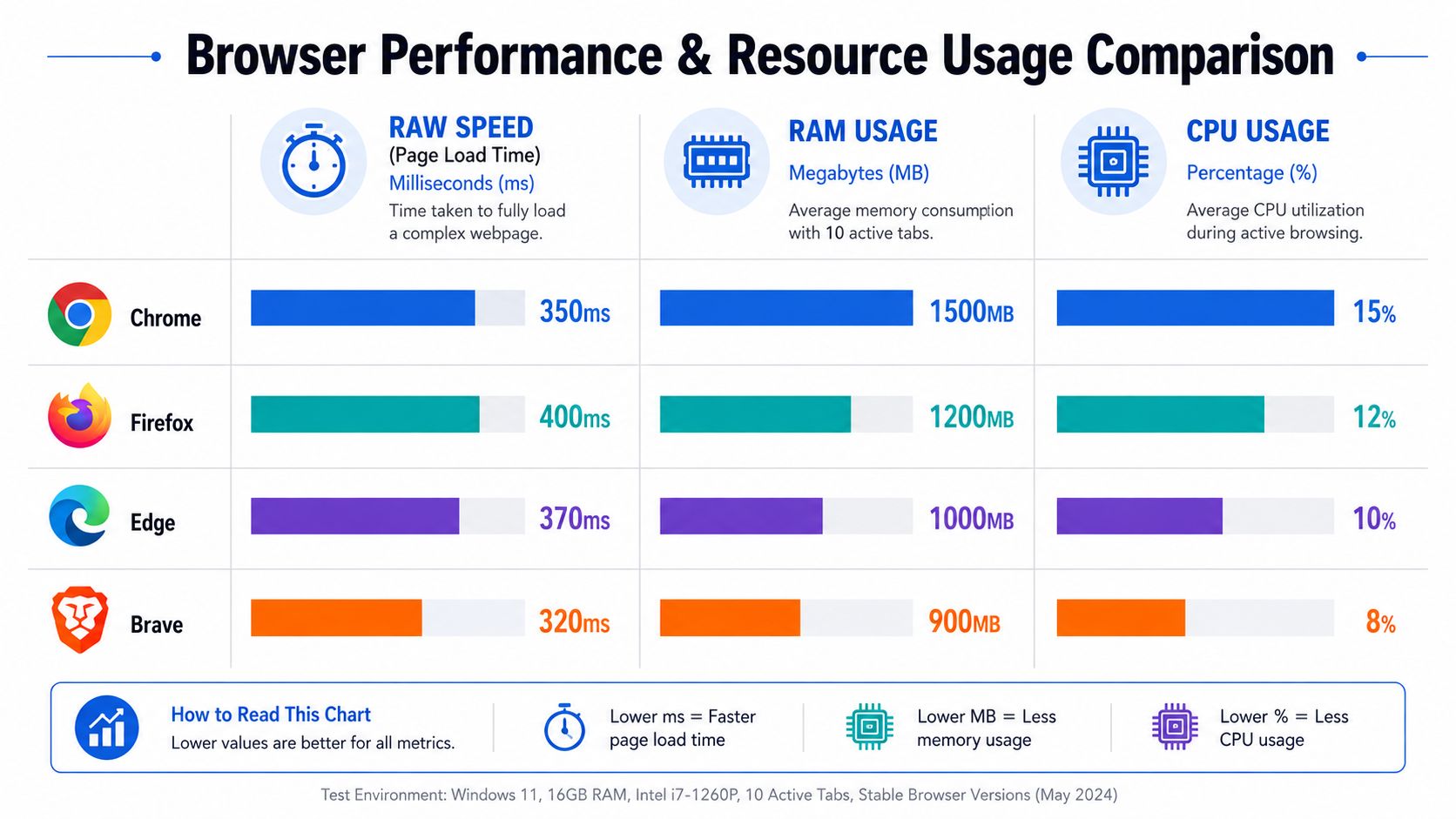
The speed story changes once you move from fresh launches to all-day usage. Browser performance isn't just page load time. It's tab handling, extension overhead, memory discipline, crash recovery, and whether the browser stays responsive after hours of use.
For many offices, Edge is the practical default on Windows because the performance gap is small in normal work, while the integration with Windows and built-in AI features can be useful if your staff already work inside the Microsoft stack. Chrome still feels quickest in plenty of scenarios, but the decision isn't as one-sided as it was years ago.
What slows a business machine in real life
Most complaints about a “slow browser” come from one of these combinations:
- Too many tabs: Staff leave quote systems, inboxes, dashboards, and research pages open for days.
- Extension sprawl: Password managers, ad blockers, PDF tools, grammar tools, screen capture plugins, and CRM helpers all compete for resources.
- Weak hardware: Older laptops struggle once browser tabs, video calls, and Office apps run together.
- Bad process: Users rely on the browser as a filing cabinet instead of closing finished sessions.
Battery life matters too, especially for mobile staff. Energy efficiency benchmarks released in 2026 placed Microsoft Edge first, followed by Chrome, then Firefox, and finally Safari, based on browser energy efficiency benchmarks published by Magic Lasso. On a sales laptop, site visit machine, or director's portable device, that can matter more than shaving a little off page load time.
If your staff use Windows laptops away from the office, Edge often delivers the better balance of speed, battery life, and lower support friction.
There's another angle many firms miss. If your team uses browser-based scraping, repetitive web tasks, or portal automation, browser choice affects reliability. A practical guide to web automation tools is worth a look if you're standardising browser-driven workflows, because automation tends to behave best when you reduce extension clutter and keep browser versions consistent across machines.
My rule in business environments is simple. For fixed desktops and broad app compatibility, Chrome is still a strong standard. For Windows laptops, Edge often makes more operational sense. For low-spec hardware or privacy-sensitive browsing, Brave deserves testing before you assume Chrome is the only fast option.
Security Privacy and UK Business Compliance
A browser decision isn't only about convenience. In a UK business, it affects how much tracking runs by default, how much data leaks to third parties through scripts, and how much control you have over user behaviour.

If you handle customer records, enquiries, bookings, or payment-related workflows, browser privacy settings stop being a personal preference. They become part of your compliance posture. That's especially true when staff use web tools loaded with analytics tags, chat widgets, ad scripts, and embedded third-party content.
Privacy settings affect legal risk
Most generic “best browser” articles fall short by focusing on speed and interface, then treating privacy as a bonus feature. For a London or Essex SME handling customer data, privacy isn't optional.
Brave blocks trackers immediately without add-ons, making it the top secure browser for UK compliance. That matters because ICO's 2024 report linked 68% of UK data breaches to unblocked browser-based tracking scripts, as noted in CloudSEK's secure browser overview. If your staff browse customer systems, marketing platforms, and third-party dashboards all day, reducing trackers at the browser level can lower exposure before users install anything.
That doesn't make Brave the perfect answer for every office. Some line-of-business apps expect looser defaults and may need exceptions. But if you're comparing browsers purely on business risk, Brave deserves a seat at the table that many reviews never give it.
A second issue is tracking methods that don't rely only on cookies. If you want a clear explanation of what is browser fingerprinting, it's worth reading up on because many owners underestimate how much can be inferred from browser and device characteristics even before a user logs in.
A browser with stricter privacy defaults can reduce risk immediately. A browser with broad compatibility can reduce support calls immediately. Those two benefits don't always come from the same product.
The browser policy question most firms miss
Security in practice comes down to policy as much as technology. Ask these questions before you settle on a browser standard:
- Who controls extensions: If users can install anything they like, security weakens quickly.
- How fast updates land: Browsers need automatic updates and they need them consistently.
- What happens by default: Built-in blocking is more dependable than asking every user to configure settings correctly.
- Can you segment use cases: Some firms benefit from one browser for core work and another for privacy-sensitive tasks.
A simple model works well for many SMEs:
- Use one primary browser for mainstream work such as Microsoft 365, accounting, CRM, and supplier portals.
- Use a second hardened browser for finance, HR, compliance, and any workflow handling more sensitive data.
- Lock extension installs down so the browser doesn't become a security free-for-all.
Later in the process, many firms realise staff need a clearer visual explanation of privacy basics and browser risk. This short walkthrough is useful for that conversation:
Chrome and Edge both provide strong business-grade security foundations when managed properly. Brave changes the equation by making privacy stronger from the outset. For UK businesses with compliance exposure, that distinction matters.
Ecosystems and Enterprise Management Capabilities
A browser can be secure and reasonably fast, but still be the wrong choice if it creates admin headaches. In a small business, support time disappears into repetitive tasks like setting homepage policies, moving bookmarks, approving extensions, handling saved passwords, and helping people continue work between phone and laptop.
Why cross device continuity matters
Cross-device sync is no longer a nice extra. Staff start a quote on a desktop, open a reference page on a phone, then rejoin the same task on a laptop at home or on site. If the browser handles tabs, history, passwords, and profiles cleanly, people work faster with fewer interruptions.
That's one reason Chrome remains so influential for business use. In the UK mobile sector, Google Chrome captured 65.8% market share in 2025, according to UK mobile browser share figures reported by SQ Magazine. For firms with mobile-first staff, that matters because the browser your team already uses on phones affects training, familiarity, and how smoothly work moves across devices.
In practice, the strongest ecosystems for business usually come down to Chrome and Edge. Both have mature extension catalogues, password and profile sync, and a familiar Chromium foundation that most web apps handle well. Safari works well inside Apple-heavy teams, but mixed environments often expose its limits. Brave benefits from Chromium compatibility, though some organisations will need to test how its stricter defaults affect internal workflows.
Management features that save support time
The feature many small firms under-value is central management. If you can enforce settings centrally, you save time and reduce mistakes.
Here's what usually matters most:
- Policy control: IT admins can define startup pages, default search, password rules, and permitted extensions.
- Extension governance: Approve what the team needs, block what causes risk or conflict.
- Profile separation: Keeping work and personal browsing apart reduces confusion and data spill.
- Sign-in consistency: Managed sign-in reduces the “I can't find my saved passwords” problem after device changes.
For Windows offices, Edge often has the smoothest fit because it lives naturally inside the Microsoft environment many SMEs already pay for. Chrome is also highly manageable and usually the easiest standard when your application estate is broad or your suppliers default to Chrome support.
The best browser for a small business isn't only the one users like. It's the one your IT team can configure once and avoid fixing every week.
Firefox and Brave can work well in managed environments too, but they're less often the path of least resistance for a typical Essex SME with standard cloud apps, Microsoft accounts, and mixed user ability.
If your business is growing, browser choice should reduce support dependency, not add to it. A browser that's easy to deploy and govern pays you back through fewer tickets, cleaner user setups, and less time spent undoing poor defaults.
Use Case Driven Recommendations for Your Business
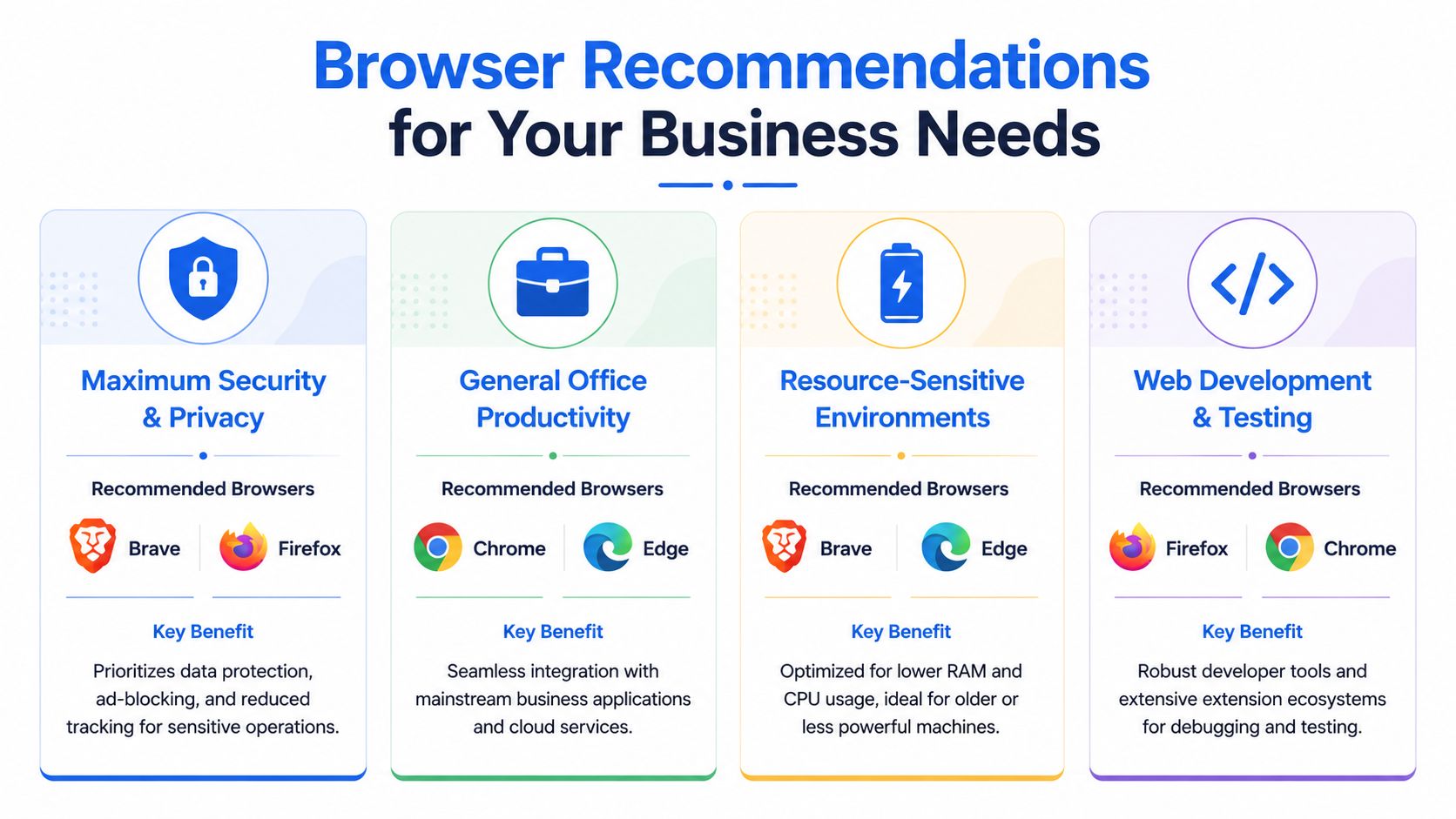
By this point, the right answer should be clearer. What browser is the best depends on what you need the browser to do, what devices you run, and how much risk you're willing to accept in return for convenience.
Best fit by business scenario
For all-round compatibility and least friction, choose Chrome.
If your business relies on mainstream web apps, supplier portals, and common cloud platforms, Chrome is still the safest broad default. It's familiar, widely supported, and usually the browser vendors expect first.
For Windows offices and mobile staff, choose Edge.
If your team uses Windows laptops and Microsoft 365 all day, Edge is often the more practical option. It fits the platform well, tends to be kinder to battery life, and keeps management straightforward.
For stricter privacy and compliance-focused work, choose Brave.
If your business handles sensitive customer information and wants stronger tracker blocking from the outset, Brave is the standout choice. It won't be ideal for every web app, but it deserves serious testing for finance, HR, admin, and privacy-sensitive roles.
For Apple-centric teams, choose Safari with a backup browser available.
On Macs, Safari is clean, efficient, and pleasant to use. I still recommend keeping Chrome or Edge installed as a fallback for awkward business portals, because that's where Apple-only setups can lose time.
The practical answer to what browser is the best
If a client asked me to standardise one browser across a typical small office in Essex, I'd usually start with one of these models:
- General office model: Chrome as the main browser for compatibility.
- Microsoft-first model: Edge as the company standard on Windows devices.
- Privacy split model: Chrome or Edge for general work, Brave for sensitive tasks.
- Apple office model: Safari for daily use, Chrome kept ready for problem websites.
Firefox still has a place. It's useful as a secondary browser, especially for testing, troubleshooting, or users who prefer its style and tools. I just wouldn't make it the default for most mainstream SMEs unless there's a specific reason.
If your team spends most of its day in Chrome and wants to work more efficiently inside it, this guide to maximizing productivity in Chrome is a useful starting point for extension choices and workflow improvements. Just keep extension approvals tight if you're applying that advice in a business setting.
The short version is this. Chrome is the best general-purpose browser for compatibility. Edge is often the best operational choice for Windows businesses. Brave is the best answer when privacy and tracker control carry the most weight. That's the practical answer, not the fanboy answer.
If you want help choosing, standardising, and locking down the right browser setup for your team, Networking2000 can help you align browser choice with your wider IT support, security, connectivity, and day-to-day business systems across London and Essex.

