You've probably had this conversation already. Someone suggests adding smart meters, temperature sensors, trackers, door controls, or occupancy devices to your business, and it sounds sensible until you ask the practical question: how are all these things going to connect reliably and securely?
That's where many small businesses in Essex and London get stuck. The hardware gets the attention, but the key decision is the network underneath it. If the connectivity is wrong, the whole project becomes expensive, awkward to manage, and hard to trust.
Table of Contents
- Why Your IoT Connectivity Choice Matters
- A Tour of Modern IoT Connectivity Options
- Matching the Technology to the Task
- Essential Security and Management Considerations
- Planning Your Budget and Scalability
- Your IoT Deployment Decision Framework
- How Networking2000 Delivers Your IoT Solution
Why Your IoT Connectivity Choice Matters
A lot of owners start with the device. That's understandable. A smart sensor or tracker is visible, easy to demo, and easy to buy. But the harder question is whether the connection behind it suits the job.
The easiest way to think about IoT connectivity solutions is transport. You wouldn't use a bicycle to move a pallet, and you wouldn't send a heavy lorry to deliver one envelope. Connectivity works the same way. Some options are ideal for short bursts of data in one building. Others are built for mobile equipment, battery-powered sensors, or devices buried deep inside a plant room.
That matters more now because adoption in the UK isn't niche any more. The UK IoT market reached $8.3 billion in 2025 and is projected to reach $61.5 billion by 2035, with a 22.2% CAGR, according to OMR Global's UK IoT market analysis. For a business owner, that doesn't just mean market growth. It means suppliers, competitors, landlords, logistics partners, and customers are all getting more comfortable with connected systems.
The wrong choice creates expensive problems
A poor connectivity decision usually shows up in ordinary day-to-day frustrations:
- Devices drop out indoors when the signal doesn't suit the building.
- Battery life suffers because the network choice needs more power than the device can spare.
- Support gets messy when each site or device type ends up on a different setup.
- Security gets patched together instead of being designed properly from the start.
Practical rule: choose the network for the job the device does, not for the label printed on the box.
For a small business in Romford, Brentwood, Chelmsford, or central London, that usually means ignoring the hype and asking simpler questions first. Does the device stay in one place? Is mains power available? Does it send tiny updates or larger files? Is it indoors, outdoors, underground, or in a moving vehicle?
Those answers usually point you to the right family of IoT connectivity solutions much faster than any sales brochure will.
A Tour of Modern IoT Connectivity Options
Short-range connections inside one site
Wi-Fi is often the first option people think of because it already exists in most offices, shops, and warehouses. It's a good fit when devices are inside one site, power is available, and the device needs to send or receive more than tiny status updates. Cameras, smart displays, and office sensors can work well on Wi-Fi if the wireless coverage is properly planned.
Bluetooth is more limited in scope, but useful for nearby device-to-device communication, short-range beacons, and situations where a phone or gateway collects the data. It's not usually the right answer for site-wide business monitoring on its own.
The trade-off with short-range wireless is straightforward. It can be quick and cost-effective where your local network is already strong, but it depends heavily on building layout, interference, and access point placement. In older buildings across London and Essex, thick walls, metal partitions, and improvised office layouts often make this less simple than it sounds.
If your environment includes detached spaces, plant rooms, service risers, or outbuildings, it's worth reviewing practical network design approaches such as ethernet and wireless for unmanned buildings, because the weak point is often the building itself rather than the IoT device.
Cellular for mobile and distributed devices
Cellular is the workhorse for many business deployments because it doesn't rely on your local broadband or internal Wi-Fi. If the device is moving, sits at a remote site, or needs to stay online even when your office internet has a bad day, cellular is usually the sensible starting point.
In the UK, 4G LTE provides sufficient performance and coverage for the majority of current IoT use cases, making it the dominant connectivity layer over 5G for cost-effective, non-time-critical applications, as noted in this practical UK guide to cellular IoT connectivity. That lines up with what many engineers see in the field. For trackers, gateways, payment devices, remote monitors, and general telemetry, 4G is often the right answer.
5G has its place, but small firms are often encouraged towards it before they need it. If the use case isn't highly time-sensitive and doesn't require heavier throughput, 4G is usually simpler and easier to justify.
Low-power wide-area options
LPWAN technologies enter the picture. They're designed for devices that send small amounts of data and need to preserve battery life.
NB-IoT and LTE-M are especially relevant for battery-operated devices that report small packets, such as environmental sensors, utility monitors, or simple alarms. They're not built for rich media or constant high-volume traffic. They're built for efficiency.
Other low-power approaches like LoRaWAN can also be useful in the right setup, especially on private or campus-style deployments, but they require more planning around gateways and coverage ownership. For many SMBs, the attraction of NB-IoT or LTE-M is that they can use existing cellular infrastructure rather than building out their own radio footprint.
If a sensor only needs to say “I'm here, this is my reading, and my battery is fine,” a low-power option often makes more sense than putting it on a heavier network.
IoT connectivity options at a glance
| Technology | Typical Range | Data Rate | Power Consumption | Best For |
|---|---|---|---|---|
| Wi-Fi | Short-range within a building or site | High | Higher | Cameras, smart office devices, fixed equipment on mains power |
| Bluetooth | Very short-range | Low to moderate | Low | Beacons, nearby peripherals, handheld interaction |
| 4G LTE | Wide area | Moderate to high | Moderate | Vehicle tracking, remote equipment, distributed business sites |
| 5G | Wide area | High | Moderate to high | Higher-demand use cases where low latency or larger throughput matters |
| LTE-M | Wide area | Low to moderate | Low | Battery-powered monitored devices needing cellular reach |
| NB-IoT | Wide area | Low | Very low | Fixed sensors sending small data packets over long periods |
| LoRaWAN | Wide area, depending on gateway design | Low | Very low | Low-data sensor networks where private coverage makes sense |
The table is a starting point, not a final answer. The best IoT connectivity solutions aren't the most advanced on paper. They're the ones that still work on a rainy Tuesday when the building is busy, the signal is awkward, and nobody on site wants to reboot anything.
Matching the Technology to the Task
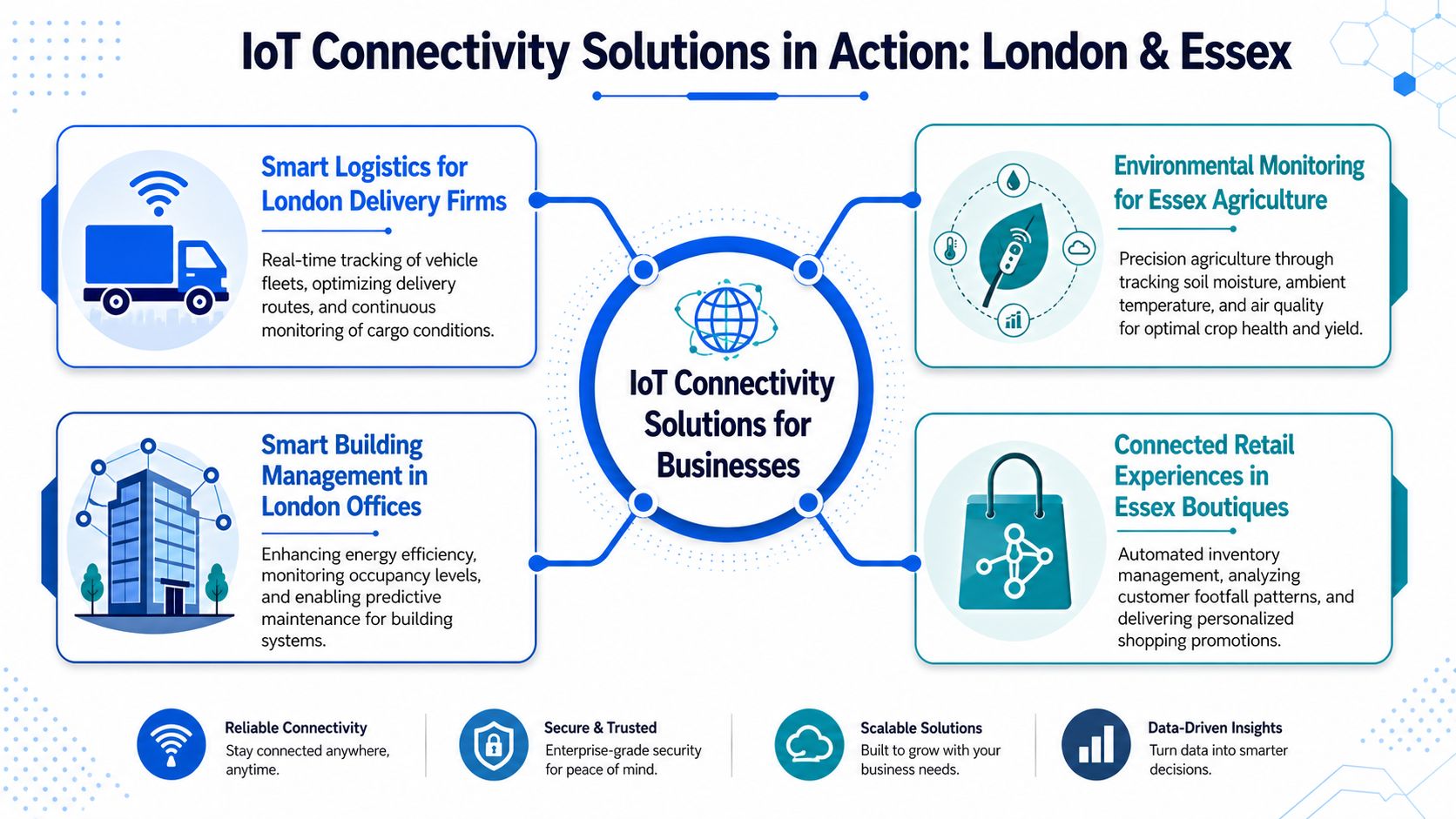
A firm in Essex might have trackers in vans, temperature sensors in a plant room, and occupancy sensors in a small office. Putting all of that on one network sounds tidy. In practice, it usually creates avoidable cost and support issues.
The right choice comes from the job the device has to do. Start with four checks. Where is it installed. How often does it report. Is it battery-powered. What happens if it drops offline for an hour.
A courier fleet moving across London usually suits 4G LTE. The devices are mobile, coverage needs to follow the vehicle, and the hardware has vehicle power available. LTE is not the cheapest option per device, but for tracking, driver status, and proof-of-delivery equipment, it is often the lowest-friction option to run.
A small property portfolio in Essex is different. Metering, leak detection, boiler monitoring, and door alerts often sit in basements, risers, and service cupboards where signal is awkward and nobody wants to change batteries every few months. In that setting, LTE-M or NB-IoT often makes more sense than standard cellular because the data volumes are small and power draw matters more than speed.
Inside a single office or warehouse, Wi-Fi can be the practical answer if coverage is already good and the devices are fixed in place. It works well for higher-data equipment such as cameras, controllers, and screens. It works less well for sensors tucked into corners where the business Wi-Fi was never designed to reach, or where the IT team does not want dozens of extra endpoints sharing the same estate as user laptops and phones.
Some firms ask about private low-power networks such as LoRaWAN. They can work well on a yard, farm, depot, or industrial site where you control the area and only need small packets of data. The trade-off is straightforward. You gain control and can keep running costs low, but you also take on gateway placement, local radio planning, and ongoing maintenance. For a single site in Essex, that can be sensible. For scattered sites across London and the South East, public cellular is often easier to live with.
Data handling often gets missed in these decisions. A sensor that reports cleanly is only half the job. The business still needs to collect, sort, store, and pass that data into the systems people use. digna's data ingestion guide is a useful reference if you want a clearer view of that part before buying hardware.
A practical way to match technology to task looks like this:
- Choose Wi-Fi for fixed devices on one site where power is available and coverage has already been tested properly.
- Choose 4G LTE for vehicles, temporary locations, kiosks, and remote equipment that cannot depend on site broadband.
- Choose LTE-M or NB-IoT for low-data sensors that need long battery life and better odds of working in hard-to-reach indoor locations.
- Choose private low-power radio only if your business is ready to manage gateways, coverage gaps, and local support.
Most SMB projects do better when the shortlist gets smaller. Once you know the site conditions, power limits, and reporting pattern, the wrong options usually rule themselves out fast.
Essential Security and Management Considerations
Before talking about platforms and dashboards, it helps to keep one point in view. An IoT deployment isn't secure because the devices are modern. It's secure because someone has controlled how devices join the network, how data moves, and how faults are handled when something goes wrong.
Security basics that can't be skipped
Small businesses sometimes assume attackers only care about laptops, servers, and email accounts. In practice, neglected sensors, gateways, controllers, and routers are often easier targets because they're installed once and forgotten.
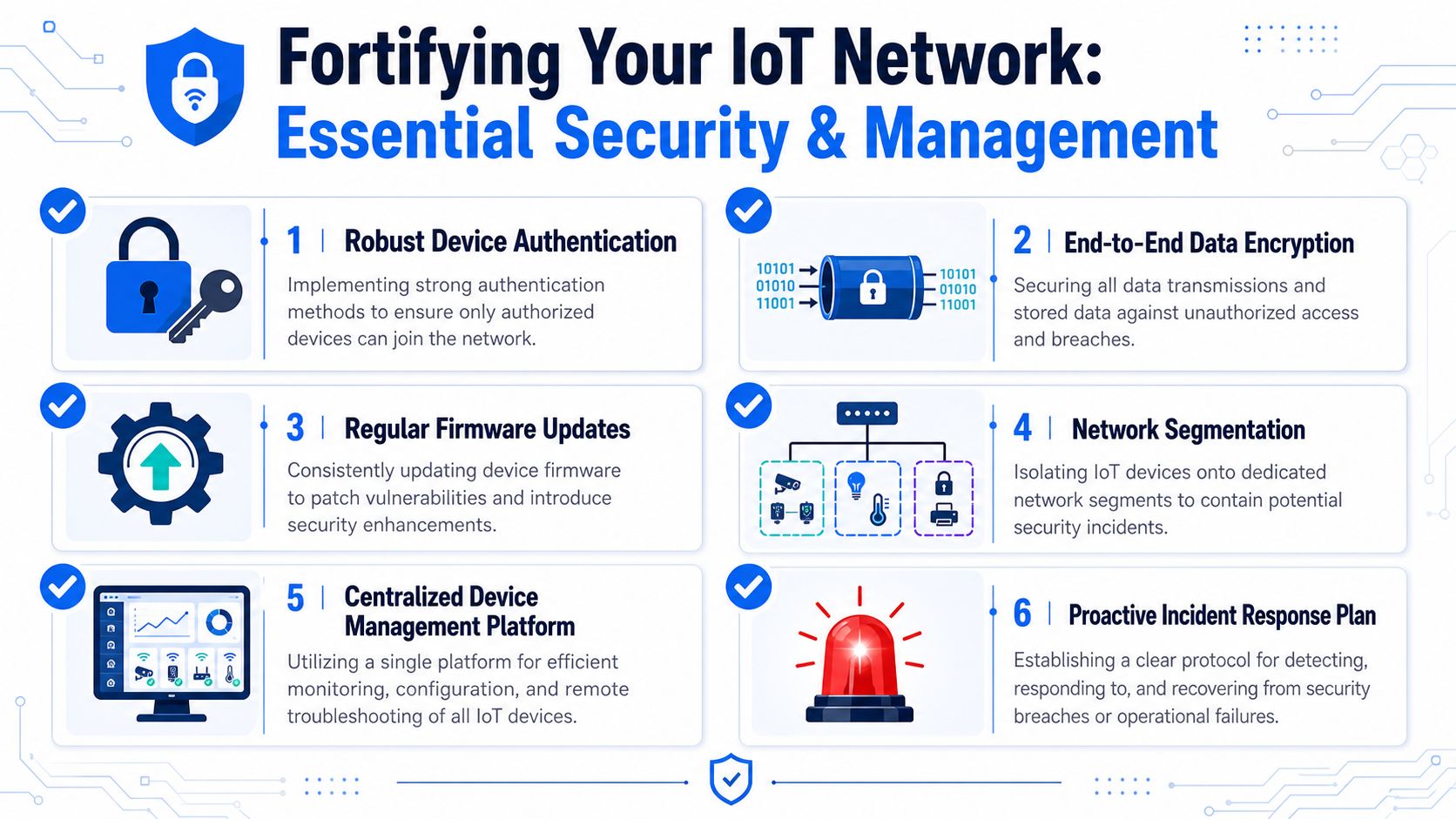
A sound baseline includes:
- Controlled onboarding: each device should be identified properly before it joins the network.
- Encrypted traffic: sensor data, control messages, and management access should be protected in transit.
- Firmware discipline: devices need a realistic update process, not a promise that someone will “get round to it”.
- Segmentation: IoT equipment should sit on separate network segments where practical, not mixed in casually with business-critical systems.
For firms in manufacturing or industrial environments, this broader guide for manufacturers on network security is useful because it frames network protection as an operational issue, not just an IT checklist.
Later in the deployment, visualising what “good” looks like can help non-technical stakeholders align around the basics. This short video does that clearly:
The management problem most firms underestimate
Security isn't the only challenge. Ongoing management is what catches many businesses out. One sensor is simple. Ten devices are manageable. A mixed fleet across sites, carriers, and hardware types is where things start to become labour-intensive.
A common question in the UK market is how to manage IoT connectivity across multiple carriers without building a software layer yourself. The emerging trend is a shift to “cloud-native, software-defined global connectivity” that allows smooth switching between UK carriers without hardware changes, as described in floLIVE's discussion of recommended IoT connectivity solutions. That matters because single-carrier lock-in can be painful when signal quality changes from one site to the next.
What tends to work well is a simple management model:
- Standardise device types where possible so you're not supporting five variants of the same function.
- Use central visibility for SIMs, device status, and alerts.
- Keep carrier flexibility in mind if you operate across mixed locations in London and Essex.
- Decide who owns support before rollout. If an alert appears at 7am, someone needs to know what happens next.
Good IoT management is mostly about reducing avoidable complexity before scale exposes it.
Planning Your Budget and Scalability
Think in total cost not device cost
The cheapest sensor rarely creates the cheapest project. What matters is total cost over the life of the deployment: hardware, installation, data plans, gateway or platform charges, support time, replacement cycles, and the cost of failures.
That matters because the market is expanding quickly. The UK IoT market is forecast to grow by USD 25.73 billion between 2024 and 2029 at a CAGR of 12.5%, driven by adoption in manufacturing, logistics, and energy, according to Research and Markets' UK IoT market report. For a business owner, the practical meaning is simple. More solutions will be available, but more firms will also be competing for sensible deployment, support, and integration.
A low upfront option can become expensive if it needs constant manual intervention. That often happens when businesses choose consumer-grade hardware, depend on patchy Wi-Fi, or ignore management software because it looks like an optional extra.
Build for growth without overbuilding
You don't need to engineer for a huge rollout on day one. You do need to avoid painting yourself into a corner.
A sensible budget review usually checks these points:
- Connectivity costs: fixed broadband, Wi-Fi extension, cellular plans, or LPWAN service charges.
- Support overhead: who replaces failed devices, checks alerts, and updates firmware.
- Site variation: one office may be easy. A mixed estate of shops, depots, and plant rooms usually isn't.
- Expansion path: can the same setup support more devices and more sites without a redesign.
The right commercial mindset is to pay a bit more for clarity and maintainability if it saves repeated site visits, ad hoc fixes, and device churn later. That's especially true for SMBs that don't have an internal engineering team to absorb the mess.
Your IoT Deployment Decision Framework
A small business in Essex often reaches the same point. The owner has seen a demo, the devices look straightforward, and the supplier says connectivity is handled. Then the practical questions start. Will it work in a basement, a yard, or a vehicle. Who fixes it when a device stops reporting. What will it cost to keep running across several sites.
A simple decision process avoids expensive guesswork.
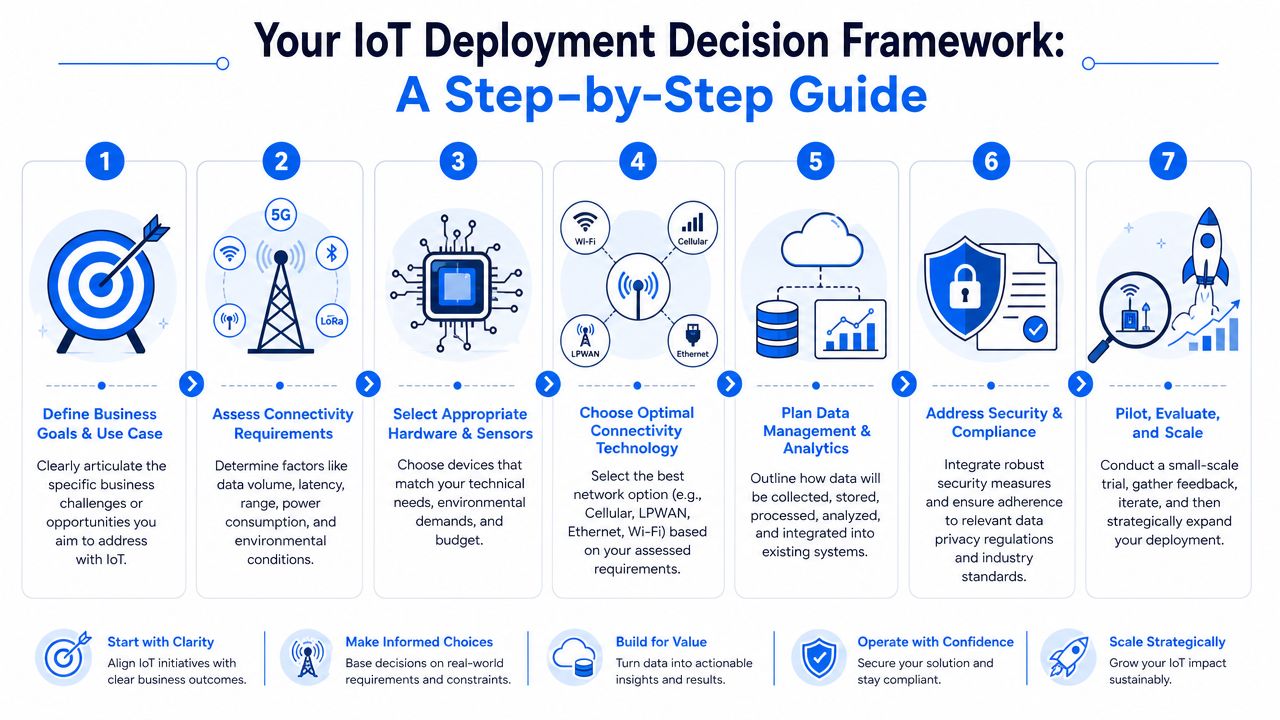
A practical seven-step checklist
Start with the operational problem
Define the job first. Reduce spoilage, monitor freezers, track tools, detect leaks, control access, or measure energy use. A clear use case makes the connectivity choice much easier.Set out what the device must send and receive
Some devices send a small status message every few hours. Others need regular telemetry, remote commands, or firmware updates. That difference quickly rules out unsuitable options.Inspect site conditions
Building layout matters more than product marketing. A plant room, a listed building in London, a metal-clad unit in Essex, and a delivery van all create different coverage problems. Check signal, interference, access to power, and how easy the device is to reach for maintenance.Check power and maintenance limits
Battery-powered devices need a different approach from mains-powered ones. If a sensor is fitted in a hard-to-reach meter cupboard, battery life and low-touch support matter more than headline speed. As noted earlier, low-power cellular can suit this type of deployment, but only if local coverage is proven on site.Reduce the shortlist to one main option and one fallback
Keep the shortlist tight. For many SMBs, the main choice is between Wi-Fi, wired Ethernet, cellular, or a low-power wide area option. Pick the primary route, then keep a backup in mind if coverage, installation cost, or reliability falls short during testing.Pilot in the worst location, not the easiest one
Test where failure is most likely. That could be a basement comms cupboard, a rear service yard, a refrigeration area, or a route through central London with variable mobile signal. A useful pilot checks connectivity, battery behaviour, alert quality, and whether staff can act on the information without extra training.Assign ownership before rollout
Decide who monitors alerts, replaces failed units, updates firmware, and speaks to suppliers. Many projects go wrong here. The hardware works, but no one owns the day-to-day support.
The aim is to make a calm business decision, not chase every available technology. If a pilot shows weak coverage, awkward maintenance, or too much manual checking, change course early. That is far cheaper than forcing a poor fit across multiple sites.
How Networking2000 Delivers Your IoT Solution
For most businesses, the hard part isn't finding connected hardware. It's tying together networking, coverage, cabling, security, internet access, wireless design, and ongoing support in a way that doesn't become fragmented.
That's where a local engineering-led partner makes a real difference. Networking2000 has been supporting businesses and homes across London and Essex since 1998, with practical experience across IT support, wireless networks, routers, Cat5e and Cat6 cabling, managed firewalls, internet connectivity, VoIP, CCTV, alarms, and access control. That matters for IoT because most real deployments touch more than one discipline. A smart building project might need better Wi-Fi in one area, new cabling in another, secure segmentation on the network, and support for the broadband edge as well.
The value isn't just technical coverage. It's having engineers who can explain trade-offs clearly. A small business owner usually doesn't need a lecture on standards. They need a plain answer to questions like: will this work in my building, what will it cost to maintain, and who do I ring when it stops reporting?
Networking2000's approach fits that reality. The service portfolio covers the infrastructure underneath IoT, the security around it, and the support needed after go-live. For firms in Romford, Hornchurch, Rayleigh, Brentwood, Chelmsford, Wickford, and across London, that means one conversation instead of several disconnected suppliers.
If you're weighing up Networking2000 for an IoT project, the sensible next step is a no-obligation conversation about the actual use case, the building, and the support model you need. That's usually the fastest way to sort practical options from expensive distractions.

