If you're running a small business in Essex or London, there's a fair chance your IT still depends on somebody remembering to do things. Someone checks backups on Monday morning. Someone installs updates when there's time. Someone creates new email accounts for starters, removes access for leavers, and chases the same printer or Wi-Fi issue again and again.
That works until it doesn't. A missed patch, a failed backup, or a user account left active too long can turn a routine admin task into downtime, risk, and wasted money.
Automation in IT helps by taking the repeatable jobs off people's plates and making them happen the same way every time. For local SMEs without a dedicated internal IT team, that's often the difference between a system that limps along and one that supports the business properly.
Table of Contents
- What Is IT Automation and Why Does It Matter Now
- Key Benefits and Risks of IT Automation for SMEs
- Practical Examples of Automation in a Small Business
- How to Implement IT Automation in Your Business
- Automation Tools vs Managed IT Services
- How We Automate IT for Businesses in London and Essex
- Your Next Step Towards a More Efficient Business
What Is IT Automation and Why Does It Matter Now
IT automation means using software, scripts, and connected systems to handle routine IT work without someone doing each step manually. A simple way to think about it is direct debit for your technical jobs. Once it's set up properly, the task happens on schedule, follows the same rules each time, and doesn't rely on memory.
In a small business, that could mean Windows updates running in a controlled way overnight, backups checking themselves and reporting failures, Microsoft 365 accounts being created from a standard template, or network monitoring tools raising an alert before staff start ringing round to say the internet is down.
That matters now because automation has moved well beyond large enterprise IT departments. In the UK, 58% of SMEs now use some form of process automation, up from 41% in 2023, and the average first-year ROI is 250% with payback in as little as 6 to 9 months, according to this UK workflow automation statistics roundup. That tells you two things. Smaller firms are already adopting it, and they're doing it because it solves real operational problems.
What automation in IT looks like in plain English
A lot of owners hear "automation" and think robots, AI chatbots, or some massive digital transformation project. In practice, most useful automation in IT is much less dramatic.
It usually starts with jobs like these:
- Patching: Devices receive approved updates on a schedule instead of waiting for somebody to remember.
- Backups: Files, servers, or cloud data copy automatically and report if anything fails.
- User management: New starters get the right accounts and permissions faster, with less manual setup.
- Monitoring: Tools watch servers, broadband, firewalls, and Wi-Fi and flag issues early.
- Helpdesk workflows: Tickets are routed to the right person instead of sitting in one inbox.
If you're new to the wider business side of automation, this business process automation guide gives a useful overview of how repetitive work can be standardised across a company, not just inside IT.
Practical rule: If a task happens often, follows the same steps, and goes wrong when people are rushed, it's usually a good candidate for automation.
Why it matters for local SMEs
For a business owner in Romford, Brentwood, Chelmsford, or central London, the question isn't whether automation sounds modern. Instead, the pertinent question is whether your current setup wastes time, creates avoidable risk, or slows your team down.
A manual process often looks cheap because the cost is hidden. It's spread across staff time, interruptions, delays, and errors. Automation brings those hidden costs into the open by removing repeat admin and making your systems more predictable.
Key Benefits and Risks of IT Automation for SMEs
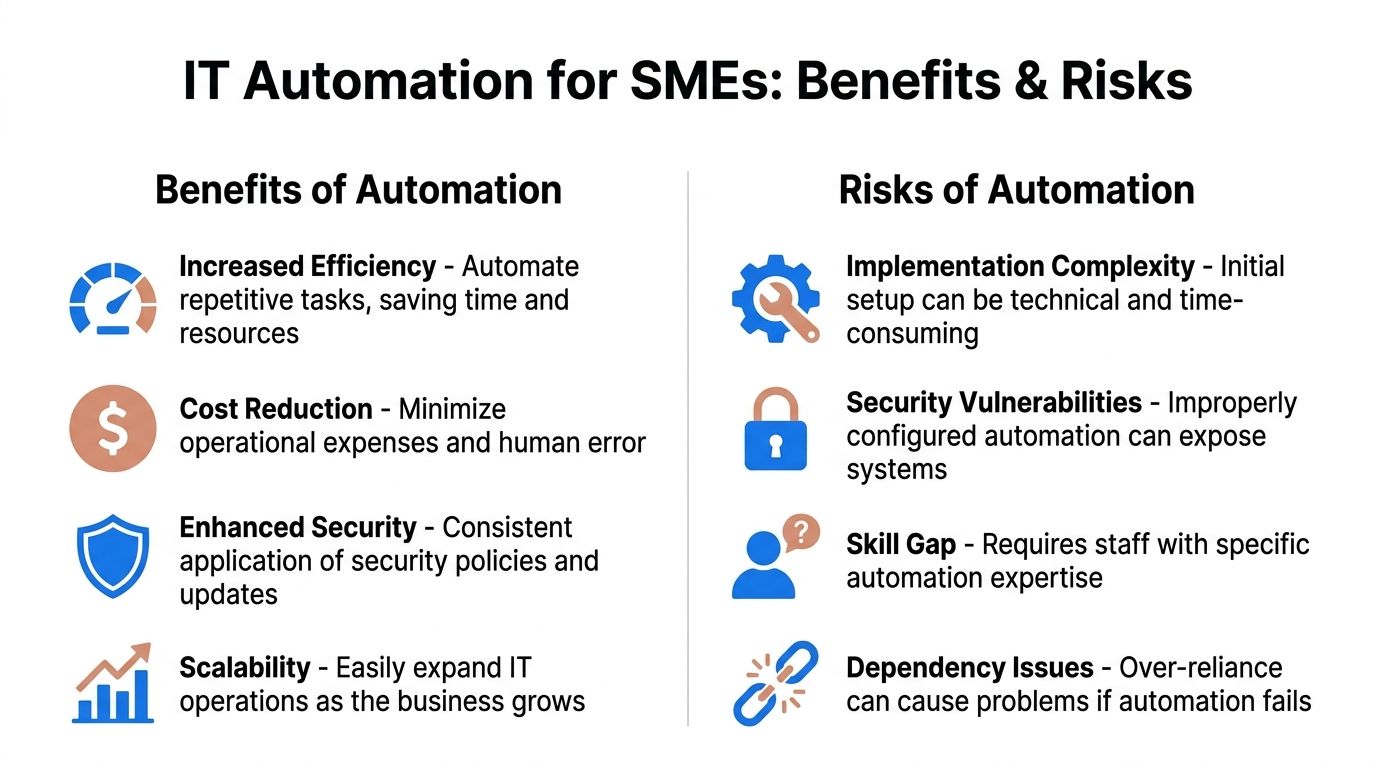
The honest answer is that automation can be excellent for an SME, but only when the business treats it as an operational change rather than just another tool purchase.
Where automation helps most
The first benefit is consistency. People get distracted, pulled into other jobs, or work around outdated systems. Automation doesn't get busy and skip steps. If patching, monitoring, account setup, or backup checks follow a defined process, automation keeps them repeatable.
The second benefit is time. That doesn't just help the IT person. It helps the office manager who no longer has to chase onboarding tasks, the director who isn't dealing with password reset chaos, and the whole team who can get on with work instead of waiting for routine fixes.
There's also a security upside when automation is planned properly. Scheduled patching, account deactivation for leavers, and alert-driven responses reduce the chance that a small oversight turns into a bigger problem.
A practical way to look at it is this:
| Area | Manual approach | Automated approach |
|---|---|---|
| Updates | Done when someone remembers | Done to a planned schedule |
| Backups | Checked occasionally | Checked and reported consistently |
| New users | Built from scratch each time | Created from a standard process |
| Monitoring | Problems found after complaints | Problems flagged earlier |
Where businesses get caught out
Many blog posts get too rosy. Automation isn't magic. It can save a lot of hassle, but poor implementation causes its own problems.
A major issue is the skills and culture gap. According to The AI Automation Agency's analysis of UK companies, 60 to 70% of UK AI automation projects fail because of weak business alignment, siloed implementation, and not enough workforce upskilling. The same source says 70% of UK businesses cite a lack of trust in technology reliability as the single biggest barrier to adoption.
Those two points matter more than people realise. Many firms don't fail because the tool is bad. They fail because:
- Nobody owns the process: The software gets installed, but no one decides what success looks like.
- Staff weren't prepared: Teams don't trust the output, so they work around it.
- Rules are unclear: If your onboarding process varies every time, automating it speeds up confusion.
- Reliability isn't proven: Businesses won't hand over critical tasks unless they trust the system to work every day.
If your team doesn't trust the automation, they'll build manual workarounds around it. Then you pay for both systems and get the benefit of neither.
The trade-off to keep in mind
Automation removes repetitive effort, but it also creates dependency on the process you build. A rushed setup can lock in bad habits faster. A well-designed setup gives you cleaner operations and fewer surprises.
For most SMEs, the smartest route isn't "automate everything". It's to automate stable, boring, repeatable work first and leave edge cases with a human until the process is proven.
Practical Examples of Automation in a Small Business
The easiest way to judge automation in IT is to stop thinking about software categories and look at ordinary business days. Where are people repeating the same task? Where do mistakes happen because someone is busy? Where do problems only get noticed after they've already disrupted the office?
Routine jobs that suit automation well
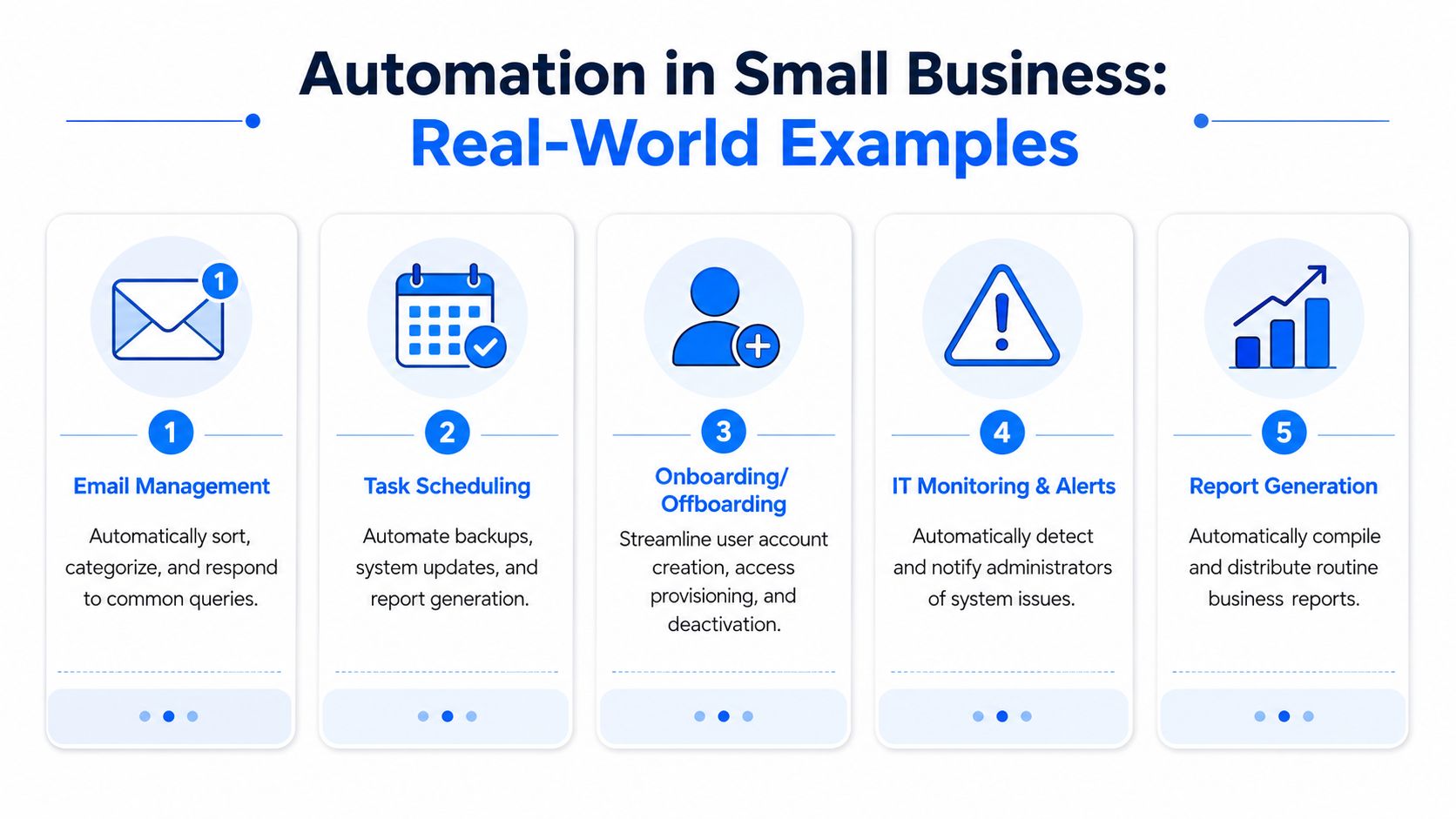
Take software patching. In a manual setup, updates get delayed because nobody wants to interrupt the workday or restart a machine at the wrong time. Over weeks, some devices are fully updated, some are half-done, and some are missed completely. With automation, you define maintenance windows, group devices sensibly, and get reporting on what succeeded and what failed.
Then there's backup verification. Plenty of firms say they have backups, but the test is whether someone knows they completed successfully and can be restored. A proper automated setup doesn't just run the backup job. It also checks status, sends alerts when something breaks, and avoids that awful moment when you need the data and discover the backup hasn't worked for days.
Another strong candidate is user onboarding and offboarding. New starters often need email, file access, Teams or VoIP permissions, security policies, and device setup. Leavers need access removed promptly. Automation helps standardise both sides so nothing critical gets forgotten.
To make that more visual, this short video gives a simple overview of how business automation works in practice:
What the day-to-day difference looks like
A small office with a few dozen users doesn't need a giant enterprise platform to benefit. It usually needs cleaner handling of common jobs.
Examples include:
- Monitoring and alerts: Internet links, switches, wireless access points, servers, and firewalls are watched continuously. If something drops, the issue is flagged earlier.
- Helpdesk triage: Repeated requests such as password resets, mailbox issues, and access requests can be categorised and sent to the right queue faster.
- Scheduled reporting: Routine status reports, storage warnings, and service summaries can be generated automatically instead of assembled by hand.
- Email handling: Shared mailboxes can sort, route, or label common requests so staff aren't manually organising the same messages every day.
A good automation setup should feel boring. The task just happens, the exception gets flagged, and your staff stop spending energy on routine admin.
One practical area that owners often overlook is network configuration hygiene. In smaller businesses, Wi-Fi changes, switch updates, firewall rules, and broadband failover settings are sometimes recorded in different places or remembered by one person. Automation won't replace engineering judgement there, but it can make configuration changes, checks, and alerts far more controlled.
The biggest improvement isn't flashy. It's that the business becomes less dependent on memory, heroics, and crossed fingers.
How to Implement IT Automation in Your Business
Most SMEs don't need a grand automation programme. They need a sensible starting point, clear priorities, and a realistic view of what their existing systems can support.
Start with the boring jobs
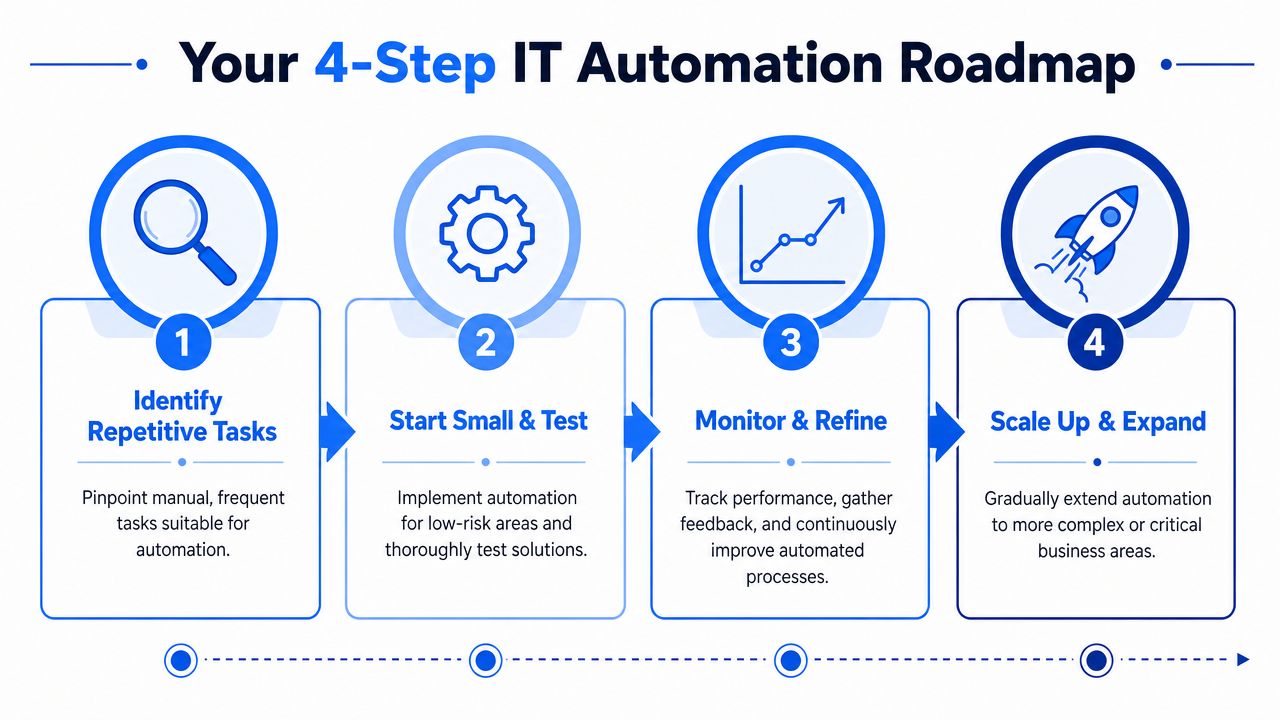
Begin with tasks that are repetitive, low drama, and easy to define. Good first candidates are patch scheduling, backup checks, user provisioning templates, routine maintenance scripts, and simple service alerts.
A straightforward way to shortlist them is:
- Find recurring work: Look for jobs somebody does every day, every week, or every month.
- Check for a clear process: If the steps vary wildly each time, tidy the process before you automate it.
- Pick something with visible value: Choose a task where saved time or reduced disruption will be noticed quickly.
If security operations are part of your plan, it helps to understand what automated response should look like before you build anything. This strategy for incident response is useful reading because it frames automation around repeatable actions, not panic-driven reactions.
Build on solid ground first
This is the point many firms skip. They try to automate on top of messy, ageing systems and then wonder why results are inconsistent.
In the UK, 41% of manufacturers identify integration difficulties caused by legacy systems as a primary hurdle to automation, according to Make UK's report on smarter manufacturing. Even if you're not a manufacturer, the lesson carries straight across to office IT. If your devices, network kit, software versions, and permissions are poorly organised, automation becomes harder to trust.
Check these basics before rolling anything out:
- Device estate: Are laptops, desktops, and servers reasonably standardised?
- User permissions: Do you know who should have access to what?
- Backup and recovery: Are you automating a process you've already validated?
- Documentation: Could another person understand the setup if the original contact is away?
Pilot, review, then expand
The best approach is usually a pilot. Automate one process, test it properly, and let staff see the benefit. Once it works, you can widen the scope.
Keep your review practical:
| Question | What to look for |
|---|---|
| Is it reliable? | The process completes consistently and exceptions are visible |
| Is it saving time? | Staff spend less time on repeat admin |
| Is it understood? | People know what the automation does and when to step in |
| Is it safe to expand? | The process is stable enough to use in other areas |
Don't chase complexity early. A small, reliable automation that removes daily friction is worth more than an ambitious project that nobody fully trusts.
Automation Tools vs Managed IT Services
For many businesses, this decision comes down to capability, time, and risk. You can absolutely automate parts of your environment with in-house tools. The question is whether your team can design, maintain, secure, and troubleshoot those automations without them becoming another half-finished side project.

When DIY tools make sense
If you've got a capable internal IT person, some jobs are perfectly reasonable to handle using tools such as PowerShell, Microsoft Power Automate, Zapier, Task Scheduler, or built-in features inside Microsoft 365, backup platforms, firewalls, and monitoring systems.
DIY works best when:
- The scope is narrow: One reporting task, one onboarding checklist, or one alerting workflow.
- The risk is low: A failure would be inconvenient, not business-critical.
- The environment is understood: Your team knows the systems well and documents what it builds.
- Some trial and error is acceptable: You can afford the time to test and refine.
That route can be cost-effective, especially for straightforward internal processes. It also gives technical teams flexibility.
When managed services are the safer choice
There comes a point where DIY stops being efficient. That usually happens when automation touches security, compliance, business continuity, or anything your staff rely on every day.
Managed support is often the better fit when:
- Security is central: Automated patching, account controls, firewall management, and response workflows need proper oversight.
- The setup spans multiple systems: Cloud services, on-site devices, Wi-Fi, telephony, backups, and user management all need to work together.
- There isn't time for experimentation: Owners and office managers need a result, not a learning project.
- Reliability matters more than novelty: The business wants confidence that the process will keep working.
A lot of SME owners also underestimate the compliance angle. If automation affects access control, monitoring, incident handling, or data protection, governance matters. This guide for security leaders to compliance is useful because it connects managed security operations with the practical need for oversight and accountability.
Worth remembering: The more critical the task, the less sensible it is to rely on an undocumented script that only one person understands.
A managed provider also closes the trust gap. If your team is hesitant about automation, they're often more comfortable when an experienced engineer designs it, tests it, and supports it rather than leaving the business to figure things out alone.
How We Automate IT for Businesses in London and Essex
Local SMEs rarely ask for "automation" as a standalone project. They ask for fewer problems, faster support, less downtime, and systems that stop needing constant manual attention. Automation is often part of the answer, even if that isn't the phrase they use.
What local businesses usually need first
For a retail business in Hornchurch, the practical starting point is often network and device stability. That means automated monitoring on broadband, Wi-Fi, and key devices so faults are spotted early, plus scheduled patching that doesn't interrupt trading hours.
For an accounting firm in Brentwood, the pressure is usually on consistency and access control. New starters need the right tools quickly, leavers need access removed cleanly, and backups need to be checked without relying on someone remembering every week.
For a growing office in Chelmsford or Romford, onboarding becomes the pain point. Once headcount starts changing more often, manual setup creates delays and mistakes. Standardised account creation, mailbox setup, permissions, and device preparation save time and reduce the chance of something being missed.
A wider market trend backs up why businesses are focusing here. Approximately 70% of UK companies report measurable operational efficiency gains from automation tools, and the UK workflow automation market is projected to grow from $182.25 million to $449.99 million between 2024 and 2035, according to Market Research Future's UK workflow automation market overview. The takeaway for local firms is simple. This isn't fringe anymore. It's becoming part of normal, well-run operations.
Why local support matters
For smaller organisations, the hard bit isn't usually finding a tool. It's deciding what should be automated, what needs a human check, and whether the current IT setup can support it cleanly.
That matters in London and Essex because many SMEs don't have an in-house specialist for every area. They may have an office manager, a technically minded director, or a part-time IT contact. That's enough to keep things going, but not always enough to build reliable automation across backups, security, networking, Microsoft 365, and phones.
The practical value of experienced support is that someone can look at the whole picture. Not just the script or the platform, but the business process behind it, the fallback plan if it fails, and the way staff will use it.
Your Next Step Towards a More Efficient Business
The best use of automation in IT isn't replacing people. It's removing the repetitive admin that wastes their time and creates avoidable mistakes. When updates, backups, monitoring, user setup, and routine responses are handled properly, your team can focus on customers, projects, and work that grows the business.
The safest route is usually the simplest one. Start with one process that's repetitive, easy to define, and annoying when it goes wrong. Prove that it works. Build trust in it. Then expand carefully.
If your systems are a bit mixed, your team is stretched, or you don't want to gamble on trial and error, get proper advice before you automate anything important. A short conversation with an experienced engineer can save a lot of rework later.
If you'd like a straightforward review of where automation could save time and reduce risk in your business, speak to Networking2000. They support businesses across London and Essex with practical, jargon-free IT help, and they can advise on whether a simple automation, a managed service, or a wider tidy-up of your systems makes the most sense.

