A lot of business owners first think about off site IT when something breaks at the worst possible moment. The office is closed, someone's trying to send invoices from home, the phones have stopped routing properly, and nobody can open a shared file they need for the morning. In London and Essex, that often happens across multiple locations at once. One person is in Romford, another is in Chelmsford, someone else is working from a kitchen table in Hornchurch, and suddenly a small technical problem becomes a business problem.
That's where off site IT earns its keep. Done properly, it isn't just “remote help”. It's a practical way to keep systems available, support staff wherever they're working, and recover quickly when something goes wrong. It also forces a useful question: if your main systems were unavailable tonight, how would you know what gets restored first, who signs it off, and whether the process has ever been tested? A structured disaster recovery testing framework is often the difference between a written plan and one that performs under pressure.
Table of Contents
- Is Your Business Prepared for an IT Emergency
- What Off Site IT Services Mean for Your Business
- On-Site vs Off-Site IT A Practical Comparison
- Key Benefits and Strategic Risks of Off Site IT
- Your Implementation Checklist for Off Site IT
- Making Off Site IT Work in London and Essex
- The Smart Move for Modern SMEs
Is Your Business Prepared for an IT Emergency
A familiar scenario. It's half past seven in the evening. Your bookkeeper is catching up on payments from home, your sales manager is preparing for an early meeting in the City, and the office phone system starts behaving oddly after a broadband drop. Nobody wants a theory lesson at that point. They want access back, files back, calls back, and a clear answer on what happens next.
This is the primary function of off site IT. It gives a business a way to respond without waiting for somebody to drive across town, find parking, access a server cupboard, and start troubleshooting from scratch. In practice, it means support teams can log in securely, check alerts, restore access, roll back changes, confirm whether the issue is local or wider, and decide quickly if an on-site visit is needed.
Practical rule: If a problem can stop work outside office hours, it needs a support model that works outside office walls.
For small firms, the risk isn't only a dramatic disaster like fire or theft. It's often ordinary failure. A failed update. A sync issue. A laptop that won't connect to shared resources. A broadband line that drops just as someone needs remote access. Those are the incidents that cost time and create stress because they interrupt routine work.
A solid off site setup usually gives you three things:
- Faster first response: An engineer can assess the issue immediately rather than travelling first.
- More resilience: Your backups, remote access and hosted services aren't tied to one room in one building.
- Better visibility: You can see whether systems are healthy before users start reporting problems.
Business owners don't need to become infrastructure specialists. They do need to know whether their support model matches the way their staff work now.
What Off Site IT Services Mean for Your Business
Off site IT is a broad term, so it helps to strip it back to what you're buying. Think of it less as one product and more as a collection of services delivered away from your premises but designed to support the work you do every day.
Near-universal connectivity is a big reason this model now works well for local firms. 99% of UK premises can access superfast broadband and 97% can access gigabit-capable broadband, which means the infrastructure is now there for businesses in London and Essex to use off-site services reliably. At that point, provider quality and day-to-day support matter more than simple availability of a fast line, as noted in these UK connectivity figures.
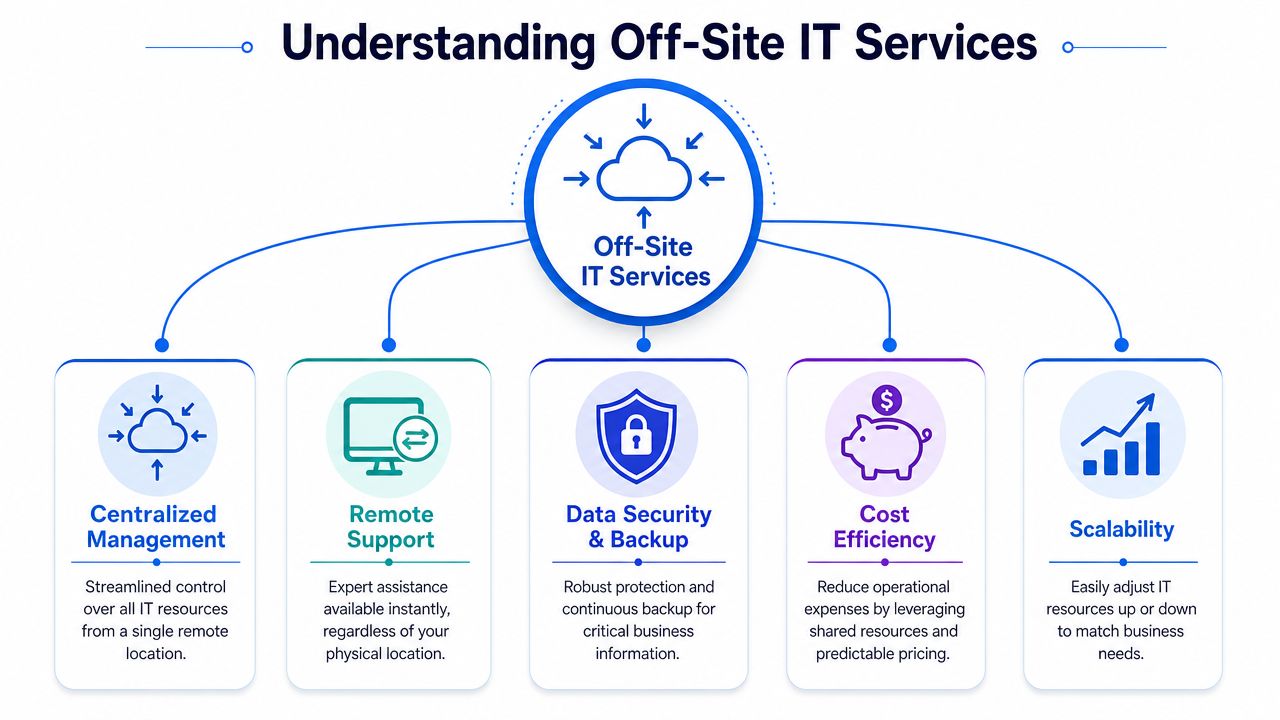
The main parts of off site IT
Remote support is the easiest part to understand. It's your virtual engineer. When a PC misbehaves, a printer stops talking to the network, or a user can't connect to email, the support team connects securely and works on the issue without waiting to attend site.
Off-site backups are your digital fireproof safe. Your data is copied away from the office so a local hardware failure, theft, or building issue doesn't leave you with nothing to restore from.
Disaster recovery services go further. They're closer to keeping a working version of your business ready elsewhere, so if a serious incident hits your main environment, you can bring key systems back in a controlled order.
A lot of firms also include hosted services in the same conversation. That might be cloud email, hosted VoIP, remote file access, or line-of-business systems delivered from a managed platform rather than a box in the comms cupboard.
To see how user experience changes when services move away from local hardware, it's worth looking at PageSpeed Plus RUM. Tools like that show what staff and customers experience in real time, which is often more useful than a provider saying a system is “up”.
After the definitions, this short explainer helps visualise the model in a simple way:
What good off site support feels like day to day
When off site IT is set up well, it should feel ordinary. Staff log in. Calls route correctly. Files open. Home users get support without long delays. The technology fades into the background.
What doesn't work is treating off site IT as a cheap substitute for planning. If nobody has agreed who needs access to what, where backups live, how recoveries are tested, or when an engineer should still attend site, you don't have a proper service. You have a collection of remote tools and a lot of assumptions.
Good off site IT removes friction for users, but it increases discipline behind the scenes.
On-Site vs Off-Site IT A Practical Comparison
Most SMEs don't need to choose one model forever. They need to know which jobs belong where. Some tasks still need hands on support. Others are slower and more expensive when you insist on doing everything on site.
A useful benchmark here is incident resolution speed. UK-based SMEs using remote IT support see an average reduction in mean time to resolve incidents of 30–40% compared to walk-in only support, because engineers can triage, diagnose and apply patches without physical dispatch, according to this remote support MTTR data.

Where on site still matters
There are jobs a remote engineer cannot do from another location.
- Physical installs: Cabling, router swaps, desk moves, and new hardware deployments still need somebody on the ground.
- Premises faults: Power issues, damaged ports, patching cabinet problems, and failed local equipment often need a site visit.
- Hands-on user support: Some staff need in-person help when devices are being rebuilt or replaced.
On-site support also suits businesses with unusual premises requirements, specialist equipment, or strict internal rules around physical access.
Where off site usually wins
For day-to-day support, off site usually has the edge because the engineer starts work straight away.
| Criterion | On-Site Support | Off-Site Support |
|---|---|---|
| Cost model | More travel time, more reliance on local hardware, and often higher fixed support overhead | More predictable monthly service structure and less need to solve every issue with a visit |
| Speed of response | Delayed by travel, access arrangements, and engineer availability on the road | Secure remote access lets engineers begin triage and repair work quickly |
| Scalability | Expanding often means more hardware, more setup time, and more time on premises | New users, services and locations are usually easier to add |
| Maintenance | Reactive if visits are booked only after faults appear | Better suited to monitoring, patching and routine checks in the background |
| Coverage for hybrid work | Weaker when staff are split across office, home and branch sites | Better suited to supporting dispersed users from one service desk |
| Physical tasks | Strong for installs and equipment handling | Limited unless paired with scheduled field support |
The practical answer for many London and Essex firms is hybrid. Keep on-site capability for physical work and use off site IT for support, monitoring, backup, hosted services and rapid response.
If your support model requires a van journey before anyone can even diagnose the fault, simple issues will keep taking too long.
Key Benefits and Strategic Risks of Off Site IT
The strongest reason to move towards off site IT isn't fashion. It's exposure. The UK government's 2024 Cyber Security Breaches Survey found that 50% of businesses experienced a cyber breach or attack in the previous 12 months, rising to 74% among medium-sized businesses, which is why security, logging and controlled remote access now sit at the centre of support design rather than the edge of it, as reflected in this UK cyber breach survey summary.
Why businesses move this way
The first benefit is access to broader skills. A small business rarely needs one full-time specialist in every area, but it may need help across broadband, Wi-Fi, VoIP, Microsoft 365, backup, firewall policy, endpoint issues and user support in the same month. Off site service models make that breadth easier to deliver.
The second benefit is continuity. If your email, telephony, backups and remote access all depend on one physical office, a local problem can knock over several services together. Moving key functions off premises reduces that concentration of risk.
The third benefit is commercial clarity. Many SMEs prefer monthly operational spend to surprise hardware failures and emergency call-outs. That doesn't mean off site is always cheaper. It means costs are usually easier to plan when support, monitoring and hosted services are wrapped into a service agreement.
Where the risks really sit
The risks are real, but they're often misunderstood.
Provider dependency is the biggest one. If your supplier controls remote access, backups, firewall rules and hosted systems, you need clear documentation, clear ownership and clear exit terms. Otherwise convenience turns into lock-in.
Connectivity quality still matters. Off site IT depends on stable broadband and sensible failover planning. In central locations that's often straightforward. In outer London and parts of Essex, line quality and local setup still vary more than people assume. A weak office Wi-Fi design can make a good broadband circuit feel unreliable.
Governance is the issue many firms miss. A remote engineer can be brilliant, but if access rights are too broad, logging is poor, and nobody reviews who can log in, you've created a hidden security problem in the name of support.
A sensible way to think about off site IT is this trade-off:
- You give up some direct physical control
- You gain speed, resilience and access to wider expertise
- You only come out ahead if security and accountability are built in from the start
That's why “more secure” isn't the right question on its own. The better question is whether your business will be more resilient, more supportable and easier to recover when something goes wrong.
Your Implementation Checklist for Off Site IT
A good off site IT rollout usually succeeds or fails before the contract is signed. I've seen London and Essex firms buy a tidy-looking support package, then find out too late that nobody agreed what gets covered first during an outage, who approves access, or how recovery will work on a Monday morning.
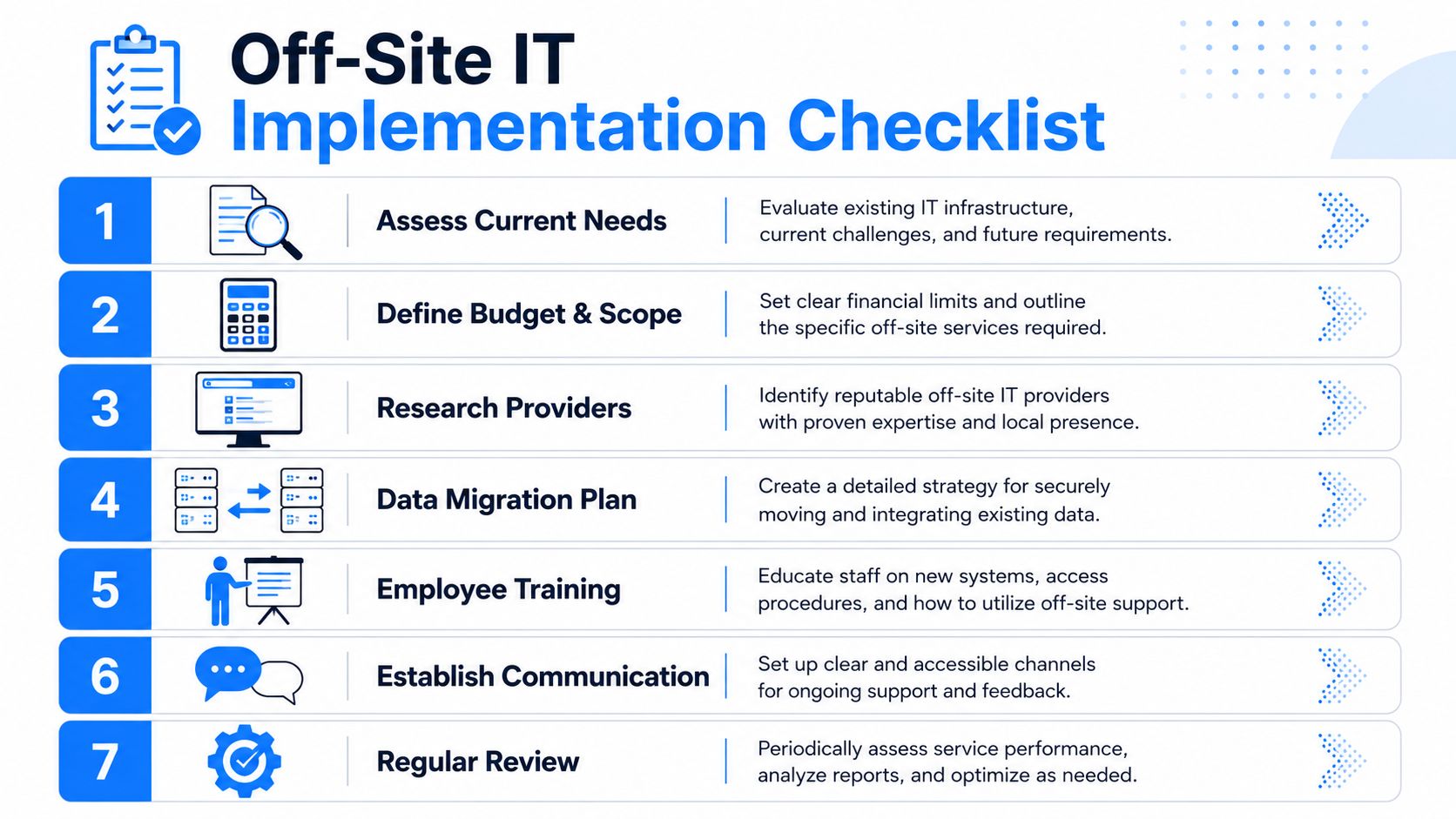
The safest approach is to treat implementation as an operational exercise, not a procurement exercise. Small businesses do not need a long technical document. They need a shortlist of checks that exposes weak assumptions early.
Start with your real working day
Begin with what would stop the business trading, serving clients, or answering the phone. That sounds obvious, but it gets missed all the time.
- List the systems that stop work if they fail. For many SMEs, that means email, shared files, business software, broadband, Wi-Fi, telephony, printers, and remote access.
- Map how people work. A team split between a Chelmsford office, home workers in Essex, and regular meetings in London has different support needs from a single-site office.
- Check what happens if your main connection drops. If the answer is tethering to mobile phones and hoping for the best, the plan needs work.
- Set priorities in plain English. Decide what must be restored first, what can wait, and who makes that call.
For firms still juggling paper files alongside cloud systems, document handling needs to be part of the same conversation. A practical UK paperwork storage guide can help you decide what should stay on paper, what should be scanned, and how those records fit into your continuity plan.
Vet security and access properly
Vague answers prove to be expensive.
Remote support can be safe and well controlled, but only if access is limited, recorded, and reviewed. Providers should be able to explain who can log in, how they are approved, whether multi-factor authentication is enforced, and what audit trail you receive after support work is carried out.
Ask questions like these:
- Access control: Which engineers can reach your systems, and is that access restricted by role?
- Authentication: Is MFA enforced for every engineer and every admin account?
- Logging: Are remote sessions recorded or logged in a way you can review later?
- Backup access: Who can restore data, and what approval is needed before they do it?
- Offboarding: If you leave the provider, how quickly is their access removed?
A simple question often tells you more than a polished proposal ever will. “If someone from your team connects to our systems out of hours, what record do we receive the next day?”
Make recovery measurable
Backups are only useful if they restore the right data within a timescale the business can live with. That means testing, evidence, and clear responsibilities.
Focus on three points:
- Recovery scope: Can they restore a file, a mailbox, a laptop, a server, or the full environment?
- Recovery order: Which services come back first, and who agrees that order?
- Testing: How often are restores tested, and what proof do you get?
This matters even more for smaller firms with lean teams. If your finance system, phones, and shared drives all fail at once, there needs to be a written order of recovery. Otherwise the loudest complaint wins, and that is rarely the right business decision.
Read service levels like an operator, not a buyer
Response times are often presented well because they are easy to market. Resolution times are what affect the business.
Check whether support hours match your actual trading hours. A business that starts early, runs evening shifts, or relies on directors working from home after hours may need more than a standard weekday helpdesk. This is particularly relevant around London and Essex, where travel, hybrid working, and patchy home broadband can turn a small issue into half a day of lost time if support boundaries are unclear.
If one supplier is covering support, connectivity, backups, cloud systems, and phones, get the handover points written down. Joined-up service can work very well. It only works if there is no confusion about who owns each problem and who updates your team while it is being fixed.
Final checks before go-live
Before the service starts, confirm the practical details that often get skipped:
- Ownership: Know who owns licences, domain records, backup sets, hardware lists, and admin credentials.
- Contacts: Agree who in your business can authorise changes, raise urgent issues, and approve access.
- User guidance: Staff should know how to get help, how to report suspicious activity, and what to do if broadband or phones fail.
- Review points: Revisit the setup after office moves, staffing changes, new software, or a change in broadband provider.
A checklist like this does not slow the project down. It prevents the usual problems later, especially for SMEs that need fast remote support but still want control, accountability, and a realistic plan for the way they work.
Making Off Site IT Work in London and Essex
Local context matters more than people think. A business in central London, a small office in Brentwood, and a mixed home-and-office team spread across Essex won't all use off site IT in the same way. The common thread is that support has to cope with branch connectivity, home broadband, mobile working and systems that can't wait for the next available visit.

What works locally is a service that combines remote response with a realistic understanding of geography and working patterns. A firm opening in a business park may need resilient internet and VoIP from day one. A company with staff split between Romford and central London may care more about secure remote access, device support and reliable call handling outside standard office routines.
Provider quality is the decisive differentiator once the underlying connectivity is there. London and Essex SMEs don't usually need more jargon. They need clear answers, sensible escalation, and support that can deal with broadband, Wi-Fi, routers, phone systems and user issues as one joined-up service rather than five separate arguments.
The Smart Move for Modern SMEs
A director gets the call at 7:40 on a Monday. Staff cannot log in, the phones are unreliable, and half the team is working from home in Essex while the rest are heading into London. In that moment, the question is not whether support is on-site or off-site. The question is how quickly the business can get back to work.
For many SMEs, off site IT is now the sensible default for day-to-day support, fast triage, and continuity. It suits the way smaller firms operate: split teams, cloud systems, tight budgets, and very little tolerance for downtime. The better approach is usually mixed. Keep on-site help for hardware, cabling, office moves and hands-on fixes. Use off site support for monitoring, user issues, security checks, backup oversight, and rapid response when something breaks.
That model gives business owners in London and Essex a better balance of cost, control, and response time. It also reduces a common local risk. Too much dependence on one office, one internet connection, or one staff member who knows how everything fits together.
If your setup still has those weak points, a practical review with a local provider can save a lot of disruption later.
If you want to review your current setup, compare support options, or map out a more resilient off site IT approach, speak with Networking2000 about the systems your business depends on and where the weak points are likely to be.

