You're probably already backing up something.
A member of staff saves files into Microsoft 365 or Google Workspace. The accounts package lives on a server in the office. Someone takes a copy to a USB drive now and then. A cloud app says your data is “protected”. On paper, that sounds fine.
The problem is that having copies of data isn't the same as being able to recover the business. When a server fails, a laptop is stolen, an admin account is locked out, or ransomware encrypts both live systems and connected backups, the real question isn't “did we back it up?” It's “can we restore the right data, in the right order, fast enough to keep trading?”
That gap catches a lot of small firms in London and Essex out. They don't fail because nobody cared. They fail because the backup existed, but the recovery plan didn't.
Table of Contents
- Your Business Is One Click Away From Disaster
- What Business Data Backup Really Means
- Choosing Your Backup Strategy On-Premises Cloud and Hybrid
- Decoding RPO and RTO Your Business Continuity Timelines
- Testing Your Backups The Difference Between Hope and Certainty
- Navigating Costs and Compliance in the UK
- Your Practical Backup Implementation Checklist
Your Business Is One Click Away From Disaster
An architect in Essex doesn't usually think about backup while drawing plans, answering client emails, and chasing contractors. The problem lands on a Monday morning when the office server won't open project folders, the accounting system won't load, and every shared document has been renamed by malware. The team can't issue drawings, can't invoice, and can't tell clients when work will resume.
That's not an extreme scenario anymore. It's ordinary enough that every business owner should treat it as a planning assumption, not bad luck.

The risk is broader than ransomware as well. Staff delete folders. Disks fail. Updates go wrong. Cloud sync tools overwrite good files with bad ones. Ex-employees leave with undocumented passwords. A power issue can corrupt a machine just as effectively as a hacker can.
The hard part is that most firms only discover the weakness when they need the restore. The UK Government's 2025 Cyber Security Breaches Survey figures cited here say 43% of UK businesses experienced a cyber security breach or attack in the previous 12 months, rising to 67% of medium businesses. Among those businesses, 20% reported losing data or assets after the breach.
Practical rule: If losing access to your files would stop invoicing, customer work, payroll, or email, backup is a business issue. It isn't just an IT tidy-up job.
A lot of owners still think backup means “we've got a copy somewhere”. That's only half the job. If the copy is incomplete, infected, inaccessible, or too slow to restore, the business still stops. Good business data backup is about keeping the company operational when something goes wrong, not just proving that a backup task ran overnight.
What Business Data Backup Really Means
A backup is a copy with a purpose
Business data backup means creating protected copies of the information your company relies on so you can restore operations after loss, corruption, deletion, hardware failure, or attack. That sounds simple, but in practice it's where many firms go wrong. They focus on making copies and ignore the conditions needed to recover from them.
A USB drive in a drawer is a copy. A synced folder in the cloud is a copy. Exporting accounts data once a month is a copy. None of those, on their own, amount to a backup strategy.
Just as with a fire drill, owning a fire extinguisher is useful, but it doesn't prove staff know how to get out of the building, where to meet, or who checks that everyone is safe. In the same way, owning backup storage doesn't prove you can restore a failed server, reconnect users, recover permissions, and get people working again.
What needs protecting in a real business
Most SMEs have more critical data than they first realise. It usually includes more than the obvious shared drive.
- Email and calendars matter because they hold customer conversations, approvals, attachments, and diary history.
- Accounts and payroll systems matter because if they're down, cash flow and staff confidence take a hit very quickly.
- Line-of-business applications such as CRM, case management, stock, or project systems often hold the live version of the truth.
- User devices matter because laptops often contain active spreadsheets, local downloads, saved credentials, and draft work that never made it back to the server.
- Configurations and access details matter because a restored file server is no use if nobody can authenticate to it or reconnect the applications that depend on it.
A backup that restores files but not logins, permissions, application settings, or admin access can still leave the business stuck.
This is why good business data backup sits inside business continuity. The target isn't just data preservation. The target is restoring the parts of the business people need in the right order.
When I review small business setups, the common problem isn't total neglect. It's partial protection. Files might be covered, but the database isn't. Microsoft 365 might be assumed safe, but nobody has checked how restore works. A local NAS may hold copies, but it's permanently connected and vulnerable if malware spreads across the network. Real backup work closes those gaps.
Choosing Your Backup Strategy On-Premises Cloud and Hybrid
What each model looks like in practice
Most SMEs end up choosing between three broad approaches. On-premises backup means data is copied to storage in your own office or server room, often to a NAS or backup appliance. Cloud backup sends copies to a provider's platform over the internet. Hybrid backup uses both, usually keeping a local copy for speed and an off-site copy for resilience.
Each has trade-offs, and there isn't one right answer for every firm.
On-premises backup is attractive when you need fast restores. If a member of staff deletes a folder or a server needs a quick rollback, local storage is usually the quickest route. The downside is obvious. If the office has a fire, flood, theft, electrical issue, or ransomware reaches the backup target, the local copy may go with it.
Cloud backup removes that single-location risk and suits businesses without much in-house infrastructure. It's also easier to scale when your data grows. The drawback is recovery speed for larger restores and dependence on internet access and account control. If you need to pull back a lot of data quickly, local recovery is often easier.
Hybrid is what I usually prefer for working businesses because it balances speed and resilience. Restore a single file or a virtual machine from the local copy if you need pace. Fall back to the off-site copy if the building, hardware, or local backup platform is compromised.
For firms comparing practical options, this guide on how to secure your files with Steel City IT is useful because it frames cloud backup in plain business terms rather than vendor language.
Backup Strategy Comparison On-Premises vs. Cloud vs. Hybrid
| Factor | On-Premises | Cloud | Hybrid |
|---|---|---|---|
| Recovery speed | Usually quickest for local restores | Depends on internet and provider access | Fast for common restores, resilient for major incidents |
| Upfront spend | Higher, because hardware is needed | Lower entry point, usually service-based | Moderate, because you're combining both |
| Ongoing effort | You manage hardware, capacity, and checks | Less hardware to look after, but service oversight still matters | More moving parts, but stronger coverage |
| Risk from site loss | Higher if kept only in one location | Lower, because copies are off-site | Lower, because one copy is away from the office |
| Ransomware exposure | Risky if backup storage is always connected | Better if immutability and access controls are in place | Strongest when one copy is isolated and recovery is tested |
| Best fit | Small office with server-heavy workloads and fast local restore needs | Cloud-first firms with limited on-site equipment | SMEs that need both speed and proper continuity |
The baseline that actually holds up
Whatever model you pick, the best baseline is the 3-2-1-1-0 rule. The technical definition set out here is clear: keep three copies of data, on two different media types, with one off-site, one offline or immutable copy, and zero backup verification errors.
That last part matters more than people think. Plenty of businesses have “three copies” and still can't recover because nobody checked integrity, retention, or restore permissions. A backup system that never gets verified is just a tidy-looking risk.
A few practical points help:
- Use automation: Manual backup routines get missed when staff are busy or off sick.
- Separate credentials: Don't let one compromised admin account control production systems and backup deletion.
- Protect versions: Versioning helps when corruption or bad edits sync across files before anyone notices.
- Keep one copy isolated: Offline or immutable storage limits the damage if ransomware reaches the network.
The mistake is choosing a backup platform by storage size alone. What matters more is how quickly it restores, how safely it stores copies, and whether your team could use it under pressure.
Decoding RPO and RTO Your Business Continuity Timelines
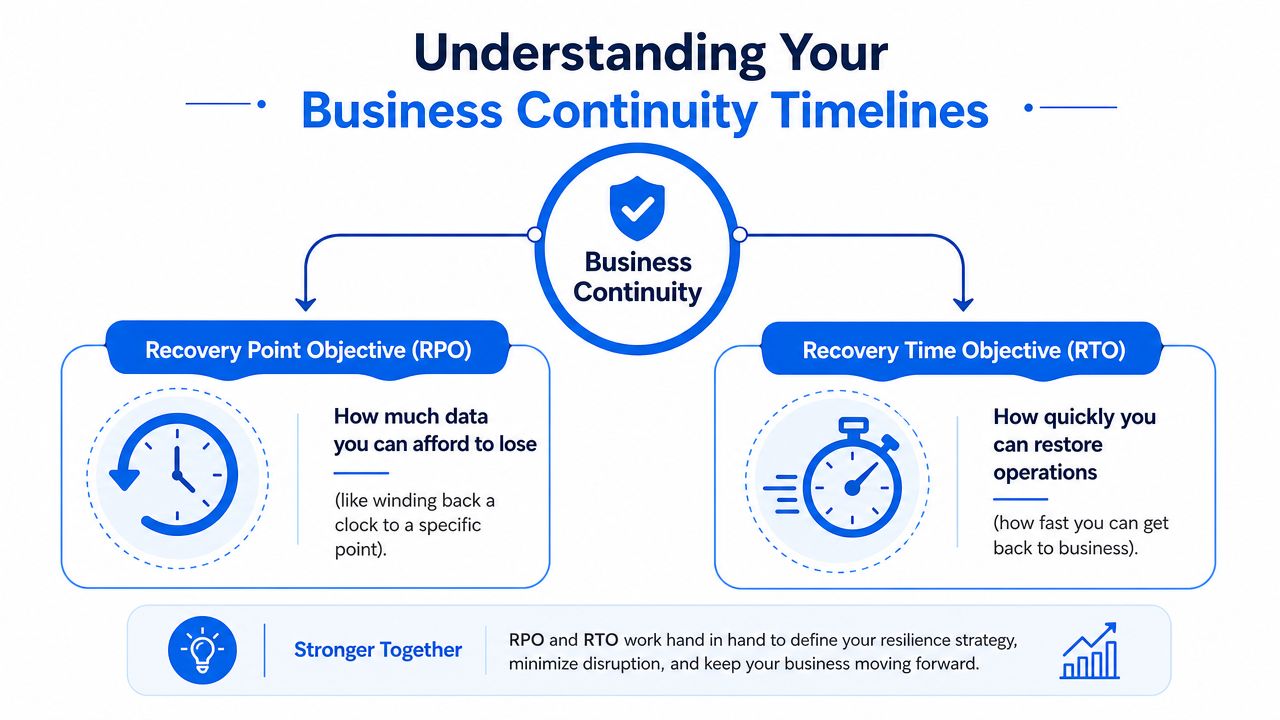
A backup plan starts making sense when you stop talking about terabytes and start talking about time. Two terms matter here. RPO and RTO.
They sound technical, but they're really business decisions.
RPO is your rewind point
Recovery Point Objective is how much data loss you can live with. Think of a bank machine that goes down. RPO asks, “What's the latest confirmed transaction we can recover to?” If the answer is one hour ago, then anything entered after that point may need redoing.
For a busy online retailer, a long rewind point is painful because orders, stock changes, and customer messages move all day. For a small consultancy, losing a short block of recent edits may be frustrating but manageable. The point is to decide this deliberately, not by accident.
RTO is your get-back-to-work time
Recovery Time Objective is how long the business can be disrupted before the damage becomes unacceptable. Same bank analogy. RTO asks, “How quickly can we get the machine working again?” In your business, that could mean restoring file access, line-of-business software, phones, email, or remote login.
The lower your RTO, the more disciplined your backup and recovery setup needs to be. Fast recovery usually means automation, good documentation, tested restores, and clear priority order.
The reason this matters for SMEs is simple. The Cyber Security Breaches Survey 2024 figures referenced here state that 50% of businesses reported a cyber security breach or attack in the previous 12 months, and micro businesses were less likely than larger firms to have formal incident response arrangements. In practice, that means smaller firms often rely heavily on backups when something goes wrong.
If you've never set an RPO or RTO, your real targets are being set for you by whatever your current backup system happens to manage.
A sensible way to think about it is by business function:
- Email and shared files often need quick recovery because most staff depend on them.
- Accounts systems may tolerate a slightly slower restore, but not if payroll or invoicing is due.
- Archived data can usually have a looser target than live operational systems.
- Customer-facing systems need the shortest tolerances because downtime is visible immediately.
Once those timelines are clear, the right backup frequency and restore method become much easier to choose.
Testing Your Backups The Difference Between Hope and Certainty
The biggest weakness I see isn't that businesses ignore backup. It's that they trust backup software messages far too easily. A green tick in a console tells you a job completed. It doesn't prove the restore will work under pressure.
That's why the phrase “backup is not recovery” matters so much. The guidance discussed here warns that recovery depends on more than stored copies. Access constraints, dependencies, credentials, isolation from attackers, and recovery sequencing can all block a successful restore.
Why backup jobs can still fail recovery
A backup can exist and still be useless. That happens more often than owners expect.
Common examples include:
- Missing application consistency: Files restore, but the database behind the application is corrupt or incomplete.
- Broken permissions: The data comes back, but staff can't access the folders they need.
- Lost admin access: The backup platform is healthy, but nobody can log in because the only recovery account was tied to a locked mailbox or former employee.
- Infected restore points: Malware sat undetected long enough to contaminate older backups.
- No recovery order: Teams restore the wrong system first and then discover the dependency they needed was elsewhere.
Untested backup is organised optimism.
A proper recovery test exposes those problems while the business is calm, not when phones are ringing and clients are chasing updates.
Here's a useful explainer to watch before you build your own routine:
A testing routine an SME can actually stick to
You don't need an enterprise war room to test properly. You do need rhythm.
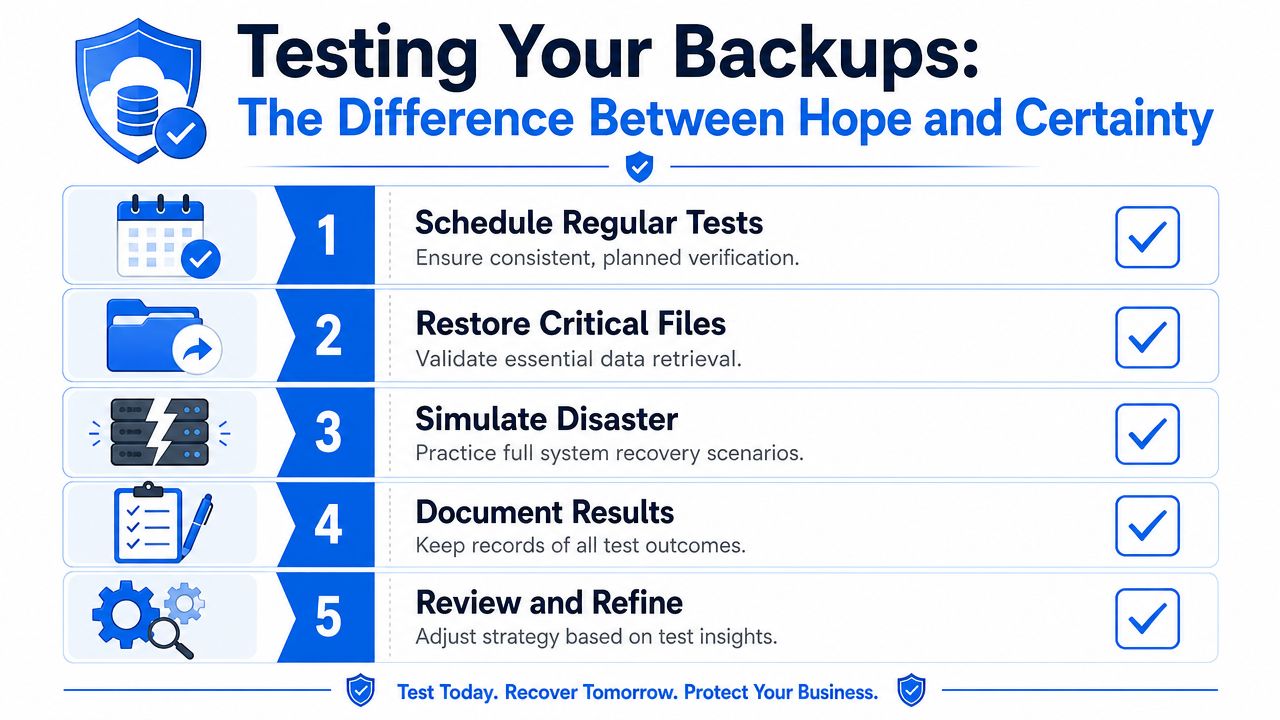
Monthly file restore
Pick a handful of critical files and restore them to a safe location. Open them. Check dates, permissions, and version history. This catches the basic failures quickly.
Quarterly application or server restore
Test the things people work from, not just loose documents. That might mean restoring an accounts package test instance, a virtual server, or a shared drive structure.
Annual recovery drill
Run a scenario as if the main server, cloud tenant, or office location were unavailable. Walk through who does what, which credentials are needed, and what order systems come back in.
Document every result
Record what restored, what failed, how long it took, and what had to be fixed. If nobody writes it down, the lesson gets lost and the same gap comes back next quarter.
Review changes after major IT work
New software, new servers, staff changes, or office moves all affect recovery. Backup plans go stale faster than people think.
Testing isn't bureaucracy. It's the point where business data backup turns into something you can rely on.
Navigating Costs and Compliance in the UK
Owners usually ask two questions once the risk is clear. What will this cost, and how does it sit with compliance?
Both are fair questions. Both are also easier to handle when the backup plan is designed properly from the start.
What compliance means for backup copies
If your business stores personal data, backup copies are still part of that responsibility. They aren't exempt because they're “just archives”. You still need to know where the data is, who can access it, how it's protected, and how long it's retained.
In practice, that means a few sensible rules:
- Restrict access tightly: Backup consoles and storage should only be available to authorised staff or your IT provider.
- Encrypt backup data: That applies both in storage and while it's being transferred.
- Set retention deliberately: Keeping everything forever is rarely a good policy. It increases clutter, cost, and the amount of historical data you need to manage.
- Record what's covered: If someone asks what systems contain personal data, “somewhere in the backups” isn't a defensible answer.
- Plan for deletion requests carefully: Backups are meant for recovery, not day-to-day search and retrieval. The practical handling of deletion requests needs thought so you don't break recoverability while still managing personal data responsibly.
A good rule for SMEs is to treat backup like any other sensitive system. If it contains customer records, HR data, emails, contracts, and accounts information, it deserves the same level of care as your live environment.
What actually drives backup cost
Backup pricing varies, but the moving parts are usually straightforward once you know what to ask.
| Cost driver | What it changes |
|---|---|
| Data volume | More data usually means more storage, longer backup windows, and heavier restores |
| Retention period | Keeping more historical versions increases storage use |
| Backup frequency | More frequent capture improves recovery point but increases system and storage demands |
| Type of environment | A few laptops are simpler than servers, cloud apps, databases, and virtual machines |
| Recovery expectations | Faster recovery often needs better local storage, better tooling, or a hybrid design |
| Management level | Fully managed backup, monitoring, and testing cost more than a basic self-managed setup |
Reality check: Cheap backup often becomes expensive during the restore. The invoice you want to avoid is the one created by downtime.
The mistake is buying on headline price alone. Ask how restores are handled. Ask whether Microsoft 365, Google Workspace, servers, endpoints, and key applications are all included. Ask what gets tested, who gets alerted on failures, and how long a real restore is likely to take.
That's where cost starts to make business sense. You're not buying storage. You're buying recovery capability.
Your Practical Backup Implementation Checklist
Most firms don't need a grand redesign. They need a clean, honest checklist and the discipline to follow it.
A workable checklist for a busy SME
List the systems that run the business
Start with live operational value, not just storage size. Shared files, email, accounts, CRM, line-of-business apps, laptops, and admin credentials all belong on the list.Rank what must come back first
Don't treat every system equally. If staff can work without archives for a day but not without email or the accounts platform, that priority order should be written down.Set realistic recovery expectations
Decide how much recent work you can afford to lose and how long each key system can be unavailable before the business struggles.Choose the backup model that fits how you operate
If you need fast restores in the office, local backup may matter. If site loss is a concern, off-site copies matter. For most SMEs, hybrid is the practical middle ground.Apply the 3-2-1-1-0 approach properly
Don't just tick the box. Make sure one copy is away from the office, one copy is isolated from tampering, and verification is part of the process.Automate backups and monitor failures
Human memory is not a control. Scheduled tasks, reporting, and alerting are.Write a recovery plan in plain English
Include who to call, where credentials are stored, what order systems come back in, and how staff work during the outage.Test restores on a schedule
File restore, system restore, and a wider recovery drill should all exist in the calendar.
When to stop patching it together
If your firm handles sensitive client data, depends on multiple cloud and on-site systems, or doesn't have someone in-house who can manage backup and recovery calmly, it's time to get specialist help. The danger point is when the setup has grown bit by bit and nobody can say with confidence what would happen after a serious incident.
For businesses across London and Essex, that's usually when a managed local provider becomes the sensible option. You want engineers who can look at the full picture, not just sell storage.
If you want that burden off your desk, Networking2000 can help design, manage, and verify a backup and recovery setup that fits the way your business works. They support firms across London and Essex with practical, jargon-free IT help, so you're not left guessing whether your backups would hold up on a bad day.

