You've probably got this already. One app for accounts. Another for quotes. A separate system for jobs. Email and files in Microsoft 365 or Google Workspace. Staff messaging in Teams, Slack, or WhatsApp. Then someone exports a spreadsheet, someone else retypes it, and nobody is fully sure which version is right.
That's the point where “just getting another app” stops helping. For most UK small businesses, the main issue isn't a lack of software. It's a lack of connection, control, and clarity across the software you already rely on.
Table of Contents
- Beyond App Chaos What Apps for Enterprise Mean for Your Business
- The Core Categories of Business Applications
- How to Choose the Right Apps for Your SMB
- Cloud vs On-Premise Deciding Your Deployment Strategy
- Integrating Your Apps into a Unified Ecosystem
- Best Practices for Security and Management
- Your Next Steps Get Expert Help from a Local IT Partner
Beyond App Chaos What Apps for Enterprise Mean for Your Business
A lot of owners hear apps for enterprise and assume it means software built for huge corporates with giant IT teams. In practice, it usually means something much simpler. Your key systems work together, your staff can get to what they need without jumping through hoops, and the business can trust the information it sees.
That matters because most firms don't suffer from having too little software. They suffer from fragmented software. Industry reporting found that enterprise environments average 897 applications, yet only 28% of those applications are integrated. The same reporting notes that departments often use 40 to 60 different applications, creating the sort of fragmentation that slows work and makes growth harder to manage, as covered by Integrate.io's data integration reporting.
For a small business, the symptoms are easy to spot:
- Sales and ops don't match: A salesperson promises a date that the delivery team can't see.
- Finance chases missing detail: Invoice data sits in email or someone's notes.
- Managers build reports by hand: Staff pull figures from several systems into one spreadsheet.
- New starters struggle: They need multiple logins, separate bookmarks, and tribal knowledge to do basic tasks.
Practical rule: If staff are copying data from one system into another, your software stack is creating admin instead of removing it.
The fix isn't always a full replacement project. Sometimes the right move is to keep the systems that already work and connect them properly. That's where a more deliberate enterprise app approach helps. You stop thinking in terms of isolated purchases and start thinking in terms of business workflow.
If you want a plain-English view of what that looks like in practice, MakeAutomation automation strategies gives a useful overview of how firms reduce manual steps across systems. That's the shift that matters. Better apps aren't just shinier tools. They're part of a digital setup that removes repeat work, reduces confusion, and gives you fewer places for mistakes to hide.
The Core Categories of Business Applications
The UK's enterprise software market was forecast to generate about US$17.3 billion in 2025, which shows these systems are part of mainstream business operations rather than a specialist niche, according to Statista's enterprise software outlook.
That market is broad, so it helps to sort business applications into jobs rather than buzzwords.
What sits at the front of the business
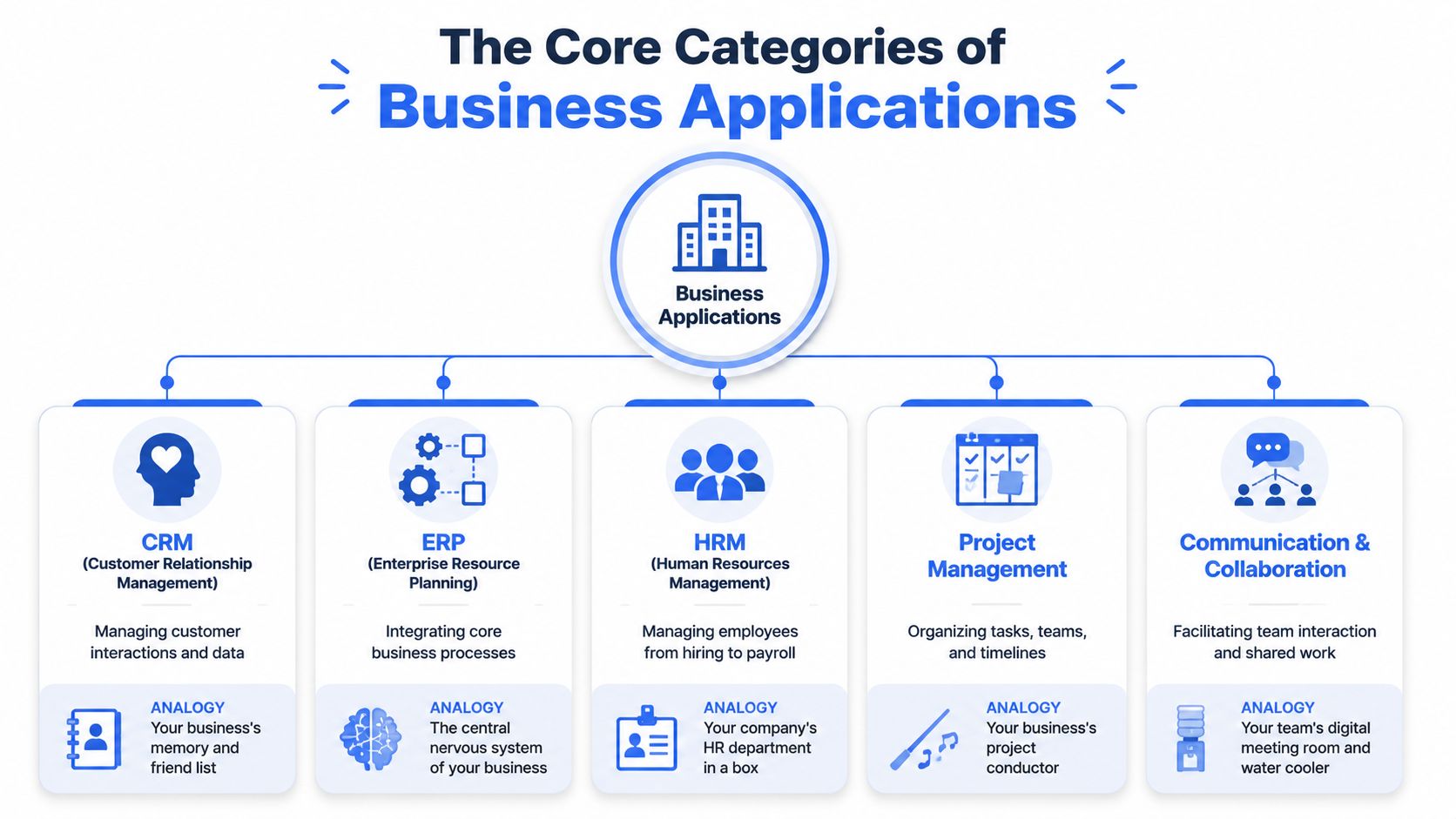
A CRM such as Salesforce, HubSpot, or Microsoft Dynamics 365 is your business's memory for customer relationships. It tracks enquiries, follow-ups, quotes, and account history. If your team relies on inboxes and memory to manage sales, a CRM usually pays for itself in consistency alone.
Communication and collaboration platforms like Microsoft Teams, Slack, and SharePoint keep conversation and shared documents in one place. Done well, they cut down on scattered email chains and “can you send that file again?” messages. Done badly, they become yet another silo.
Project management tools such as Asana, Trello, Monday.com, or Jira help teams organise work by task, owner, and deadline. These are useful when jobs pass between people or departments. They're less useful when nobody agrees on process in the first place.
Good software doesn't fix a broken process. It makes a clear process easier to follow.
What keeps the back office running
An ERP system, such as SAP Business One, NetSuite, or Dynamics 365 Business Central, is closer to the central nervous system of the business. It ties together finance, purchasing, stock, operations, and sometimes customer data. For a growing firm, this is often the point where separate systems stop coping.
HRM software handles employee records, leave, onboarding, payroll links, and policy documents. Tools in this category can remove a surprising amount of admin, especially where hiring and compliance tasks are still handled across email, paper forms, and spreadsheets.
Business intelligence tools like Power BI and Tableau sit on top of your data and turn it into dashboards and reports. They don't usually create the data. They help you understand it. If your reporting still depends on one person knowing how to build the monthly spreadsheet, BI is usually the missing layer.
A simple way to think about it is this:
| Category | Main job | Common example |
|---|---|---|
| CRM | Manage customer relationships | HubSpot, Salesforce |
| ERP | Run core business operations | NetSuite, Business Central |
| HRM | Manage employee processes | BambooHR, HiBob |
| Project management | Organise tasks and delivery | Asana, Jira |
| Collaboration | Help teams communicate and share work | Teams, SharePoint |
Most SMBs don't need every category at once. They need the right mix, chosen in the right order.
How to Choose the Right Apps for Your SMB
Buying business software is where many firms incur hidden financial losses. The demo looks polished, the feature list is long, and the monthly price seems manageable. Then the team avoids using it, the setup drags on, and someone discovers it doesn't fit a key process.

Start with the work not the demo
The better approach is to review how work moves through your business. Start with one process that causes friction, such as onboarding a customer, approving purchase requests, or issuing invoices after a job is complete. Then ask which app will make that process simpler and more reliable.
Check these points before you commit:
- Fit for your current workflow: Can it handle the way your team really works, not the idealised version shown in the sales call?
- Usability: Will non-technical staff use it without constant prompting?
- Support quality: When something breaks, can you get help quickly and clearly?
- Growth path: Will it still suit you if you add staff, locations, or services?
- Exit risk: Can you move your data out if the product stops fitting?
A cheap app that creates duplicate admin isn't cheap. A powerful app that nobody adopts isn't powerful.
The hidden costs buyers miss
One of the most overlooked checks is accessibility. Buyers often treat it as a compliance note for larger organisations. That's a mistake. Accessibility problems in enterprise apps can create hidden costs through legal liabilities, brand damage, and reduced efficiency, and building accessibility in from the start is far more cost-effective than retrofitting later, as explained in Telerik's review of the hidden costs of inaccessible apps.
In day-to-day terms, inaccessible software creates support calls, workarounds, and training problems. It can slow down staff who use keyboards rather than a mouse, those who need clearer contrast, or teams relying on assistive tools. Even if nobody raises it formally, the business still pays for the friction.
Ask vendors practical questions:
- Can staff complete key tasks without relying on a mouse?
- Are forms, menus, and alerts clear and consistent?
- Does the supplier treat accessibility as part of product design or as an afterthought?
- Can they show how updates are tested before release?
If a vendor can only talk about features, not adoption, support, and maintenance, you're not hearing the full cost of ownership.
The right app for an SMB is rarely the one with the longest feature sheet. It's the one your team can use confidently, your processes can depend on, and your IT setup can support without heroic effort.
Cloud vs On-Premise Deciding Your Deployment Strategy
Where your software lives matters almost as much as what it does. For most small businesses, the decision comes down to cloud SaaS or on-premise deployment. Both can work. The right choice depends on your budget, internal IT capacity, security preferences, and how your staff need to access systems.
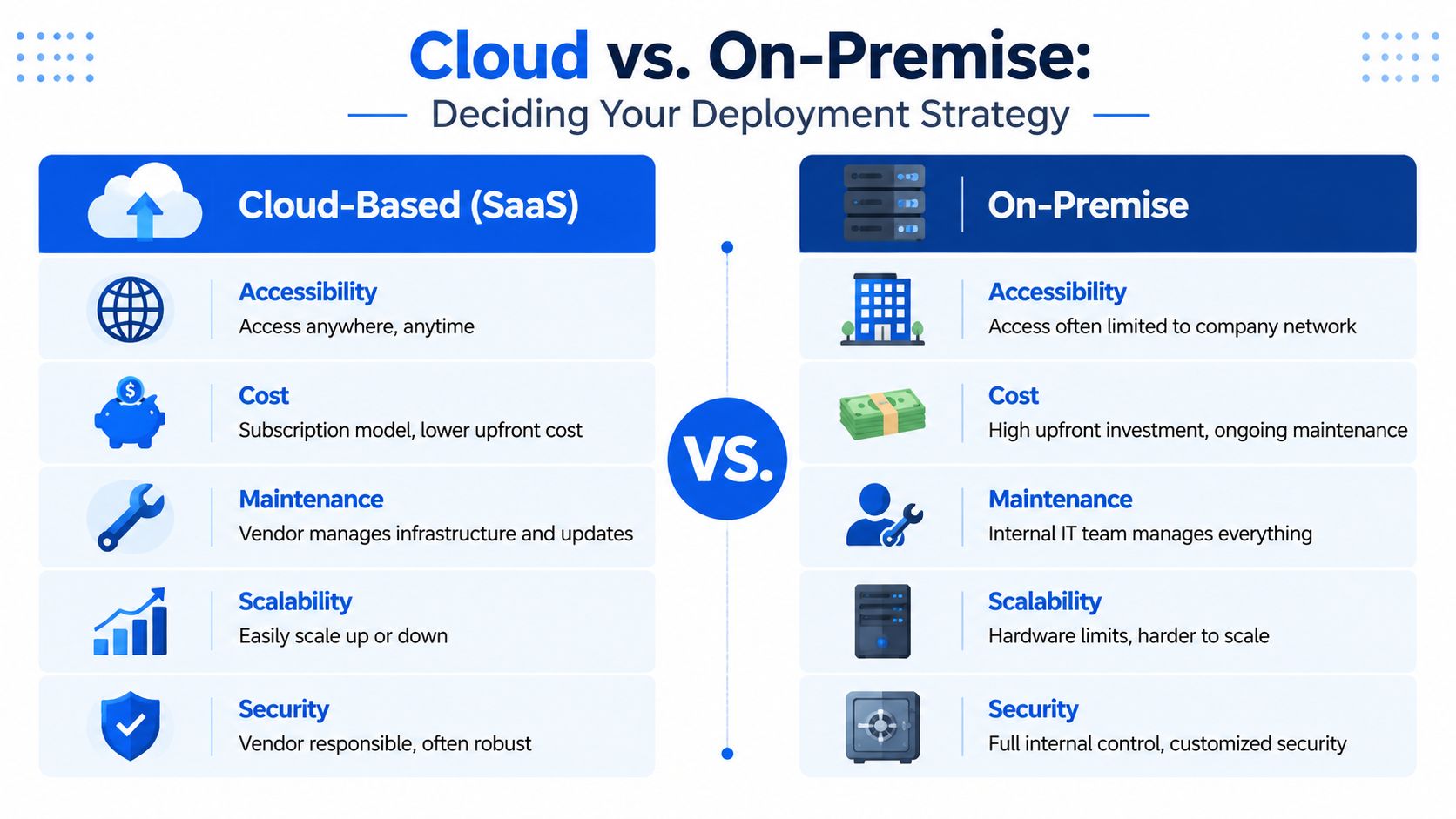
A quick visual comparison helps:
Where cloud works well
Cloud software suits businesses that want quicker rollout, easier remote access, and less hands-on infrastructure management. Products like Microsoft 365, Xero, HubSpot, and Business Central Online are popular for a reason. Staff can log in from different locations, updates arrive through the vendor, and you don't need to maintain your own application servers.
Cloud is often a strong fit when:
- Your team is mobile or hybrid: Staff need access from home, site visits, or multiple offices.
- You want predictable upkeep: The vendor handles platform updates and most core maintenance.
- You need flexibility: Adding users or services is usually simpler than buying and installing new hardware.
Later in the decision process, many owners find it useful to hear a plain walkthrough before they choose. This video gives a straightforward overview of the trade-offs involved:
Where on-premise still makes sense
On-premise software can still be the better option where a business needs tighter internal control, has specialist legacy systems, or runs workloads that are awkward to move. Some firms also prefer to keep certain systems close to existing infrastructure because of operational habits or integration constraints.
Here's the practical comparison:
| Factor | Cloud SaaS | On-premise |
|---|---|---|
| Upfront cost | Usually lower to start | Usually higher at the beginning |
| Maintenance | Mostly handled by vendor | Managed by your internal IT or provider |
| Access | Good for remote and multi-site use | Often easier inside the business network |
| Control | Shared with vendor model | More direct internal control |
| Scaling | Usually simpler to expand | Often tied to hardware and setup effort |
Choose the model your team can support properly. A perfect deployment strategy on paper still fails if nobody can maintain it well.
A lot of SMBs end up with a mixed setup. Email and collaboration sit in the cloud, while a line-of-business system or file workflow remains on-premise for a period. That's normal. What matters is having a deliberate reason for each choice, not just inheriting old decisions and hoping they still make sense.
Integrating Your Apps into a Unified Ecosystem
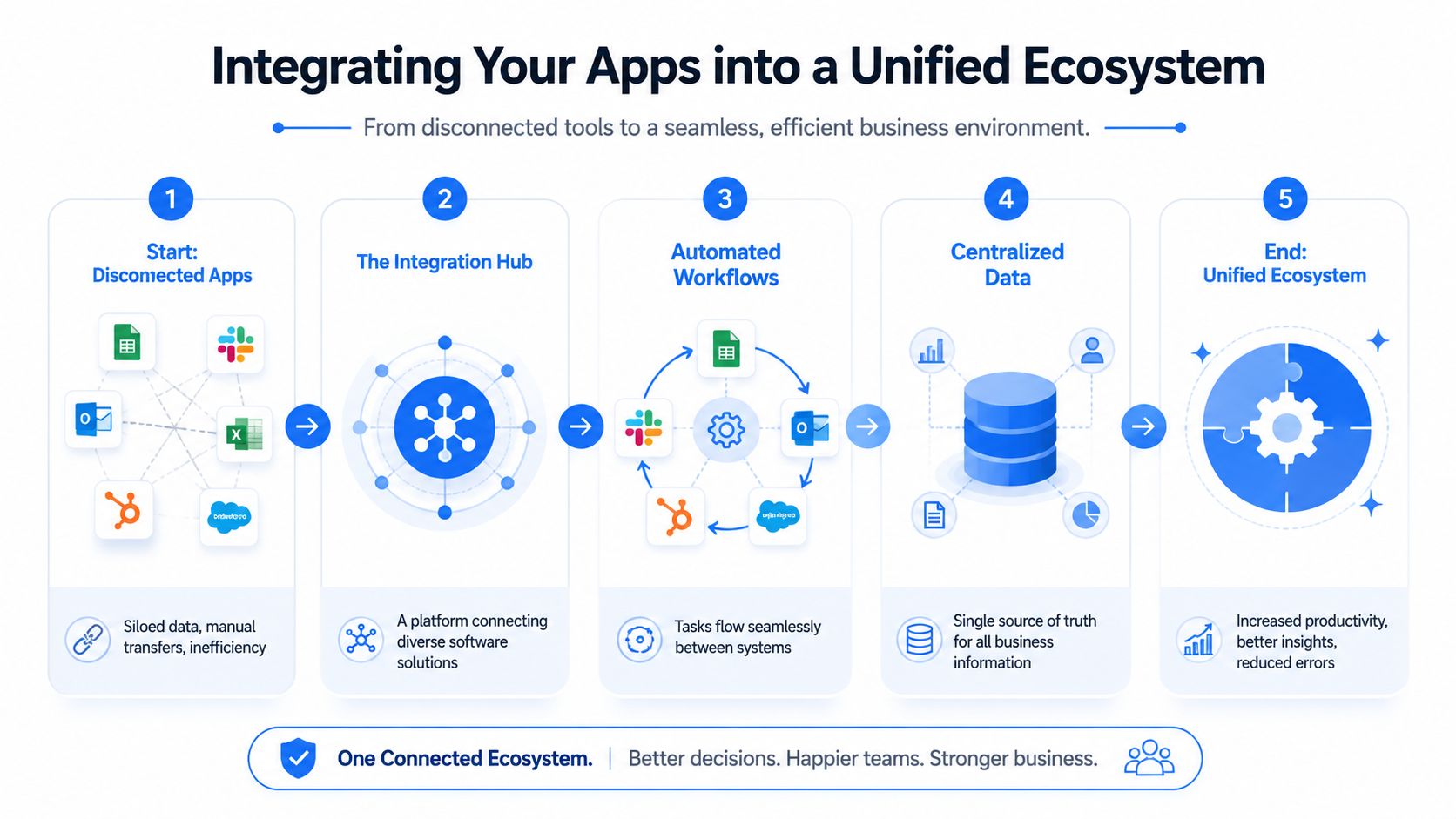
Most software problems don't start with bad products. They start when decent products are left to operate in isolation. Sales enters customer details in one system, accounts re-enters them in another, and operations keeps a third version in a shared spreadsheet.
That's why integration matters more than the launch itself. Effective enterprise apps must be designed with future scaling, APIs, and storage in mind, and in practice, getting an app to fit with existing software is often harder than the initial rollout, as noted in Mango IT's guide to building enterprise apps.
Integration is where the real value appears
An integrated setup means data moves automatically or predictably between systems. That could be a new customer in HubSpot creating a record in your accounts package, a support ticket triggering a task in Microsoft Teams, or stock data flowing from your ERP into reporting dashboards.
The technical piece behind this is often the API, which is a controlled way for one system to exchange information with another. You don't need to write code yourself to benefit from that. But you do need to ask software suppliers whether the app connects cleanly with the tools you already depend on.
A useful way to think about your environment is as a stack rather than a pile of apps. Toolradar's guide to software stacks is helpful on that point because it explains how different layers of software fit together instead of competing for attention.
What a joined-up stack looks like
A practical app ecosystem usually includes a few shared rules:
- One trusted identity layer: Staff should sign in through a consistent access system where possible.
- Clear data ownership: Decide which platform is the master record for customers, products, staff, and finance data.
- Controlled automations: Automate repeat steps, but only after the underlying process is stable.
- Documented connections: Someone should know what talks to what, and what breaks if a link fails.
Integration should remove choices, not create more of them. Staff shouldn't need to guess where a record lives.
One common mistake is connecting everything to everything. That creates fragile dependencies and hard-to-trace failures. A cleaner approach is hub-and-spoke. Your core systems become the centre, and secondary tools connect through managed interfaces rather than ad hoc workarounds.
If you're judging apps for enterprise, this is often the deciding factor. Not whether the software looks impressive in isolation, but whether it helps create a calmer, more coherent operating environment across the business.
Best Practices for Security and Management
Security for business apps isn't just about stopping attackers. It's also about stopping confusion, lockouts, accidental access, and downtime caused by poor housekeeping. The firms that manage this well usually aren't doing anything flashy. They're doing the basics consistently.
For enterprise apps, especially mobile ones, secure back-end integration is the most critical engineering constraint. Protecting sensitive data with strong security controls and maintaining compatibility across devices drives complexity and long-term reliability more than front-end features, according to TMA Solutions' guidance on enterprise mobile app development.
Control access before problems start
Access management is where many SMBs can improve quickly. Staff often accumulate permissions over time, especially after role changes. Former employees may still have accounts. Shared logins linger because they feel convenient. All of that creates avoidable risk.
Use a simple control checklist:
- Give access by role: Staff should only see the systems and data they need for their job.
- Review leavers and movers promptly: Remove or change access as soon as people leave or switch duties.
- Avoid shared accounts: They make accountability harder and security weaker.
- Use single sign-on where possible: Fewer passwords usually means fewer unsafe workarounds.
For owners who want a plain-language view of what good SaaS protection should cover, Saaspa.ge security provides a useful overview of the areas worth checking when cloud services are part of the mix.
Treat management as an ongoing job
Good app management also covers updates, backups, device policies, and support habits. If staff use company systems on phones or tablets, those devices need rules around access, screen locks, and what happens if one is lost. If a supplier rolls out an update, someone needs to know whether it changes key workflows.
A practical operating routine usually includes:
| Area | What good looks like |
|---|---|
| Updates | Tested and applied in a controlled way |
| Backups | Critical data can be restored when needed |
| Devices | Company access is managed on mobiles and tablets |
| Monitoring | Failed logins, sync problems, and outages are noticed quickly |
Security works best when it's boring. Clear permissions, clean records, tested backups, and routine checks prevent most avoidable pain.
The main point is simple. Security isn't a one-off setup task after the app goes live. It's part of keeping the business operational every week.
Your Next Steps Get Expert Help from a Local IT Partner
If your business feels buried under logins, duplicate systems, manual updates, and software that doesn't quite join up, the answer usually isn't “buy more tools”. It's to simplify the setup you've already got and make future decisions with a clearer standard.
Start with three actions:
- List your current core apps and who uses them.
- Mark the points where data is retyped, exported, or chased by email.
- Decide which systems are essential, which are duplicating work, and which need connecting properly.
That exercise usually shows where the real friction sits. Sometimes the answer is replacing one weak link. Sometimes it's integrating the systems that are already in place. Sometimes it's tightening security and access so staff can work with less confusion.
For many SMBs in London and Essex, this is difficult to do well while also running the business day to day. A local IT partner can help you assess what's worth keeping, what should move to the cloud, what needs better integration, and how to support it without adding fresh complexity.
The best outcome isn't a bigger software estate. It's a cleaner one. Fewer workarounds. Better visibility. More reliable processes. Less time spent untangling preventable IT problems.
If you want jargon-free advice on choosing, integrating, securing, and supporting business software, Networking2000 can help you build a practical plan that fits your business, your budget, and the way your team operates.

