Your staff are trying to teach, your pupils are trying to log in, and the network picks that exact moment to crawl. A class loses momentum. The office team can't pull the right student data quickly. Safeguarding alerts sit in separate systems that nobody fully trusts. On paper, the school has plenty of technology. In practice, the digital environment is unstable.
That's the primary problem with IT for education. Most schools don't fail because they lack apps or devices. They struggle because the underlying infrastructure isn't strong enough to support daily use, secure enough to protect data, or organised enough to scale. Leaders often buy visible technology first and only later discover the hidden dependencies: switching, wireless coverage, permissions, backups, filtering, audit trails, support capacity, and staff training.
If you're on a leadership team, treat this as an infrastructure issue first. Reliable IT for education starts behind the scenes. When the foundation is weak, every classroom tool becomes harder to use, harder to secure, and harder to justify.
Table of Contents
- Beyond Broken Wi-Fi Understanding the IT Challenge in Schools
- What Is IT for Education Really
- The Core Components of a Modern School IT System
- Best Practices for IT Deployment and Management
- Smart Budgeting and Future-Proofing Your School IT
- Navigating Compliance Safeguarding and Data Protection
- How a Local IT Partner Can Help Your School Succeed
Beyond Broken Wi-Fi Understanding the IT Challenge in Schools
A common school IT failure doesn't start with a cyber incident or a major outage. It starts with a normal lesson. Pupils open laptops. Half connect slowly. An online quiz stalls. A teacher switches to paper because that's faster than waiting. The technology technically exists, but it isn't dependable enough to use with confidence.
That gap between owning technology and operating it well is the implementation gap. It's where many schools get stuck. Ofsted reported that in 2023/24 many schools were still rebuilding after pandemic-era disruption, and the Department for Education's standards show that effective use depends on reliable infrastructure and trained staff, not just software, as discussed in this implementation gap overview.

Why the visible problem is rarely the real problem
Leadership teams often see the symptom first:
- Slow lessons: Interactive platforms buffer, logins fail, and teachers stop relying on them.
- Admin friction: Office staff duplicate work because systems don't integrate cleanly.
- Safeguarding anxiety: Internet access exists, but filtering, monitoring, and access controls feel inconsistent.
- Support overload: The same faults keep returning because nobody addresses the root cause.
The instinctive response is to buy another tool. That's usually the wrong move.
Practical rule: If teachers don't trust the network, they won't build lessons around digital tools.
Schools need to stop thinking in terms of isolated purchases and start thinking in terms of a digital environment. That means coverage, switching, segmentation, permissions, resilience, support processes, and documented ownership. If those basics are weak, every new platform adds complexity without adding confidence.
The schools that get this right aren't necessarily the ones with the most technology. They're the ones with the fewest unpleasant surprises on a normal Tuesday morning.
What Is IT for Education Really
IT for education isn't just a stockroom full of laptops, a handful of cloud subscriptions, and a Wi-Fi password written on a whiteboard. It's the school's digital nervous system. It connects classrooms, offices, safeguarding processes, communications, assessment workflows, and leadership reporting. When it works, people barely notice it. When it fails, the whole organisation feels it immediately.
Consider a building's core utilities. You don't evaluate electricity by looking at one light switch, and you don't judge plumbing by one tap. School IT works the same way. Classroom devices, MIS access, wireless coverage, web filtering, printing, telephony, CCTV, door access, file permissions, backups, and cloud identity all depend on a joined-up foundation.
It's now core infrastructure, not an optional extra
The UK has treated digital capability in schools as a long-term priority for decades. The push reaches back to the BBC Micro era in the early 1980s, and later to the National Grid for Learning launched in 1998. That direction makes sense in a connected world. UNESCO reported that the global share of internet users rose from 16% in 2005 to 66% in 2022, and about 50% of the world's lower secondary schools were connected to the internet for pedagogical purposes in 2022, according to its technology in education report.
For school leaders, the conclusion is straightforward. Connectivity isn't a nice extra for occasional enrichment. It sits underneath teaching, homework, administration, remote collaboration, and parent communication.
The parts have to work as one system
A school may have good devices and still have bad IT for education. That happens when leaders buy components separately and never design the environment as a whole. A tablet programme fails if wireless coverage is patchy. A cloud MIS rollout frustrates staff if identity and access rules are messy. A new online homework platform creates complaints if home access, device policies, and support arrangements aren't clear.
A better approach is to map the whole estate:
- Teaching systems: classroom devices, displays, learning platforms, printing
- Administrative systems: MIS, finance, HR, admissions, reporting
- Operational systems: telephony, internet access, network hardware, cabling
- Protection layers: filtering, endpoint security, backups, permissions, logs
- People and process: onboarding, training, support, change control, supplier management
For schools thinking about digital skills pathways as well as infrastructure, BCS vocational qualifications are a useful example of how technical capability connects to education outcomes beyond simple device access.
Good school IT is boring in the best possible way. Lessons start on time, systems are available, and staff know what to do when something goes wrong.
If your current setup feels like a pile of separate decisions, that's the first sign it needs redesign.
The Core Components of a Modern School IT System
A modern school IT system should be easy to understand. It has a few essential parts, and each one affects daily teaching and operations. If one part is weak, the others start carrying the strain.
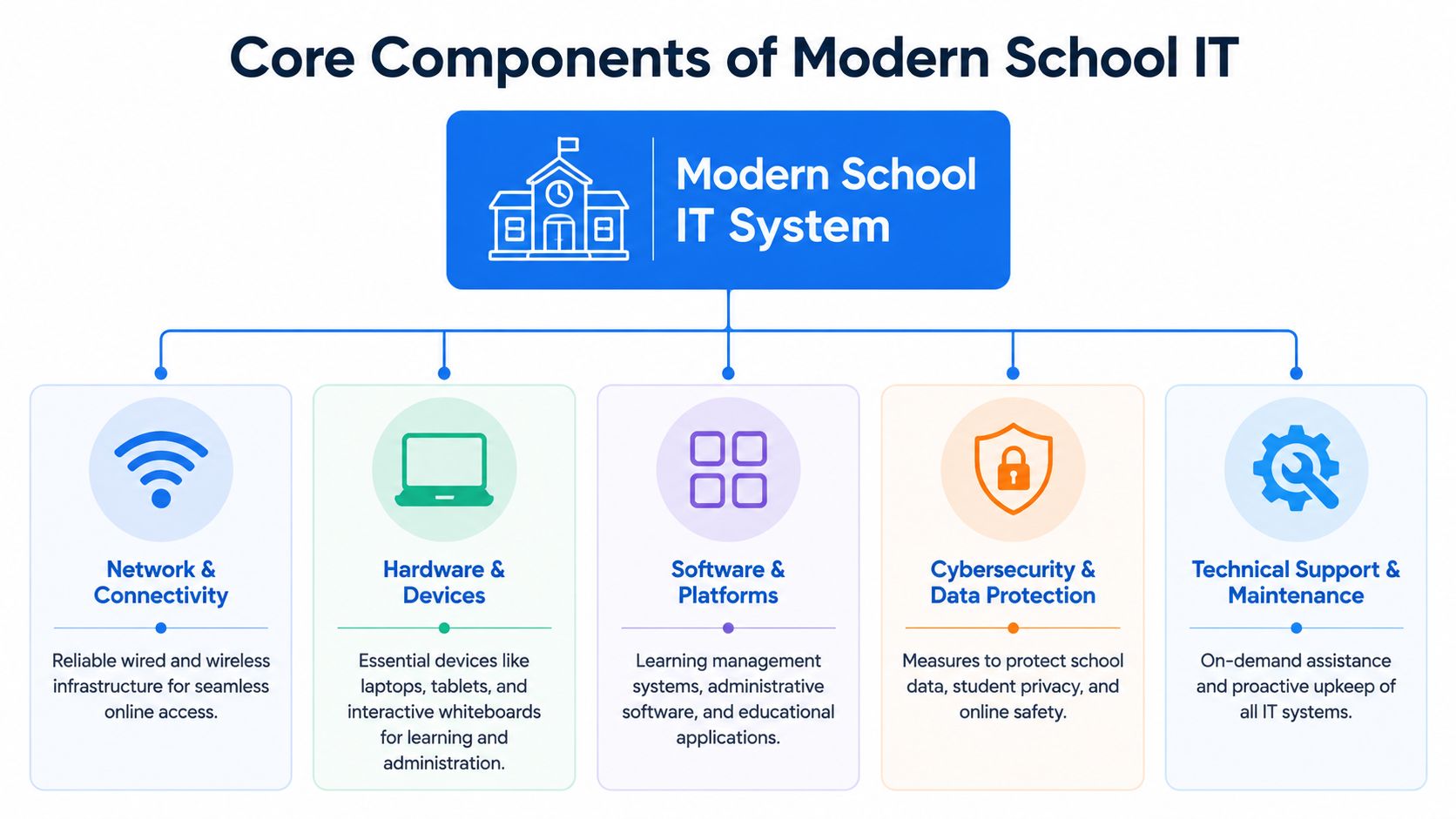
Network and connectivity
Start here, because everything else depends on it. The network is the data motorway for the school. That includes internet connectivity, internal switching, structured cabling, wireless access points, and how traffic is managed across the site.
A reliable network should do three things well. It should provide stable coverage in classrooms and offices. It should separate traffic sensibly, so guest users, staff devices, and operational systems don't all sit in the same unrestricted space. It should also be monitored, because a school can't fix what it can't see.
Ask blunt questions:
- Coverage: Do staff know where wireless dead spots are, or do they just work around them?
- Capacity: Can the network handle simultaneous logins, streaming, assessments, and cloud syncing?
- Resilience: Is there a clear response plan when a switch, firewall, or line fails?
- Visibility: Can someone quickly identify whether the problem is the device, the application, or the network?
If the answer to most of those is “not really”, your school doesn't have a digital strategy. It has a tolerance for disruption.
Devices and management
Devices are the visible part of IT for education, but they're only useful when management is disciplined. Schools usually operate a mix of staff laptops, pupil laptops or tablets, interactive displays, printers, office desktops, and specialist devices in departments or support areas.
The mistake is treating device procurement as the finish line. The essential work starts after delivery. Devices need standard builds, patching, user policies, account controls, warranty tracking, replacement planning, and a support process that staff consistently use.
A healthy device estate usually has these characteristics:
| Area | What good looks like |
|---|---|
| Provisioning | New starters get devices and access without manual chaos |
| Consistency | Similar users receive similar builds and permissions |
| Security | Lost devices don't automatically become data leaks |
| Lifecycle | Leaders know what needs replacing before failure becomes widespread |
Communications and telephony
Schools still underestimate communications infrastructure. Telephony is no longer just an office convenience. It affects parent contact, safeguarding escalation, site coordination, attendance follow-up, and incident response.
A poor phone system creates bottlenecks. Calls get missed. Staff invent workarounds. Critical messages rely on personal mobiles or ad hoc forwarding. A better setup uses properly managed VoIP, clear call routing, and sensible failover planning.
The phone system isn't separate from IT. In a school, it's part of operational safety.
Security across physical and digital systems
Security in schools has to cover both cybersecurity and physical protection. Leaders often split these into separate conversations, but day to day they overlap. The same site that needs secure accounts and filtered internet access may also need controlled entry points, CCTV coverage, and managed permissions for who can access what.
Many local providers can add practical value, because the work crosses network engineering and site systems. For example, Networking2000 provides managed firewalls, wireless networks, Cat5e and Cat6 cabling, VoIP telephony, CCTV, and access control. That kind of joined-up service matters because schools rarely benefit from treating network, communications, and premises security as unrelated projects.
A sensible security stack includes:
- Account security: strong identity management and sensible privilege levels
- Endpoint protection: managed controls on staff and pupil devices
- Web filtering and monitoring: aligned with safeguarding duties
- Backups and recovery: tested, not assumed
- CCTV and access control: connected to site operations, not bolted on later
The core question is simple. Can your school explain how a lesson connects, how a device is controlled, how a call gets through, and how a risk is detected? If not, the system is incomplete.
Best Practices for IT Deployment and Management
Schools waste money when they treat IT like a shopping exercise. Buying equipment is easy. Deploying it well is hard. The difference comes down to planning, sequencing, training, and support discipline.
Roll out in phases, not in a rush
The fastest way to create disruption is a big-bang rollout across the whole school. New wireless, new devices, new telephony, new filtering, and new software all at once sounds decisive. It usually produces confusion.
A phased approach works better because it exposes weak points before they affect everyone. Start with a pilot area, test real workflows, fix what breaks, then expand. That gives you cleaner feedback from staff and a more accurate picture of what the system needs under daily load.
Use a simple deployment order:
- Stabilise the foundation: cabling, switching, wireless, internet resilience
- Set identity and access rules: user groups, permissions, onboarding, leavers
- Standardise devices: builds, patching, remote management, security policies
- Layer in platforms: teaching tools, admin systems, telephony, specialist apps
Train staff on the workflow, not just the tool
Too many schools deliver technical demos and call that training. Staff don't need a feature tour. They need to know how the change affects the way they teach, record, communicate, and escalate problems.
That means training by role. Teachers need classroom-ready workflows. Office staff need reliable data handling and reporting routines. Senior leaders need visibility, approvals, and escalation paths. Site staff need practical guidance on communications and physical security systems.
Staff buy into new systems when the process gets easier, not when the manual gets longer.
Make training short, repeatable, and close to real tasks. Then document the few actions people perform most often: logging in, sharing files, taking registers, resetting passwords, reporting faults, and requesting access changes.
Move from break-fix to managed support
Reactive support is expensive because it waits for failure. In schools, failure rarely affects one person. It ripples into classrooms, offices, and safeguarding routines quickly.
A managed approach is stronger because it focuses on prevention:
- Monitoring: spot failing hardware, unusual behaviour, or saturation before users complain
- Maintenance: patch systems, review logs, retire obsolete kit, test backups
- Documentation: keep diagrams, asset lists, access rules, and escalation contacts current
- Review cycles: revisit priorities each term instead of letting systems drift
Break-fix support rewards firefighting. Managed support rewards stability. School leaders should prefer the model that reduces surprises, not the one that looks cheaper until the next outage.
Smart Budgeting and Future-Proofing Your School IT
Cheap IT often becomes expensive IT. Schools feel the pressure to stretch budgets, so it's tempting to pick the lowest upfront quote and hope it lasts. That approach usually ends with hidden support costs, rushed replacements, and staff time wasted on avoidable faults.

Budget for the full lifecycle
A sensible school IT budget covers the full lifecycle, not just the purchase price. Leaders should look at total cost of ownership. That includes installation, licensing, support, maintenance, repairs, replacement planning, user training, and disposal.
If a cheaper option needs more manual support, breaks consistency, or creates patchy coverage, it isn't cheaper. It's just moved the cost somewhere less visible.
A simple budgeting lens helps:
| Budget area | Question to ask |
|---|---|
| Acquisition | What are we buying and what dependencies come with it? |
| Operation | Who supports it, patches it, and manages access? |
| Risk | What happens if it fails during term time? |
| Replacement | Do we know when this becomes a problem rather than an asset? |
Choose procurement models that fit reality
Buying outright gives control, but it also creates replacement cliffs. Leasing can smooth costs and simplify refresh cycles, but only if the terms are clear and the device strategy is disciplined. There isn't one correct model for every school.
What matters is matching procurement to operational reality. If your school struggles to replace large batches of devices in one go, spreading cost may be sensible. If you have specialist hardware with long useful life, direct purchase may make more sense. The mistake is choosing a finance model before defining the technical standard.
For hardware refresh conversations, it also helps to think beyond acquisition. Schools replacing ageing devices should consider responsible disposal. A practical external reference is this practical guide for school e-waste, which is useful for planning end-of-life handling even though it isn't UK-specific.
A short explainer can help leadership teams frame the budgeting discussion:
Plan for AI before you buy AI
Schools are under pressure to experiment with AI tools, but budget decisions shouldn't start with the tool. They should start with governance. The Department for Education's 2024 guidance says schools should evaluate data protection, bias, age-appropriate use, accuracy, and safety before deployment, as summarised in this overview of technology research and AI considerations in education.
That has budget consequences. AI isn't just a software line item. It creates requirements around policy, permissions, staff guidance, monitoring, and sometimes stronger infrastructure. If your current environment is disorganised, AI will magnify the disorder.
The right question isn't “Can we afford this tool?” It's “Can we govern this tool properly once it arrives?”
Navigating Compliance Safeguarding and Data Protection
Compliance in schools shouldn't sit in a binder on a shelf. It has to be visible in the way systems are designed, accessed, monitored, and supported. If your policies say one thing and your permissions say another, the permissions are the actual policy.
Compliance has to be built into the system
Under UK GDPR, schools are data controllers for the personal data they collect. They're expected to apply principles such as data minimisation, accuracy, storage limitation, and confidentiality. In practical terms, that means school systems need role-based access, audit logging, retention rules, and sensible supplier checks before analytics or new platforms are introduced, as outlined in this education data governance guidance.
That should change how leaders buy and approve technology. Don't ask only whether a platform is useful. Ask:
- Access: Who can see what, and why?
- Logging: Can you trace sensitive actions after the event?
- Retention: How long is data kept, and who enforces that rule?
- Supplier diligence: What data leaves the school, and under what terms?
Safeguarding needs technical enforcement
Schools also have wider duties around safeguarding, filtering, monitoring, and safe use. Those duties don't sit only with pastoral staff. They rely on technical controls that function in daily use.
A few critical points stand out:
- Filtered access: web access should reflect age, role, and risk
- Account discipline: shared logins and over-permissioned accounts need to go
- Secure storage: sensitive files shouldn't sit in ad hoc locations
- Recovery planning: backups matter because availability is part of protection
One reason to take this seriously is that education-related data incidents are painfully concrete when they happen. The IPNA database leak is a useful reminder of what poor protection can look like when student records are exposed.
A safeguarding policy without technical enforcement is just a statement of intent.
Leaders should expect their IT environment to support compliance by default. If a system allows broad access, weak oversight, or unclear retention, it needs redesign, not another reminder email.
How a Local IT Partner Can Help Your School Succeed
A Monday morning failure tells you more about your IT partner than any procurement presentation. Registration has started. Classroom Wi-Fi is unstable. Phones are patchy. A door access issue is waiting at reception. Staff do not care which supplier owns which contract. They need one team that can diagnose the problem on site, fix the root cause, and stop the same issue happening again.

That is the implementation gap in plain terms. Schools rarely fail because they picked the wrong app. They fail because weak switching, poor wireless design, fragmented support, unmanaged permissions, or ageing infrastructure make good tools unreliable in daily use.
A local IT partner is often the better choice because they can assess the actual environment, not just the support ticket. They can inspect cabling, comms cabinets, wireless coverage, internet resilience, legacy hardware, and how separate systems interact across the site. In older school buildings, that detail matters. Thick walls, piecemeal upgrades, and years of workaround fixes do not respond well to generic remote support scripts.
A competent partner should start with the foundations. If staff are reporting slow lessons, inconsistent access, and recurring support issues, the first step is a technical review of the network, identity controls, device estate, and support process. Buying more laptops or another software platform before that review is a mistake.
Expect four things from a serious school IT partner:
- Infrastructure knowledge: wireless, switching, structured cabling, internet connectivity, and firewalls
- Joined-up support: clear escalation, on-site response where needed, maintenance, documentation, and ownership of recurring issues
- System coordination: IT support, telephony, CCTV, access control, and connectivity handled as one operating environment
- Practical planning: phased upgrades, lifecycle advice, procurement input, and a clear order of priorities
Schools should also expect plain speaking. If a provider cannot explain why a fault affects teaching, safeguarding, administration, or site operations, they are focused on tickets, not outcomes.
There is also a lifecycle issue that schools often leave too late. Device refreshes need a disposal plan, data wiping process, and responsible recycling route. Leadership teams reviewing hardware replacement should use a Practical guide for school e-waste as part of that planning, not after old equipment has already been stacked in cupboards.
For schools in London and Essex, Networking2000 is a practical local option because it covers the areas that usually break apart across multiple suppliers: IT support, networking, VoIP, connectivity, CCTV, and access control. That matters because school IT success depends less on product choice and more on whether the underlying environment is stable, secure, and properly supported.
The right partner gives your school a system that works as a whole. That is what staff notice. That is what leadership should buy.

