You've probably already got company data sitting on phones you don't own and rarely see.
A director checks email on a personal iPhone at home. A salesperson opens customer files on a tablet in the car between meetings. Someone in accounts uses a laptop that leaves the office every day and connects to café Wi-Fi, home broadband, and your Microsoft 365 account before lunch. For most small businesses in Essex, that isn't unusual anymore. It's normal.
The problem is that normal working habits create a blind spot. If a device is lost, if an app is out of date, or if a member of staff leaves with work data still synced to a personal handset, many businesses realise too late that they never had proper control in the first place. That's where mobile device management stops being an IT buzzword and starts being a practical business tool.
Table of Contents
- Your Business Data Is on the Move Are You in Control
- What Is MDM and Why Does Your SMB Need It
- The Core Features of an MDM Solution
- Choosing Your MDM Deployment Model
- Navigating Security and UK Compliance
- Your Step-by-Step MDM Implementation Plan
- Finding the Right MDM Partner in London and Essex
Your Business Data Is on the Move Are You in Control
A small business owner usually spots the issue in bits, not all at once. An employee asks for access to work email on a personal phone. Another stores files in a cloud app because it's quicker. Somebody leaves, and you're suddenly wondering whether business contacts, attachments, or saved passwords are still sitting on a device you can't reach.
That's the point where many firms start looking for security advice, password policies, and breach prevention resources. A simple visual like Freeform Company data protection helps frame the issue properly. Data protection isn't only about firewalls and antivirus. It's also about the phones, tablets, and laptops people use every day.
Why this is now a business control issue
Mobile device management gives you a way to see which devices access company systems, apply rules to them, and act remotely when needed. Without that, you're relying on goodwill and memory. Staff might mean well, but they won't all keep software updated, use strong passcodes, or separate personal apps from work data consistently.
The wider market shows how quickly this has moved from niche IT tooling into normal operations. The global MDM market was estimated at USD 7.67 billion in 2024 and is projected to reach USD 28.37 billion by 2030, with a 24.5% CAGR from 2025 to 2030, according to Grand View Research's mobile device management market report.
Practical rule: If staff can read company email, download files, or log into line-of-business apps on a device, that device needs a management policy, not just a password.
What control actually means
For an SMB, control doesn't mean spying on staff. It means being able to answer simple questions fast:
- Which devices have access: You need a clear list, not assumptions.
- What security settings apply: Passcodes, encryption, and app rules should be enforced.
- What happens if a device is lost: You should be able to lock it, wipe business data, or remove access.
- What happens when staff leave: Access needs to be revoked cleanly and quickly.
Businesses often delay this because they think MDM is only for large enterprises with hundreds of phones. It isn't. If you've got a handful of people using mobile devices for work, you've already got the problem MDM is designed to solve.
What Is MDM and Why Does Your SMB Need It
Mobile device management is easiest to understand if you stop thinking of it as a security product and think of it as a remote control for your business devices.
Instead of touching every phone, tablet, or laptop one by one, you use a central platform to tell those devices how they should behave. That can include requiring a passcode, turning on encryption, deploying a business app, removing access, or checking whether the device still meets your rules.
Think of it as a remote control for work devices

A useful way to picture it is this. Your staff have different devices, different habits, and different locations. MDM gives you one place to manage the work side of all that complexity.
That matters because mixed environments are messy. One person uses Android, another uses iPhone, a manager has a Windows laptop, and half the team works from home two days a week. If you don't standardise how those devices connect to your systems, every exception becomes a support issue and a security risk.
Microsoft describes its Windows model as an enterprise management framework that lets organisations centralise controls and apply security policies and business applications consistently. That matters because it helps enforce configuration baselines and reduces the risk of misconfiguration-driven incidents in distributed businesses, as outlined in Microsoft's Windows MDM overview.
What it changes day to day
In practical terms, MDM helps an SMB in three main ways:
- Security becomes consistent: You don't need to hope staff set devices up properly.
- Onboarding gets cleaner: New starters can receive the right apps and settings faster.
- Support gets simpler: Your IT team or provider can manage policies centrally instead of chasing one-off fixes.
The main gain is consistency. Most small firms don't get into trouble because they made one dramatic technical mistake. They get into trouble because ten small inconsistencies build up over time.
A short explainer can help if you want to see the concept in a more visual format:
Good MDM isn't about adding friction. It removes the need for staff to make security decisions they were never trained to make.
If you run a small company, that's the primary value. You replace ad hoc device use with rules that are clear, repeatable, and manageable.
The Core Features of an MDM Solution
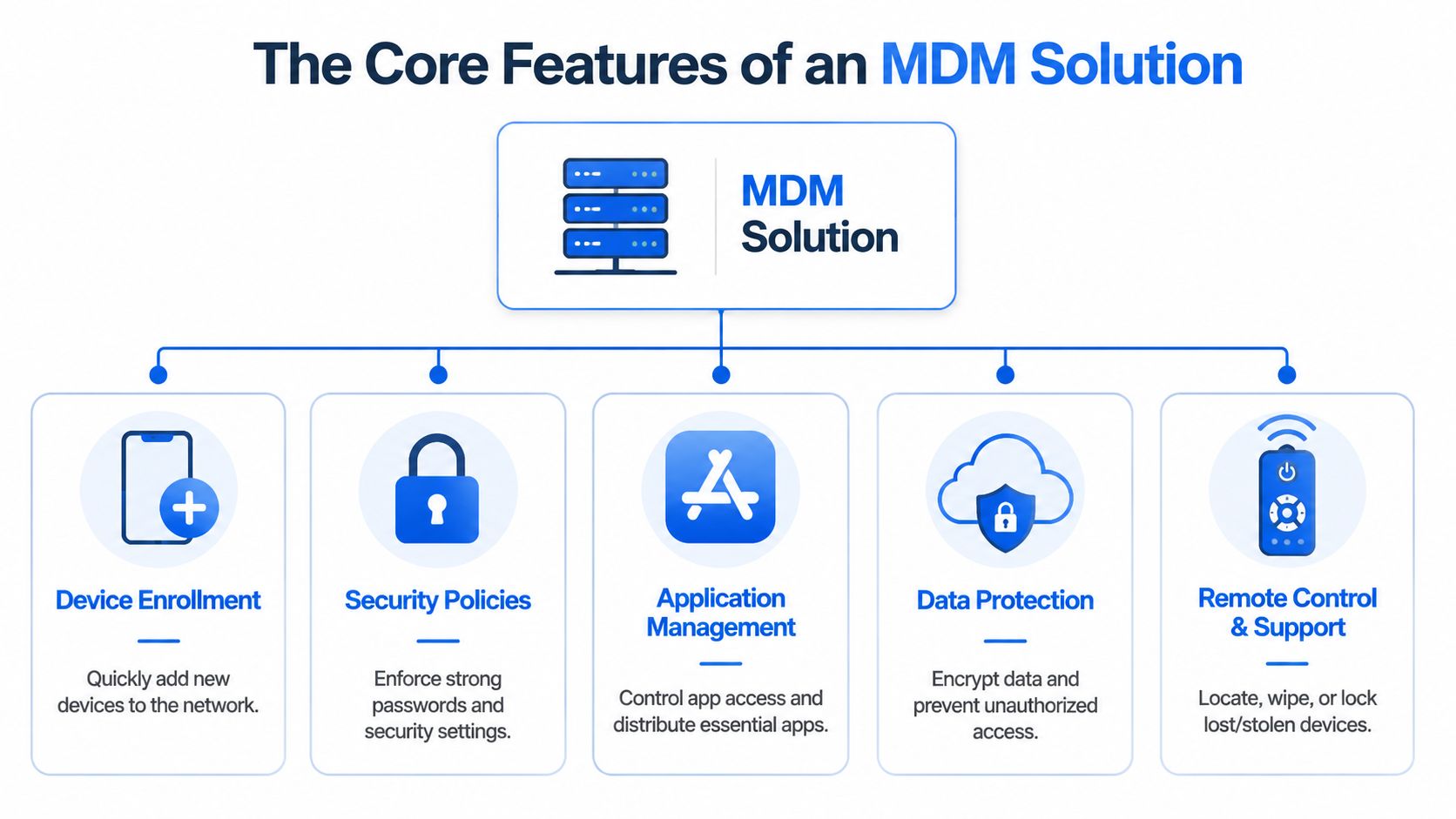
The feature list on vendor websites can get noisy quickly. For most UK small businesses, five capabilities do most of the heavy lifting.
Getting devices into management properly
Enrolment is the process of linking a phone, tablet, or laptop to your management platform. If enrolment is clumsy, staff resist it and devices slip through unmanaged.
For company-owned devices, enrolment should be predictable. For personal devices, it needs consent, clarity, and a clear explanation of what the business can and cannot control. This is often where projects go wrong. Firms focus on the software and forget the user experience.
A decent enrolment process should answer:
- Who is allowed to enrol: Staff, contractors, directors, or all three.
- Which devices are permitted: Company-owned only, or also BYOD.
- What happens at enrolment: What settings are applied and what work data is added.
- What happens at exit: What gets removed if the person leaves.
Setting rules that people cannot quietly ignore
Policy enforcement is where MDM earns its keep. This is the part that requires passcodes, encryption, screen lock settings, and approved configurations.
Without enforced policy, your rules are only suggestions. You can email a password standard to staff, but that doesn't mean anyone follows it. MDM turns policy into action.
Typical examples include:
- Passcode rules: Preventing weak device authentication settings.
- Encryption requirements: Protecting stored data if a device is lost.
- Access conditions: Blocking devices that fall out of compliance.
- Configuration baselines: Keeping settings standard across the business.
Controlling apps without making life difficult
Application management is about deciding which apps are needed for work, how they're delivered, and what data they can handle.
This is one of the biggest practical wins for a small business. If everyone needs the same email app, document app, or line-of-business tool, you can push it out centrally instead of relying on staff to install the right thing from memory.
What works well is a short approved app list tied to roles. What doesn't work is trying to control every single app on a personal device with no clear privacy boundary.
If your policy says “use approved apps only” but nobody has defined what approved means, staff will fill the gap themselves.
Keeping devices patched and safer
Security and patching matter because older software creates avoidable exposure. The point of MDM isn't that it replaces every security tool. It's that it gives you a central way to keep endpoints aligned.
For SMBs, the most useful outcome is a simple one. You can see which devices are current, which are behind, and which should no longer be trusted with company access.
Acting fast when something goes wrong
Remote actions are the emergency controls. If a device goes missing, a staff member leaves suddenly, or a tablet has been used in the wrong way, you need the option to respond without waiting for the hardware to come back.
Useful remote actions include:
- Locking a device
- Removing work access
- Wiping business data
- Refreshing configuration
- Checking compliance status
These tools are powerful, so they need governance. The mistake isn't having remote wipe. The mistake is using it without clear ownership, approval, and documentation.
Choosing Your MDM Deployment Model
Once you know what MDM does, the next decision is how you want it delivered. Most small businesses end up choosing between a cloud service, an on-premise setup, or handing the day-to-day management to a provider.
What each model looks like in practice
Here's the trade-off in a simple format.
| Factor | Cloud-Based (SaaS) | On-Premise | Managed Service Provider (MSP) |
|---|---|---|---|
| Upfront cost | Usually lower to start | Usually higher because you're running more yourself | Often predictable monthly cost |
| Ongoing maintenance | Vendor maintains the platform | Your business maintains the platform | Provider handles platform management |
| In-house expertise needed | Moderate | Higher | Lower |
| Scalability | Usually straightforward | Depends on your own setup | Usually flexible if the provider is organised |
| Control over environment | Good, within vendor limits | Highest direct control | Shared control with service agreement |
| Speed of rollout | Often faster | Can be slower | Depends on provider process and planning |
Cloud-based MDM suits a lot of SMBs because it removes infrastructure overhead. You don't need to host the management platform yourself, and updates are handled for you.
On-premise can still make sense if your business has unusual control requirements or established internal systems you don't want to move away from. The downside is that you're taking on more responsibility, and small firms often underestimate what that means in practice.
How small businesses usually decide
The better question isn't “Which model is best?” It's “Which model fits the team you have?”
If your business has no internal IT department, a self-managed on-premise approach usually creates more stress than value. If you've got one overworked IT person covering everything from printers to Microsoft 365, adding full MDM ownership may not be sensible either.
A managed service model often works well when you want:
- Clear accountability: Someone owns enrolment, policy setup, and troubleshooting.
- Less internal admin: Your team doesn't spend time learning every platform detail.
- Faster response: Device issues don't sit in a queue behind other business tasks.
- A practical rollout: Staff need help, communication, and follow-up, not just a licence.
What doesn't work is buying an MDM licence and assuming the project is done. The software is only part of the answer. Policy design, user communication, privacy boundaries, and support all matter just as much.
Navigating Security and UK Compliance
For UK businesses, MDM isn't only about security settings. It's also about whether your device policies are fair, proportionate, and properly explained.
That becomes especially important when staff use their own phones for work. A BYOD setup can be efficient and convenient, but it creates a tension that many small firms handle badly. The company wants control over business data. The employee wants privacy over a personal device. Both are reasonable.
BYOD is where policy mistakes happen
NCCoE notes that MDM can enrol either personal or corporate-owned devices, which is why ownership and consent matter so much. The ICO's guidance on workplace monitoring also pushes businesses toward transparency, data minimisation, and proportional controls. Taken together, they point to the same conclusion: effective MDM has to balance policy enforcement with privacy and GDPR-aligned governance, as discussed in the NCCoE overview of the benefits of mobile device management.
In plain terms, don't ask for more control than you need.
That means a personal phone used for email shouldn't automatically be treated like a fully company-owned device. If your policy allows BYOD, staff should know:
- What the business can see
- What the business cannot see
- What data is classed as work data
- What happens if the phone is lost
- What happens when employment ends
The fastest way to lose staff trust is to deploy device controls first and explain them later.
What good governance looks like
A sound setup usually separates work data from personal data as cleanly as the platform allows. It also limits monitoring to what the business needs for security and access control.
Good practice also includes the end of the device life cycle, not just the beginning. If you replace old handsets, remove company-owned mobiles from service, or retire stock after upgrades, disposal needs attention as well. A practical public guide like Reworx Recycling's disposal guide is useful because secure device governance doesn't end when the handset leaves the user's desk.
A policy that is effective in practice usually has these traits:
- Transparent wording: Staff can read it and understand it without legal translation.
- Proportionate controls: The rules fit the risk level of the device and role.
- Clear separation: Work data is managed without unnecessary intrusion into personal use.
- Joiner and leaver process: Access is added and removed in a repeatable way.
Businesses often worry that privacy-friendly MDM is weaker. Usually the opposite is true. When staff understand the boundaries and trust the setup, enrolment is smoother and compliance is better.
Your Step-by-Step MDM Implementation Plan
A good MDM rollout isn't a one-day technical job. It's a small operational change project. The technical side matters, but the planning and communication matter just as much.

Phase 1 and Phase 2
Phase 1 is planning. Start by listing which devices currently access business data, who owns them, and what those users need to do. Don't overcomplicate this. You're trying to identify risk, ownership, and access patterns.
Then write the ground rules. Decide whether you'll allow BYOD, what minimum security settings are required, what happens when a device is lost, and who approves exceptions.
Phase 2 is the pilot. Test the platform with a small group from different roles. Include at least one person who isn't technical, because they'll show you where the process is confusing.
Useful checks during the pilot:
- Enrolment clarity: Can staff follow the steps without a support call?
- Policy impact: Do the rules protect data without blocking normal work?
- App delivery: Are the right business apps available and working?
- Exit process: Can you remove work access cleanly?
Phase 3 and Phase 4
Phase 3 is full rollout. In this phase, communication makes the difference. Staff need a short explanation of what's changing, why it's changing, and what support they'll get.
Keep the message simple. Tell people what the business is managing, what remains private, and what they need to do by what date. If that message is muddy, expect resistance.
Phase 4 is ongoing management. Devices change, staff roles change, and your policy should keep up. Review compliance regularly, remove old devices from the platform, and update rules when your working practices change.
A stable MDM environment isn't one you never touch. It's one you review before small gaps become bigger problems.
The firms that get this right treat MDM as part of normal IT governance, not a one-off purchase.
Finding the Right MDM Partner in London and Essex
If you're choosing outside help, the partner matters as much as the platform. A weak provider can make a good MDM product feel painful. A competent provider makes the rollout feel organised, fair, and manageable.
The UK's NCSC recommends MDM services that use built-in platform management features, support automatic updates, and apply clear configuration policies. That makes technical understanding important when you're judging providers, as set out in the NCSC guidance on getting ready for mobile device management.
What to ask before you sign anything
Ask direct questions. Don't settle for vague sales language.
- How do you handle mixed ownership devices: Personal and company-owned devices need different treatment.
- How do you enrol new starters: The process should be documented and repeatable.
- How do you remove access for leavers: This should be quick and clear.
- How do you support patching and policy changes: You want ongoing management, not just setup.
- How do you explain privacy boundaries to staff: If they can't answer this well, expect rollout friction.
For firms in London and Essex, local support still matters. If your business needs practical help with device policy, onboarding, user support, and broader IT security, Networking2000 is one option to consider alongside other managed service providers, especially if you want a local team that already works with businesses across places such as Romford, Hornchurch, and Brentwood.
A local partner should be able to translate policy into plain English, map device rules to the way your staff work, and support the wider picture around connectivity, security, and day-to-day IT operations. That's far more useful than a generic licence with no implementation thought behind it.
If your business needs a practical mobile device management plan that fits the way your staff work, speak to Networking2000. They support businesses across London and Essex with clear, jargon-free IT advice and can help you assess device risks, shape workable policies, and put the right support model in place.


