Your office phone rings, but the wrong person answers. A customer leaves a voicemail that nobody notices until late afternoon. Someone working from home uses a personal mobile because the office system can't follow them. Then your broadband drops for a moment and everyone assumes VoIP would be worse, even though the actual issue is that the business has never reviewed how its communications are set up.
That's where many small firms in Essex and London are right now. The phone system still works, technically, but it doesn't fit the way the business operates anymore. Staff move between office, home and mobile. Customers expect quick routing and consistent service. Older PBX and line-based setups start to feel rigid at exactly the moment companies need flexibility.
There's also a hard deadline behind all this. The UK's legacy phone network is being retired, and businesses still relying on analogue or ISDN services need a practical replacement path. For many SMEs, that path is VoIP.
Table of Contents
- Is Your Business Phone System Ready for 2027?
- What Is VoIP and Why Is the UK's Phone Network Changing?
- Key VoIP Benefits for Modern London and Essex Businesses
- Hosted vs On-Premise VoIP Which Model Fits Your Business?
- Ensuring Call Quality Network Readiness and Security
- Your Step-by-Step VoIP Migration Checklist
- How to Choose the Right VoIP Provider
- Frequently Asked VoIP Questions
Is Your Business Phone System Ready for 2027?
A lot of SMEs only start looking at phone systems when something breaks. The receptionist can't transfer calls properly. The old handset in the warehouse fails. A director asks why the business number can't ring on a mobile app. Those problems feel separate, but they usually point to the same issue. The phone setup belongs to an older way of working.
For UK businesses, there's now a bigger reason to act. BT has set a target to complete the migration from analogue and ISDN lines to digital voice services by 31 January 2027, which means firms still tied to legacy office phone systems need to prepare for replacement rather than repair, as noted in this overview of the UK VoIP transition.
That deadline changes the conversation. VoIP business phone systems aren't just a nice upgrade for companies that want a few extra features. For many businesses, they're the practical route away from services that are being retired.
The signs you're already due for change
You probably need to review your setup if any of these sound familiar:
- Calls depend on one physical location: If staff must be in the office to answer properly, the system is too rigid.
- Simple changes need an engineer visit: Renaming an extension or redirecting calls shouldn't feel like building work.
- Non-phone services still sit on old lines: Alarm diallers, lift lines, fax machines and door entry often get missed until late.
- Nobody knows what happens during an outage: If there's no failover plan, the business is relying on luck.
Practical rule: If your current system only works well when everybody is in one building and nothing goes wrong, it isn't ready for the next phase of UK telecoms.
The good news is that modern VoIP can solve more than one problem at once. It can improve flexibility, tidy up call handling, support remote staff, and give the business a clearer path through the national switchover. The key is planning it properly, not treating it as a quick phone swap.
What Is VoIP and Why Is the UK's Phone Network Changing?
VoIP stands for Voice over Internet Protocol. In simple terms, it means your calls travel over your data connection rather than over a dedicated old-style phone line. Instead of separate voice wiring and line rental for every service, voice becomes part of your wider network.
Voice over the internet in plain English
The easiest way to think about it is this. Traditional telephony works more like sending a paper letter through a fixed route. VoIP works more like email. Your voice is turned into digital data, sent across the network, and rebuilt at the other end almost instantly.
That doesn't mean it's informal or makeshift. Properly designed VoIP business phone systems can support desk phones, cordless handsets, call queues, voicemail-to-email, softphones on laptops, and mobile apps that keep staff on the business number wherever they're working.

If you want a more technical look at how digital calling is delivered over business connectivity, this explanation of transforming business communications with SIP is a useful companion read, especially for firms comparing hosted VoIP with SIP-based trunking into an existing PBX.
Why the UK is moving away from old phone lines
The bigger story isn't that VoIP suddenly became fashionable. The underlying network has been changing for years. Ofcom's communications-market reporting has shown a long-term decline in fixed voice usage as users shift to digital communications, with business connectivity increasingly built around broadband and fibre rather than traditional voice circuits, as summarised in this review of UK business phone system trends.
For a small business owner, that matters because the old assumptions no longer hold. The copper line that used to carry voice as a standalone service isn't the centre of the setup anymore. The data connection is.
That shift has practical effects:
- Phones become location-flexible: A user can sign in from a desk phone, a laptop app or a mobile.
- Call handling improves: Auto-attendants, ring groups and voicemail delivery fit naturally into digital systems.
- Office moves get easier: You don't have to rebuild the whole phone estate around fixed line positions.
- Hybrid working becomes manageable: Staff keep one business identity instead of juggling office and personal numbers.
Most businesses don't need a lecture on telecoms history. They need to know whether their current phone service has an expiry date. In the UK, many legacy setups effectively do.
The most useful way to view VoIP is not as a gadget-heavy phone upgrade. It's the communications layer that fits the network most businesses already rely on.
Key VoIP Benefits for Modern London and Essex Businesses
The standard sales pitch for VoIP usually starts with cheaper calls. That can matter, but it's rarely the main operational win for an SME. The bigger benefits show up in how staff answer, route and manage calls during a normal week.
Flexibility that matches real working patterns
Plenty of Essex and London businesses no longer work from one fixed desk pattern. Admin staff may be in the office. Sales staff might be on the road. Directors often split time between sites, home and client meetings. A phone system that only works inside the building creates friction every day.
With the UK's broader move towards digital communications, features such as mobile integration and remote working make more sense because they sit on data-first infrastructure rather than legacy fixed voice, as noted in this market summary referencing Ofcom reporting.
In practice, that means staff can answer the company number from the right device, without exposing a personal mobile and without forcing customers to remember different contact details for different people.
A better front door for callers
Many older systems make even well-run firms sound disorganised. Calls bounce between extensions. Nobody knows who's covering lunch. Voicemail sits unheard on one handset in the office.
VoIP business phone systems usually improve this quickly because the platform is built for routing.
- Auto-attendants can greet callers and send them to the right team.
- Call queues stop enquiries disappearing when one person is busy.
- Voicemail-to-email helps staff spot missed messages sooner.
- Time-based routing can switch call handling between office hours and out-of-hours cover.
A small company doesn't need to sound small, and it also doesn't need to sound complicated. It just needs a cleaner call path.
Room to grow without rebuilding everything
Traditional systems often become awkward when the business changes shape. A new starter needs a handset. Another site opens. One department grows faster than expected. Suddenly a simple extension change becomes a mini project.
Cloud-based systems handle this better because users, numbers and features are generally easier to add or adjust. That matters in competitive local markets where firms need to stay responsive.
A good phone system shouldn't force your business to work around it. It should adapt to the way your team already works, then tidy up the weak spots.
There's also a softer benefit that owners notice quickly. Staff stop thinking of the phone system as separate from the rest of the business. It becomes part of the wider workflow, alongside email, calendars, customer records and mobile working.
Hosted vs On-Premise VoIP Which Model Fits Your Business?
Most businesses looking at VoIP reach the first real decision quite quickly. Do you want a hosted system in the cloud, or an on-premise system that you run on your own equipment?
Neither is automatically right. The right choice depends on how much control you need, how much internal IT capacity you have, and how comfortable you are managing communications as infrastructure rather than as a service.
What hosted VoIP looks like day to day
Hosted VoIP is usually the simpler fit for SMEs. The provider runs the core platform remotely. Your business uses desk phones, softphones or mobile apps to connect into it. Changes such as adding users, adjusting call flows or enabling features are typically easier and faster.
For companies that don't want to own telephony hardware or maintain call control servers, hosted often keeps things cleaner. It also suits firms with mixed working patterns because users can connect from different locations without the business having to build everything around one office.
A lot of business owners start their research by comparing providers and features. If you want a broader sense of how cloud telephony is positioned for smaller firms, this guide on modern office phone systems is a helpful overview.
When on-premise still makes sense
On-premise VoIP gives the business more direct control. That can appeal to organisations with specific integration needs, custom call flows, internal IT expertise or site-level requirements that don't fit neatly into a hosted platform.
It also means more responsibility. Someone has to manage updates, resilience, backups, device provisioning and fault diagnosis. If the business doesn't already have the in-house discipline for that, owning the stack can become a burden rather than a benefit.
Hosted and on-premise also differ in how cost feels to the business. Hosted usually shifts spending towards ongoing service costs. On-premise tends to involve more upfront commitment in equipment, setup and maintenance planning.
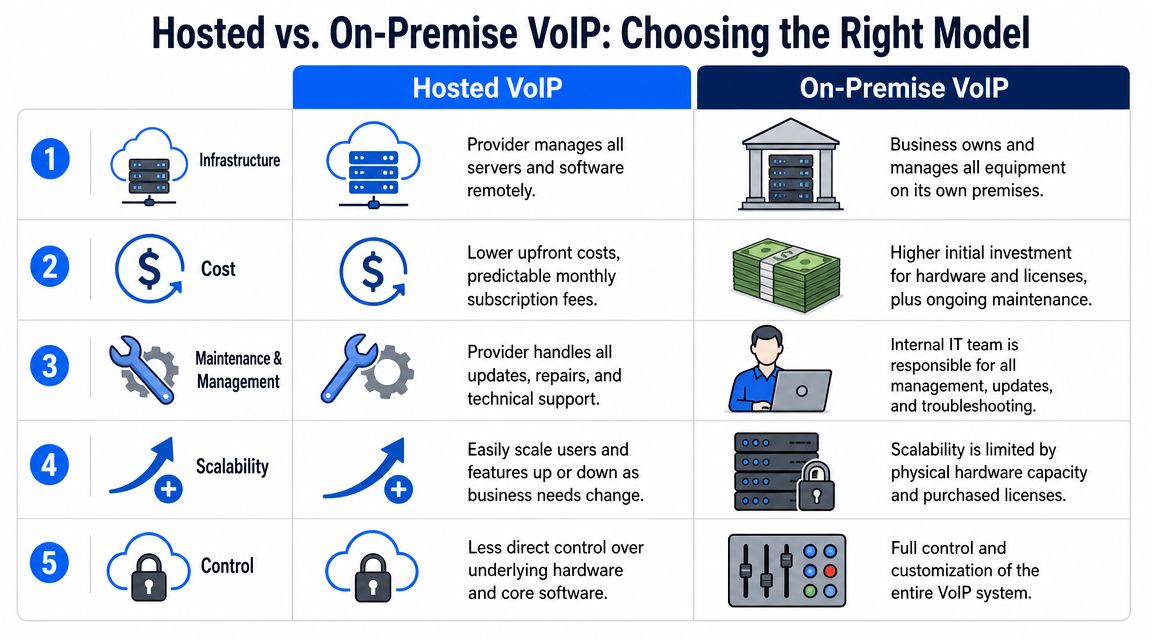
Hosted vs On-Premise VoIP at a Glance
| Factor | Hosted (Cloud) VoIP | On-Premise VoIP |
|---|---|---|
| Infrastructure | Provider manages the core platform remotely | Business owns and manages the system locally |
| Cost shape | Lower upfront commitment, ongoing service charges | Higher upfront investment, plus maintenance responsibility |
| Management | Provider handles most platform upkeep | Internal team or support partner handles updates and faults |
| Scalability | Easier to add users and features | Expansion depends on local capacity and licensing |
| Control | Less direct control of the platform core | More control and customisation |
For most SMEs, the decision comes down to this:
- Choose hosted if you want speed, flexibility and less infrastructure to manage.
- Choose on-premise if telephony is tightly tied to internal systems and you're prepared to maintain it properly.
- Pause the decision if your connectivity and failover planning still aren't clear, because the delivery model won't fix weak foundations.
Ensuring Call Quality Network Readiness and Security
The most common objection to VoIP is still, “Will calls be clear?” That's a sensible question. Good voice quality doesn't happen because a provider says it will. It happens because the network is stable, the traffic is prioritised properly, and the setup has been designed for real usage.
What affects call quality in the real world
A lot of people look only at broadband speed tests. That's not enough. VoIP quality depends on low latency, jitter and packet loss rather than headline download speed alone, and UK networks can support VoIP well when traffic is prioritised correctly, as explained in this guide to VoIP quality and QoS.
That lines up with what engineers see on site. A business can have fast internet on paper and still suffer poor call quality if backups, large uploads, guest Wi-Fi and video traffic all compete with voice at the wrong moment.

A reliable setup usually includes some combination of the following:
- QoS on the router: Voice traffic gets priority over less time-sensitive traffic.
- Voice VLANs where appropriate: Phones can be separated from general user data to keep behaviour predictable.
- Decent switching and Wi-Fi design: Weak local networking causes as many complaints as the internet circuit itself.
- A fallback path: If the main connection fails, calls need somewhere sensible to go.
On-site reality: The businesses that struggle with VoIP are rarely using “too little internet” in the simplistic sense. More often, they're using one connection for everything with no traffic policy and no fallback.
Security controls that matter
Security should be treated as part of the phone system, not an optional extra. Voice platforms can be abused if user accounts are weak, devices are poorly managed, or call permissions are too open.
The basics are straightforward:
- Strong account credentials: Don't leave default passwords in place.
- Restricted calling permissions: Not every extension needs the same outbound access.
- Encrypted signalling and media: Use secure platform options where available.
- Admin access control: Limit who can make routing, user and billing changes.
- Fraud monitoring: Unusual call patterns should trigger investigation quickly.
Businesses also need to think about resilience during power or connectivity issues. If the office loses internet or power, can calls forward to mobiles, another site or voicemail? The answer should be designed in before go-live, not improvised during the first outage.
Your Step-by-Step VoIP Migration Checklist
A smooth migration starts long before the first handset is unpacked. The firms that get caught out usually rush to compare features and monthly pricing before they've checked what else depends on the old lines.
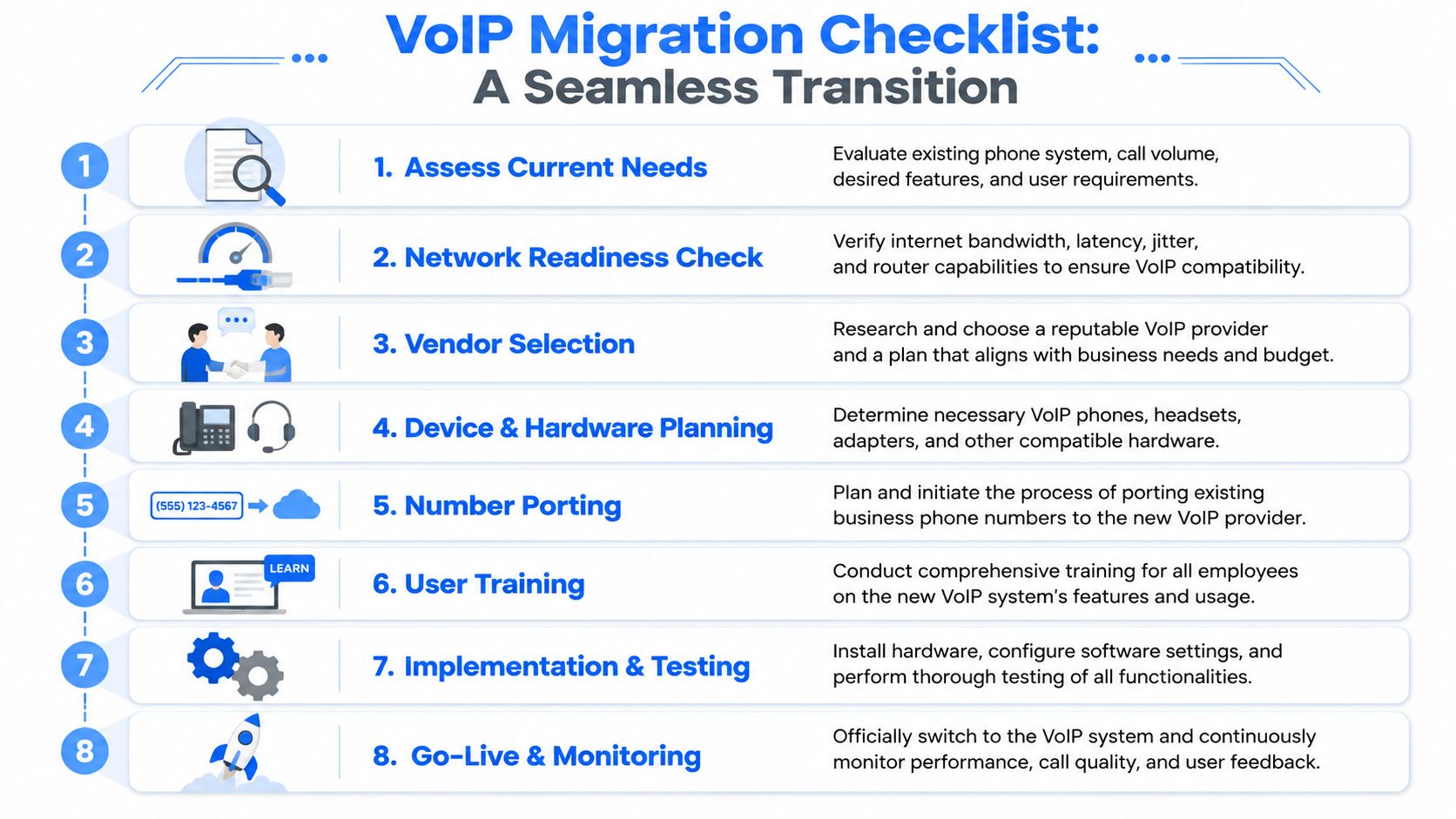
To make the process easier to visualise, keep this checklist in view as you plan the move.
Start with an audit not a handset order
Begin with the current state of the business, not with catalogue browsing. List every line, extension, direct dial number, hunt group, voicemail box and call flow that matters. Then look at the network that will carry the new service.
Check the broadband or leased line arrangement, internal switching, Wi-Fi coverage, router capability and any need for traffic prioritisation. If the business has staff split between office and home, think about both environments. A VoIP rollout often fails at the edges, not at the core.
This video gives a useful high-level view of migration planning and common implementation stages:
A practical migration plan usually includes:
- Inventory the current estate: Numbers, users, devices, call flows and any special routing.
- Assess network readiness: Stability matters more than marketing speed claims.
- Choose endpoints carefully: Desk phones, cordless units, conference devices and headsets should suit real usage.
- Plan number porting early: Keep existing business numbers where possible and avoid last-minute surprises.
Protect the services people forget about
This is the part many generic guides barely mention. The PSTN switch-off affects more than desk phones. Businesses need to identify legacy dependencies such as alarms, door entry systems, fax lines and lift lines before migration, because those services may rely on old telephony paths and need separate planning for continuity and compliance, as outlined in this discussion of hidden dependencies during VoIP migration.
That matters a lot in older buildings and mixed-use premises across London and Essex, where telephony often evolved in layers over time. The office may know about the reception phones, but not about the panel in the back room that still dials out over a legacy line.
Use this review list:
- Alarm signalling: Confirm how intruder or fire-related communication currently leaves the building.
- Door entry and gate systems: Check whether remote release or speech units depend on analogue dial-out.
- Lift emergency lines: These must be reviewed with extra care because they're safety-critical.
- Fax and specialist devices: Don't assume they'll behave well once moved onto IP.
- Older handsets and adapters: Some can be retained with the right hardware, others should be replaced.
Don't cancel an old line because “nobody uses that number”. Verify what's attached to it first.
Test before cutover and train properly
Pilot the setup with a small group before switching the whole company. Test inbound routing, outbound calls, voicemail delivery, transfers, group ringing, mobile apps, remote access and failover behaviour. If the business uses cordless phones in warehouses or yards, test them where they'll be used.
Then train users properly. Not a vendor PDF. Actual guidance that shows staff how to transfer calls, pick up group calls, use voicemail, switch devices and report faults.
Good cutovers are organised, not dramatic. By go-live day, the business should already know how the system behaves under normal conditions and what happens when something fails.
How to Choose the Right VoIP Provider
A VoIP platform can look polished in a demo and still be the wrong fit in real life. The true test is whether the provider can help you design a service that works under your conditions, with your building, your users and your risk points.
Look for engineering help not just a licence portal
A good provider won't jump straight to handsets and tariffs. They'll ask how your calls flow, what else sits on the lines, how staff work, what internet resilience you have, and what happens if the primary connection drops.
That matters because one of the most overlooked parts of VoIP is proper sizing for real UK conditions. Provider guidance often notes that planning should cover bandwidth, QoS and failover so SMEs avoid call quality issues during congestion or broadband faults, as discussed in this article on what small teams should consider when choosing VoIP.
When comparing options, ask direct questions:
- Who checks the network before migration?
- Who helps identify hidden line dependencies?
- What's the failover plan for inbound calls?
- How are mobile and remote workers supported?
- What support do users get after go-live?
If you're researching platforms and comparing feature sets beyond a single brand, resources such as Rosie's guide to Dialpad alternatives can help you think more clearly about what matters operationally rather than getting distracted by sales language.
Why local support still matters
For a business in Essex or London, local knowledge still counts. Buildings vary. Broadband availability varies. Internal cabling quality varies. So do the practical realities of getting someone on site when a handover, fault or cabling issue needs physical work.
The best support partner is usually the one that can connect the dots across telephony, connectivity, routing, Wi-Fi and physical infrastructure. Phone systems don't live in isolation. They sit on the same foundations as the rest of the business network.
Choose the provider that treats VoIP as part of business continuity, not just as a subscription.
Frequently Asked VoIP Questions
Can I keep my existing business number?
Usually, yes. Number porting is a standard part of many migrations, but it needs planning early. Don't leave it until the final week, especially if several numbers, departments or call paths are involved.
Do I need special phones?
Not always. Many businesses use a mix of IP desk phones, softphones on laptops, and mobile apps. Some older devices can be adapted, but not all of them are worth keeping. It depends on usability, age and how critical they are.
What happens if the internet goes down?
That depends on how the system has been designed. A well-planned VoIP setup can reroute calls to mobiles, voicemail, another site or another connection. A poorly planned one just stops working. This is why failover design matters as much as the phone platform itself.
Is VoIP suitable for small businesses?
Yes, if the network is stable and the rollout is planned properly. Small businesses often benefit most because they need flexibility without the overhead of maintaining old telephony equipment.
Will call quality be worse than a traditional line?
Not if the network is ready and voice traffic is prioritised correctly. Most problems blamed on VoIP come from unmanaged local networks, poor Wi-Fi design or lack of resilience.
What about power cuts?
Desk phones and network equipment usually depend on local power, so the business needs a continuity plan. That may include battery backup for key devices, call forwarding rules or mobile app use for essential staff.
Do I need to worry about alarms or door entry?
Yes. Any service currently using a phone line should be checked before migration. That includes alarms, lift lines, fax machines and entry systems. These are some of the most common hidden dependencies.
If your business in Essex or London needs clear advice on replacing an old phone system, planning for the PSTN switch-off, or building a more resilient VoIP setup, Networking2000 can help. Their engineers support businesses with VoIP telephony, connectivity, cabling, security systems and practical migration planning, so you can move to digital communications without missing the details that cause problems later.

