For many UK small businesses, cyber security is now a day-to-day business risk, not a problem for larger firms to worry about. A single phishing email, weak password, or missed update can stop staff working, delay payments, expose customer data, and leave a small team trying to recover without the time or in-house expertise to do it properly.
The practical question is where to start when budgets are tight and the team already has too much to do. The answer is not more tools for the sake of it. Small firms usually get better results from a clear plan, a few well-chosen protections, and outside support when the job needs specialist hands.
That is the approach this guide takes. It is written for UK SMEs that need sensible priorities, plain-English advice, and a realistic route to better protection. If you want a broader primer before focusing on the day-to-day decisions, this comprehensive guide to cybersecurity is a useful companion read.
From an IT support point of view, the goal is straightforward. Reduce the chance of a breach, limit the damage if something does get through, and make sure your business can keep operating. For small teams in Essex and London, that often means starting with the basics, then getting local expert help from a provider such as Networking2000 where it saves time, avoids expensive mistakes, and keeps security manageable over the long term.
Table of Contents
- Why Cybersecurity Is a Top Priority for UK SMEs in 2026
- The Real Cyber Risks Facing Your Business Today
- Your Essential Cybersecurity Toolkit for Foundational Defence
- A Prioritised Roadmap for Small Teams
- Budgeting for Security Without Breaking the Bank
- Why Local IT Support Is Your Secret Weapon
- Building a Secure and Resilient Future
Why Cybersecurity Is a Top Priority for UK SMEs in 2026
Half a day offline can be enough to disrupt payroll, delay orders, stop quotes going out, and leave staff working around broken systems. For a small business, that is not a technical inconvenience. It is an operational problem with direct financial consequences.
Many UK SME owners still assume attackers focus on banks, major retailers, or national brands. In practice, smaller firms are often easier targets. They tend to have lean teams, limited IT time, older devices mixed with newer cloud services, and processes that were never designed with security in mind.
A cyber incident rarely stays inside the IT cupboard. It reaches finance, customer service, operations, and compliance very quickly. If your team cannot access files, trust incoming payment requests, or log in to Microsoft 365, the working day starts to unravel.
Why the risk feels bigger now
The pressure has changed. Criminals do not always need advanced tools when a weak password, a missed patch, or an exposed account will give them what they need. As noted earlier, phishing remains one of the most common ways small businesses get caught out, and the disruption usually starts with something ordinary rather than dramatic.
Email is still the front door for many attacks.
That is why small teams need a plan that matches the way they work. A practical comprehensive guide to cybersecurity can help with the terminology, but day to day, the priority is simpler. Reduce the easy entry points first, make recovery possible, and give staff clear rules they can follow without slowing the business down.
What sensible looks like
Sensible security for a small business in Essex, London, or anywhere else in the UK starts with prioritisation. Protect accounts. Keep devices updated. Make sure backups can be restored. Check who has access to what. Then review those basics on a schedule, because security slips when nobody owns it.
Many SMEs need outside help, not because the business has failed, but because the workload is real. A local support partner such as Networking2000 can help set priorities, close obvious gaps, and keep the basics under control without pushing you into enterprise-level spend.
The goal in 2026 is not a large security programme. The goal is a short, workable plan that fits a limited budget, supports a small team, and lowers the chance that one bad click turns into days of disruption.
The Real Cyber Risks Facing Your Business Today
UK small businesses usually get hit through routine day-to-day work. A fake invoice arrives at the right time. A copied Microsoft 365 sign-in page catches someone between meetings. An old laptop misses patches and keeps syncing company files anyway.
For small teams in Essex and London, that matters because the weak points are rarely dramatic. They sit inside normal habits, email approvals, shared access, reused passwords, and devices that nobody has checked properly for months.
Why ordinary businesses get targeted
Criminals look for access that is cheap, quick, and likely to work. They are not screening for famous brands. They are looking for firms with money to move, customer data to steal, payroll to interrupt, or supplier relationships they can exploit.
That includes solicitors, wholesalers, care providers, estate agents, construction firms, and engineering teams. In practice, if your business depends on email, cloud files, online banking, or card payments, you are already in scope.
Cyber Defense Magazine points out that phishing emails are getting harder to spot because AI helps attackers write cleaner, more believable messages, as covered in its piece on the SME cybersecurity paradox.
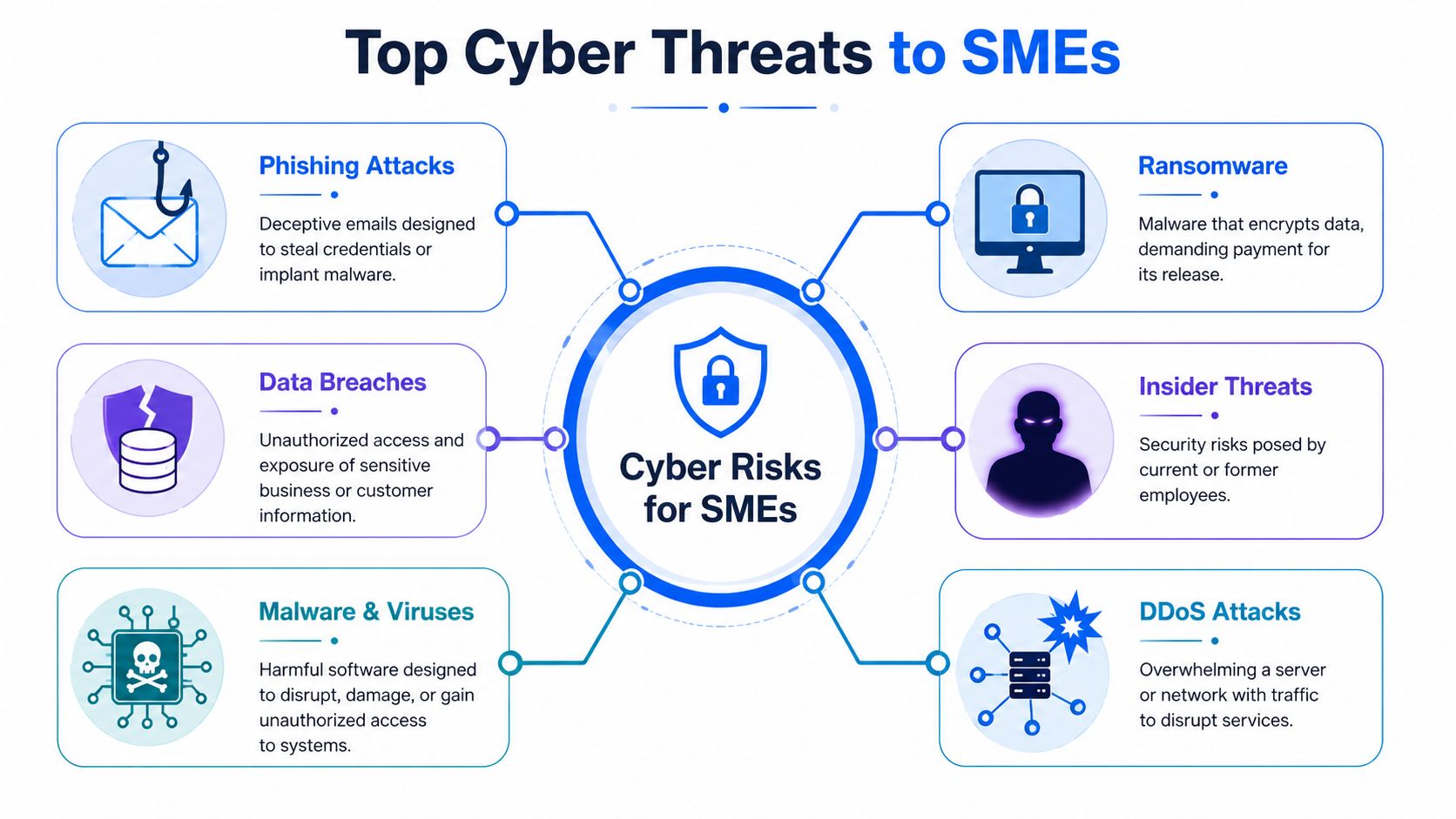
A phishing email now may be well written, correctly branded, and timed around real business activity. It might mention an overdue payment, a shared file, a voicemail alert, or a sign-in request that looks routine. That is why good people still get caught. The message arrives while someone is busy and trying to keep the day moving.
What attacks look like on a normal workday
The common patterns are familiar once you have seen them a few times:
- Phishing and credential theft. A staff member follows a believable email, enters login details into a fake page, and hands over access to mail, files, or contacts.
- Business email compromise. An attacker gets into a genuine mailbox and uses that trusted account to send payment changes or urgent instructions.
- Ransomware. Malware reaches a device or shared storage, encrypts files, and turns a normal morning into an outage.
- Insider mistakes or misuse. Internal risk often comes from poor offboarding, shared logins, or data saved in the wrong place. HR teams that want a clearer process should review this practical guide for HR to insider threats.
- Endpoint compromise. A poorly protected laptop becomes the starting point for wider access to cloud apps, email, and stored documents.
Even simple cyber incidents can be expensive in time, stress, and lost trust.
What matters for an SME is impact. A stolen mailbox can lead to invoice fraud. A locked file share can stop orders going out. A copied staff list or client file can trigger difficult conversations about reporting, liability, and reputation. I have seen businesses spend more time recovering from one missed basic control than they would have spent fixing the issue properly in the first place.
For a small team with a limited budget, the answer is not a pile of enterprise security tools. It is a clear starting point, sensible priorities, and outside help when internal time runs short. That is where a local support partner such as Networking2000 can make a practical difference for Essex and London firms that need to reduce risk without overspending.
Your Essential Cybersecurity Toolkit for Foundational Defence
UK small businesses do not need a crowded stack of security products. They need a core set of controls that close the common gaps attackers use first, and they need those controls set up properly and checked regularly.
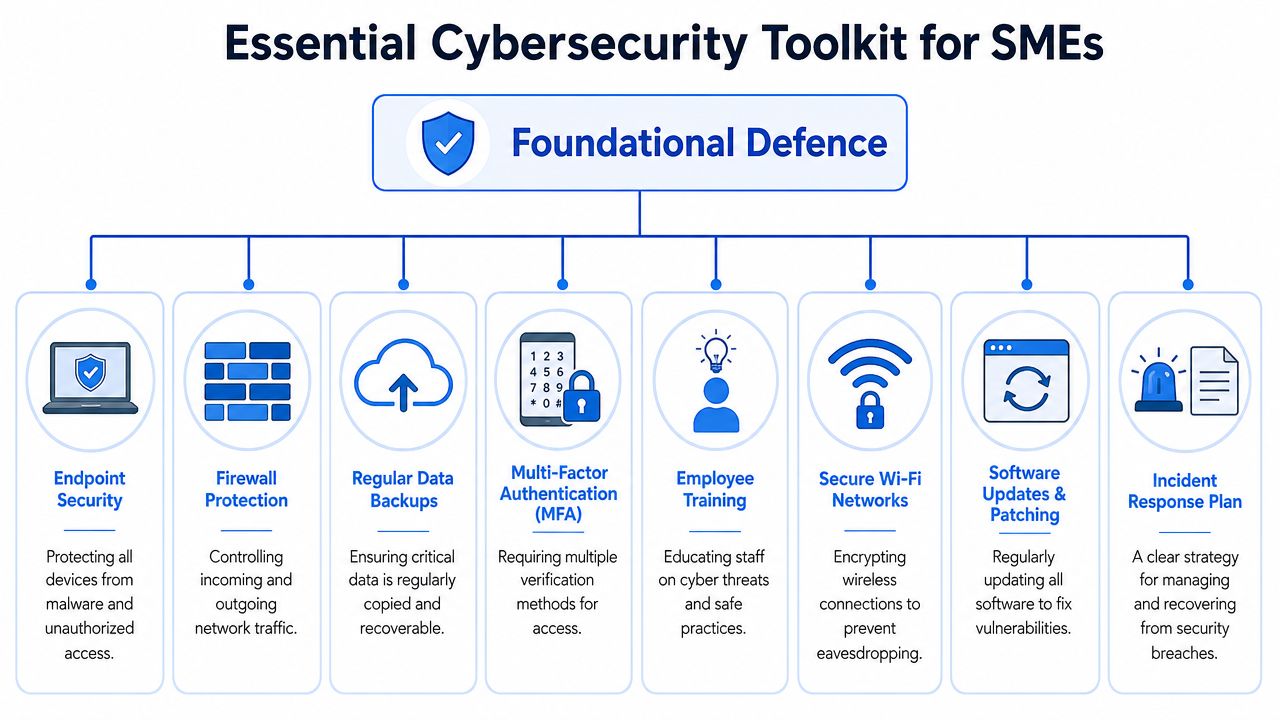
Guidance aimed at SMEs consistently points to a short list that makes the biggest difference: MFA, patching, and backups you can recover from, alongside protection for devices, email, and networks, as explained in this guide to cybersecurity measures for SMEs.
The controls that do the heavy lifting
These are the controls I would expect most small teams in Essex, London, or anywhere else in the UK to have in place before spending money on more advanced tools.
- Multi-factor authentication. A stolen password should never be enough on its own. Start with Microsoft 365 or Google Workspace, remote access, finance platforms, administrator accounts, and any account that can reset other passwords.
- Patching and software updates. Known vulnerabilities stay exploitable until systems are updated. A defined weekly patching routine is far better than relying on staff to click update when they remember.
- Backups you can restore. Recovery matters more than backup status lights. Use the 3-2-1 approach, keep at least one copy offline or immutable, and test restores often enough to know they work.
- Endpoint protection. Laptops and desktops are a common entry point. Devices need centrally managed protection, alerting, and basic policy enforcement, especially for teams working between office, home, and client sites.
- Email security. Email remains a common route for phishing, malware, and payment fraud. Filtering, attachment scanning, link protection, and mailbox rules monitoring all help reduce that risk.
- Firewall protection. A managed firewall helps control inbound and outbound traffic and gives visibility when something unusual happens. For offices with shared internet access, this still matters a great deal.
- Secure Wi-Fi and access control. Guest devices, printers, company laptops, and core business systems should not all sit on the same network. Segmentation reduces the chance of one problem spreading further than it should.
- Incident response planning. A short written process saves time under pressure. Staff need to know who reports an issue, who isolates a device, who checks backups, and who speaks to your IT support provider.
How the layers work together
Each control covers a different point of failure. The practical value is in how they support each other.
| Layer | What it does in plain English | What goes wrong without it |
|---|---|---|
| MFA | Stops a stolen password being enough on its own | Criminals sign in as staff and start from a trusted account |
| Patching | Fixes known weaknesses in software and operating systems | Old security holes stay open and easy to exploit |
| Backups | Gives you a workable recovery path after deletion, corruption, or ransomware | Downtime lasts longer and some data may be lost for good |
| Endpoint protection | Spots and blocks suspicious activity on laptops, desktops, and servers | One compromised device can open the door to wider access |
| Email security | Filters out more malicious messages before staff interact with them | Phishing, malware, and invoice fraud are more likely to get through |
| Firewall and network controls | Restricts risky traffic and limits exposure between systems | Threats spread more easily and suspicious behaviour is harder to spot |
| Training | Helps staff recognise unusual requests and report them early | Security tools are bypassed by rushed decisions or confusion |
| Response plan | Reduces delay and uncertainty during an incident | Small problems turn into longer outages and messier recoveries |
A small team does not need every advanced feature on day one. It does need consistency. I have seen businesses buy good security products and still get caught out because alerts were ignored, backups were never tested, or old user accounts were left in place.
There is a trade-off here. Tighter security can add a little friction to logins, device setup, and access requests. For most SMEs, that inconvenience is minor compared with the cost of a mailbox breach, a locked file share, or a week spent rebuilding systems.
If you are reviewing suppliers, one option in the local market is Networking2000, which provides managed firewalls, email services, IT support, and related security services for businesses in London and Essex. Any provider you use must be able to implement these controls cleanly and support them day to day.
A Prioritised Roadmap for Small Teams
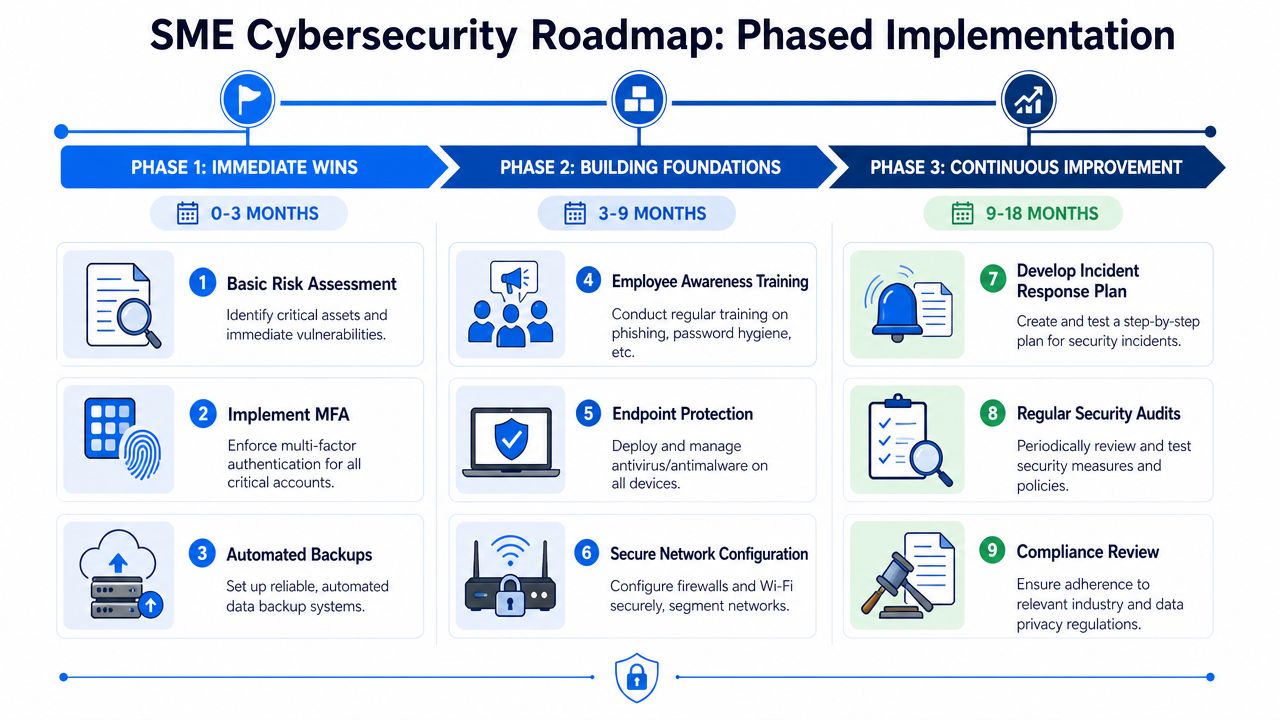
Small teams don't need a massive cyber programme. They need a sequence that reduces risk quickly, then builds on itself. Trying to do everything at once usually means nothing is embedded properly.
The UK's Cyber Essentials scheme, launched in 2014, matters because it turns cyber hygiene into five measurable technical controls rather than broad policy language, as outlined in this overview of the SME cyber resilience state of the sector. For a small business, that's useful because it gives structure without dragging you into enterprise-level complexity.
Phase one gets the basics under control
Treat the first phase as a tidy-up with serious consequences.
- Turn on MFA for critical accounts. Start with email, finance, remote access, and administrator logins.
- Check backup status and restore ability. Confirm what is backed up, where it is stored, and whether anyone has tested recovery.
- List your key systems and devices. You can't protect what nobody has properly documented.
- Remove old access. Shared logins, ex-staff accounts, and unnecessary admin rights create easy openings.
This stage often reveals where the actual mess is. Dormant accounts. Devices nobody owns. Apps still linked to old staff. Those are fixable problems, but only if someone checks.
Phase two makes security repeatable
Once the biggest gaps are closed, move into controls that need process.
- Standardise patching so updates happen on a schedule, with oversight.
- Deploy managed endpoint protection across company devices, including remote laptops.
- Harden email and spam controls to reduce risky messages before staff ever see them.
- Segment access sensibly so not every user and device can reach everything.
- Write short operational rules for passwords, joiners and leavers, file sharing, and device use.
A lot of firms skip this stage because it feels less urgent than MFA. That's a mistake. Security only sticks when it becomes repeatable.
Phase three turns good practice into routine
Resilience comes to the fore.
Security maturity for a small firm doesn't mean owning every tool. It means knowing who has access, what's patched, what's backed up, and who does what when something breaks.
Build a simple cycle around monthly checks, restore testing, user reviews, and staff reminders. If Cyber Essentials fits your customer base or supply chain, use it as a practical milestone. It gives many SMEs a sensible target that customers and larger partners recognise.
The roadmap doesn't need to be perfect to work. It needs to be realistic enough that your team will keep doing it.
Budgeting for Security Without Breaking the Bank
Budget is where many good intentions stall. Owners know cyber risk is real, but they also know there's payroll to meet, stock to buy, and growth targets to chase. That tension is normal.
McKinsey notes that the SME cyber market remains underserved and recommends SME-specific pricing and bundled security-in-a-box offerings because smaller firms are constrained by limited resources and usually have to focus on growth before security, as discussed in its analysis of what's next for securing SMEs.
The buying mistake small firms make most often
The biggest mistake isn't always under-spending. It's buying in the wrong order.
Some firms collect separate tools for email, antivirus, backups, password management, and remote support without anyone properly joining them up. Others jump straight to expensive enterprise products that create admin overhead their team can't manage. Both routes lead to waste.
A better buying question is this: what are we paying to reduce, and who is responsible for keeping it working?
Use that lens and the decision gets clearer.
- If a tool reduces a major risk such as account takeover or failed recovery, it deserves priority.
- If a tool creates more admin than your team can handle, it may be the wrong fit even if it looks impressive in a demo.
- If nobody owns it after purchase, it won't protect much for long.
How to choose between DIY and managed help
For very small businesses, a full DIY approach often sounds cheaper than it really is. Someone still has to set policies, review alerts, manage updates, test restores, and deal with incidents when they happen. That labour cost may not sit on an IT budget line, but it still exists.
Here's a practical comparison:
| Option | Usually works well for | Main trade-off |
|---|---|---|
| DIY with separate tools | Very small firms with simple systems and someone internally who is disciplined | Lower upfront cost, higher risk of gaps and inconsistency |
| Part-time internal ownership | Firms with an office manager or operations lead who can coordinate vendors | Better oversight, but cyber tasks compete with day job priorities |
| Managed service bundle | Teams that need coverage without building an internal security function | Ongoing monthly cost, but clearer accountability and less fragmentation |
Don't buy for a hypothetical future company. Buy for the business you are today, with a route to scale later. Solid MFA coverage, proper endpoint protection, tested backups, and managed patching will do far more for most SMEs than a long shopping list of advanced features nobody has time to operate.
Why Local IT Support Is Your Secret Weapon
For small businesses in Essex and London, local support solves a problem national platforms often can't. When something suspicious happens, you don't want to explain your setup from scratch to a rotating queue of strangers. You want somebody who already knows your systems, your users, your pressure points, and your priorities.

A local engineer can spot the practical issues that generic cyber advice misses. Shared PCs in a warehouse office. A director using personal email on the move. Old Wi-Fi kit still serving part of the building. A file share that everybody can access because “that's how it's always been”.
What a good local partner should actually manage
The value isn't just software. It's ownership.
A good support partner should help you:
- Set priorities so you fix high-risk gaps first rather than chasing every shiny tool.
- Manage the basics properly including patching, endpoint security, mailbox protection, backups, and access control.
- Document response steps so staff know what to do if a device looks compromised or a payment request seems wrong.
- Support onboarding and offboarding because joiners and leavers create real access risk if handled casually.
- Translate technical issues into business language so directors can make decisions without being buried in jargon.
That local relationship also matters when a problem has a physical side. Router issues, cabling faults, office moves, Wi-Fi dead spots, firewall replacements, and device collection all benefit from having somebody nearby who can physically attend.
What you should ask for every month
Useful cyber reporting should tell you whether your protections are in place, not just whether something bad already happened. SME security KPIs should track MFA coverage, patch compliance, endpoint protection, email-risk events, and backup restore success, as explained in this guide to cyber security KPIs for SME leaders.
Ask your provider to show those measures in plain English. If they can't explain what's covered, what's missing, and what changed since last month, the reporting isn't doing its job.
Here's a useful explainer on the wider issue of small business cyber risk and response:
The right support partner doesn't just install products. They reduce uncertainty. That's what most SME owners are really paying for.
Building a Secure and Resilient Future
Good cybersecurity for SMEs isn't about chasing perfection. It's about making your business harder to compromise and easier to recover. That means protecting sign-ins, keeping systems updated, testing backups, tightening access, and making sure staff know what to question.
The firms that cope best aren't always the ones with the most technology. They're the ones with clear routines and somebody responsible for keeping those routines alive. Security works the same way finance works. It needs ownership, review, and follow-through.
If the worst does happen, recovery planning matters as much as prevention. That includes knowing when you need specialist help, such as professional data recovery, alongside your wider backup and incident response process.
Start with one concrete action this week. Turn on MFA where it's missing. Review your backup restore process. Check who still has access to what. Small steps done properly are what build resilience.
If you want practical help putting a sensible cyber plan in place, Networking2000 can help you review your current setup, tighten the basics, and support your business with clear, local IT and security advice across Essex and London.

