It's a normal weekday morning in Essex. You open your inbox before the kettle's finished boiling, skim a supplier message, see an invoice attached, and think nothing of it. The logo looks right. The sender name looks familiar. The tone sounds normal. Later, you find out the bank details were changed, the payment's gone, and the email never came from your supplier at all.
That's a key problem with electronic mail security. Most bad emails don't look dramatic. They look routine.
For small businesses in London and Essex, and for home users managing school, banking, shopping, and family accounts from the same laptop, email is still the front door to everything else. If someone gets through that door, they often don't stop at one message. They go after passwords, cloud accounts, payment approvals, saved browsers, contact lists, and trust between staff and customers. If you already monitor system vulnerabilities, that's useful, but inbox security still needs its own attention because many attacks start with a person clicking before any technical warning appears.
The good news is that sensible protection works. Not magic products. Not fear. Just the right layers, applied properly, with a bit of discipline around how people send, receive, approve, and question email.
Table of Contents
- The Unseen Risk Hiding in Your Inbox
- Understanding Electronic Mail Security Layers
- Top Email Threats to London and Essex Businesses
- Your Defensive Toolkit of Security Protocols
- A Practical Security Checklist for Your Business and Home
- Troubleshooting Common Email Security Issues
- Making Email Security Your Business as Usual
The Unseen Risk Hiding in Your Inbox
A lot of owners still think email security means “stopping spam”. That's only part of it. The harder problem is stopping a message that looks reasonable enough to trust.
A bookkeeper in Chelmsford gets a message that appears to come from the director asking for an urgent payment before lunch. A trades business in Romford gets a note from a supplier with “updated bank details”. A parent in Rayleigh gets a school-related message with a link to “review a document”. None of these rely on clever hacking in the film sense. They rely on timing, pressure, and familiarity.
Why inbox attacks work so often
Email works because it's built on trust. People expect invoices, password resets, shared files, courier notices, and calendar invites to arrive there. Attackers know that. They copy the normal rhythm of business and slot themselves into it.
The result isn't always malware. Sometimes the message is just persuasion. The victim types in a password on a fake Microsoft 365 page, approves a sign-in request they shouldn't, or sends money because the request sounds plausible.
Practical rule: If an email pushes urgency, secrecy, or a sudden change to payment details, treat it as a process problem first and a technical problem second.
Why this matters locally
Small firms around London and Essex often move quickly. That's a strength in business, but it can become a weakness in email. One person wears three hats, approvals happen on mobiles, and a rushed reply on a train can bypass the checks you'd use at a desk.
Home users face the same pressure in a different way. Personal inboxes now hold banking messages, shopping accounts, broadband notices, NHS-style communications, and family logistics. If one email account is compromised, the attacker may use it to reset access elsewhere.
Electronic mail security matters because email isn't just mail any more. It's identity, reputation, payment flow, and access control sitting in one place.
Understanding Electronic Mail Security Layers
Electronic mail security works best as a set of layers, not a single tool. A spam filter on its own will miss things. Multi-factor authentication on its own will not stop a fake invoice request. Device protection on its own will not tell staff whether the sender can be trusted.
Securing email is closer to securing a small office in Romford, Chelmsford, or Stratford than buying one clever gadget and hoping it covers everything. You lock the front door, check who is asking to come in, keep valuables out of easy reach, and make sure a mistake at one point does not turn into a full break-in.
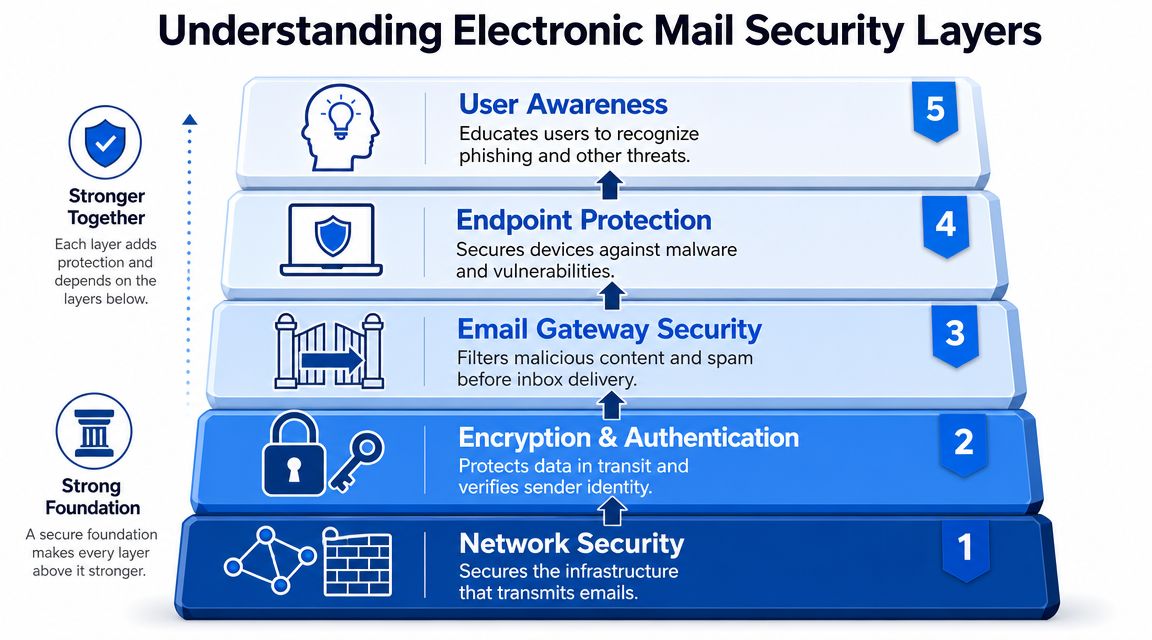
Here is what those layers usually look like in practice:
- Network security protects the connection between your staff, your devices, and the mail service. This matters more than many small firms realise, especially with home broadband, guest Wi-Fi, and staff checking email from phones on the move.
- Encryption and authentication help confirm messages are genuine and stop tampering while mail is in transit. In plain English, this is part of how you prove a message really came from your domain and not from someone pretending to be you.
- Email gateway security filters out obvious junk, malicious links, risky attachments, and known bad sending patterns before they hit the inbox.
- Endpoint protection covers the laptop, desktop, or mobile that opens the email. If a user clicks something they should not, the device still needs a chance to block the damage.
- User awareness closes the gap technology cannot. Staff and home users still decide whether to trust a login page, open a file, or act on a payment request.
For London and Essex businesses, the weak spot is often not the headline security tool. It is the gap between tools. A firm has Microsoft 365 protection switched on, but no proper sign-in rules. Or they have anti-virus on laptops, but shared mailboxes with weak access control. Or a web form, copier, CRM plug-in, or booking system sends mail in the background using stored credentials that nobody has reviewed in years. If your business uses custom scripts or integrations, guidance on securing developer credentials is worth reading.
One layer will fail sometimes. That is normal.
Filters miss a message. A user signs in on a fake page. A phone is lost. An old app keeps using a password that should have been retired. Good email security accepts that one control can be bypassed and makes sure the next control reduces the impact.
That is why practical electronic mail security protects four things at the same time:
- Who sent the message
- What the message contains
- Who can access the mailbox
- What happens after something gets through
This short explainer gives a decent visual overview of how those layers fit together in practice.
A secure inbox is one where malicious email is harder to deliver, harder to trust, and less damaging if someone interacts with it.
For smaller organisations and home users across London and Essex, the sensible approach is usually straightforward. Use the built-in protection you are already paying for in Microsoft 365 or Google Workspace. Add proper sign-in controls, device protection, and clear approval rules for payments and account changes. The trade-off is simple. A few extra checks create a bit more admin, but they prevent the sort of email incident that steals a morning, a bank transfer, or a customer relationship.
Top Email Threats to London and Essex Businesses
The biggest mistake I see in small firms is assuming all email threats look the same. They don't. Some are noisy and obvious. The dangerous ones are tidy, polite, and well timed.
UK reporting shows why this can't sit in the “IT issue” box. The UK's Cyber Security Breaches Survey 2024 found that 50% of UK businesses experienced a cyber breach or attack in the previous 12 months, and phishing remained the most common type of attack faced by businesses. The same reporting put the figure at 32% for micro businesses, 45% for small businesses, 61% for medium businesses, and 74% for large businesses in the previous 12 months, which shows the exposure rises with size and complexity, as cited in the TitanHQ summary of the Cyber Security Breaches Survey 2024.
Phishing that blends into daily work
Basic phishing still works because it imitates normal admin.
Common examples include:
- Account warnings that claim your Microsoft 365 or Google Workspace password is expiring.
- Shared file notices that lead to a fake login page.
- Courier and billing emails designed to get a quick click on a phone.
- Messages from a known contact whose mailbox has already been compromised.
These attacks don't need deep technical skill. They need a decent copy of a login page and a subject line that catches you between tasks.
Business email compromise and payment fraud
This is the one that hurts smaller firms most because it targets trust and process. UK government crime data show that 49% of business and charity organisations experienced a cyber breach or attack in the latest survey year, and business email compromise and invoice-redirection fraud are a major concern because attackers manipulate staff into making payments that look legitimate, as outlined in SentinelOne's overview of email security threats.
In practice, that usually looks like one of these:
- Fake director emails asking for an urgent transfer
- Supplier impersonation with “new bank details”
- Thread hijacking where an attacker replies inside a real ongoing conversation
- Payroll redirection requests sent to HR or finance
The technical controls matter here, but process design matters just as much. If one email can change bank details, your weakness isn't only email. It's approval design.
Call back on a known number. Not the number in the email. That one habit stops a lot of expensive mistakes.
Account takeover after the email arrives
Some of the worst incidents don't end with the original message. They start there.
A user enters credentials into a fake sign-in page. The attacker logs into Microsoft 365, creates forwarding rules, reads old threads, and waits for the right moment to impersonate someone internally. That's why inbox protection alone isn't enough.
A second gap often gets missed in small business guidance. Email security is now tied closely to cloud identity. NCSC-related reporting highlighted hundreds of thousands of phishing reports through the Suspicious Email Reporting Service, and UK guidance increasingly points to compromised Microsoft 365 or Google Workspace accounts as the primary operational risk. The useful discussion is less about spam filtering on its own and more about conditional access, mailbox auditing, and suspicious forwarding behaviour, as discussed in SecurityScorecard's analysis of email security and identity risk.
When staff work from home, on personal mobiles, or across shared devices, the identity layer matters even more. If an attacker steals access to the mailbox itself, they inherit the trust that mailbox already has.
Your Defensive Toolkit of Security Protocols
The strongest technical controls in electronic mail security are often the least visible. Users don't notice them when they work properly, but they do a lot of heavy lifting in the background.
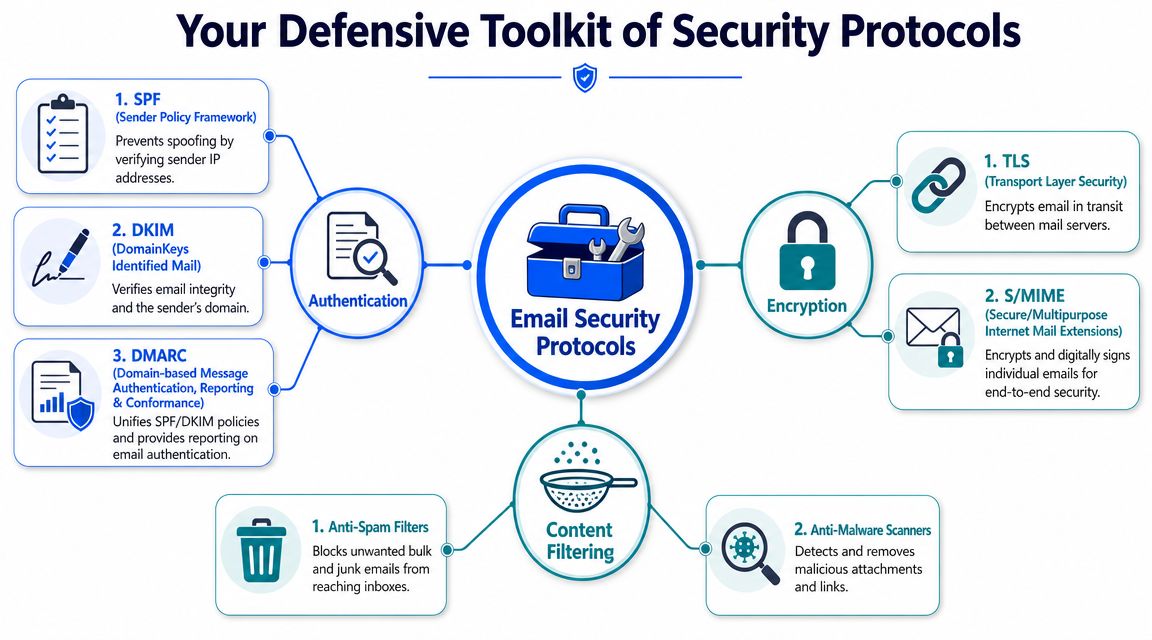
The postal service way to understand SPF DKIM and DMARC
The easiest way to explain SPF, DKIM, and DMARC is through post.
- SPF is your approved list of mail carriers. It tells receiving systems which services are allowed to send mail for your domain.
- DKIM is a tamper-evident seal on the envelope. It helps prove the message really came from the stated domain and wasn't altered in transit.
- DMARC is the instruction sheet for what to do if the first checks fail. It tells receiving systems how to handle unauthorised messages that claim to come from your domain.
This became far more practical in the UK after the National Cyber Security Centre launched in October 2016 and pushed email authentication through tools such as Mail Check. That mattered because email-based attacks account for over 90% of successful cyber incidents, and DMARC gives organisations a way to stop spoofed mail claiming to be from their domain, as described in email security best practices guidance.
If you run a business domain and haven't sorted these three properly, you're leaving the front sign on the building while letting anyone else answer the door in your name.
The tools around the protocol layer
Authentication isn't the whole stack. It proves sender legitimacy, but it doesn't solve every malicious email. You still need protection around content, accounts, and sensitive messages.
A sensible toolkit usually includes:
- Advanced filtering for suspicious links, attachments, spoofing signs, and known bad senders.
- Attachment scanning and sandboxing so risky files can be checked before a user opens them.
- TLS for encrypting mail in transit between servers.
- S/MIME or similar message-level protection where individual encrypted or digitally signed mail is required.
- Mailbox auditing and alerting to catch odd forwarding rules, unusual sign-ins, or suspicious changes.
- Phishing-resistant MFA on the account itself, not just a password.
Worth remembering: SPF, DKIM, and DMARC protect your domain reputation. They do not replace MFA, endpoint protection, or payment verification.
There's also a trade-off here. Stronger filtering can occasionally quarantine legitimate mail. Lax filtering creates less friction, but more risk. Most businesses are better off accepting a small amount of review and release work if it means fewer fake invoices, fewer credential lures, and fewer compromised accounts.
A Practical Security Checklist for Your Business and Home
You don't need a huge project plan to improve email security. You need the right actions in the right order.
For your business
If you run a small business in London or Essex, start with the items that reduce the most risk quickly.
Turn on MFA everywhere that matters
Prioritise Microsoft 365, Google Workspace, finance tools, payroll, and any remote access systems. Avoid leaving older accounts excluded “for now”. Those exceptions tend to become the doorway.Set up domain authentication properly
SPF, DKIM, and DMARC should be treated as baseline controls for any company domain.Protect payment workflows
Never accept bank detail changes or urgent transfer requests purely by email. Build in a call-back and a second approval.Review mail forwarding and shared mailbox rules
Attackers often create hidden forwarding or quiet archive rules after compromise.Train staff on realistic signs, not just generic warnings
Show them what supplier fraud, fake login pages, and internal impersonation look like.Secure company devices
If email is accessed on laptops and mobiles, those endpoints need current protection, controlled access, and basic visibility.
For your home
Home users don't need enterprise tooling, but they do need better habits.
- Use a password manager so each key account has a unique password.
- Enable MFA on personal email first because that mailbox often resets everything else.
- Pause before tapping links on your phone. Small screens hide clues.
- Keep devices updated so a risky attachment has less chance of succeeding.
- Check the full sender address when a message claims to be from a bank, retailer, or delivery company.
- Separate family accounts where possible rather than sharing one mailbox for everything.
Essential Email Security Checklist
| Security Action | For Your Business (SMB) | For Your Home |
|---|---|---|
| MFA | Enable for all staff, especially email, finance, and admin accounts | Enable on your main email, banking-related accounts, and shopping accounts |
| SPF DKIM DMARC | Apply to your company domain | Not usually managed personally unless you run your own domain |
| Payment verification | Require call-backs and dual approval for bank changes and urgent transfers | Verify unusual payment or billing emails through official apps or known numbers |
| Device protection | Secure laptops, desktops, and mobiles used for work email | Keep home laptop and phone updated and protected |
| Staff or user awareness | Train on phishing, impersonation, and fake invoices | Learn to spot fake delivery, account, and password reset messages |
| Mailbox monitoring | Review forwarding rules, suspicious sign-ins, and unusual activity | Check account activity if you suspect compromise |
| Password practice | Use unique passwords stored in a secure manager | Do the same, especially for your main inbox |
Small improvements compound. MFA plus payment call-backs plus proper authentication settings is far stronger than any one of those on its own.
If you can only do three things this month, do these first. Protect the mailbox account with MFA, stop payment changes being actioned from email alone, and make sure your domain isn't easy to spoof.
Troubleshooting Common Email Security Issues
Problems usually show up before people call them “security incidents”. Mail starts landing in spam. Users get odd bounce backs. Someone clicks something they shouldn't have. Fast response matters.

Why are my emails going to spam
Start with the basics. Check whether your domain authentication is in place and consistent, whether users are sending from the correct platform, and whether the message looks overly sales-heavy or link-heavy.
Also check list quality if you send newsletters or customer updates. Poor addresses and typo-filled contacts damage trust over time. If you manage mailing lists, understanding Icypeas email verification can help reduce bad addresses and improve delivery hygiene.
What should I do if someone clicked a bad link
Don't wait to “see if anything happens”.
Take these first steps:
- Reset the password for the affected account.
- Revoke active sessions so existing sign-ins are forced out.
- Review MFA status and tighten it if needed.
- Check mailbox rules for forwarding, deletion, or hiding behaviour.
- Inspect recent account activity for unfamiliar sign-ins or locations.
- Warn internal staff if the mailbox may have been used to send further messages.
If the account belongs to finance, management, or anyone with broad access, treat it as urgent.
Why am I getting bounce backs for mail I never sent
That often means someone is spoofing your domain name. It doesn't always mean your mailbox is hacked, but it does mean receiving systems are seeing messages that claim to be from you.
The fix usually sits at the domain level, not in Outlook or your phone app. If spoofing, delivery failures, and mailbox behaviour all appear together, get professional help quickly rather than trying random settings changes.
Making Email Security Your Business as Usual
Good electronic mail security isn't about turning staff into paranoid investigators. It's about making the safe action the normal action.
That means proper authentication on your domain. MFA on every important account. Clear checks before money moves. Alerting on strange mailbox behaviour. Sensible device security. Short, realistic staff guidance that matches the emails people receive. When those habits are built into day-to-day work, attacks become harder to land and easier to contain.
For businesses in London and Essex, that local reality matters. Teams are busy. Owners approve things from cars, trains, kitchens, job sites, and shop floors. Home users juggle family admin and online accounts from the same few devices. Security has to fit real life or it won't stick.
The aim isn't perfection. The aim is fewer avoidable mistakes, less spoofing, less account abuse, and fewer expensive surprises from a message that looked ordinary at first glance.
If you're in London or Essex and want practical help tightening up email, identity, devices, or payment processes, Networking2000 offers experienced, jargon-free support for businesses and home users who need clear answers and fast action.

