You're probably using the internet for more than you realise. A till system in the shop. A laptop at home. Microsoft 365 for email. VoIP handsets on desks. Guest Wi-Fi for visitors. Maybe a few smart cameras as well. Thoughts about security often arise only when something goes wrong, usually after a suspicious email, a strange pop-up, or a broadband router starts behaving oddly.
That's where a firewall comes in. In plain English, it's the digital security guard sitting between your devices and the wider internet, checking what should be allowed through and what should be stopped. If you've ever wondered what is the purpose of a firewall, the short answer is this. It creates control at the edge of your network, so random, risky, or unwanted traffic doesn't get a free pass into your business or home.
For a small business owner in Essex or a home user in London, that matters because your network now carries real value. Customer details, card machines, Teams calls, office files, banking sessions, printers, phones, and Wi-Fi all rely on that connection being protected properly.
Table of Contents
- Your First Line of Defence in a Digital World
- The Core Purpose of a Firewall Explained
- How Firewalls Protect Your Business and Home
- An Overview of Common Firewall Types
- Signs You Need a Managed Firewall Service
- Your Next Steps for a Secure Network
- Frequently Asked Questions About Firewalls
Your First Line of Defence in a Digital World
It is Monday morning. A member of staff in your Essex office opens a laptop, the VoIP phones come online, the card machine connects, and customers start using the guest Wi-Fi. At home, it might be your work laptop, your teenager's gaming console, a smart doorbell, and your banking app all sharing the same broadband. In both cases, one internet connection is carrying a lot of trust.
A firewall helps you control that trust.
The term can sound technical, but the purpose is straightforward. A firewall sits between your devices and the wider internet and checks what should be allowed through. That matters in ordinary, day-to-day situations, not only in big firms with server rooms. If the wrong connection reaches an exposed device, the problem is rarely abstract. It can mean locked files, interrupted phones, a compromised email account, or someone getting a foothold on the office Wi-Fi.
For a small business in London or Essex, that can quickly become a business issue rather than an IT issue. Customer records, shared folders, payment systems, printers, and cloud logins all depend on the network behaving properly. For a home user or a hybrid worker, the stakes are just as real. Family devices often sit on the same network as work devices, which means a weak point in one place can create risk somewhere else.
A firewall works like a staffed entrance to your digital premises. It checks incoming and outgoing connections against rules you set, then permits the safe traffic and blocks the rest. You decide, for example, whether a remote desktop service should be reachable, whether unknown traffic should be refused, or whether certain devices should be kept separate from the main network.
That is why firewalls are called the first line of defence. They do not handle every security job on their own, but they reduce the number of unwanted connections that ever get a chance to interact with your PCs, phones, servers, or smart devices in the first place.
If you want one plain-English takeaway over a cup of tea, it is this. A firewall helps stop your internet connection from becoming an open door to the things you rely on every day.
The Core Purpose of a Firewall Explained
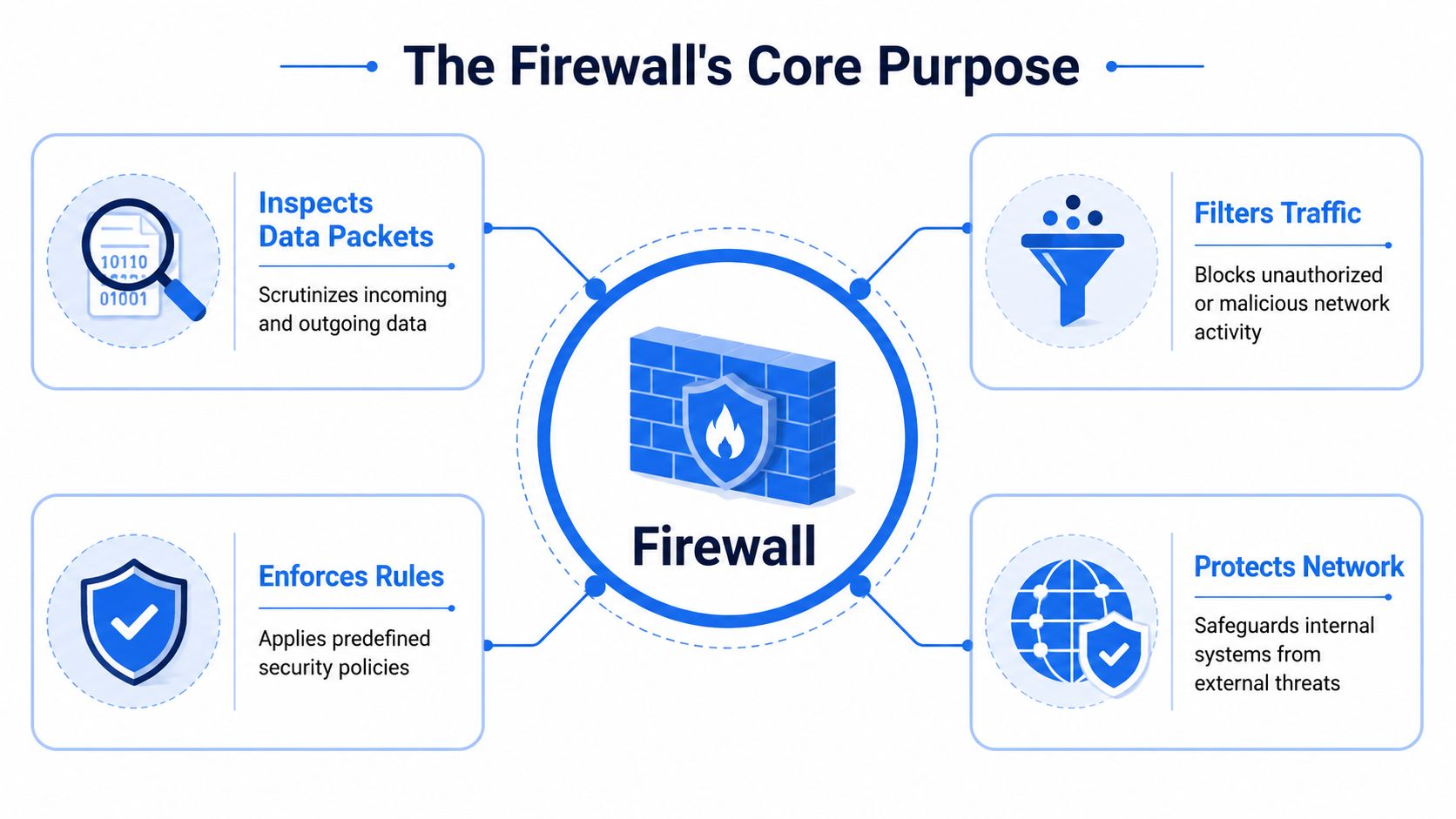
A firewall has a straightforward job. It sits between your network and other networks, checks traffic against rules, and decides what gets through.
Data moves across the internet in small requests and responses. Each one carries useful clues, such as where it came from, where it is trying to go, and which service it wants to reach. The firewall reads those clues and compares them with the policy you have set. If the connection fits the rules, it is allowed. If it does not, it is blocked or ignored.
A controlled boundary for your network
At a practical level, the purpose of a firewall is to create a controlled boundary between the devices you rely on and the traffic you do not control.
For a small business in London or Essex, that boundary might sit in front of office PCs, shared files, VoIP phones, card payment systems, CCTV, and staff Wi-Fi. For a home user, it may be protecting laptops, smart TVs, work devices, tablets, and the broadband router itself. The point is the same in both cases. Strangers on the internet should not have a free run at the things inside your network.
A simple rule helps here.
Practical rule: If a service does not need to be reachable from the internet, keep it closed.
That one decision can stop a lot of trouble before it starts. Your printer does not need random connection attempts from outside. Neither does a back-office PC, a NAS drive, or a phone system.
It enforces the house rules
A firewall is useful because it turns your decisions into technical rules that are enforced.
You might allow email, Microsoft 365, cloud apps, remote support, and approved calling platforms. You might block unknown inbound traffic, limit remote access to named staff, and keep guest Wi-Fi away from the machines that hold customer records. If you are reviewing phone platforms or cost-effective business communications, the firewall also helps make sure voice traffic reaches the right systems without exposing the rest of the office network.
That is why a firewall is more than a box plugged in near the router. It is the rulekeeper for your network.
Firewall versus antivirus
This often causes confusion, so it is worth making it plain. Antivirus protects the device itself by spotting and stopping harmful files or behaviour after they arrive. A firewall works earlier in the process. It controls whether certain connections should be allowed to reach that device at all.
They do different jobs. You want both.
A properly configured firewall feels less like a gadget and more like a receptionist with a guest list: controlled, consistent, and based on your rules.
How Firewalls Protect Your Business and Home
A firewall becomes easier to understand when you stop thinking about it as a box with lights on it and start thinking about the everyday problems it prevents.

In the UK, 50% of businesses experienced a cyber security breach or attack in the previous 12 months, according to the Cyber Security Breaches Survey 2024 referenced by Check Point. That figure helps explain why reducing the attack surface matters so much. A firewall narrows the number of doors an attacker can try.
For a small business
Take a typical office in Essex. You've got email, cloud files, VoIP phones, staff laptops, maybe a card machine network, plus Wi-Fi for employees and visitors. Without sensible firewall rules, all of that can end up sharing space too freely.
A firewall helps by putting order into that setup.
- It shields internet-facing services. If nobody needs direct access to an internal PC or office printer from outside, the firewall can keep that closed.
- It limits spread after a mistake. If someone clicks a phishing link, the firewall can reduce how easily that problem reaches other systems.
- It protects supporting services. VoIP, remote support tools, and business apps often need connectivity, but only in specific ways.
That last point matters for smaller firms using cloud telephony or Microsoft Teams. If you're reviewing cost-effective business communications, firewall planning should be part of the conversation so voice traffic works without leaving the rest of the network unnecessarily open.
For home and hybrid working
At home, the risks are different, but the principle is the same. A modern home network often includes work laptops, personal mobiles, gaming consoles, smart speakers, TVs, and cameras. If they all sit on one flat network with weak controls, one compromised device can create a bigger mess than expected.
A firewall can help home users by:
- Protecting work devices from noisy or unwanted traffic on the wider internet
- Separating guest access from personal devices where the setup allows it
- Adding safer browsing controls through filtering and policy enforcement
- Reducing exposure for connected gadgets that weren't built with strong security in mind
Here's a quick explainer that gives a simple visual overview of how firewall protection works in practice.
Why outbound control matters too
It's commonly assumed firewalls only stop things coming in. That's only half the story.
A useful firewall also watches what's trying to leave. If a laptop is infected, the attacker often wants it to contact an outside service, steal credentials, or send data out. Egress control helps cut off that route.
A well-set firewall doesn't just keep strangers out. It also stops trusted devices from talking to the wrong places when something has gone wrong.
That's particularly valuable when you're trying to protect customer records, office files, or remote access tools from being misused after an initial compromise.
An Overview of Common Firewall Types
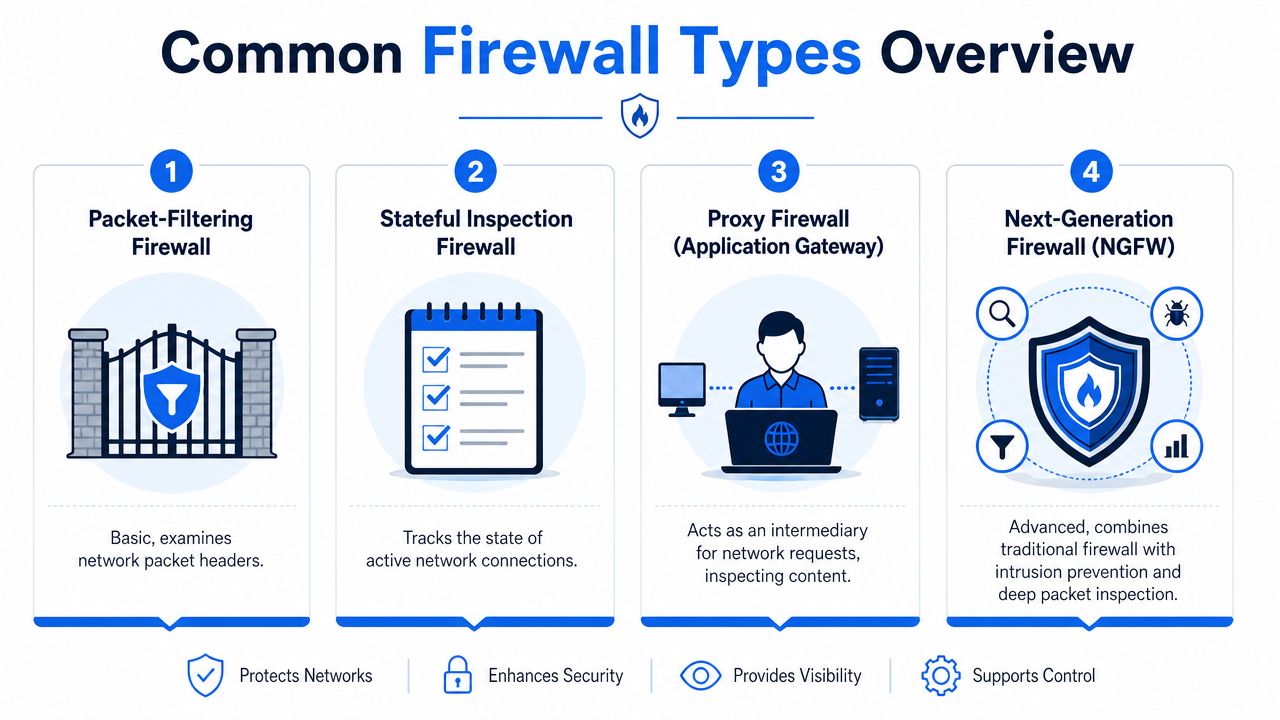
Not all firewalls work in the same way. Some live inside your broadband router. Some run on each computer. Some are far more advanced and can recognise applications, users, and patterns of suspicious behaviour.
The easiest way to understand the common types is to match them to where they sit and what sort of job they're best at.
Hardware firewalls
A hardware firewall is a physical device that sits between your network and the internet connection. This is often the right fit for an office because it protects the whole site from one central point.
For a small business, that's handy when you want to control staff Wi-Fi, office PCs, VoIP traffic, and guest access without relying on each device to fend for itself.
Software firewalls
A software firewall runs on an individual computer or server. Windows devices, for example, include built-in firewall controls.
This can be useful for laptops and desktops, especially when staff work remotely. The limitation is that each machine needs to be managed properly, and it won't give you the same whole-network view as a dedicated business firewall.
Stateful and proxy firewalls
These are terms that often sound more complicated than they are.
A stateful firewall keeps track of active conversations. It knows whether traffic is part of a legitimate connection that started properly, rather than treating every packet as if it appeared from nowhere. That makes decisions more informed.
A proxy firewall acts more like a middleman. Instead of traffic going directly from a device to the destination, the proxy steps in between, checks it, and passes it on if it meets policy.
Some firewalls check the envelope. Others also pay attention to the conversation that follows.
Next-generation firewalls
A next-generation firewall goes further. It can combine traditional firewall rules with features such as deeper inspection, application awareness, segmentation, and more detailed visibility.
For UK SMEs, this matters because a firewall isn't only about opening or closing ports. It's also about enforcing policy cleanly. Cloudflare's overview of firewall purpose describes that policy-driven role, including default-denying inbound connections and only opening what's needed for business apps or VoIP.
Firewall types at a glance
| Firewall Type | How It Works | Best For |
|---|---|---|
| Hardware firewall | Protects the network from a central physical device | Offices and small businesses |
| Software firewall | Runs on each individual device | Laptops, desktops, remote users |
| Stateful inspection firewall | Tracks active connections and judges traffic in context | Most modern business networks |
| Proxy firewall | Intercepts requests and acts as an intermediary | Environments needing tighter content control |
| Next-generation firewall | Adds deeper inspection and application awareness | Businesses with broader security needs |
No single type is “best” in every case. The right choice depends on what you're protecting, how many users you have, whether staff work remotely, and whether services like VoIP or guest Wi-Fi need to be separated properly.
Signs You Need a Managed Firewall Service
A lot of people start with the firewall built into the broadband router and leave it at that. For some homes, that may be enough for a while. For a growing business, it often stops being enough long before anyone notices.
When a basic router stops being enough
You should start thinking seriously about managed firewall support if any of these sound familiar:
- You've hired staff or added devices. More people and more equipment usually mean more access paths, more remote working, and more room for mistakes.
- You handle customer or business-sensitive information. That could be personal details, shared documents, finance records, or internal communications.
- You use VoIP or cloud calling. Phone systems need stable, sensible rule sets. They also need someone to troubleshoot when voice quality and security overlap.
- You want secure remote access. Giving staff access from home should be controlled, not improvised.
- You've got guest Wi-Fi, CCTV, or smart devices on site. These should usually be separated from core business systems.
A managed firewall service means someone experienced sets the rules, monitors the alerts, keeps firmware and policies current, and spots problems before they become outages or incidents.

Why cloud apps do not replace a firewall
A common misunderstanding is that if you use Microsoft 365, Teams, HTTPS websites, and cloud software, the firewall matters less. It doesn't.
As noted in guidance discussed in this firewall overview, perimeter controls still matter in a layered defence, especially with ransomware and phishing remaining major threats. A firewall is still useful for segmentation, VPNs, and outbound filtering, even when much of your traffic is encrypted and your tools are cloud-based.
That's one reason many firms look for ways to simplify IT with managed security. Not because they want more complexity, but because they want somebody to deal with it properly.
If your network supports staff, customers, phones, files, and Wi-Fi, firewall management becomes an operational task, not a one-off setup.
Value isn't just blocking bad traffic. It's having someone keep the rules tidy, review what's exposed, and make sure the protection still fits the business you have now, not the one you had two years ago.
Your Next Steps for a Secure Network
The purpose of a firewall comes down to control. It creates a boundary, checks traffic against rules, reduces unnecessary exposure, and helps stop problems from spreading. For a home user, that means safer day-to-day internet use. For a business, it means protecting the systems that keep work moving.
If you're unsure whether your current setup is doing enough, start with a few basic questions. Are your office devices separated from guest Wi-Fi? Is remote access properly secured? Are your phones, laptops, and shared files protected by clear network rules? If you don't know the answer, that's usually the point to ask for help.
For anyone comparing options around ensuring robust firewall security for your business, the useful lesson is this. The right firewall isn't just the device you buy. It's the policy, setup, monitoring, and support behind it.
A secure network doesn't have to be complicated for the person using it. It just has to be designed properly.
Frequently Asked Questions About Firewalls
Is the firewall on my router enough
For basic home use, the router firewall may provide a useful starting layer. For a business, it's often too limited on its own. It may not give you strong segmentation, detailed visibility, cleaner remote access control, or the flexibility needed for VoIP, guest Wi-Fi, and staff devices.
Will a firewall slow my internet down
A correctly chosen and properly configured modern firewall shouldn't create a noticeable problem in normal use. If a firewall is undersized, badly configured, or overloaded with features that don't suit the connection, you might feel it. The answer isn't to remove protection. It's to size and configure it properly.
Can a firewall stop viruses
It can help, but it's not the whole answer. A firewall can block risky inbound traffic, reduce exposure, and limit what malware can do if a device is compromised. It's also useful for egress control, which means stopping sensitive data from leaving the network and blocking malware from contacting outside systems. That role is highlighted in WPEngine's firewall overview, especially for organisations handling customer data and trying to enforce confidentiality.
A firewall works best alongside other basics:
- Antivirus and endpoint protection on the device itself
- Patching and updates so known weaknesses are fixed
- Strong passwords and access control so accounts are harder to abuse
- Sensible user awareness so phishing emails are less likely to succeed
No single tool does everything. A firewall is one of the most important layers because it helps decide what gets a chance to reach your systems in the first place.
If you'd like jargon-free advice on protecting your home or business network, Networking2000 can help. They support customers across London and Essex with practical firewall, IT, networking, and communications solutions, including local help for areas such as Romford, Hornchurch, Rayleigh, and Brentwood.

