You're usually looking at access control for one of two reasons. Either keys have started causing real problems, or you've outgrown the way your property works today. A member of staff leaves and nobody knows who still has copies. A cleaner needs entry at fixed times, but not all day. A side entrance gets used more than expected and becomes the weak point. At home, it might be a gate, an outbuilding, or a front door where you want more control without carrying another key.
That's the point where access control system installation stops being a nice upgrade and starts becoming a practical job. It isn't just about fitting a reader beside a door. It's about deciding who gets in, when they get in, what happens during a power cut, what gets logged, and how the whole thing ties into the building you already have.
For London and Essex properties, that decision nearly always comes with local complications. Older buildings hide awkward cable routes. Existing doors don't always suit modern electric locking. Fire escape arrangements can't be treated as an afterthought. And if the system logs staff entry or uses biometrics, data protection matters as much as the lock itself.
Table of Contents
- Why Your Old Keys No Longer Cut It
- Before You Buy Hardware Plan Your Access Points
- Keypads Cards Fobs or Biometrics Which Is Best
- From Cabling to Controller The Installation Process
- Going Live Testing Your System and Meeting UK Rules
- Your Access Control Partner in London and Essex
Why Your Old Keys No Longer Cut It
The usual key system works fine until it doesn't. A business starts with one front door key, one back door key, and a cabinet key. Then more people need access. Copies get cut. Nobody updates the list. One lost key turns into a full lock change because there's no reliable way to know where that key ended up.
That same pattern shows up in homes as well. A side gate gets shared with trades, family, or tenants. An external office or garage needs to stay secure without handing out physical keys that are impossible to track later. Traditional locks still have their place, but they don't give you any audit trail, any scheduling, or any quick way to remove access without changing hardware.
Access control fixes that by shifting the question from “Who has a key?” to “Who should have permission?” That's a much better way to run a site. You can issue a fob, a card, a code, a mobile credential, or a biometric profile. You can limit access by time, by door, and by user. You can also see who entered and when, which matters after a security incident and during day-to-day management.
The wider market tells the same story. The global access control market is estimated at USD 10.62 billion in 2025 and projected to reach USD 15.80 billion by 2030, according to MarketsandMarkets' access control market outlook. For UK buyers, projects commonly land in a per-door range of £1,500 to £3,000, with premium biometric systems exceeding £7,500 per door, so planning matters before anyone drills a frame or orders hardware.
Practical rule: The expensive part usually isn't the reader on the wall. It's changing the wrong doors twice, choosing the wrong lock type, or missing the building constraints at survey stage.
For some sites, the conversation starts even earlier with the outer perimeter. If you've got plant areas, yards, or storage units, physical hardening still matters alongside electronic entry. That's why it's worth looking at strategies for container defence when a project includes shipping containers, compounds, or detached storage as part of the wider access plan.
Before You Buy Hardware Plan Your Access Points
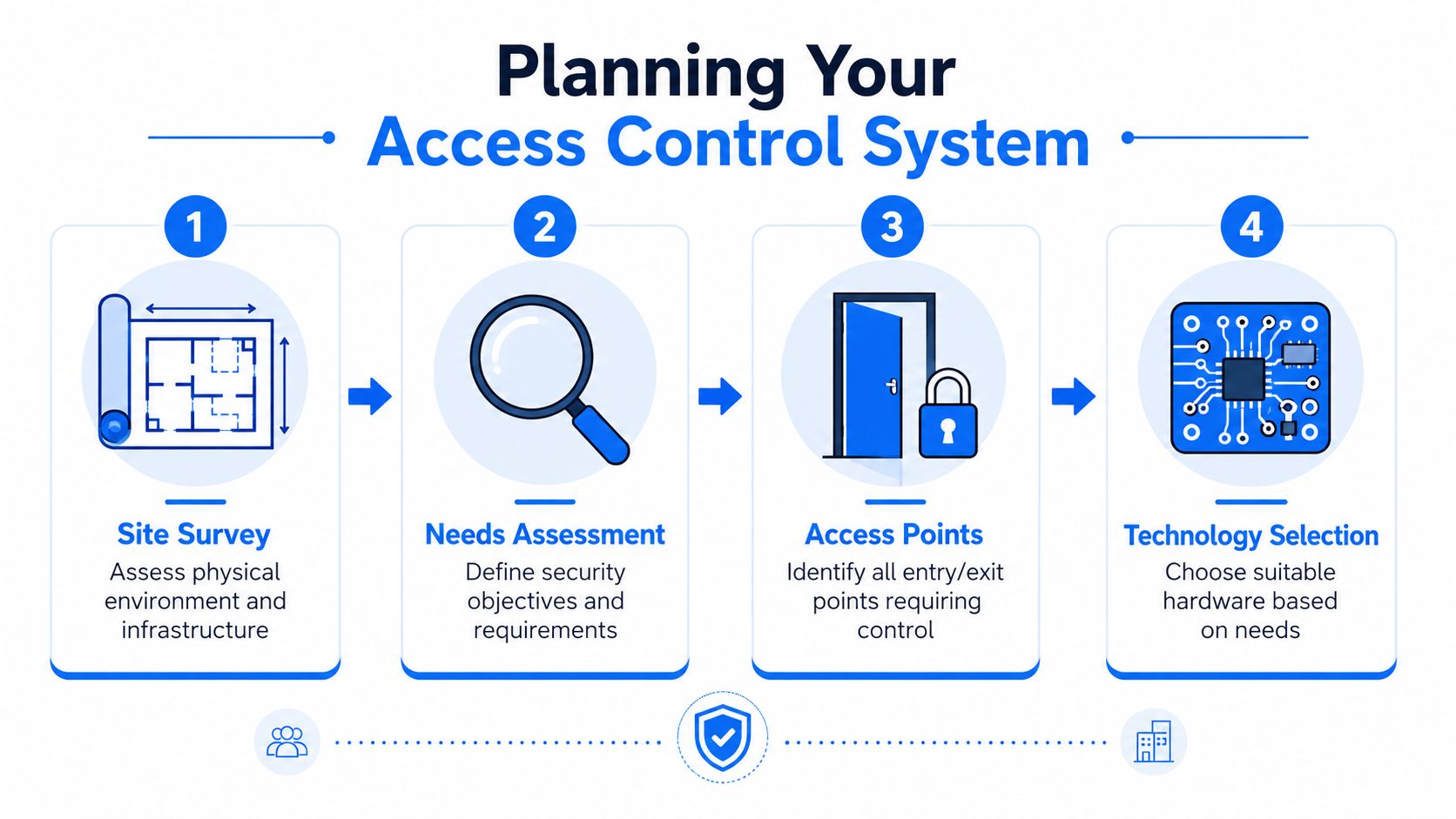
A poor installation often starts with a rushed shopping list. Someone picks a keypad online, orders a maglock, and assumes the rest can be figured out on the day. That approach usually creates rework. Good access control system installation starts with the building, the people using it, and the decisions the system must enforce.
Start with the building not the brochure
Walk the site first. Don't just count final doors. Include every opening that affects movement through the property:
- Main entrances: Front doors, reception entries, and side access used by staff.
- Internal restrictions: Server rooms, stock rooms, treatment rooms, private offices, or loft conversions used as workspaces.
- External routes: Gates, bin store entrances, yard doors, detached garages, and delivery access points.
- Shared circulation: Communal doors in converted buildings, rear corridors, and split-use spaces where different users need different rights.
Take notes on the details that change the install. What material is the door made from? Is it timber, aluminium, uPVC, or steel? Is there already a closer fitted? Is there glass beside the frame? Is there a safe route for low-voltage cabling? In London and Essex, older properties often look straightforward from the front and become much more complicated once you start tracing cable paths and checking frame condition.
Specialist installers consistently treat this as a structured project. They assess needs, define the right readers and locks, test wiring, and train staff because access control often ties into other systems such as CCTV and visitor management. Security101's step-by-step guide to installing access control systems describes that formal process well, and it matches what works in practice.
Map people as carefully as doors
A system fails just as quickly when permissions are vague. Before choosing hardware, set out your user groups clearly. For a small office, that might be management, staff, cleaners, and contractors. For a home setup, it might be family members, regular trades, short-term visitors, and one emergency backup credential.
Use a simple floor plan and answer four questions for each group:
- Which doors do they need
- What times do they need access
- Do they need entry only, or entry and exit logging
- Who approves changes later
This sounds basic, but it avoids common mistakes. Cleaners shouldn't inherit all-day access because it's easier. A garden office shouldn't share the same code as the front gate. A storeroom used by deliveries may need controlled access without opening the rest of the building.
A good plan removes arguments later. The system simply reflects the way the property should operate.
Decide what success looks like
At survey stage, define what the finished system must do. That usually includes a mix of convenience, control, and resilience.
A useful planning list looks like this:
- Daily operation: Users can get in easily without reception staff becoming door operators.
- Leavers process: Access can be removed fast without changing physical cylinders.
- Incident review: Entry events are visible when something goes missing or a door is forced.
- Expansion: Additional doors can be added without replacing the whole platform.
- Supportability: Someone on site understands the basics of adding users and issuing credentials.
If you can't describe those outcomes clearly, the hardware decision is premature.
Keypads Cards Fobs or Biometrics Which Is Best
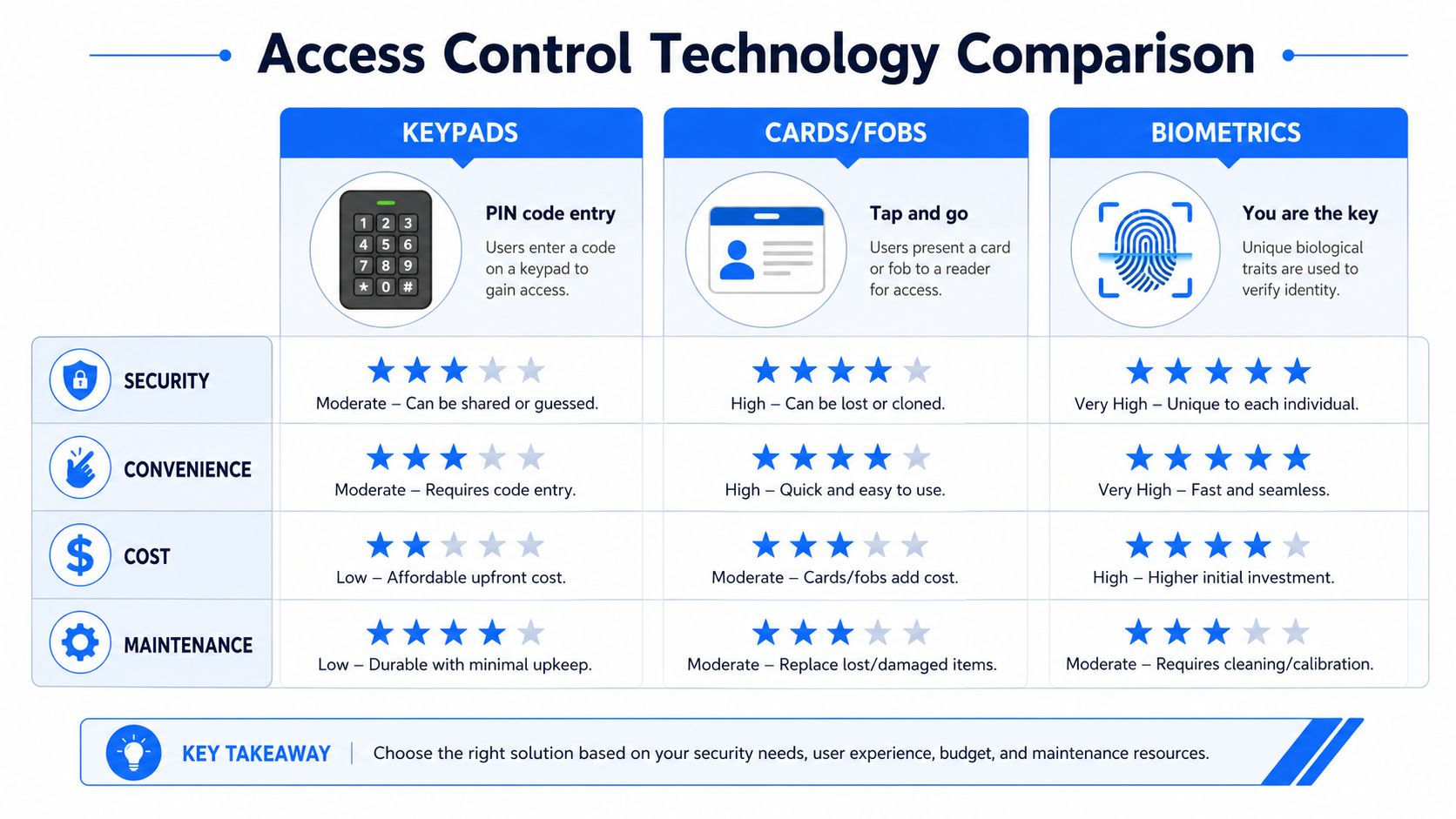
No credential type is best everywhere. The right answer depends on how often the door is used, who uses it, what happens if a credential is shared, and how much admin you want to deal with later. The mistake is treating every opening the same.
Where each credential works well
Keypads are simple and familiar. They work well on lower-risk doors, shared utility areas, or single-user residential gates where convenience matters more than a named audit trail. Their weakness is obvious. Codes get shared, written down, or left unchanged for too long.
Cards and fobs are still the most practical fit for many SMEs. They're easy to issue, easy to cancel, and easy to understand. They work especially well for offices, workshops, small warehouses, and multi-user buildings where you need quick throughput at the door.
Mobile credentials can be excellent where users already rely on smartphones and remote administration matters. They can reduce the hassle of replacing lost fobs, but they introduce another dependency. You're now relying on app setup, user adoption, and sometimes cloud connectivity.
Biometrics suit doors where identity matters more than convenience. That could be a server room, a controlled records area, or a high-value private room in a home office environment. They're not automatically the best option just because they feel advanced. They need careful thought around privacy, fallback access, and user acceptance.
A practical comparison
| Credential type | Best fit | Main strength | Common weakness |
|---|---|---|---|
| Keypad | Shared, lower-risk access points | Low friction and simple use | Codes are easily shared |
| Card or fob | Offices, staff entrances, general commercial use | Fast issue and revoke process | Lost credentials need admin control |
| Mobile credential | Sites wanting remote management | Convenient for frequent users | Depends on user setup and platform reliability |
| Biometric | Sensitive areas needing stronger identity checks | Ties access to the individual | Privacy, enrolment, and fallback planning |
The right mix is often hybrid, not pure. A main office entry may use cards or mobile credentials, while a comms room adds biometric verification or a secondary factor. A homeowner may prefer a keypad at the gate and a fob or app for the main entrance.
Avoid the common mismatch
The most common bad fit is overspecifying the easy door and underspecifying the critical one. A stock cupboard gets a premium reader because it's visible. The rear staff entrance gets a basic setup despite being the critical risk point. The right way to choose is by consequence, not by appearance.
Use these trade-offs to guide the decision:
- Choose keypads when the user group is small, trusted, and easy to manage.
- Choose cards or fobs when you need named users and straightforward administration.
- Choose mobile access when remote credential issue matters and users are comfortable with apps.
- Choose biometrics when you need stronger identity assurance and you're prepared to handle privacy obligations properly.
It also helps to look beyond the credential itself and think about operations. Preventing facility access issues is often less about the reader type and more about how permissions, entry points, and daily workflows are managed.
Don't pick the credential people will admire. Pick the one they'll use correctly on a wet Tuesday morning when they're carrying boxes, answering the phone, or trying to lock up quickly.
One more practical point. If a system has no sensible fallback, it isn't ready. A biometric reader should still have an approved fallback route for enrolment problems or sensor failure. A keypad on a family gate should have a process for changing the code without delay. A fob system should make it easy to disable one lost token without rewriting the whole setup.
From Cabling to Controller The Installation Process
Once the plan is right, the physical work starts. During this phase, many clients realise access control system installation is a building services job as much as a security job. There's wiring, power, door hardware, containment, controller location, software setup, and life-safety integration to get right.

What actually gets installed
At minimum, most systems include these parts:
- Reader or keypad: The device the user presents a credential to.
- Electric locking hardware: Often an electric strike, magnetic lock, or another electrically released lock arrangement.
- Controller: The decision-maker that checks permissions and tells the lock what to do.
- Power supply: Dedicated low-voltage power, often with battery backup depending on design.
- Cabling and containment: The unseen part that determines whether the system is stable or troublesome.
In UK practice, the controller and power supply should be kept in a secure comms location rather than exposed near the door. Door devices should be wired as a supervised loop, and the full install should align with BS EN 60839-11-1. ButterflyMX's access control installation guidance captures the key point well: the controller must be secured, wiring needs proper supervision, and lock behaviour has to be integrated with life-safety systems before go-live.
The sequence on site is usually straightforward in principle. Survey the opening. Confirm the fire-exit strategy. Route low-voltage cabling. Fit and terminate the reader and lock hardware. Commission the panel. Test each opening under authorised use and forced-entry conditions.
The lock choice that affects safety
This is the decision that can't be guessed on the day. Every opening needs the right fail-safe or fail-secure behaviour.
- Fail-safe means the door releases on power loss.
- Fail-secure means the door remains locked on power loss.
That sounds simple until you apply it to a real building. A fire exit cannot be set up in a way that compromises safe escape. A rear stock door may need to remain secure under different conditions. The access system, fire alarm interface, escape hardware, and local door function all need to work together.
If the lock type is chosen before the fire strategy is checked, the project is running in the wrong order.
This is also why a neat-looking magnetic lock on a sketch isn't enough. The practical question is always, “What does this door do during fire alarm, mains failure, controller failure, and normal day-to-day use?” If there isn't a clear answer, the opening isn't ready for installation.
A quick visual overview helps if you want to see the hardware side in context.
What slows jobs down in older properties
London and Essex buildings often create the same set of headaches. Solid walls. Decorative finishes. Narrow frames. Previous cabling with no labels. Doors that have shifted over time. Mixed hardware added by different trades over the years.
Common delay points include:
- Containment routes: There may be no clean path for low-voltage cable without visible trunking or extra making-good.
- Door compatibility: Existing ironmongery and frame condition may not suit the lock originally specified.
- Occupied working areas: Shops, clinics, and offices often need phased work outside busy hours.
- Cable segregation: Power and data routes must be handled properly, especially where existing services are already crowded.
What works is honesty at survey stage. If the building is likely to need visible containment, frame modification, or phased commissioning, that should be clear before the job starts. What doesn't work is pretending an old property will behave like a new-build commercial unit.
Going Live Testing Your System and Meeting UK Rules
A lot of weak projects look finished before they're ready. The readers power up. The doors release. Users get their fobs. Then the problems start. One cleaner can open the wrong area. One door doesn't report held-open alarms. Nobody knows how long logs are kept. The installer leaves, and the site inherits all the risk.
Commissioning is where weak installs get exposed
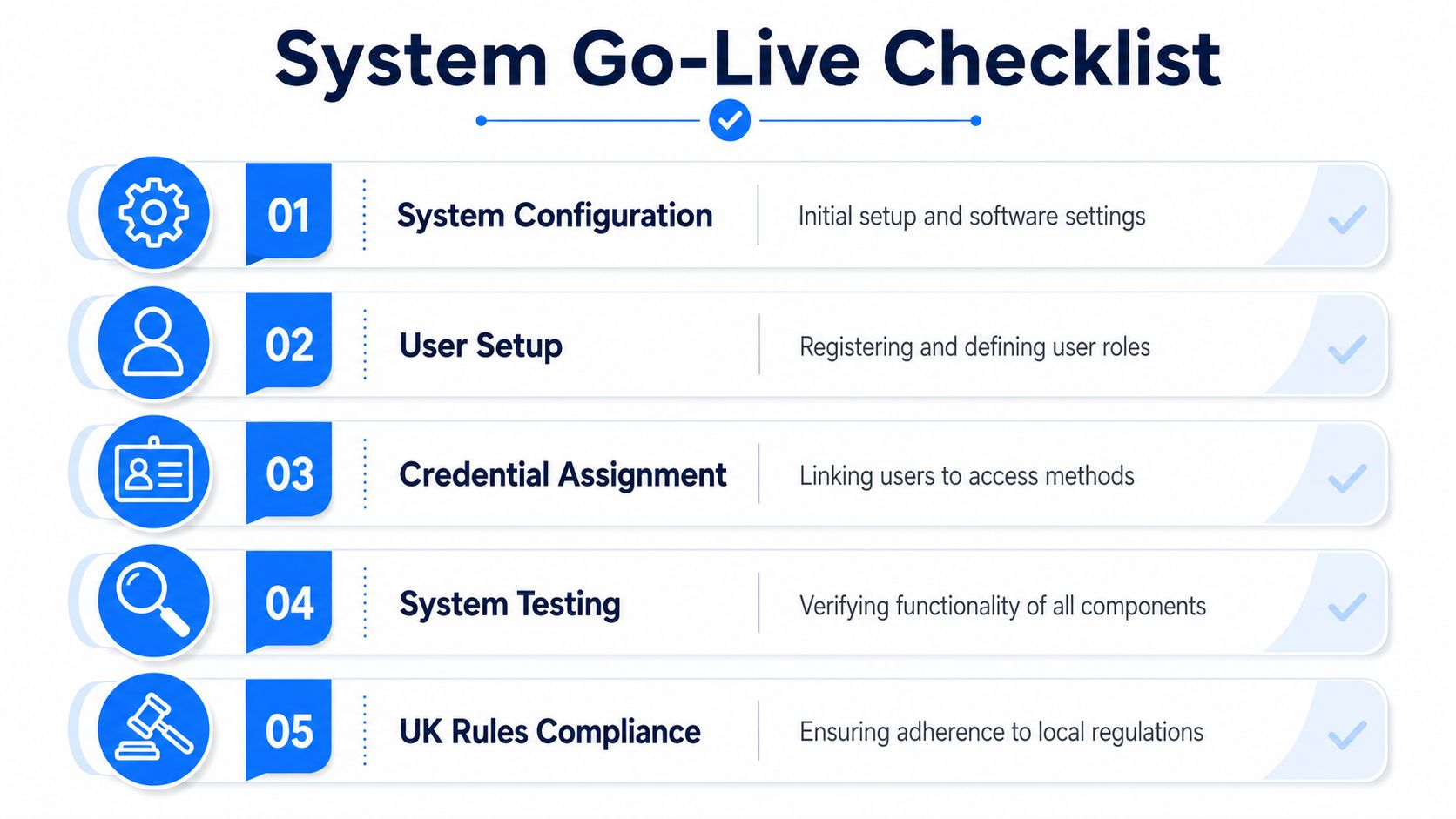
Go-live should be deliberate. Start with software configuration, then user setup, then testing under normal and abnormal conditions.
A proper commissioning pass should include:
- Valid credential tests: Confirm authorised users can access only the right doors.
- Invalid credential tests: Check denied access behaves correctly and is logged.
- Door state checks: Verify forced-entry and door-held-open events are reported.
- Schedule testing: Make sure time-based access follows the programmed windows.
- Power and outage behaviour: Confirm the system behaves safely if power or connectivity changes.
Training matters here as much as wiring. Someone on site needs to understand how to add a user, remove access, issue a replacement credential, and review events without guessing. If nobody can do that, the install is only half finished.
Access logs are not just admin data
Many buyers still treat logs as harmless background data. Under UK law, that's the wrong mindset. Access logs and biometric data can be personal data, and the ICO advises organisations to carry out a DPIA for high-risk monitoring. The same source also highlights the cyber side. 43% of UK businesses faced a cyber attack in the last year, which is why networked access control has to be treated as part of the wider risk picture. Those points are summarised in this access control installation guide discussing data protection and cyber risk.
That changes how a system should be handed over. You need clear answers on:
- Purpose: Why is the data being collected at all
- Retention: How long logs are kept
- Access: Who can view logs and who can export them
- Storage: What stays locally and what sits in a cloud platform
- Special category risk: Whether biometric processing creates a higher privacy burden
Access control data can reveal working patterns, attendance habits, contractor visits, and incident history. Treat it with the same care as other sensitive operational records.
For SMEs, that often means documenting the basics instead of assuming the software defaults are fine. For homeowners, it means understanding what a connected app-based system stores and who can access that information.
Cybersecurity and resilience need a place in the handover
A modern door system sits on a network, even when the buyer thinks of it as “just security”. That means the handover should cover digital resilience as clearly as the physical operation.
The practical questions are simple:
- Can the system keep operating safely if the internet drops
- Is the controller separated sensibly from the rest of the network
- What happens during a power interruption
- How are admin accounts protected
- How are firmware and software updates managed
What works is designing for graceful failure. Doors should fail in the right way for their use. The site should know what remains operational during an outage. Admin access should be limited to the people who need it. If that discussion never happens, the install may still look tidy, but it isn't complete.
Your Access Control Partner in London and Essex
Good access control looks simple when it's done properly. A user presents a credential. The right door opens. The wrong one doesn't. Fire escape requirements are protected. Logs are available when needed. Day-to-day admin isn't a struggle. That simplicity is the result of careful planning, not luck.
For businesses and homeowners in London and Essex, the hard part usually isn't deciding that keys are no longer enough. The hard part is getting the whole project right across door hardware, cabling, network design, permissions, testing, privacy, and ongoing support. Older properties make that even more important because the building itself often dictates what's realistic.
A professional installation should leave you with more than working hardware. It should leave you with a system that people understand, that fits the building, and that can be maintained without constant workarounds. That means sensible lock choices, clean commissioning, clear admin processes, and support when users change or doors are added later.
Long term, maintenance is where reliability is protected. Doors move. Closers drift. credentials get lost. Software gets updated. Staff change. A system that isn't reviewed ends up creating the same frustration it was meant to remove.
If you're planning access control system installation for an office, shop, warehouse, gate, or home in London or Essex, getting local advice early usually saves time, cost, and disruption later.
If you want practical advice on access control system installation in London or Essex, speak to Networking2000. Their engineers handle the full job from survey and cabling to configuration, testing, and ongoing support, with clear guidance that makes sense whether you're securing one entrance or a multi-door site.

