A lot of small businesses in London and Essex already have “a disaster recovery plan” without really having one. They've got backups running somewhere, a few admin passwords saved, maybe a mobile number for the internet provider, and a general belief that if something goes wrong the IT person will sort it.
Then a real outage happens.
The broadband drops in Chelmsford on a Monday morning. Staff can't log into Microsoft 365. The VoIP phones stop ringing. Orders are sitting in a cloud system nobody can reach. Customers are calling, but nobody can answer. At that point, the question isn't whether you own backups. It's whether your business can recover, under pressure, with the systems and suppliers you depend on every day.
That's what disaster recovery testing is for. Not paperwork. Not ticking a compliance box. Just proof that your business can keep operating, or get back on its feet fast enough, when the things you rely on stop working.
Table of Contents
- What is Disaster Recovery Testing Really?
- Why Testing is Non-Negotiable for UK Businesses
- Setting Clear Objectives and Success Criteria
- Choosing the Right Type of Disaster Recovery Test
- Creating and Executing Your Test Plan
- Analysing Results and Improving Your Plan
What is Disaster Recovery Testing Really?
A Romford business loses internet access just after opening. That sounds like an inconvenience until you list what rides on that one connection. Email, cloud files, VoIP handsets, card payments, remote access, security alerts, supplier portals, and often the login system staff need to reach anything else.
If nobody has ever tested what happens next, recovery becomes guesswork.
Disaster recovery testing is the act of proving that your business can restore critical services after a disruption. It's the difference between saying “we've got backups” and proving that you can restore the right data, in the right order, within a timeframe the business can live with.
Backup is not the same as recovery
A backup answers one question. Did a copy of the data exist?
Recovery answers several harder questions:
- Can you restore it quickly enough to keep trading?
- Can staff still log in when core systems are under pressure?
- Can customers still reach you if the phone system is affected?
- Can the team follow the process without relying on one person's memory?
That's why a backup report on its own doesn't give much comfort. A green tick in a console can hide all sorts of problems, such as missing permissions, outdated credentials, broken restore steps, or a dependency nobody documented.
Practical rule: If you haven't restored it and timed it, you don't yet know if it's recoverable.
It's about your actual business day
For a small or medium-sized business, disaster recovery testing doesn't need to look like a huge corporate exercise. It needs to reflect what would cause real harm to the business.
That could be:
- A broadband failure that cuts off cloud systems
- A VoIP outage that stops incoming calls
- A locked account problem that prevents access to Microsoft 365
- A ransomware incident that encrypts shared files
- A failed server or NAS holding key documents or line-of-business software
Good testing focuses on those realities. It checks whether the business can still answer customers, access records, take payments, work remotely, and coordinate staff when normal assumptions stop being true.
Why Testing is Non-Negotiable for UK Businesses
For years, a lot of smaller firms treated disaster recovery testing as something for banks, hospitals, or very large companies. That view doesn't hold up anymore, especially when so many smaller businesses now depend on cloud platforms, internet telephony, and hosted systems to get through an ordinary working day.
An untested plan usually breaks at the worst point
The issue isn't whether a document exists. The issue is whether that document still matches today's setup.
A business might have changed internet providers, moved files into SharePoint, switched to hosted VoIP, added multi-factor authentication, or opened remote access to more staff. Each of those changes can affect recovery. If the plan wasn't updated and tested after the change, parts of it may already be wrong.
That matters because many organisations still don't test thoroughly enough. A Flexential summary of 451 Research found that only 37% of organisations test disaster recovery once a year, and just 21% test more than twice a year. The same summary says 71% do not perform failover testing and 62% do not carry out regular backup restoration exercises according to the resiliency data it references in its disaster recovery testing overview.
For a London or Essex SMB, the lesson is straightforward. If your phones, files, and internet access stop at the same time, shallow testing won't tell you how the day really unfolds.
A plan that only works on paper often fails at the handoff points, who calls whom, who approves what, and how staff keep working while systems are being recovered.
The pressure is no longer just internal
Testing is also being driven by outside expectations. Customers ask tougher questions. Cyber insurers want more evidence that recovery arrangements are real. Regulated supply chains expect suppliers to show resilience, not just promise it.
One sign of that shift is the regulatory direction coming out of financial services. The EU's Digital Operational Resilience Act affects UK firms operating in EU financial markets or serving regulated clients, and it requires critical ICT systems to be tested at least annually, with extra testing after significant changes, as outlined in Cutover's explanation of DORA testing expectations.
If you want a broader view of why resilience is becoming an operational issue rather than a pure IT issue, these DataLunix resilience insights are worth reading.
A short explainer can help if you're discussing this internally with directors or operations leads.
Setting Clear Objectives and Success Criteria
A disaster recovery test goes wrong long before the outage simulation starts if nobody agreed what “recovered” means.
For most small businesses, the first two terms worth understanding are RTO and RPO. They sound technical, but they're really business decisions.
- RTO, or Recovery Time Objective, is how long a service can be unavailable before the damage becomes unacceptable.
- RPO, or Recovery Point Objective, is how much recent data you can afford to lose.
Start with business services, not servers
The National Cyber Security Centre advises organisations to test recovery arrangements using realistic scenarios and to measure actual recovery time and data loss against pre-agreed objectives. That practical approach is summarised in this guidance on disaster recovery testing methodology.
So don't begin with “server one” and “server two”. Start with services the business cares about:
- Phones
If your VoIP platform is down, how long can reception, sales, or support operate before the business feels it properly? - Email and Microsoft 365 access
If staff can't authenticate, they may be locked out of files, Teams, calendars, and shared mailboxes at the same time. - Customer records
If your CRM or accountancy platform loses recent changes, how much rework can the team realistically absorb? - Shared files
Not every folder matters equally. Quotes, live jobs, compliance documents, and finance records usually need faster recovery than old archive data.

Turn recovery goals into pass or fail rules
Many firms remain too vague on this point. “Restore as quickly as possible” sounds sensible, but it's useless in a test report.
A better approach is to write down simple pass or fail criteria before the exercise starts.
| Service | Example objective | What counts as a pass |
|---|---|---|
| VoIP phone system | Recover calling capability within the agreed business window | Staff can make and receive calls through the fallback route within the target |
| Customer database | Restore data with acceptable data loss window | Restored data is current enough to meet the agreed RPO |
| Shared file access | Recover access for priority users first | Key users can open, save, and verify critical files |
| Email and login | Re-establish authentication and messaging | Staff can sign in and send or receive messages through the agreed method |
A useful way to prepare for this is to review your dependencies first. If you need a starting point for that exercise, this IT security risk assessment process gives a practical framework for identifying what matters and where the weak spots usually sit.
If your phones recover but nobody can log in, you haven't passed. If data restores but the team can't reach customers, you haven't passed. Recovery has to be usable, not merely technical.
Choosing the Right Type of Disaster Recovery Test
Not every test needs to be dramatic. In fact, the wrong type of test can waste time, scare staff, and still tell you very little.
The right choice depends on what you're trying to prove, how much disruption the business can tolerate, and whether you're testing people, systems, or both.
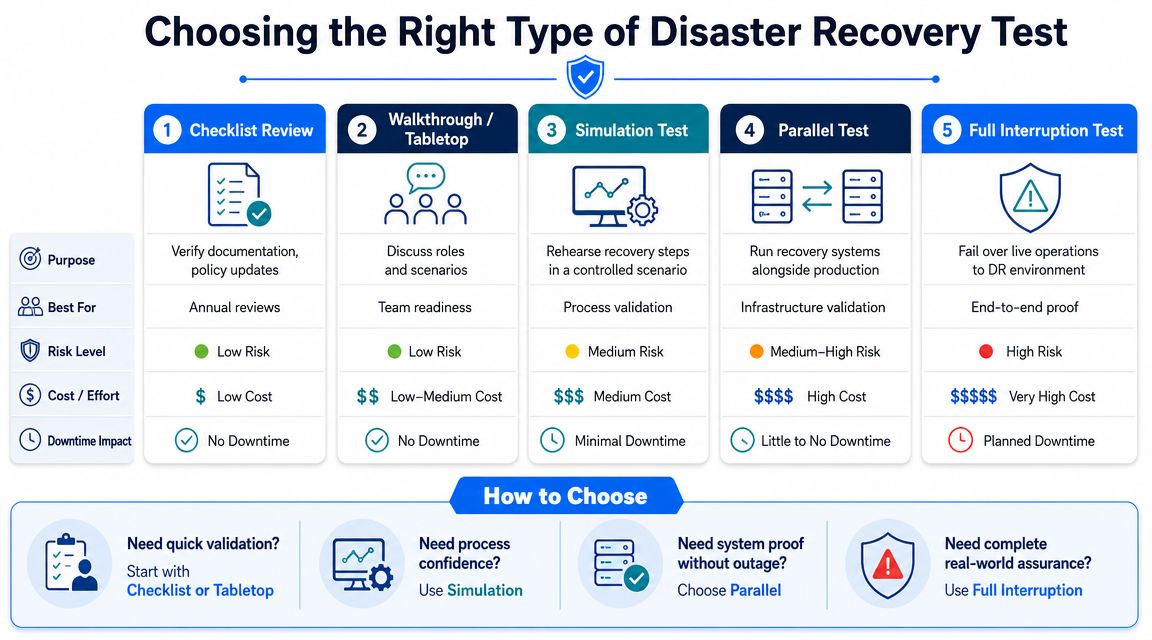
Four test types that matter for SMBs
A sensible programme usually mixes lighter exercises with occasional deeper validation.
Walkthrough or checklist review
This is the least disruptive starting point. The team reads through the plan, confirms contacts, checks supplier details, and looks for obvious holes.
It's useful for spotting outdated documentation. It does not prove recovery works.
Simulation
A simulation creates a realistic incident without switching production services over. You might declare that the office internet is unavailable, then ask the team to follow the comms, escalation, and workaround process.
This is good for testing decisions, handoffs, and staff response under pressure.
Parallel test
A parallel test brings up recovery systems while live production stays active. That makes it safer than a full failover but more meaningful than a paper exercise.
It's often a good middle ground for businesses that want technical proof without risking a working day.
Full interruption or failover test
This is the most demanding option. You actively switch from the primary service to the recovery arrangement and verify that the business can operate there.
It provides the strongest evidence, but it also carries the most operational risk. For smaller firms, this is usually best used selectively for the services that matter most.
Test the communications stack separately
One of the biggest gaps in disaster recovery testing is that many plans focus on servers and backups but ignore what fails first in ordinary business life. Communications.
UK SMEs rely heavily on VoIP, broadband, and cloud authentication such as Microsoft 365, and a test plan is incomplete if it doesn't check what happens when those services are the point of failure, as highlighted in this guide to communications-aware DR testing.
That means you should run a distinct scenario around questions like these:
- If the primary broadband line fails, how do staff keep working?
- If the hosted PBX is unreachable, how are calls redirected or handled?
- If cloud login is unavailable, who can still access what?
- If email alerts fail, how does the team coordinate?
A business can restore a server and still fail the incident if staff can't receive alerts, authenticate, or speak to customers.
For many London and Essex firms, a communications-loss test is more valuable than a dramatic building-loss scenario, because it reflects what's more likely to interrupt trade.
Creating and Executing Your Test Plan
A useful test plan isn't a giant binder full of theory. It's a short runbook people can follow on a stressful day.
For smaller businesses, the right question is usually not “how do we run the perfect exercise?” It's “what's the smallest test we can run that gives us real evidence and improves the plan?”
A minimum viable testing rhythm
A practical model for SMEs is a phased one. The recommendation outlined in this SME-focused disaster recovery testing guide is simple and achievable:
- One tabletop discussion per quarter
Pick a realistic scenario and walk through decisions, dependencies, contacts, and fallback actions. - One critical data restore test monthly
Choose the data or service that would hurt most if unavailable, then prove you can restore it. - One communications failover drill annually
Validate what happens when phones, broadband, or cloud access are the problem.
That rhythm works because it balances effort with value. You're not trying to simulate every disaster. You're building repeatable confidence.
A simple runbook that works
Keep the runbook lean. One or two pages is often enough for a single scenario.
A basic format looks like this:
- Scenario
State what has failed. Keep it specific. “Primary internet circuit unavailable at 08:45” is better than “network issue”. - Business impact
Note which teams or customer services are affected. - Recovery objective
Record the agreed outcome. For example, restore customer call handling through the fallback route. - Roles
Name the decision owner, technical lead, communications lead, and supplier contacts. - Steps
List the actions in sequence. Keep them plain and short. - Stop conditions
Define when to pause or end the test if risk rises. - Evidence
Note what you'll measure, such as restore time, data age, user login success, or call routing success.
Here are two realistic test cases for an Essex or London SMB:
- Shared files unavailable after suspected ransomware activity
Can you isolate the affected system, confirm backup integrity, restore priority data, and let key staff resume work safely? - Main office internet failure
Can calls be rerouted, can staff work through a secondary connection or alternative location, and can customers still reach the business?
If your internal processes are messy, documenting them clearly is half the battle. This actionable guide for process managers is useful for turning ad hoc knowledge into repeatable steps that other people can follow.
A final practical point. Tell the right people in advance. Not everyone needs the full script, but stakeholders should know a test is happening, who is in charge, and what counts as an acceptable level of disruption.
Analysing Results and Improving Your Plan
The most valuable part of disaster recovery testing usually starts when the exercise ends.
You discover whether the issue was technical, procedural, or human. Often it's a mix of all three. Maybe the restore worked, but the wrong people were notified. Maybe the failover path existed, but a supplier number was out of date. Maybe the team recovered the data, but nobody had checked whether users could successfully open the application afterward.
What to record after every test
You don't need a mountain of paperwork. You do need a clear record of what happened.
Capture these points while they're still fresh:
- What failed
Be specific about the scenario and the starting condition. - What worked
Keep the successful steps. They become the backbone of future runbooks. - What delayed recovery
Look for approval bottlenecks, missing credentials, unclear ownership, and dependency gaps. - What the business felt
Did staff lose communication? Could customers still get through? Were priority services restored in the right order? - What changes now need owners
Every remediation point should belong to someone, with a retest planned once it's fixed.
The test is only successful if it changes the plan, the documentation, or the setup for the better.
Simple Disaster Recovery Test Checklist for London & Essex SMBs
| Phase | Task | Status (Not Started / In Progress / Complete) | Notes / Outcome |
|---|---|---|---|
| Preparation | Confirm the scenario being tested | ||
| Preparation | Identify the critical services affected | ||
| Preparation | Review current contact list for staff, suppliers, and decision makers | ||
| Preparation | Confirm the agreed recovery objectives for the test | ||
| Preparation | Set pass or fail criteria before starting | ||
| Execution | Start the test and record the time | ||
| Execution | Follow the runbook in the documented order | ||
| Execution | Record any deviations, workarounds, or missing steps | ||
| Execution | Check whether staff can communicate during the incident | ||
| Execution | Verify that users can access the recovered service, not just that IT can see it | ||
| Review | Record actual recovery time | ||
| Review | Record actual data loss window, if relevant | ||
| Review | Note what caused delay or confusion | ||
| Review | Update the disaster recovery plan and contacts | ||
| Review | Assign owners to each corrective action | ||
| Review | Schedule the retest |
For most small businesses, improvement comes from repetition rather than complexity. Run a realistic test. Write down what broke. Fix the weak points. Test again. That cycle is what turns disaster recovery from wishful thinking into something you can rely on when a bad day hits.
If you want help turning a backup-heavy setup into a practical recovery plan, Networking2000 can help you review the weak points, test the parts that matter most, and make sure your phones, internet, cloud access, and core business systems are covered in a way that makes sense for a London or Essex business.

