Your internet line has been upgraded. The provider has handed over a faster service. Yet staff still complain that Teams calls freeze, the Wi-Fi drags in meeting rooms, and file transfers feel inconsistent. In many London and Essex offices, the problem isn't the connection coming into the building. It's the cabling and layout inside it.
That catches business owners out because cabling is easy to ignore when it's hidden above ceilings, inside risers, or tucked behind desks. But a poor data cabling installation directly affects everything built on top of it: wireless access points, VoIP handsets, CCTV, printers, desktops, and the switches tying them together. If the physical layer is weak, the rest of the network spends its life compensating.
A good cabling job isn't just about getting a link light. It's about building a network foundation that stays reliable, passes scrutiny, and still makes sense when you add more staff, more devices, or a new Wi-Fi standard.
Table of Contents
- Is Your Network Ready for 2026 and Beyond
- Understanding Your Cabling Options From Cat5e to Fibre
- The Data Cabling Installation Process Explained
- Why Compliance and Certification Matter in the UK
- What Drives Your Installation Cost
- Choosing the Right Contractor in London and Essex
- Your Next Steps to a Faster Network
Is Your Network Ready for 2026 and Beyond
A lot of firms still assume their network is fine because “it worked before”. That's the wrong test. The better question is whether it still supports the way your team works now, and the way you'll need to work over the next few years.
As of early 2025, Ofcom reported that full-fibre availability in the UK reached 78% of premises in its Connected Nations report. That matters because faster internet access exposes weak internal networks very quickly. Businesses upgrade the line, then discover the office cabling, patching, or cabinet design can't keep up with modern backhaul demands.
Wi-Fi is where this usually becomes obvious. A newer access point can only perform as well as the cable and switch port feeding it. If you're rolling out stronger wireless coverage, cloud telephony, or IP cameras, old copper runs and poorly terminated outlets start showing their age. Users don't describe that as “a structured cabling limitation”. They say the internet feels unreliable.
The hidden bottleneck inside the building
The physical network often gets treated as a one-off fit-out item. In practice, it behaves more like long-term infrastructure. If it was installed for an earlier era of desktop use, light web traffic, and a few phones, it may now be carrying wireless backhaul, voice, CCTV, door access, and shared data traffic on the same estate.
That's why data cabling installation should be treated as a business continuity decision, not a cosmetic one. The cost of getting it wrong isn't limited to poor speeds. It shows up as dropped calls, troubleshooting time, awkward desk moves, and upgrades that turn into partial rewires.
Practical rule: If your broadband has improved but user experience hasn't, stop blaming the provider first. Check the internal cabling path, terminations, patching, and cabinet design.
What future-ready looks like in practice
A future-ready network doesn't mean buying the most exotic cable on the market. It means matching the cabling design to likely device growth, uplink demand, and building constraints. For many SMEs, that includes planning for stronger wireless backhaul, more Power over Ethernet devices, and cleaner separation between user drops and backbone links.
What works is measured planning. What doesn't work is assuming yesterday's cabling standard will carry tomorrow's workload without compromise.
Understanding Your Cabling Options From Cat5e to Fibre
Choosing cable types can seem more technical than it needs to be. Most business owners don't need a standards lecture. They need to know what belongs at the desk, what belongs between floors, and what will age badly.
For most UK business projects, the practical baseline is Cat6A for new office outlets and fibre for the vertical backbone, because Cat6A supports 10GBASE-T over the full 100-metre channel and fibre is used for high-throughput uplinks between floors or buildings. That's the most useful starting point for a modern office conversation.
Why cable choice affects real business use
Think of the cable types like transport routes.
Cat5e is the older road that still gets traffic through for basic tasks. It can be serviceable in small, light-duty environments, but it doesn't leave much headroom for the direction many offices are heading.
Cat6 is a better route for general business traffic. It's often fine where runs are sensible and expectations are moderate. The catch is that it's frequently chosen because it sounds modern enough, not because anyone has mapped what the wireless, voice, and device estate will demand over time.
Cat6A is the motorway choice for new copper outlets. It's thicker, less forgiving to install badly, and needs proper pathway planning. But when installed and terminated correctly, it gives businesses room to grow without revisiting the whole floor later.
Fibre is different. It isn't the next step up from desk cabling in the way many people assume. It's the right medium for backbones, inter-floor links, building-to-building connections, and areas where copper distance, throughput growth, or interference become limiting factors.
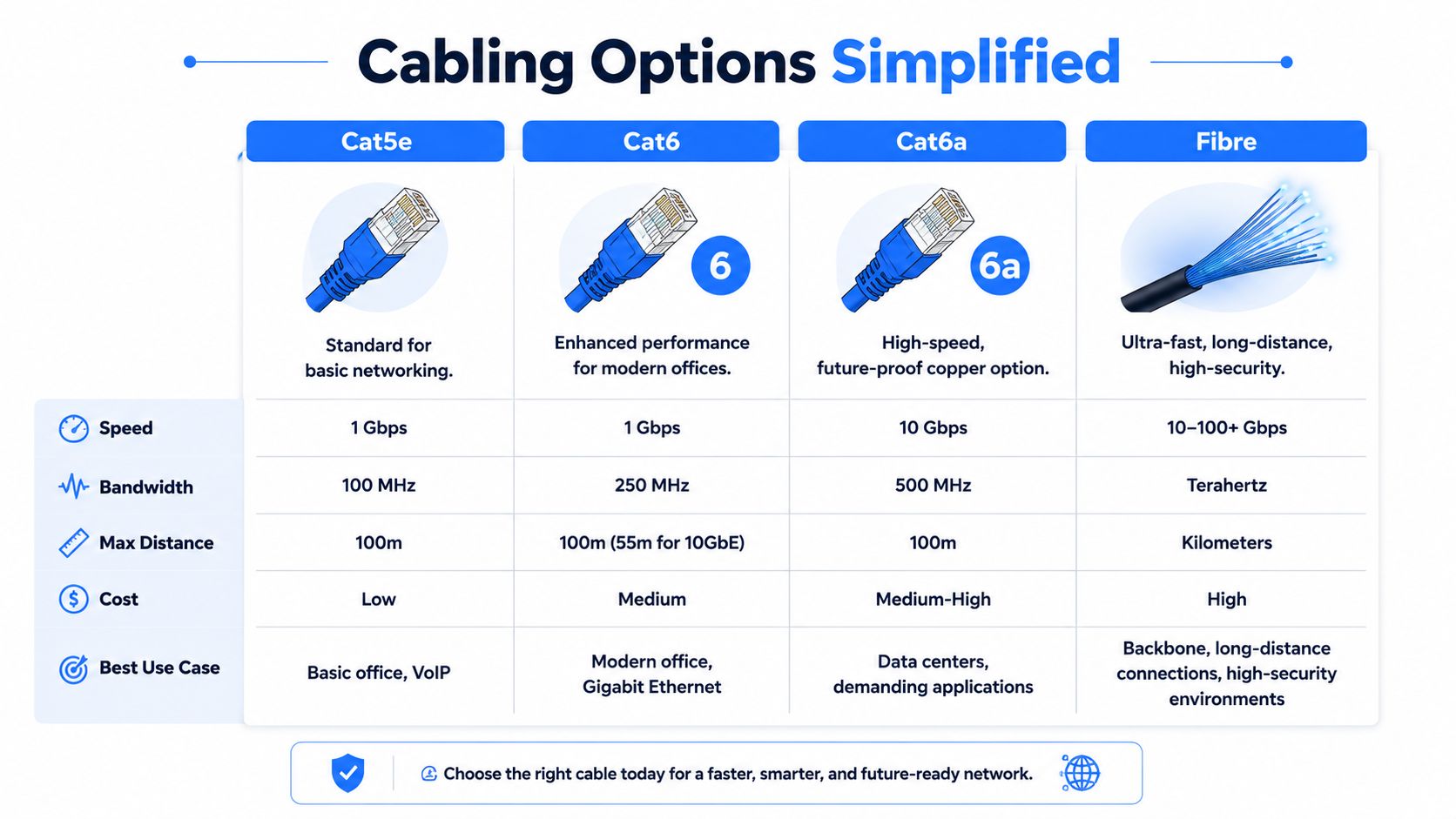
Data Cable Comparison at a Glance
| Cable Type | Max Speed (at 100m) | Best For | Future-Proofing |
|---|---|---|---|
| Cat5e | 1 Gbps | Basic office connectivity, light VoIP use | Limited |
| Cat6 | 1 Gbps | General office networks, modern desktop use | Moderate |
| Cat6A | 10 Gbps | New office outlets, stronger long-term copper design | Strong |
| Fibre | Depends on design and optics | Backbone links, risers, uplinks, longer runs | Very strong |
A comparison table is useful, but it only helps if you read it the right way. The biggest mistake is treating every cable run as if it has the same job. It doesn't. A user outlet at a desk and an uplink between floors have different roles, so they should be designed separately.
If an installer proposes one cable type for every part of the building without separating horizontal runs, backbone links, and equipment-room interconnects, the design probably isn't mature enough yet.
A sound design usually follows a simple logic:
- Use copper where it makes sense: Shorter user drops, standard desk outlets, and device connections where electromagnetic interference is controlled.
- Use fibre where copper becomes awkward: Riser links, uplinks, building interconnects, and any path where later growth would force replacement.
- Avoid false economy: Saving money on cable grade can look sensible on day one and expensive the moment you upgrade Wi-Fi, change switching, or add more PoE devices.
The best data cabling installation isn't the one with the fanciest materials everywhere. It's the one that puts the right medium in the right place, leaves a clean path for expansion, and doesn't box the business into a rewiring job too early.
The Data Cabling Installation Process Explained
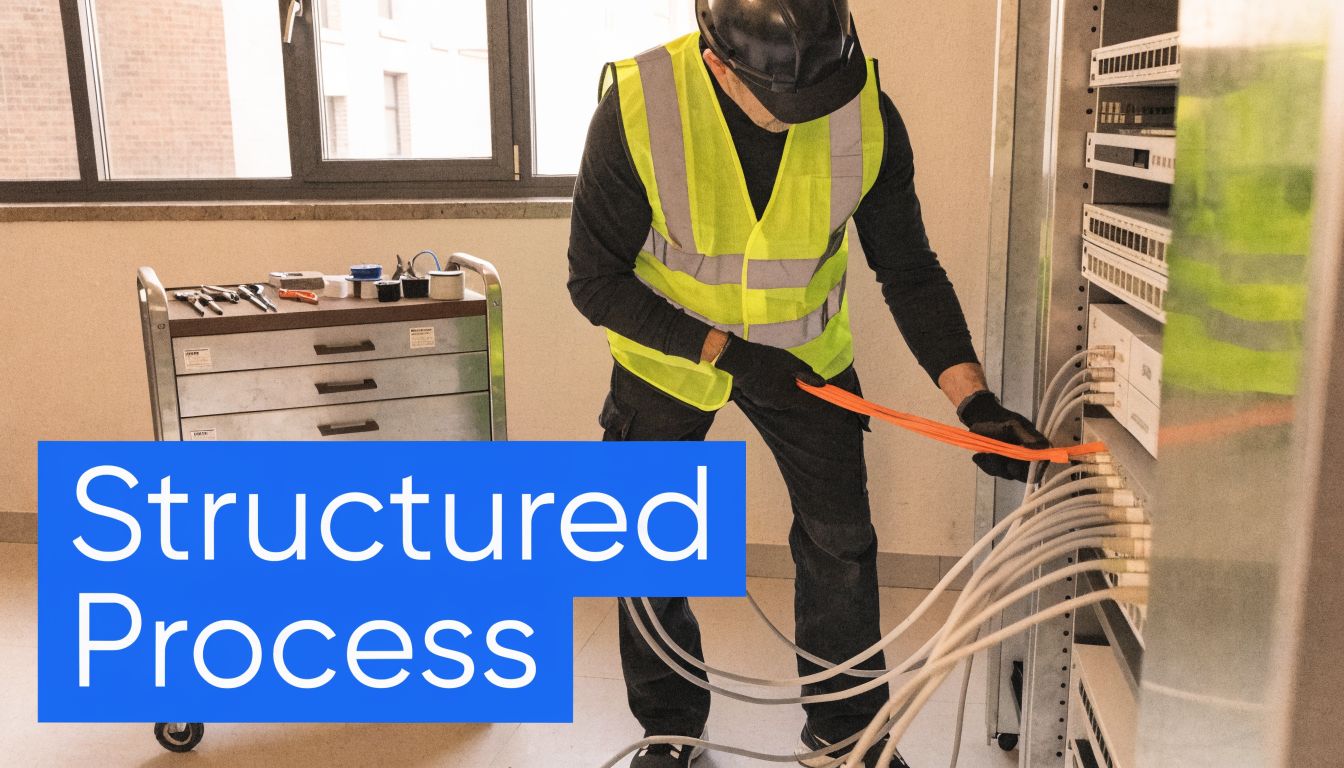
From the client side, a good installation feels organised from the first visit. Someone surveys the space, asks how your staff work, checks risers and ceiling voids, and looks at where cabinets, patch panels, and wireless access points should sit. That early thinking prevents a lot of the mess you see in rushed projects.
What happens before the first cable is pulled
A proper site survey should do more than count desks. It should identify building constraints, likely cable routes, cabinet locations, and the devices the network needs to support. That includes access points, phones, CCTV, printers, and any equipment that may draw power from the switch.
Then comes the design. At this stage, a professional installer maps horizontal runs, backbone paths, and equipment-room interconnects rather than treating the whole job as one bundle of cables. Outlet positions, patch panel capacity, cabinet airflow, and labelling standards should all be settled before installation begins.
A useful outside reference for buyers comparing cable categories is Clouddle's analysis of Ethernet cable performance. It helps frame the practical difference between cable choices before you sign off a design.
Where quality is won or lost
The physical install is the visible part, but it isn't the whole job. Good engineers route and support cable neatly, protect bend radius, avoid unnecessary stress on the sheath, and keep pathways logical. Bad installs often “work” at handover and become fault-finding exercises later.
Termination and labelling are where discipline shows. Patch panels should be consistent, faceplates should match the schedule, and every run should be identifiable without guesswork. If a contractor shrugs at labelling, expect pain later when moves, adds, or faults come up.
This walkthrough gives a decent visual sense of what a structured install involves:
A professional handover normally includes these elements:
- Test results for each run so performance isn't assumed.
- Labelling records that match the physical outlets and panels.
- As-built documentation showing what was installed in reality, not what was originally planned.
- A clean cabinet finish with sensible patching and room for future changes.
When those pieces are missing, the network becomes harder to maintain from day one. When they're done well, the cabling becomes reusable infrastructure rather than hidden guesswork.
Why Compliance and Certification Matter in the UK
Cheap cabling quotes often look attractive because they strip out the parts clients can't easily see. That usually means lower-grade components, weak documentation, poor fire-stopping, or no meaningful certification at the end. The network may appear live, but the risk hasn't gone away. It's just been buried behind walls and above ceilings.
This matters more in commercial premises than many buyers realise. Cabling routes pass through risers, ceiling voids, service penetrations, and shared building spaces. Those aren't just pathways for cable. They're part of the building's safety envelope.
Fire safety is part of the job
UK Government guidance states that service penetrations through fire-rated walls or floors must be appropriately sealed, and a compliant installation includes proper fire-stopping, CPR-rated cables, and full documentation according to UK fire safety guidance for non-domestic premises. In plain terms, a cabling contractor can't just drill, pull, and walk away.
If a cable passes through a fire compartment, somebody needs to consider how that penetration is sealed. If cable is being installed in a commercial environment, somebody needs to specify the appropriate material performance. If nobody owns those questions, the client inherits the problem.

Compliance isn't a premium add-on. It's part of handing over work that a business can live with safely and defend later.
When you're assessing a contractor's professionalism, it also helps to understand how firms signal standards and accountability. Buyers who want a quick primer on that can look at credibility through trade associations from Growth 4 Trades. Membership alone doesn't guarantee quality, but it gives you another lens for judging how seriously a company treats its obligations.
Certification is your proof
Certification gets muddled with “testing” all the time. A basic continuity check tells you the pairs are connected. It doesn't prove the installed link performs to the intended category. That distinction matters.
A certified installation should leave you with a proper record for each run. That documentation has practical value long after handover. When a user reports an intermittent fault, when you add a switch, or when another contractor needs to work in the cabinet, those records save time and reduce assumptions.
Ask for these points clearly:
- Certified test results: Not a verbal assurance that the cabling is fine.
- Outlet and panel schedules: So anyone can trace a link without guesswork.
- Fire-stopping and material details: Especially where routes pass through compartments.
- As-built records: Because drawings often change during the job.
A compliant data cabling installation protects performance, supports audits, and reduces the chance that a cheap shortcut turns into an expensive disruption later.
What Drives Your Installation Cost
Most buyers ask the same question first: how much per point? It's a fair question, but it rarely tells the full story. Two projects with the same number of outlets can price very differently because the building, pathways, finish level, and compliance requirements aren't the same.
That's why a serious quote should read like a scope, not a guess. If it only lists a cable type and a total figure, you can't tell what's been included or omitted.
What changes the quote
The first cost driver is cable and component choice. Category matters, but so do patch panels, keystones, cabinets, management hardware, and patch leads. A low figure may reflect stripped-down materials rather than an efficient design.
The second is the building itself. A tidy office with suspended ceilings, accessible risers, and sensible cabinet space is usually simpler than a site with solid walls, awkward routes, restricted working hours, or listed-building constraints. Labour changes quickly when access is difficult.
The third is project scope around the cabling. Are you installing new cabinets? Replacing patch panels? Clearing out old legacy cabling? Coordinating with electricians or building management? Those tasks don't always show up in a simplistic per-outlet comparison, but they absolutely affect delivery.
Buyer check: If one quote is much lower, ask what it excludes. Testing, labelling, out-of-hours work, containment, fire-stopping, and documentation are often where the gap appears.
How to compare quotes properly
A sensible comparison starts with line items, not totals. You want to know what standard is being installed, what is being tested, what documentation is included, and what assumptions have been made about access and working hours.
Look for these points:
- Scope clarity: Does the quote identify cabinet work, patch panels, outlets, pathways, and testing?
- Assumptions: Does it rely on existing containment, easy access, or client-provided builders' work?
- Handover detail: Are certification results and as-built records included?
- Disruption planning: Will the work happen in office hours or out of hours?
Contractors often use estimating systems to standardise this kind of breakdown. If you want to see the sort of software logic that sits behind detailed electrical and cabling pricing, Exayard electrical estimating software gives a useful example of how scopes are structured and costed.
A fair quote isn't the cheapest one. It's the one that makes the project predictable. Good data cabling installation costs what it costs because labour, compliance, testing, and future usability are all part of the deliverable.
Choosing the Right Contractor in London and Essex
A cabling job can look tidy on day one and still cause problems for years. The difference usually comes down to the contractor. Good installers build a system that is easy to test, easy to manage, and ready for the next round of upgrades. Poor ones leave you with unlabeled outlets, inconsistent performance, and no clear record of what was installed.
That matters even more in London and Essex. A modern office block, a converted warehouse, and a mixed-use building above retail units all create different constraints around routes, access, containment, fire-stopping, and working hours. Contractors with local project experience usually spot those issues during the survey, not halfway through the install when delays start costing you money.

Questions worth asking before you sign
The useful questions are the ones that show how the contractor plans, tests, and hands over the job.
- How will you survey the building and confirm cable routes before work starts? This tells you whether they rely on assumptions or actual site conditions.
- What will I receive at handover? Ask for test certification, outlet schedules, cabinet labelling, and as-built records.
- How do you deal with fire-stopping and penetrations? Responsibility needs to be clear before anyone starts drilling.
- Who signs off the testing, and what standard are you certifying to? If the answer is vague, future fault-finding gets harder.
- How do you allow for future adds, moves, and changes? A contractor who plans for extra access points, desk moves, or higher-speed uplinks is thinking beyond the install date.
- What site restrictions have you allowed for? In London and Essex, that can include landlord permits, parking limits, noisy-hours rules, and narrow access windows.
Clear answers matter. So does plain language. If a contractor cannot explain their approach without hiding behind sales talk, that usually shows up again during delivery.
What local experience changes
Local experience is not about postcode pride. It affects how realistic the programme is and how well the installation fits the building. Older properties often have awkward risers, limited ceiling space, and route compromises that can hurt performance if the design is rushed. Multi-tenant sites can add approval steps that slow work down if nobody raises them early.
This is also where future-proofing becomes practical instead of theoretical. Businesses upgrading to faster internet circuits, denser wireless, and Wi-Fi 7 need cabling that will not become the weak point a year from now. A contractor who understands that will discuss cabinet capacity, pathway space, backbone links, and spare capacity, not just the outlet count.
Networking2000 is one example of a company operating in this market, providing networking and cabling-related services for businesses in London and Essex alongside wider IT and communications support.
The right contractor leaves you with a network that performs properly, passes certification, and can be understood by the next engineer who touches it.
Choose the installer who treats cabling as long-term infrastructure. That usually means a better survey, better records, fewer surprises during the work, and a network foundation that can support growth without another disruptive refit.
Your Next Steps to a Faster Network
A faster network starts with better decisions at the physical layer. If the cabling is underspecified, poorly routed, or badly documented, faster internet, newer switches, and Wi-Fi 7 access points will only expose the weakness sooner.
Three decisions usually shape the outcome.
First, design for the next five to ten years of use, not just today's headcount. That means allowing for higher wireless density, more PoE devices, uplink growth, cabinet space, and spare capacity in the routes. The cheapest install often costs more later if every upgrade turns into extra disruption.
Second, ask for evidence that the job was finished properly. Good results are visible in the labels, the test certification, the patching records, and the handover documents. If another engineer cannot understand the installation quickly, the site will be harder to support and harder to change safely.
Third, treat compliance and workmanship as part of uptime. Fire-stopping, correct containment, suitable cable selection, and clear records all affect whether the network remains dependable after the installers leave.
If your current setup feels unreliable, start with a site survey. A proper survey shows what can stay, what needs replacing, where the route constraints are, and whether a phased upgrade will reduce risk better than a full rip-out.
For many businesses in London and Essex, the sensible next step is to walk the building with a structured cabling specialist before ordering hardware. That gives you a plan based on the building, the users, and the services you expect the network to carry.
As noted earlier, Networking2000 provides cabling and wider network infrastructure support in this market. If you are planning a data cabling installation in London or Essex, a no-obligation site survey can help you assess office connectivity, wireless backhaul, VoIP, and upgrade priorities without relying on guesswork. That approach usually prevents short-term fixes and leaves you with a network foundation that can keep up with business growth instead of limiting it later.

