Your office opens at 8:30. By 8:37, the internet is down, the phones are unreliable, one key PC won't boot, and the printer everyone shares has vanished from the network. Someone has already tried turning things off and on again. Your remote support tool won't connect because the connection itself is the problem. At that point, another phone call isn't what fixes the day. You need an engineer on site.
That's where onsite it support still matters, even in a world full of remote tools, cloud dashboards, and automated alerts. Some faults are physical. Some jobs need hands on equipment. Some outages need somebody standing in front of the cabinet, tracing a cable, swapping failed hardware, or checking whether the issue is the switch, the power, the patching, or the device itself.
For small and medium-sized businesses in London and Essex, that distinction matters more than most providers admit. The primary decision usually isn't “onsite or remote?” It's “when does remote stop being enough, and when does paying for local onsite support save more disruption than it costs?”
This guide answers that from a practical engineer's point of view. It focuses on what happens during faults, office moves, installs, security incidents, and day-to-day support for businesses that can't afford to lose a working day to guesswork.
Table of Contents
- Introduction When Your IT Fails and You Need Someone There
- What Exactly Is Onsite IT Support
- When Remote Support Is Not Enough
- Understanding Onsite Tasks and Service Level Agreements
- Decoding Onsite IT Support Pricing Models
- Your Checklist for Choosing the Right Onsite Partner
- Why Local Onsite Support Matters for London and Essex
- Frequently Asked Questions about Onsite Support
- Will onsite support ever save money, or is it just an extra cost
- Can onsite support help home offices and directors working from home
- Do I need onsite support if I already have remote support
- Can the same provider help with phones, cabling, and security
- What should I prepare before an engineer arrives
Introduction When Your IT Fails and You Need Someone There
A lot of business owners first think about onsite support when something visible breaks. A server starts beeping. A switch drops half the office. A Wi-Fi access point looks powered on but nobody can stay connected. A new starter arrives and their desk has a monitor, but nothing else is ready. These aren't abstract IT issues. They stop work.
Remote support is excellent for many jobs, but it has a hard limit. If no one can physically inspect the failed kit, replace a part, move a cable, test a wall port, or stage a new machine, you can spend hours circling the same problem. Staff get frustrated because they're answering the same questions while the business loses time.
That's why onsite it support isn't old-fashioned. It's the practical side of modern IT.
Practical rule: If the fix depends on touching the device, the rack, the cabling, or the room, you need someone there.
In the UK, onsite support now sits inside a broader managed services model rather than acting only as old-style break-fix work. The UK managed services market was valued at about USD 5.7 billion in 2023 and is projected to reach roughly USD 13.0 billion by 2030, showing the wider move towards proactive support models that still need engineers for installations, repairs, and maintenance that remote teams can't complete physically, according to CompTIA's IT Industry Outlook 2025.
For London and Essex businesses, that shift matters. Onsite engineers are no longer just the people you call after a disaster. They're part of keeping networks stable, hardware usable, offices connected, and planned changes under control.
What Exactly Is Onsite IT Support
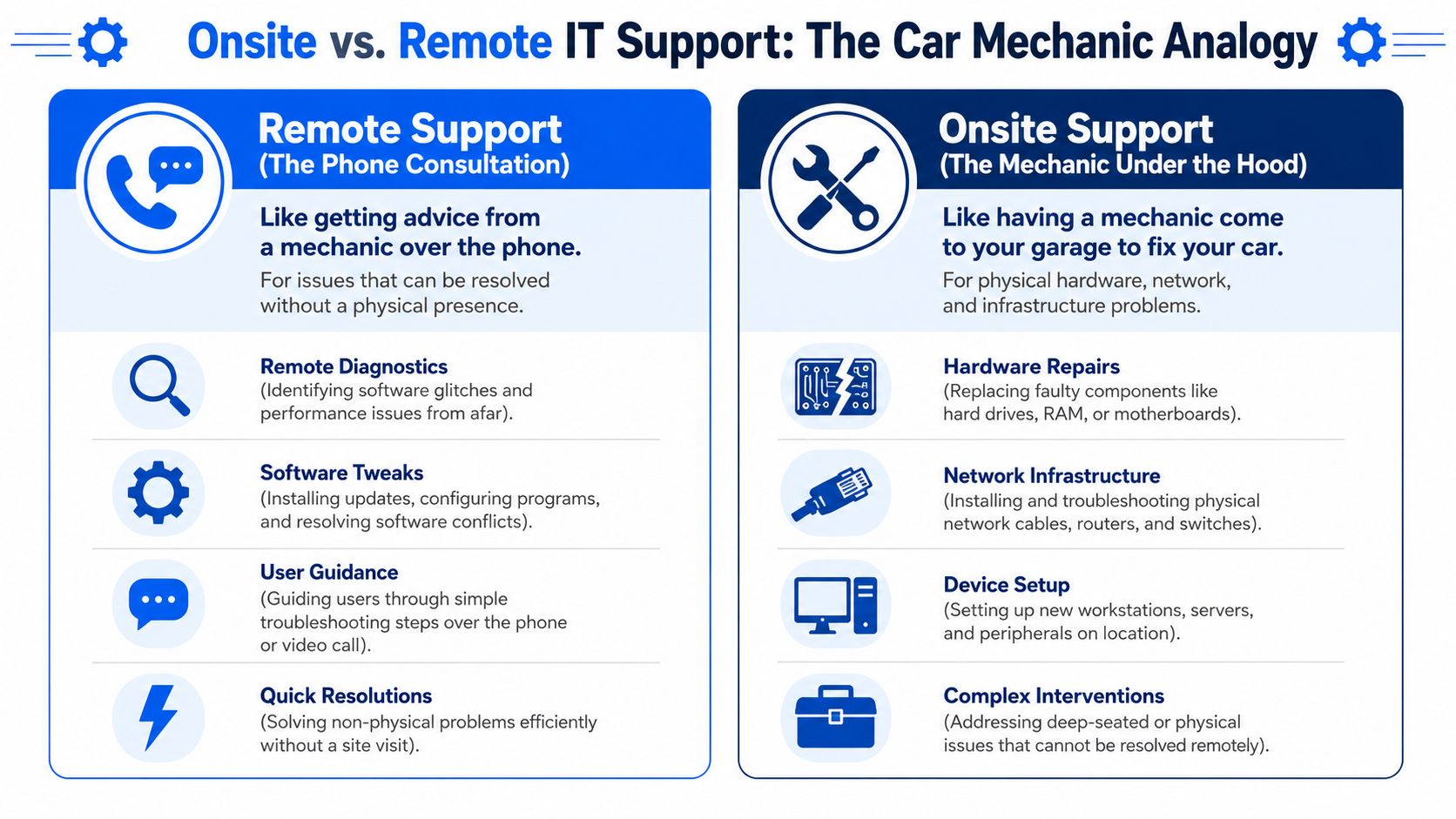
Remote support is like speaking to a mechanic on the phone. They can ask good questions, work through symptoms, and tell you what to check. Onsite support is the mechanic standing next to the car with the bonnet open, tools in hand, able to inspect, test, replace, and confirm the repair.
That distinction is simple, but it helps business owners make better decisions. If the issue lives in software, user settings, cloud services, or remote access tools, remote support is usually the fastest route. If the issue lives in hardware, power, cabling, Wi-Fi coverage, a comms cabinet, or a fresh install, onsite support becomes the working option.
Remote support solves screen problems
A remote engineer can usually handle tasks like:
- User account issues such as password resets and access problems
- Software troubleshooting for crashes, update failures, and application conflicts
- Routine maintenance including patching reachable systems and checking alerts
- Basic guidance when a user needs help with settings or a process
That's why remote support remains the first response for many tickets. It's quick, efficient, and doesn't involve travel.
Onsite support solves physical problems
Onsite it support covers the jobs where physical presence changes the outcome:
- Installing and replacing equipment such as desktops, laptops, routers, switches, and access points
- Testing cables and ports when users report unstable links, no network, or intermittent faults
- Setting up desks and devices for starters, moves, and office changes
- Handling infrastructure tasks like patching cabinets, mounting kit, and checking local power and link state
This is also why onsite support has evolved rather than disappeared. As support teams automate repetitive work and handle more issues remotely, engineers are sent out more deliberately for the jobs that need a visit. In practice, that means better use of time and less wasted effort for your business.
The right model for most SMBs isn't remote or onsite. It's remote first, onsite when the fault or task crosses into the physical world.
When Remote Support Is Not Enough
The easiest way to decide whether you need a site visit is to stop asking “how urgent does this feel?” and ask “can this be resolved without touching anything?” If the answer is no, you're already in onsite territory.

Hardware faults that need a visit
Some faults can't be solved through a remote session because there is no usable session to start with.
Examples include:
- A PC or laptop that won't power on
- A server with failed storage or warning lights
- A noisy workstation with suspected hardware failure
- A printer, scanner, or phone handset that isn't functioning physically
The primary technical advantage of onsite support is the engineer's ability to perform IMAC work, meaning Install, Move, Add, Change, and hardware repair on devices remote teams can't touch, including second-line investigation, PC staging, and liaison with service desks for replacement hardware, as described in the onsite support specialist role outline from Boston University.
Network and cabling issues
Many businesses lose time at this stage. Staff often assume “the internet is down” when the actual fault sits somewhere else entirely.
An onsite engineer can check:
- Patch leads and wall ports
- Switch ports and local indicators
- Router and firewall status
- Wi-Fi access point power and placement
- Cabinet patching and accidental disconnections
Remote support can see symptoms. Onsite support can inspect the path.
Office moves and change work
New desks, office expansions, small refits, and department moves create dozens of little physical dependencies. A user may need network connectivity, a phone extension, dock setup, printer access, and access to shared devices all at once.
These jobs go wrong when businesses treat them as admin tasks rather than engineering tasks. Moving people isn't the same as moving working IT.
Security incidents and offline devices
Sometimes the problem is not “fix this machine” but “contain the issue safely.” If a device is suspected to be compromised, physically isolating it matters. If a machine is offline and won't patch, someone may need to inspect it locally, reimage it, or confirm whether it should be removed from service.
If the network path is unreliable, the hardware is failing, or a change involves desks, ports, cabinets, or devices, stop stretching remote support beyond what it can do.
Understanding Onsite Tasks and Service Level Agreements
Businesses often buy onsite support too vaguely. They ask for “someone who can come out if needed” but don't pin down what that includes, how quickly someone should arrive, or what success looks like when they do.
What engineers actually do onsite
A proper onsite visit can include a lot more than fixing a dead PC. Depending on the environment, engineers may handle:
- Diagnosis at the desk when the reported issue doesn't match the actual fault
- Device staging for new starters or replacement hardware
- Structured cabling checks where patching and local connectivity need testing
- Wireless troubleshooting for access points, coverage gaps, and poor roaming
- Peripheral setup for printers, scanners, dock stations, and shared equipment
- Physical installation work on routers, switches, cabinets, and related kit
In businesses that rely heavily on calls, bookings, or front-desk responsiveness, support often overlaps with telephony and workflow reliability. If your operation depends on handling customer calls smoothly, a practical guide to best restaurant call management shows how call handling systems affect missed enquiries and service delivery. The same principle applies outside hospitality. If communications fail, the issue is operational, not just technical.
What an SLA means in real business terms
Service Level Agreements, or SLAs, are the promises behind the support contract. They tell you what response you can expect and how performance is judged.
Modern onsite support is measured through operational metrics such as response times, first-time fix rates, and cost per ticket, which reflects how field support has become a performance-driven service rather than an ad hoc dispatch model, as outlined in this explanation of onsite support performance metrics.
For a business owner, that means:
- Response time tells you how fast the provider commits to acting
- First-time fix rate tells you whether engineers arrive prepared and capable
- Cost per ticket helps reveal whether support is efficient or wasteful
- Travel time and utilisation show whether local coverage is working in practice
A provider that only promises a visit is asking you to trust the process. A provider that can define response expectations and resolution standards is giving you something clearer.
Business takeaway: The useful SLA isn't “we'll attend”. It's “we'll attend within an agreed window and aim to resolve the issue without dragging it across multiple visits”.
Questions worth asking before you sign
Ask these directly:
- What qualifies for onsite attendance? Get examples.
- How do you prioritise total outages versus single-user faults?
- What do you bring on a first visit? Spare kit, testing tools, replacement peripherals?
- How do you report what was found onsite?
- How do you handle follow-up if the first visit identifies a wider issue?
If the answers are vague, the service usually is too.
Decoding Onsite IT Support Pricing Models
Most London and Essex businesses will come across three pricing models. None is universally right. The right one depends on how often you need help, how predictable your environment is, and how painful downtime becomes when something breaks.
The three models most businesses choose from
Pay-as-you-go suits businesses that need occasional help and don't want a standing monthly commitment. It can work well for one-off faults, home-office support, small installs, or businesses with simple setups. The trade-off is uncertainty. If a serious outage happens at the wrong time, the support cost and the business disruption both arrive at once.
Managed service retainer suits businesses that want predictable coverage, proactive oversight, and a clearer route to escalation. This often makes sense when you have multiple users, shared infrastructure, internet-dependent systems, or a steady stream of support needs. The trade-off is paying for readiness even when the month is quiet.
Project-based pricing fits office moves, Wi-Fi deployments, cabling work, hardware refreshes, or structured change programmes. You pay for a defined outcome instead of open-ended support time. That's useful when the job has a clear start and finish.
While many UK providers offer pay-as-you-go options, the more useful question is the total cost of ownership and the cost of business interruption. That trade-off is highlighted in this discussion of onsite IT support service models and pay-as-you-go flexibility.
Comparison of Onsite IT Support Pricing Models
| Model | Best For | Pros | Cons |
|---|---|---|---|
| Pay-as-you-go | Small firms with occasional issues | Flexible, no long commitment, useful for ad hoc visits | Costs can be unpredictable during urgent outages |
| Managed service retainer | Businesses needing continuity and regular support | Predictable monthly spend, easier planning, often better alignment with ongoing support | You're paying for availability and structure, not just incidents |
| Project-based pricing | Office moves, installations, refreshes, cabling | Clear scope, defined outcome, easier to budget per job | Doesn't replace day-to-day support after the project ends |
How to think about value without guessing ROI
You won't find a reliable universal formula for when onsite support “pays for itself,” especially for SMBs. What works better is a simple decision frame:
- How many people stop work when a core device or network service fails?
- How dependent are you on phones, internet, Wi-Fi, or shared systems?
- How often do physical changes happen in your office?
- Would you rather budget for readiness or absorb emergency disruption?
If your business can tolerate delay, ad hoc support may be enough. If one outage affects sales, service, bookings, or staff productivity quickly, a more structured onsite arrangement usually makes more sense.
Your Checklist for Choosing the Right Onsite Partner
A good onsite provider should reduce risk, shorten outages, and make change easier to manage. Technical skill matters, but so does how they prepare, communicate, document work, and fit the way your business operates.

Use this checklist to judge whether a provider is a sensible investment for your business, not just whether they can fix a fault.
Operational checks
Start with the points that affect response quality on every visit:
- Can they reach your sites without turning travel into half the job? For London and Essex businesses, response depends on realistic coverage, not broad claims.
- Do they support your working pattern? If your team starts early, trades late, or needs weekend work, the provider should be able to plan around that.
- Can they handle both faults and planned changes? The same engineer or team should be able to deal with outages, device installs, desk moves, and network changes without creating handover gaps.
- Do they leave clear records? Visit notes should show what failed, what was changed, what was tested, and what still needs approval or follow-up.
- Do they arrive prepared? A provider should ask the right questions before the visit so the engineer brings likely parts, understands the site, and does not spend the first hour catching up.
That last point saves more time than many SMBs expect.
Security and recovery checks
Weak providers are exposed by these scenarios. Problems become more complex when a machine is offline, a firewall requires local access, or a backup must be verified at the premises rather than from a remote session.
A capable onsite partner should be able to patch devices that are not reachable remotely, verify backup hardware in person, isolate a suspicious device, and support local recovery work. That practical role in patching, backup checks, and ransomware response is explained in this overview of onsite support for patching, backups, and ransomware response.
Ask direct questions:
- Can you patch or recover devices that remote tools cannot reach?
- Can you test local backups onsite and confirm a restore works?
- What do you do first if a device may be compromised?
- How do you split work between onsite and remote engineers during an incident?
- Who approves business-critical decisions during recovery?
A provider proves their value under pressure, when staff are waiting and the problem is partly physical, partly technical, and time-sensitive.
Fit for your business
The right partner should match your environment, not force you into theirs.
Consider how they would support:
- A single office versus several sites. Multi-site businesses need proper scheduling, stock control, and communication between visits.
- Heavy reliance on phones, cloud platforms, or shared internet access. In those setups, a local network issue can stop sales, service, and admin work at the same time.
- Frequent staff changes or office moves. Growing businesses often need repeatable processes for staging laptops, setting up desks, and updating room or cabinet layouts.
- Teams with limited technical confidence. Engineers should explain what is happening in plain English and leave staff clear on what changes were made.
Ask for examples from businesses like yours. A law firm, warehouse office, clinic, and design studio can all need onsite support, but the working pattern, tolerance for downtime, and risks are different.
Commercial checks
This is the part many competitors skip. If you are deciding when onsite support is worth paying for, focus on whether the provider helps you control disruption.
Check:
- Is the scope clear? You should know what counts as support, project work, emergency callout, and excluded third-party issues.
- Are response expectations written down? If timing matters to your business, vague promises are not enough.
- Do they recommend a support model that fits your risk level? A business that can absorb delay may be fine with ad hoc visits. A business where one outage stops the whole office usually needs more structure.
- Can they work with your existing suppliers? Broadband, hosted telephony, software vendors, and landlords often overlap in real incidents.
- Will they help you prevent repeat faults? The best onsite partner does not just restore service. They identify patterns, weak hardware, poor cabinet layouts, and avoidable setup mistakes.
That is the essential test. You are not only buying time on site. You are buying a faster path back to normal work, fewer recurring issues, and better decisions about when onsite support earns its place in your budget.
Why Local Onsite Support Matters for London and Essex
In this region, distance on a map doesn't always tell you how quickly someone can help. Traffic, access restrictions, parking, business park layouts, building comms cupboards, and landlord-controlled connections all affect response.
Local knowledge changes the response
A local onsite provider usually works more efficiently because they know the practical conditions around the visit. They know that some faults need an early start before staff arrive. They know certain offices have awkward cabinet access. They know an internet issue may be an internal switching problem, and they don't waste the first hour proving what an experienced local engineer already suspects.
That local familiarity also helps with planned work. Office changes, Wi-Fi improvements, desk moves, replacement hardware, and telephony adjustments all go smoother when the engineer understands the site and your team already knows who is arriving.
For small businesses in Romford, Hornchurch, Rayleigh, Brentwood, and across London and Essex, local support is less about geography as a slogan and more about reducing friction. When something physical has failed, the provider who can get there, understand the setup, and act decisively is the provider that protects your working day.
Frequently Asked Questions about Onsite Support
Will onsite support ever save money, or is it just an extra cost
It can save money when the issue is stopping work and remote fixes are turning into delay. If five people are idle because a switch has failed, or a director cannot work because their home setup is down, paying for a visit is often cheaper than losing half a day of output. That is the decision many SMBs miss. The right question is not "Can this be done remotely?" but "What is the cost of waiting if it cannot?"
Can onsite support help home offices and directors working from home
Yes. Home office problems are often tied to physical equipment in the room. Docks fail, Wi-Fi coverage drops, printers stop responding, and broadband hardware needs checking in person.
For senior staff, that matters more than convenience. If the person affected handles approvals, payroll, client calls, or sales, a hands-on visit can restore normal working faster than a long remote session spent ruling things out.
Do I need onsite support if I already have remote support
In many businesses, yes.
Remote support works well for account issues, software errors, settings, updates, and user guidance. Onsite support earns its place when someone needs to test cabling, replace failed hardware, patch a network point, install equipment, or trace a fault across several devices in the same office. A good support setup uses both, with clear rules for when a remote ticket should become a site visit.
Can the same provider help with phones, cabling, and security
Often, yes, and that can remove a lot of wasted time during faults or office changes. Phones, structured cabling, Wi-Fi, CCTV, door access, and the core network regularly overlap. If different suppliers all cover a small part of the problem, you can end up paying for delay while each one waits for someone else to act.
A provider with the right skills can usually help with:
- VoIP handset and network connection issues
- basic data cabling faults and patching problems
- Wi-Fi access point installs or replacements
- network-connected CCTV or access control checks
- coordination with specialist trades where the job goes beyond IT support
What should I prepare before an engineer arrives
A short brief helps more than a long one. Write down what has stopped working, when it started, who is affected, and anything that changed just before the fault appeared.
If you can, make sure the engineer can reach the equipment, the right contact person is available, and any spare kit or admin details are easy to access. That cuts down the diagnosis time and gives you a better chance of a fix on the first visit.
If your business in London or Essex needs onsite help for hardware faults, cabling, connectivity, Wi-Fi, VoIP, security-related devices, or day-to-day IT issues that remote support cannot resolve, Networking2000 provides onsite and remote support with clear, practical service across the region.

