It's late on a Friday, the phones are still ringing, and something important stops working. Email stalls. Your shared files won't open. The till, booking system, CRM, or VoIP handsets start behaving oddly. In that moment, most business owners don't care about technical theory. They want to know three things. Who owns the problem, how fast will it be fixed, and what will the damage cost if it isn't.
That's where it support contracts stop being admin paperwork and start acting like business protection. A decent contract gives you predictable support, clear accountability, and a practical route back to normal when systems fail. A weak one gives you vague promises, arguments about scope, and invoices that grow every time your team is under pressure.
For London and Essex SMBs, the stakes are sharper than they used to be. Many firms now depend on cloud apps, mobile working, VoIP telephony, managed firewalls, and shared data access across multiple locations. If your support arrangement doesn't match that reality, you're not buying resilience. You're buying delay.
Table of Contents
- Why Your Business Needs More Than a 'Computer Guy'
- The Three Main Types of IT Support Contracts
- Decoding Your Contract Key Clauses and Terms
- Understanding Service Level Agreement Metrics That Matter
- IT Support Pricing Models and Budgeting for Costs
- A Buyer's Checklist for London and Essex Businesses
- Planning Your Onboarding and Exit Strategy
Why Your Business Needs More Than a 'Computer Guy'
A lot of small firms start with an informal setup. Someone local “looks after the computers”. They're decent, responsive enough, and cheaper than a formal provider. That arrangement can work for a while, especially when your business is small and your systems are simple.
Then the business changes. You add remote users. You move files into Microsoft 365. You install IP phones. You depend on Wi-Fi in the warehouse, broadband failover in the office, or CCTV tied into the network. Suddenly, one person with a mobile number isn't really an IT strategy.
The problem isn't whether that person is capable. The problem is continuity. If support lives in one person's head, your business is exposed when they're unavailable, overloaded, or reacting instead of preventing issues. A contract gives you a process, not just a personality.
A good support agreement should protect revenue first and technology second. The systems matter because the business depends on them.
That difference matters more now because cyber risk has become a board-level issue, not an IT hobby. In the UK, IT support is the most commonly outsourced B2B service, with 34% of businesses relying on external providers, according to ReformIT's outsourcing analysis. If you've ever had a weak password policy, unmanaged remote access, or patching that slipped because everyone was busy, a practical primer like ThreatCrush's guide to attack prevention is useful because it shows how quickly a basic security gap turns into a business problem.
Consider this trade-off:
- Informal support feels cheaper until a key system fails out of hours.
- Reactive help feels flexible until nobody agrees what's included.
- Ad hoc fixes feel fast until the same issue returns every few weeks.
A proper contract gives you ownership, escalation, and defined expectations. That's what most SMBs need.
The Three Main Types of IT Support Contracts
At 8:40 on a Monday, your internet is unstable, Teams calls are dropping, and nobody can print labels for the first dispatch run. That is when the contract model stops being an admin detail and starts affecting revenue.
For London and Essex SMBs, the right support model usually comes down to one question. Do you want to pay mostly for repair work, mostly for access to expertise, or for ongoing stability across systems that now include cloud apps, cybersecurity, broadband, and often VoIP as well?
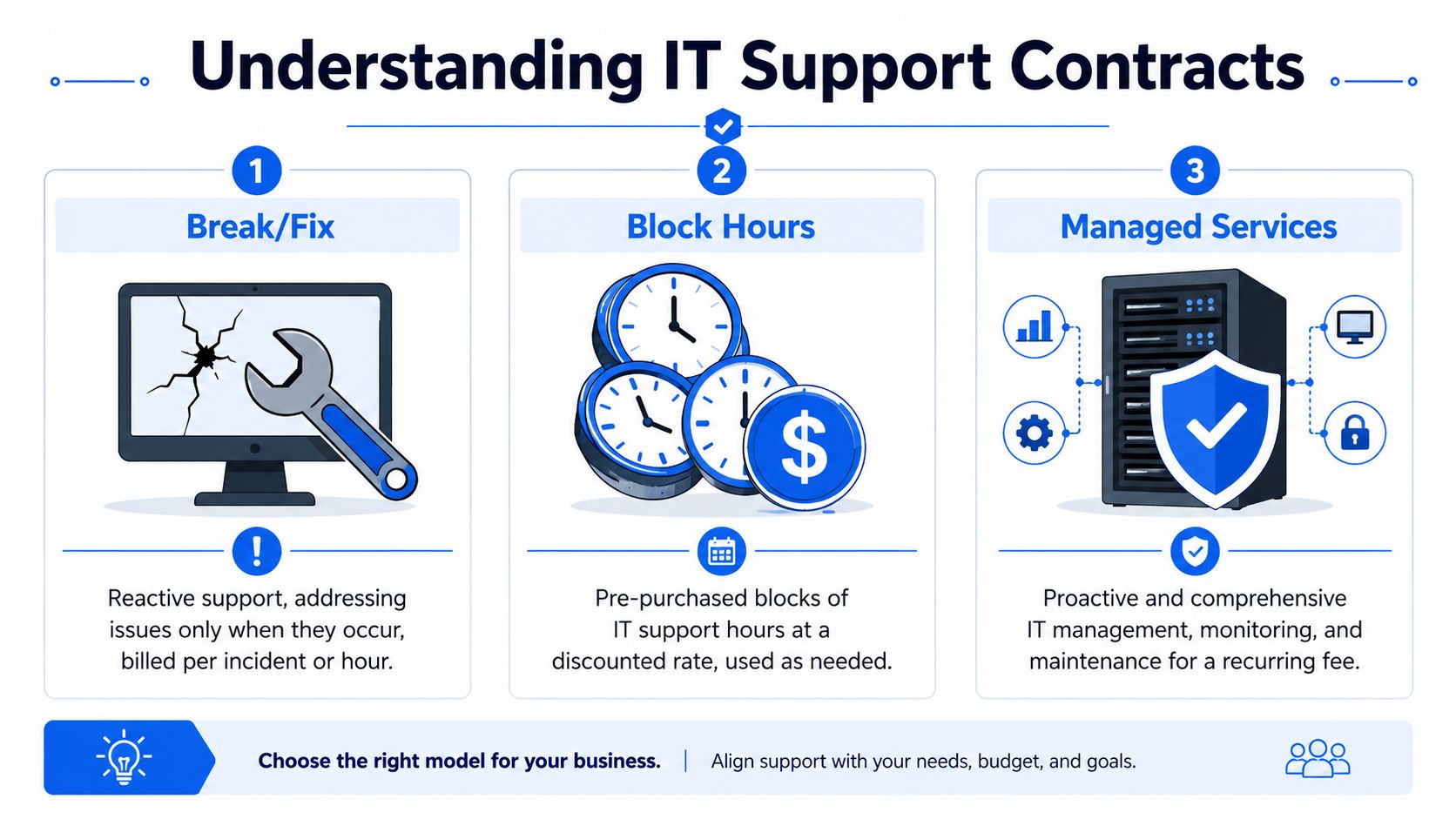
The three common models are break fix, block hours, and managed services. None is universally right. The right choice depends on how much downtime your business can absorb, how predictable you need costs to be, and whether you need help with compliance and operational risk, not just user support.
Break fix works for low-dependency businesses
With break fix, you call for help after something fails and pay by the hour or by the incident.
That can still make sense for a very small firm with a handful of devices, simple software, and no major penalty if systems are offline for a few hours. A local studio, small practice, or single-site business with low technical dependency may prefer the flexibility.
The trade-off is straightforward. You are not buying prevention. You are buying response.
That matters more in this region than many owners expect. London and Essex firms often depend on hybrid working, Microsoft 365, cloud line-of-business apps, and internet-based phones. If broadband fails, remote access breaks, or a security alert locks accounts, operations can stall quickly. Break fix also tends to leave grey areas around patching, backup checks, firewall review, and supplier liaison. Those jobs often fall between invoices because nobody has clearly been paid to own them.
Best fit: micro-businesses, very simple environments, short-term temporary sites.
Poor fit: firms relying on VoIP, remote staff, regulated data, or fast client response times.
Block hours can help during change, but they often get rationed
Block hours means prepaying for a bundle of support time and drawing it down when needed.
I have seen this work well during defined projects. Office relocations, tenant fit-outs, Microsoft 365 tidy-ups, Wi-Fi replacement, and post-acquisition clean-up are all reasonable uses for it. If the work has a beginning and end, prepaid time can be easier to control than open-ended billing.
The weakness shows up in day-to-day operations. Staff hold off reporting small issues because they do not want to burn hours on "something minor". Internal teams try workarounds. Password problems, flaky laptops, and mailbox permission issues sit around longer than they should. Eventually, someone raises them during a busy period and the business pays more to sort out a bigger mess.
For SMBs with GDPR obligations or off-payroll contractor arrangements under IR35, delay can create legal exposure as well as downtime. If leavers are not offboarded promptly, access rights linger. If devices are not updated on time, security risk grows. A support pot that people are reluctant to use can become false economy.
A useful outside view on the managed route is this DocsBot remote managed IT guide, especially if you are comparing ad hoc support against continuous monitoring.
| Model | How it feels to buy | Main strength | Main weakness |
|---|---|---|---|
| Break fix | Low commitment at the start | Pay only when needed | Unplanned costs and little prevention |
| Block hours | More budget control | Good for short, defined work | Teams often ration support |
| Managed services | Recurring monthly spend | Ongoing maintenance and clearer accountability | Value depends on scope and service quality |
Managed services suits businesses that need continuity
Managed services puts the provider on the hook for ongoing support, monitoring, maintenance, and usually a defined set of security and continuity tasks.
In practice, this is the model most growing SMBs end up needing. If your team depends on stable connectivity, secure remote access, functioning VoIP, and cloud platforms that have to work every day, paying for prevention is usually cheaper than paying for repeated interruption. The provider has a reason to patch systems, review alerts, keep documentation current, test backups, and deal with recurring faults before they become outages.
This model also works better when you bundle connected services under one operational plan. In London and Essex, that often means combining user support with Microsoft 365 administration, endpoint protection, firewall management, backup, and business telephony. If your VoIP supplier, broadband provider, and IT support company all point at each other during an outage, the contract structure is part of the problem. A joined-up service cuts that finger-pointing.
Managed support still needs scrutiny. Some contracts include remote help but charge extra for every site visit. Some cover Microsoft 365 user admin but not security settings such as MFA, conditional access, or retention policies. Some support laptops and desktops but exclude switches, Wi-Fi, printers, CCTV network links, and meeting room kit. For firms handling personal data, those exclusions can become business continuity issues very quickly.
A good rule is simple. If an hour of downtime costs more than a month of managed support, break fix is usually the expensive option in disguise.
Decoding Your Contract Key Clauses and Terms
Many support problems start long before the first ticket is logged. They start in the contract, in wording that looks harmless until there's a dispute over what was supposed to be included.
The legal language matters because it decides who does what when things go wrong.

Scope is where most disputes begin
Scope of work is the operating boundary of the whole agreement. If it isn't precise, the provider and the client will both make assumptions. That's where friction starts.
Read the scope like you're testing a quote from a builder. Ask what's included, what's excluded, and what happens at the edges. If the contract says “support for users and devices”, does that include routers, switches, Wi-Fi access points, VoIP handsets, firewalls, CCTV network links, and cabling faults? If your staff work from home, does the contract cover home setups or only office-based equipment?
A few lines worth checking carefully:
- Supported systems. Named platforms are better than vague phrases.
- On-site work. Some contracts sound all-inclusive until you discover site visits are extra.
- Third-party suppliers. Clarify whether the provider will deal with Microsoft, your broadband carrier, VoIP vendor, or software provider on your behalf.
- Projects versus support. Routine maintenance and change requests are not the same thing.
If you're reviewing remote support arrangements, DocsBot remote managed IT guide is useful for understanding how providers define off-site coverage and where remote support usually stops.
Liability confidentiality and getting out cleanly
Confidentiality should be straightforward. If an IT provider can access your mailboxes, files, backups, and user accounts, the contract needs strong confidentiality wording and practical controls behind it. If the provider talks about security but can't explain staff access controls or how credentials are handled, that's a warning sign.
Limitation of liability is the clause people skip, then regret. Providers will usually cap liability. That's normal. What matters is whether the cap is sensible given the level of access they have and the business risk they're managing.
Term and termination tells you how trapped you are if the relationship goes bad. Check notice periods, renewal terms, and any charges for early exit. Also check whether documentation, admin credentials, backup access, and configuration records must be handed over on termination.
If a provider makes it easy to sign but hard to leave, that tells you a lot about the relationship they expect to run.
For London and Essex firms, there's another practical angle. If you use self-employed specialists for projects or overflow support, contracts should also be reviewed through an IR35 lens. The tax risk sits outside the usual support conversation, but the operational impact is real if the arrangement is poorly structured.
Understanding Service Level Agreement Metrics That Matter
A Monday 8:45am outage tests an SLA faster than any sales pitch. Staff cannot log in, Teams calls are failing, the phones are unstable, and your provider says they have "picked it up." For a London or Essex SMB, that answer is too vague to run a business on.
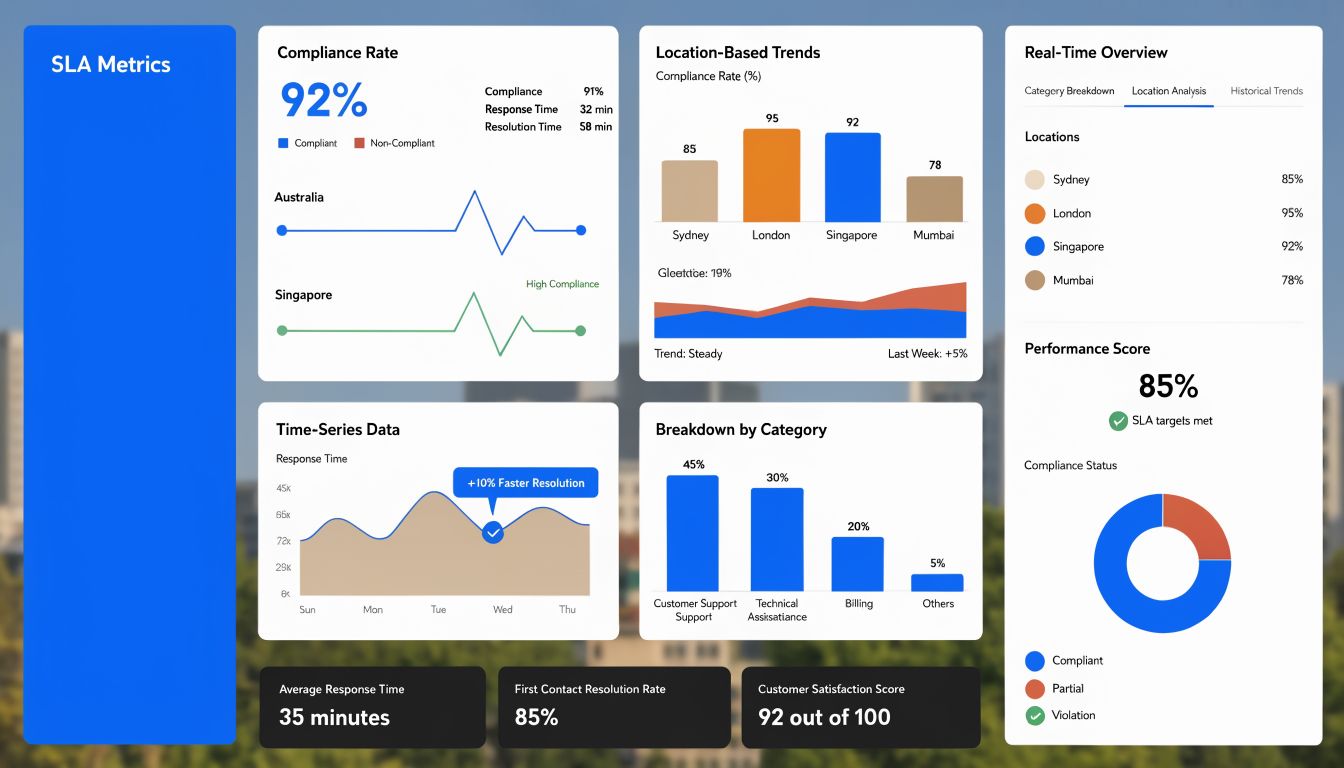
An SLA needs to tell you who responds, how fast they respond, what happens next, and how service is measured afterward. If those points are missing, the contract leaves too much room for argument during an incident.
Response time and resolution time measure different things
Response time is the clock to acknowledgement. Resolution time is the clock to restoring service, or at least putting in a workable fix. Providers often lead with response time because it is easier to hit. Your business feels the resolution time.
That difference matters in practice. If your office in Chelmsford loses internet, a five-minute response is fine, but it does not help much if the provider then spends three hours deciding whether the fault sits with the firewall, the circuit, the ISP, or an internal switch. Good SLA wording sets clear priority levels, such as P1 for full site outage, P2 for major service degradation, and lower levels for single-user issues.
Reporting matters as much as the targets. Ask to see monthly figures for first response, time to resolution, reopened tickets, and user feedback by priority level. Social Intents' satisfaction reporting is a useful reference for the kind of service feedback data that helps separate a well-run desk from one that prioritizes quick ticket closure.
RTO and RPO should match the way your business actually operates
Recovery Time Objective is the maximum acceptable downtime for a system. Recovery Point Objective is the maximum acceptable data loss measured in time. RTO works like the target for getting the doors open again. RPO is the point you can restore to without creating serious commercial damage.
These numbers should not be copied from a template. A small accountancy firm in Romford during payroll week, a logistics business near the A13, and a multi-site retailer in central London will each have different tolerance for downtime and data loss. If your VoIP platform, Microsoft 365 tenancy, line-of-business app, or file store is central to daily trading, the SLA should state the recovery targets in plain language and tie them to the backup and disaster recovery service behind them.
For firms handling customer records, HR files, or special category data, poor recovery planning also creates GDPR exposure. An SLA cannot remove that risk on its own, but it should show how the provider will contain an incident, restore access, and support your reporting obligations if systems or data become unavailable.
A short explainer is worth watching if your team needs the terminology in plain English:
Service credits matter less than escalation and accountability
Service credits rarely cover the cost of downtime. They still have value because they force the provider to define failure properly and report it consistently.
Check for clauses that cover:
- Missed critical response or resolution targets with a defined credit, service review, or both.
- Repeated SLA breaches that trigger management escalation, not just another helpdesk ticket.
- Named reporting periods so performance is reviewed monthly or quarterly.
- Clear escalation paths with named roles for technical lead, service manager, and account contact.
- Third-party dependency handling where the provider owns coordination with ISPs, VoIP vendors, and security platforms.
That last point matters more in this region than many firms expect. London and Essex SMBs often buy IT support alongside cyber security monitoring, Microsoft 365 management, and hosted telephony. Bundling can simplify support and speed up fault ownership, but only if the SLA states who is responsible when a phone issue turns out to be a network issue, or when a security control blocks a business system. If the handoff points are vague, your team becomes the go-between during an outage.
A useful SLA removes ambiguity before something breaks. That is what protects continuity, and it gives your business room to grow without carrying avoidable operational risk.
IT Support Pricing Models and Budgeting for Costs
A support quote often looks manageable until the first busy month. Then a new starter needs setup, a broadband fault knocks out VoIP, someone asks for help with a line-of-business app, and the invoice no longer matches the number discussed in the sales meeting.
That is why budgeting for it support contracts starts with charging model, scope, and change risk. The monthly figure matters. The way costs behave under pressure matters more.

In London and Essex, prices vary sharply between providers because delivery costs vary. A firm with engineers who can attend your office, handle hybrid users across Greater London, support security tooling, and coordinate with broadband or telephony suppliers will usually price differently from a remote-only helpdesk with a narrower scope. That does not make one model better by default. It means the cheaper quote can carry more operational risk.
What you are paying for
Most providers bill in one of three ways, and each one shifts budget risk differently.
Per user pricing suits businesses where each employee uses several devices and cloud services. It is common in accountancy firms, legal practices, recruitment companies, and other office-led SMBs around London and Essex. It usually tracks support demand better than device counts, but your spend rises with headcount.
Per device pricing can work well in warehouses, retail, manufacturing, and shared-desk environments where terminals, scanners, shop-floor PCs, and specialist machines matter more than named users. The trade-off is simple. Two businesses with the same number of devices can create very different support loads if one has mobile staff, Microsoft 365, and stricter security controls.
Fixed-fee all-inclusive contracts are easier to forecast if the wording is tight. They work like a service charge on a building. Predictable on paper, but only if everyone agrees what sits inside it and what gets billed separately.
A quick budgeting comparison:
| Pricing method | Usually suits | Budget risk |
|---|---|---|
| Per user | Cloud-first offices and hybrid teams | Rises with headcount and licence growth |
| Per device | Shared hardware environments | May understate user support and admin time |
| Fixed fee | Businesses wanting predictable monthly spend | Poorly defined scope leads to extra-work charges |
Where surprise costs usually appear
Unexpected spend usually comes from exclusions, not the base fee.
These are the items I would expect a finance lead or operations director to test before signing:
- Project work such as office moves, site openings, Microsoft 365 migrations, server replacement, or major network changes.
- Cyber security tools and services including endpoint detection, email filtering, managed firewall licences, vulnerability scanning, and security awareness training.
- VoIP and connectivity support where handsets are included but call flow changes, number porting, ISP liaison, or circuit faults sit outside the contract.
- Third-party application support for accountancy software, property systems, construction platforms, or other sector tools common across London and Essex SMBs.
- On-site attendance especially if your team expects an engineer to visit offices in Central London, Canary Wharf, Basildon, Chelmsford, Southend, or business parks with limited parking and access windows.
The cheapest contract on paper often becomes the most expensive during a disruptive quarter.
That is one reason bundled services deserve a hard look in this region. Many SMBs no longer buy support as a standalone function. They buy support, Microsoft 365 administration, cyber security, backup, Wi-Fi, broadband, and hosted telephony as one operating package. Bundling can reduce finger-pointing and shorten outages, especially when a phone problem turns out to be a switch issue or a security rule is blocking a cloud service. It can also make exit harder if everything is tied to one supplier, so the contract needs clear pricing, ownership of licences, and a clean handover process.
One local option in that space is Networking2000, which provides both pay-as-you-go and monthly maintenance arrangements alongside networking, communications, and security services. The practical question is not whether a provider offers a bundle. It is whether the bundle reduces handoff delays and gives your business one accountable point of control when systems fail.
London and Essex firms should also budget for regulatory and workforce realities. GDPR obligations can push up the cost of logging, endpoint protection, backup retention, and access controls. IR35 can affect how comfortable a business is relying on one freelance technician versus a contract with a service provider that can cover absence and scale. If your team handles client data, payment data, or sensitive HR records, low-cost support with weak security scope is rarely low-cost for long.
Finally, check how pricing changes over time. Annual uplifts, Microsoft licence increases, supplier pass-through charges, and out-of-hours rates should be written in plain language. If they are vague, the budget is vague too.
A Buyer's Checklist for London and Essex Businesses
Buying support in this region isn't only about desktops and passwords anymore. Many local firms need office support, home worker support, telephony continuity, broadband coordination, security oversight, and someone who can physically turn up when remote tools aren't enough.
That means your checklist should test delivery reality, not just the sales presentation.
Questions worth asking before you sign
Start with practical questions a provider should answer without hesitation.
Who supports us day to day Ask whether tickets go to a named team, a pooled service desk, or subcontractors. You want to know who owns your environment.
What do you monitor as standard
A good answer should mention endpoints, patching, backups, core network equipment, and security events if those are in scope.What counts as a critical incident
If your provider can't define severity clearly, priority handling will be inconsistent when you need it most.Will you deal with our other suppliers
In real life, faults often sit between broadband, VoIP, firewall, Microsoft 365, and internal networking. Someone needs to coordinate that.What is excluded from support
This question is often more revealing than “what's included?”
A provider serving London and Essex should also understand local operating patterns. Early starts, retail hours, mobile teams, split offices, and mixed home-office setups change what “good support” looks like.
Local red flags that matter
With Ofcom reporting a 35% rise in VoIP adoption among London and Essex SMBs, contracts should explicitly cover VoIP maintenance, Cat6 cabling, and managed firewalls to avoid service gaps and unexpected costs during migrations, according to Ofcom telecoms industry data.
That single point has several implications for buyer due diligence.
First, ask whether telephony is treated as part of business continuity or as a separate product line. If calls are business-critical, support for handsets, routers, QoS-related network issues, and broadband faults needs to join up.
Second, ask how the contract handles GDPR responsibilities. If the provider touches user data, cameras, access control systems, shared files, or email, they should be able to describe how access is controlled and logged in operational terms.
Third, if you use contractors for specialist support or rollout work, bring IR35 into the conversation early. A tax or employment-status mistake won't show up in your helpdesk reports, but it can still turn into a painful commercial problem.
A few red flags I'd treat seriously:
- Vague language like “best endeavours” with no measurable commitments.
- No local on-site capability when your environment includes network hardware, telephony, or premises security.
- One-size-fits-all bundles that ignore how your office functions.
- Pressure to sign quickly before a proper audit of users, devices, connectivity, and dependencies.
If a provider hasn't asked detailed questions about your workflows, they probably intend to support the contract they sell, not the business you run.
Planning Your Onboarding and Exit Strategy
The best time to think about a future handover is before the contract starts. Once a provider controls the documentation, admin access, and monitoring stack, your negotiating power drops.
A good start reduces future friction
A strong onboarding process should include an initial audit, asset discovery, access review, backup verification, and documentation of the network, key platforms, and suppliers. If the provider installs monitoring tools, make sure you know what they monitor and who owns the resulting data.
In plain terms, onboarding should leave both sides with the same map of your environment. If there isn't a map, support quality usually depends on whichever engineer happens to remember your setup.
Exit terms should be agreed on day one
Your exit plan should cover data ownership, credential handover, documentation transfer, removal of tooling, and cooperation with a replacement provider. Keep it practical. Who exports the configuration records? Who disables old remote agents? Who confirms backup access still works after the transition?
You also want to avoid vendor lock-in through obscure licences, undocumented changes, or services tied to accounts you don't control. If the provider purchases critical services on your behalf, the contract should state how those services are transferred or reassigned when the relationship ends.
A healthy support relationship shouldn't rely on making departure difficult. If a provider resists clear exit wording, assume the offboarding will be harder than the onboarding.
If you're reviewing it support contracts for a London or Essex business and want a second opinion before you commit, Networking2000 offers UK-based IT support, networking, communications, and security services with practical coverage for business continuity needs such as VoIP, connectivity, managed firewalls, and on-site infrastructure. A sensible next step is to compare your current contract, or proposed one, against your actual operational risks and ask where responsibility becomes blurred. That's usually where the future outage will happen.

