Late January exposes every weakness in an accounting firm's setup. Staff are chasing self-assessment deadlines, clients are emailing records in every format imaginable, and the one system everyone needs suddenly slows to a crawl. Sage won't open properly, shared files time out, remote staff can't reconnect, and the IT provider on retainer treats it like any other office outage.
That's the point where many firms realise they don't just need someone who can “fix computers”. They need it support for accountants that understands filing deadlines, bookkeeping workflows, client confidentiality, software dependencies, and what happens when a small outage lands at exactly the wrong time.
For a modern practice, technology isn't separate from service delivery. It is service delivery. If your tax tools, document storage, email security, cloud access, backups, and telephony aren't designed to work together, your team loses time, clients lose confidence, and partners end up making decisions in the dark.
Table of Contents
- Why Your Accounting Practice Needs More Than Just IT Support
- The Seven Pillars of Specialised IT for Accountants
- Navigating Cyber Threats and Compliance Mandates
- Choosing Your Service Model Break-Fix vs Managed IT
- A Non-Negotiable IT Checklist for Your Accounting Practice
- How to Choose the Right Local IT Partner in London and Essex
- Your Path to Secure and Efficient Operations
Why Your Accounting Practice Needs More Than Just IT Support
A generic support desk sees tickets. An accounting firm sees deadlines, statutory obligations, payroll cut-offs, VAT submissions, and client records that can't be exposed or lost. That difference matters.
Most practices already use plenty of technology. The issue isn't access to software. It's whether the whole environment works as one system. The 2025 Intuit QuickBooks Accountant Technology Report found that 95% of accountants say technology significantly cuts compliance time, while 89% say better integration is essential for sustainable growth, and accountants manage an average of 8 different digital tools across their practices. This is the core issue. Firms aren't under-tooled. They're often over-fragmented.
Where general IT support falls short
A non-specialist provider usually works reactively. They can reset passwords, replace a failed PC, and escalate a server issue. What they often don't understand is the chain reaction inside an accountancy practice:
- A login issue can block access to tax software, client portals, and document stores at the same time.
- A delayed patch can break an integration between bookkeeping software and another core platform.
- A sync problem can leave staff working from outdated files without realising it.
- A mailbox compromise can expose bank details, payroll data, and sensitive client correspondence.
Practical rule: If your IT provider doesn't understand month-end, year-end, VAT deadlines, and the consequences of an MTD disruption, they're supporting your devices, not your practice.
What specialised support changes
Specialist it support for accountants starts with workflow, not hardware. The provider should know which systems are business-critical, what order they fail in, and how to restore service without creating new compliance risks.
That means building support around:
- Accounting platforms such as Xero, Sage, QuickBooks, IRIS, and FreeAgent
- Secure file handling for client records, ID documents, and approvals
- Controlled remote access for partners and staff working across office and home
- Reliable communication systems so clients can still reach the firm during an outage
When firms get this right, the benefit isn't abstract. Staff stop wasting time switching between disconnected tools. Partners get fewer unpleasant surprises. Clients get quicker answers because systems are available and information is where it should be.
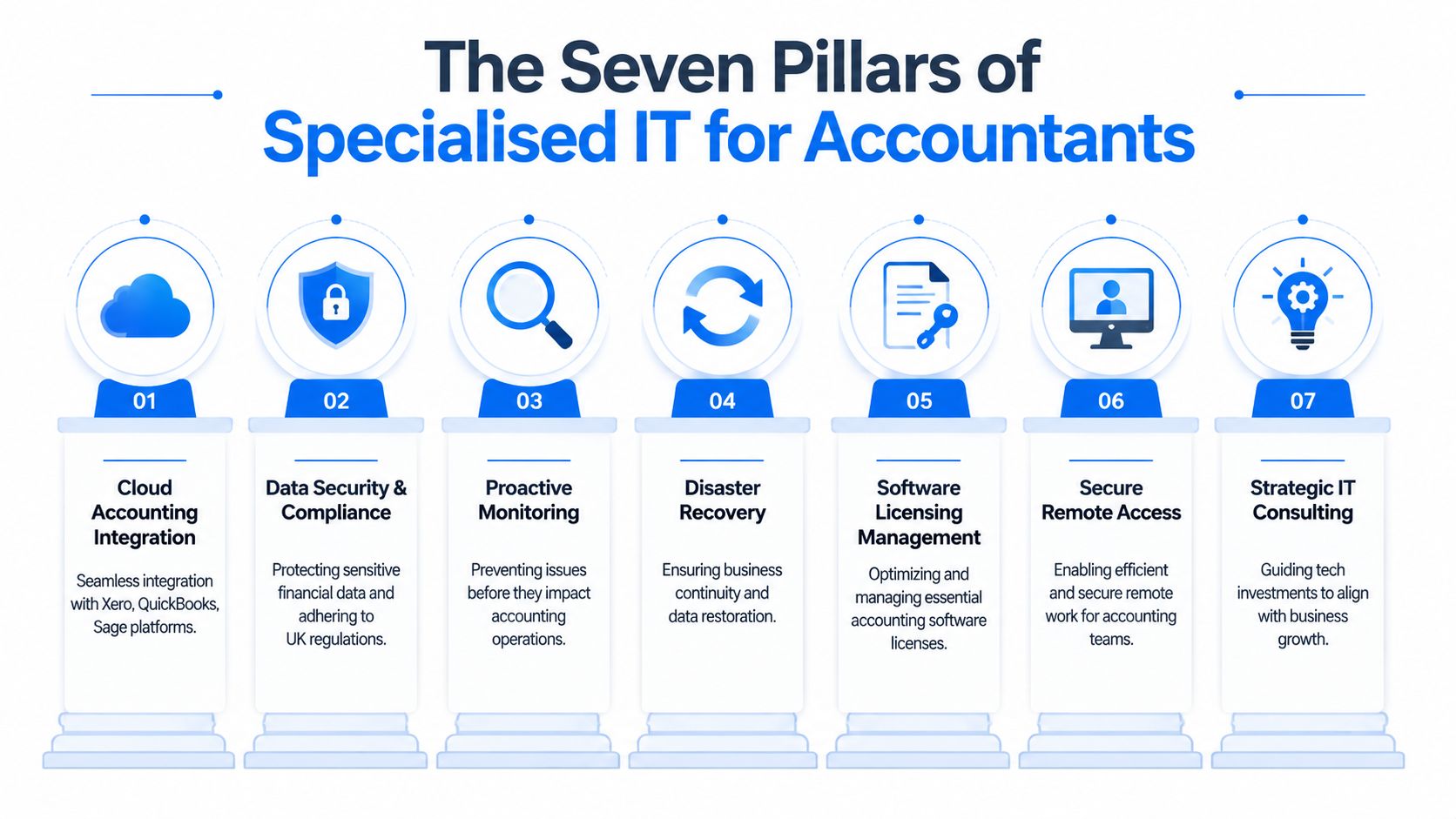
The Seven Pillars of Specialised IT for Accountants
The strongest support setups are built in layers. If one layer is weak, the rest of the practice feels it. These seven pillars are the baseline for resilient it support for accountants.
Accounting software support
This is the first test. Can your provider support the tools your team uses, not just Windows and Microsoft 365?
That includes user access, version compatibility, API issues, update planning, printing and PDF problems, and performance troubleshooting for platforms such as Xero, Sage, QuickBooks, IRIS, and FreeAgent. It also includes knowing when the issue sits with the software vendor and when it sits with your local environment.
A good provider won't just say “the software is up”. They'll ask whether bank feeds are working, whether client exports are completing, whether VAT workflows are stable, and whether integrations have failed after a change elsewhere.
Secure remote and hybrid work enablement
Many firms now operate across office, home, and client sites. That only works if remote access is secure, simple, and consistent.
The practical model is usually a managed identity layer, role-based access, multi-factor authentication, controlled device access, and clear separation between personal and business data. Staff need a setup that lets them work from anywhere without bypassing security because the approved route is too clumsy.
What fails here is improvisation. Shared family devices, local file copies, weak home Wi-Fi setups, and unmanaged laptops create risk fast.
Automated backups and disaster recovery
Backup isn't a box to tick. It's a recovery plan.
A proper setup protects cloud data, email, shared files, and line-of-business systems. It also defines what gets restored first. If a practice loses access to email, client documents, or bookkeeping data, the support team should already know the order of recovery and who signs off each stage.
Backups that haven't been tested are just assumptions in storage.
Managed cybersecurity and firewalls
Accounting firms hold high-value data. That makes them a practical target for phishing, account takeover, malware, and credential theft.
Core protections usually include managed firewalls, endpoint protection, vulnerability management, patching, secure web filtering, conditional access, and alerting that someone actively reviews. The right provider doesn't wait for staff to report something odd. They look for indicators early and act before users feel the impact.
Advanced email security and archiving
Email remains one of the biggest operational and security risks in practice. Fraudsters know finance staff process payment details, payroll changes, and sensitive attachments every day.
Strong email protection should include anti-phishing controls, attachment scanning, link protection, impersonation detection, mailbox auditing, and retention policies that support both operational retrieval and compliance needs. Just as important, the archiving setup must make historical correspondence easy to find when disputes arise.
For firms also rethinking file handling and approval flows, this guide to document management in accounting is useful because it focuses on the operational side of getting records under control.
Data protection and UK GDPR controls
Data protection isn't just a legal policy in a binder. It's enforced through permissions, encryption, logging, retention, offboarding, and device management.
A specialist provider should help the firm answer simple but serious questions. Who can access payroll data? Where are client records stored? What happens to access rights when a staff member leaves? Can the firm show who opened or changed a file?
Network reliability and VoIP for client communication
When the network struggles, everything struggles. Cloud accounting, shared files, Teams calls, VoIP, remote desktop sessions, and client portals all depend on reliable connectivity.
The support model should cover internet resilience, internal Wi-Fi quality, switch health, cabling standards, phone system continuity, and fault isolation. For many firms, telephony now sits inside the same continuity plan as email and cloud applications.
Here's the practical test. If your internet link drops at a busy point in the week, can staff keep working, can calls still be answered, and can the firm continue serving clients without chaos? If not, the foundation isn't finished.
Navigating Cyber Threats and Compliance Mandates
Accountants don't deal with theoretical cyber risk. They deal with payroll records, tax identifiers, bank details, company accounts, and confidential correspondence. When those systems fail or get exposed, the problem moves quickly from technical inconvenience to business damage.
What cyber risk looks like in practice
The headline issue isn't only ransomware. It's the ordinary, repeated failure to keep systems current, control access properly, and spot suspicious activity before a user clicks the wrong thing.
A 2023 ICAEW survey cited here found that 68% of UK practices experienced cyber incidents, with 42% linked to unpatched accounting software. Those breaches caused an average of 14 hours of downtime and £25,000 in recovery costs. For an accounting firm, that's not just an IT bill. It can mean missed work, delayed submissions, disrupted client communication, and uncomfortable explanations to clients who expect better control over their data.
Unpatched software is rarely treated as urgent until it becomes a business interruption.
Three patterns show up repeatedly in accountancy environments:
- Software updates are postponed because nobody wants to break a live workflow.
- Users collect too much access over time, especially after role changes.
- Email remains the weak entry point because attackers only need one believable message.
Compliance failures are often IT failures first
Under the Data Protection Act 2018 and UK GDPR, firms need more than written policies. They need technical controls that prove sensitive information is protected in daily practice. Encryption, access control, logging, secure device management, and clear retention rules matter because they create evidence, not just intent.
HMRC obligations add another layer. If your systems can't maintain reliable access to the software and records needed for submissions, the compliance issue often starts with infrastructure. MTD readiness is partly tax process, but it's also identity management, stable connectivity, software compatibility, and tested recovery procedures.
For firms reviewing secure collaboration and migration choices around finance data, this expert guide for finance IT is worth reading because it deals with structure and governance, not just storage.
A sensible operating model includes:
- Disciplined patching for endpoints and accounting applications
- Access reviews tied to role and client need
- Tested recovery plans for email, files, and core accounting systems
- Staff training that focuses on realistic phishing and document-handling risks
The firms that handle this best don't separate cybersecurity from client service. They treat secure operations as part of service quality.
Choosing Your Service Model Break-Fix vs Managed IT
Most small firms start with break-fix support because it appears cheaper. Nothing happens, so nothing gets billed. Then a deadline week arrives, a system fails, and the cost calculation changes very quickly.
The primary difference isn't just billing style. It's whether your provider is paid to prevent problems or only to react after the damage has started.
Why the old model keeps failing firms
Break-fix support encourages delay. Updates get postponed, hardware is replaced late, documentation stays thin, and nobody is actively watching the environment unless something already hurts. That may be tolerable in a low-dependency business. It's a bad fit for an accounting practice where downtime spreads across software, files, communication, and client delivery.
By contrast, the managed model is built around routine maintenance, monitoring, security controls, and planned improvement. That's one reason firms are moving in that direction. A 2025 survey reported here found that 80% of accountants outsourced services within the past year, and 83% agreed outsourcing helps them focus on core strategic activities.
Operational view: If your team only speaks to IT when something is already broken, your service model is working against you.
Break-Fix vs. Managed IT Support for Accountants
| Criteria | Break-Fix Support (Reactive) | Managed IT Services (Proactive) |
|---|---|---|
| Cost structure | Variable. Bills arrive after incidents, projects, or emergency work. | Predictable monthly spend tied to support scope and coverage. |
| Response pattern | Best-effort. Urgent issues compete with other clients' emergencies. | Ongoing support model with agreed priorities, monitoring, and regular maintenance. |
| Security posture | Usually patchy. Security work often happens after a scare or audit request. | Built into the service through patching, endpoint controls, access management, and review routines. |
| Downtime risk | Higher, because issues are discovered late. | Lower, because problems are spotted and addressed earlier. |
| Documentation | Often limited to what was fixed last time. | Typically better documented across users, devices, systems, and dependencies. |
| Strategic value | Little planning support. Focus stays on incidents. | Better fit for budgeting, lifecycle planning, and operational improvement. |
| Suitability for accountants | Weak during peak filing and reporting periods. | Stronger for firms with recurring deadlines and multiple integrated systems. |
The trade-off is simple. Break-fix can feel cheaper when everything is quiet. Managed support usually makes more sense when you look at business continuity, partner time, staff frustration, and the cost of failures landing during deadline periods.
For most accountancy firms, the smarter ROI question isn't “what's the cheapest monthly option?” It's “which model reduces disruption, protects client data, and gives the practice a stable operating base?”
A Non-Negotiable IT Checklist for Your Accounting Practice
To determine if your current setup is fit for purpose, do not start with the provider's brochure. Start with questions. A good accounting IT environment should survive scrutiny from partners, auditors, compliance staff, and the people who use it every day.
Security and compliance
Ask these first:
- Are all users protected by multi-factor authentication across email, cloud apps, remote access, and admin tools?
- Is client data encrypted in transit and at rest across devices, email, shared storage, and backups?
- Are user permissions reviewed regularly so staff only keep access they still need?
- Is there a documented joiner-mover-leaver process for granting, changing, and removing access?
- Can you produce audit trails showing who accessed, edited, moved, or deleted sensitive files?
- Are key accounting applications and endpoints patched on a defined schedule rather than “when there's time”?
Data resilience and continuity
A lot of firms say they have backups. Fewer can explain how recovery works under pressure.
Use this list:
- Can you restore a deleted file quickly without escalating to a lengthy support chain?
- Are Microsoft 365 email and file data included in backup coverage, not just local servers or PCs?
- Has the recovery process been tested for accounting systems, shared files, and mailbox data?
- Do you know the order of restoration if multiple systems fail at once?
- Can staff keep working if the main office internet fails, even in a reduced mode?
- Is there a communications fallback for clients if email or telephony is disrupted?
The right question isn't “do we have backup?” It's “how do we operate while recovery is happening?”
Support quality and operational control
Under these conditions, weak providers are exposed.
- Do you have named contacts who understand your environment, or do you start from scratch with every ticket?
- Are response expectations written into an SLA with clear priority levels?
- Does the provider review recurring issues and remove root causes, or just close tickets?
- Do they understand your software estate including bookkeeping, tax, payroll, document management, and telephony?
- Can they support remote staff and office staff consistently without creating separate, confusing processes?
- Do they provide plain-English reporting that helps partners make decisions?
If you can't answer several of these confidently, the problem probably isn't one missing tool. It's that your support model lacks structure.
How to Choose the Right Local IT Partner in London and Essex
Purchasing support based solely on price typically leads to poor outcomes. A more effective strategy involves verifying whether a provider understands how an accounting firm operates, how rapidly it requires assistance when issues arise, and how capably it can manage both cloud systems and physical office infrastructure.

Questions that reveal real capability
Ask questions that force operational answers, not sales language.
A useful shortlist looks like this:
- How would you handle an MTD submission failure caused by a software integration issue?
- Which accounting platforms do you support in practice, and what kinds of faults do you usually see?
- How do you manage patching without disrupting deadline-critical workflows?
- What's your process if a partner's mailbox appears compromised on a filing day?
- How do you separate urgent business-impacting issues from ordinary tickets?
- What documentation do you maintain about the client environment, users, devices, and dependencies?
- What happens if we need an engineer on site at short notice?
That MTD question matters because the tax side now depends directly on technical reliability. HMRC requires API-integrated software for MTD, and a 2024 study referenced here found that 55% of SMEs faced integration failures, leading to submission errors and penalties. A provider that can't speak clearly about software compatibility, updates, and failure handling isn't ready to support an accounting firm.
Why local presence still matters
For firms in London and Essex, local support still has practical value. Cloud tools are central, but not everything is solved remotely.
A local provider can usually offer:
- Faster on-site intervention for failed workstations, switching issues, Wi-Fi faults, cabling problems, and telephony disruption
- Better knowledge of local business patterns including multi-site working, serviced offices, and hybrid teams
- Closer accountability because the relationship is easier to maintain face to face
- More realistic support planning for offices that still rely on printers, scanners, meeting rooms, desk phones, and physical network infrastructure
Choose the provider that can explain your risk in plain English and your recovery process in practical steps.
Also look closely at the SLA. You want clarity on response times, priority definitions, escalation routes, maintenance windows, and what's included versus treated as project work. Vague promises create disputes later.
The right partner doesn't just say yes to every request. They challenge weak setups, document the environment properly, and help the firm make better decisions over time.
Your Path to Secure and Efficient Operations
Accounting firms don't need more technology for its own sake. They need a stable, secure, well-supported environment that lets staff serve clients without fighting their tools every day.
That means treating it support for accountants as a business function, not an afterthought. The firms that perform well usually share the same habits. They standardise where it helps, secure access properly, patch on time, back up the right data, test recovery, and work with a provider that understands both compliance pressure and operational reality.
The return on that investment shows up in fewer interruptions, cleaner workflows, stronger client trust, and less partner time wasted on avoidable IT issues. It also puts the practice in a better position to adopt new tools without adding more fragmentation or risk.
If you're reviewing your current setup, start with the checklist above and test your provider against real accounting scenarios. For firms in London and Essex, the strongest results usually come from working with a partner that can support both cloud systems and the office infrastructure your team still relies on.
If your firm needs practical, jargon-free support from a local team that understands business continuity, communications, security, and day-to-day operational reliability, Networking2000 is worth a look. They support organisations across London and Essex with IT, networking, VoIP, connectivity, and security services, giving accounting practices a single partner for the systems they depend on most.

